
Uvod
The Motorola E202 is a digital cordless phone designed for ease of use and practicality. It features a bright backlit display, speakerphone functionality, and a "Do Not Disturb" mode. This model incorporates essential calling features, including advanced call blocking technology that allows you to block up to 10 unwanted numbers. This manual provides detailed instructions for setting up, operating, and maintaining your Motorola E202 cordless phone.
Sadržaj paketa
Prije nego što počnete, molimo vas da se uvjerite da se u vašem paketu nalaze sve dolje navedene stavke:
- Cordless Handset and Base Unit
- Additional Cordless Handset and Charger
- Adapter za napajanje (x2)
- Rechargeable Ni-MH Batteries (x4)
- Kabl za telefonsku liniju
- Korisnički priručnik (ovaj dokument)

Image: The Motorola E202 Digital Cordless Phone, showing the handset resting in its base unit.
Setup
- Instalirajte baterije: Open the battery compartment cover on the back of each handset. Insert the two supplied Ni-MH rechargeable batteries, observing the correct polarity (+ and -). Close the battery compartment cover securely.

Slika: Sa strane view of the Motorola E202 handset, showing the battery compartment area.
- Povežite osnovnu jedinicu:
- Connect one end of the telephone line cord to the TEL LINE socket on the back of the main base unit.
- Drugi kraj telefonskog kabla priključite na zidnu telefonsku utičnicu.
- Connect one power adapter to the POWER socket on the main base unit and plug the other end into a mains power outlet.
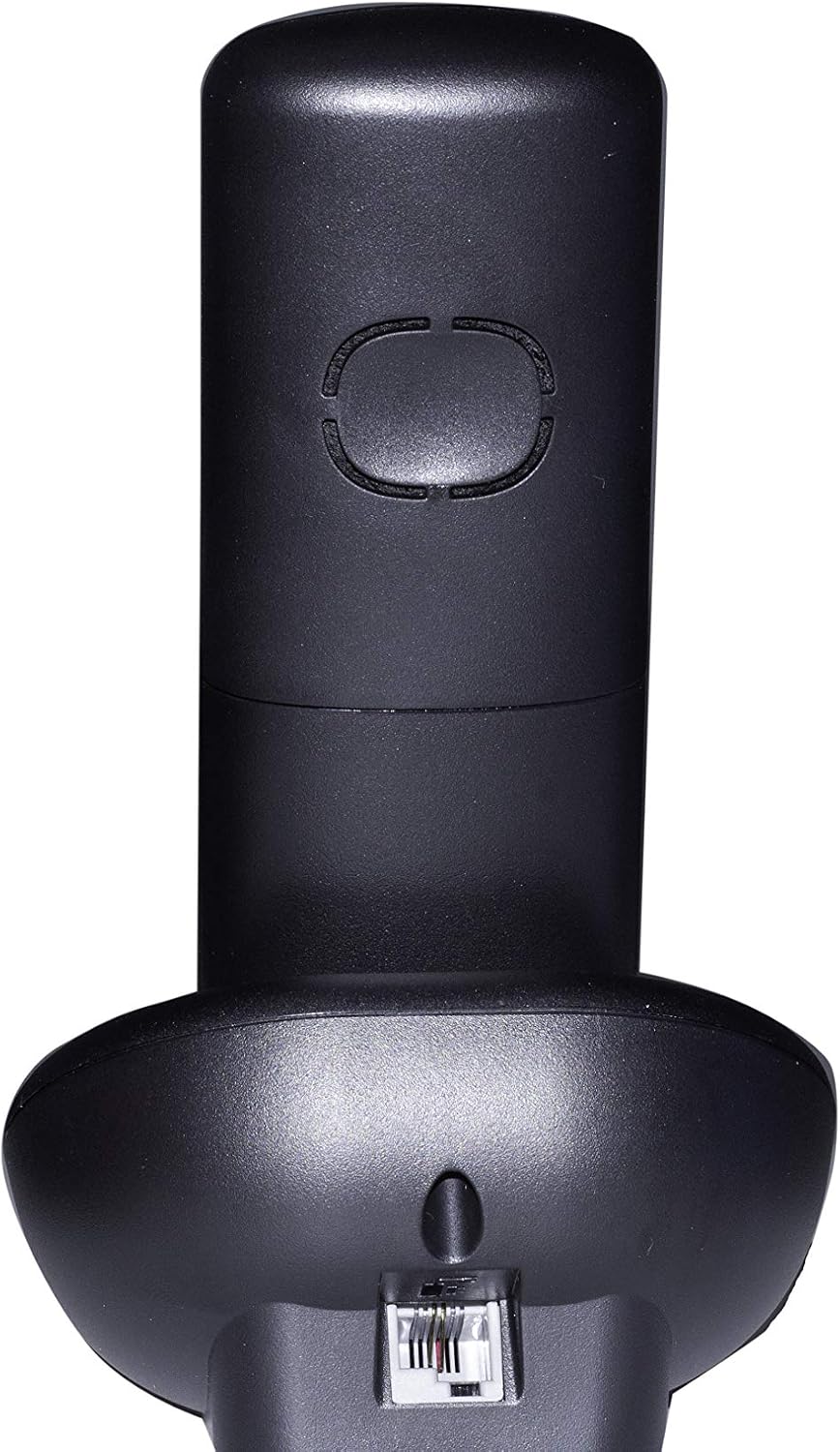
Slika: Stražnja strana view of the Motorola E202 base unit, showing the telephone line and power input ports.
- Connect Additional Charger: Connect the second power adapter to the POWER socket on the additional charger unit and plug the other end into a mains power outlet.
- Punjenje mobilnih telefona: Place each handset on its respective base/charger unit. The handsets will emit a short beep, and the display will indicate charging. Allow the handsets to charge for at least 16 hours before first use to ensure optimal battery performance.
Uputstvo za upotrebu

Slika: Front view of the Motorola E202 handset, highlighting the display and keypad.
Upućivanje i primanje poziva
- Pozovite: Pritisnite Zeleno dugme za poziv (looks like a phone receiver), then dial the number. Alternatively, dial the number first and then press the Zeleno dugme za poziv.
- Primite poziv: Kada telefon zazvoni, pritisnite Zeleno dugme za poziv.
- Završi poziv: Pritisnite Crveno dugme za prekid poziva (looks like a phone receiver with a line through it) ili vratite slušalicu na bazu/punjač.
- spikerfon: Tijekom poziva pritisnite Dugme za spikerfon (looks like a speaker icon) da biste aktivirali ili deaktivirali zvučnik.
Imenik
- Imenik može pohraniti do 50 imena i brojeva.
- Da biste pristupili telefonskom imeniku, pritisnite Navigacijski gumbi gore/dolje kada je slušalica u stanju mirovanja.
- Follow the on-screen prompts to add, edit, or delete entries.
Blokiranje poziva
- The Motorola E202 features advanced call blocking technology, allowing you to block up to 10 specific numbers.
- To block a number, navigate to the Call Blocking menu via the handset's menu options.
- You can also activate the "Do Not Disturb" function by pressing the dedicated "Do Not Disturb" button (looks like a crescent moon).
Caller ID and Redial
- ID pozivaoca: The handset display shows the caller's name and number (if available and subscribed to Caller ID service). The Caller ID list stores up to 20 names and numbers.
- Ponovno biranje: The phone automatically stores the last 10 dialed numbers. Press the Dugme za ponovno biranje (looks like an 'R' or a curved arrow) to access and redial these numbers.
Održavanje
To ensure the longevity and optimal performance of your Motorola E202 cordless phone, follow these maintenance guidelines:
- čišćenje: Obrišite slušalicu i baznu jedinicu mekom,amp tkanina. Nemojte koristiti abrazivna sredstva za čišćenje ili rastvarače.
- Održavanje baterije: Use only the specified rechargeable Ni-MH batteries. If the phone will not be used for an extended period, remove the batteries to prevent leakage.
- plasman: Keep the phone away from heat sources, direct sunlight, and moisture. Avoid placing it near other electrical appliances that may cause interference.
- Izbjegavajte kapi: Handle the handset with care to prevent damage from accidental drops.
Rješavanje problema
If you encounter issues with your Motorola E202, refer to the following common problems and solutions:
| Problem | Rješenje |
|---|---|
| Nema tona biranja. |
|
| Ne mogu upućivati ili primati pozive. |
|
| Loš kvalitet zvuka ili smetnje. |
|
| Ekran slušalice je prazan. |
|
Specifikacije
| Feature | Detalj |
|---|---|
| Brand | Motorola |
| Model | E202 |
| Boja | Crna |
| Vrsta telefona | Bežični telefon |
| Broj slušalica | 2 (Dual Cordless Phone) |
| Baterije su potrebne | 2 AAA Ni-MH rechargeable batteries per handset (included) |
| Materijal | akrilonitril butadien stiren (ABS) |
| Dimenzije artikla (DxŠxV) | 20 x 30 x 20 cm (approximate, likely packaging dimensions) |
| Tip sistema za odgovor | Digital |
| Kompatibilni uređaji | Other cordless devices of the same model, automatic answering, fax |
| Višelinijski rad | Da |
| Caller ID | Yes (Caller ID list with 20 names and numbers) |
| Kapacitet imenika | 50 imena i brojeva |
| Blokiranje poziva | Blocks up to 10 numbers, "Do Not Disturb" function |
| Memorija za ponovno biranje | Posljednjih 10 brojeva |
| Vrijeme razgovora | Do 10 sati |
| Vrijeme pripravnosti | Do 200 sati |
Garancija
The Motorola E202 Digital Cordless Phone comes with a 24-mjesečna garancija od datuma kupovine. Ova garancija pokriva proizvodne nedostatke i nedostatke materijala pri normalnoj upotrebi. Molimo sačuvajte dokaz o kupovini za reklamacije. Garancija ne pokriva štetu uzrokovanu zloupotrebom, nezgodama, neovlaštenim popravkama ili normalnim habanjem.
Podrška
For further assistance, technical support, or to report a problem not covered in this manual, please refer to the official Motorola support channels. You can often find additional resources, FAQs, and contact information on the official Motorola website. A PDF version of this user manual is also available for download from the product's Amazon page or Motorola's support site.
Za najnovije informacije o podršci, posjetite: www.motorola.com/support