
LC-dolida usb c to hdmi vga ethernet
LC-dolida USB C to HDMI VGA USB3.0 Adapter User Manual
Model: usb c to hdmi vga ethernet
Marka: LC-dolida
1. Uvod
The LC-dolida USB C Hub Adapter is a versatile 7-in-1 device designed to expand the connectivity of your USB-C enabled laptop, tablet, or smartphone. It provides multiple ports including HDMI, VGA, Ethernet, USB 3.0, 3.5mm audio, and Power Delivery (PD) charging, enhancing your device's capabilities for various applications such as external display connections, high-speed data transfer, and network access.
2. Ključne karakteristike
- Višeportna povezivost: Equipped with HDMI, VGA, RJ45 Ethernet, 3.5mm audio jack, 2x USB 3.0 ports, and a Power Delivery (PD) charging port.
- Video izlaz visoke rezolucije: HDMI supports resolutions up to 4K@30Hz, and VGA supports up to 1080P@60Hz. Both can be used simultaneously for dual display at 1080P.
- Fast and Stable Network: RJ45 Ethernet port supports up to 1000Mbps for reliable wired internet connection.
- Efikasna isporuka energije: USB-C PD charging port supports up to 87W to keep your device charged while using the hub.
- Brzi prijenos podataka: Two USB 3.0 ports offer data transfer speeds up to 5Gbps, allowing connection of external USB devices.
- Audio izlaz: Integrated 3.5mm audio jack for connecting headphones or speakers.
- Široka kompatibilnost: Compatible with various USB-C devices including 2018/17/16 MacBook/Pro/Air, Google Chromebook Pixel, Surface Book 2, and supports Samsung Dex for compatible smartphones.
3. Sadržaj paketa
- LC-dolida USB C Hub Adapter (Model: usb c to hdmi vga ethernet)
- Uputstvo za upotrebu
4. Specifikacije
| Feature | Detalj |
|---|---|
| Brand | LC-dolida |
| Broj modela | usb c to hdmi vga ethernet |
| Hardverska platforma | Laptop, PC |
| Kompatibilnost operativnog sistema | Windows 10 (and above for some features), macOS, Android (for Samsung Dex) |
| Težina artikla | 3.8 unce |
| Dimenzije paketa | 6.69 x 3.7 x 0.71 inča |
| HDMI izlaz | Up to 4K@30Hz, 1080P@60Hz (backward compatible) |
| VGA izlaz | Do 1080P@60Hz |
| Simultaneous Display | HDMI and VGA can be used simultaneously (both at 1080P) |
| Ethernet port | RJ45, supports up to 1000Mbps |
| USB 3.0 portovi | 2 ports, data transfer up to 5Gbps |
| Port za napajanje (PD) | USB-C, max 87W charging |
| Audio Jack | 3.5mm |
| Kompatibilni uređaji | Laptops, Monitors, Projectors, Smartphones (with USB-C video output support) |
5. Upute za postavljanje
- Povežite čvorište: Plug the USB-C connector of the LC-dolida hub into the USB-C port of your host device (laptop, tablet, or smartphone).
- Connect External Displays (HDMI/VGA):
- For HDMI output, connect an HDMI cable from the hub's HDMI port to your monitor or TV.
- For VGA output, connect a VGA cable from the hub's VGA port to your monitor or projector.
- For audio output via VGA, connect a 3.5mm audio cable from the hub's audio jack to your speakers or headphones.
Napomena: HDMI and VGA can be used simultaneously, but both displays will output at 1080P resolution.

Figure 1: Connecting to HDMI and VGA displays. HDMI supports up to 4K, VGA up to 1080P. 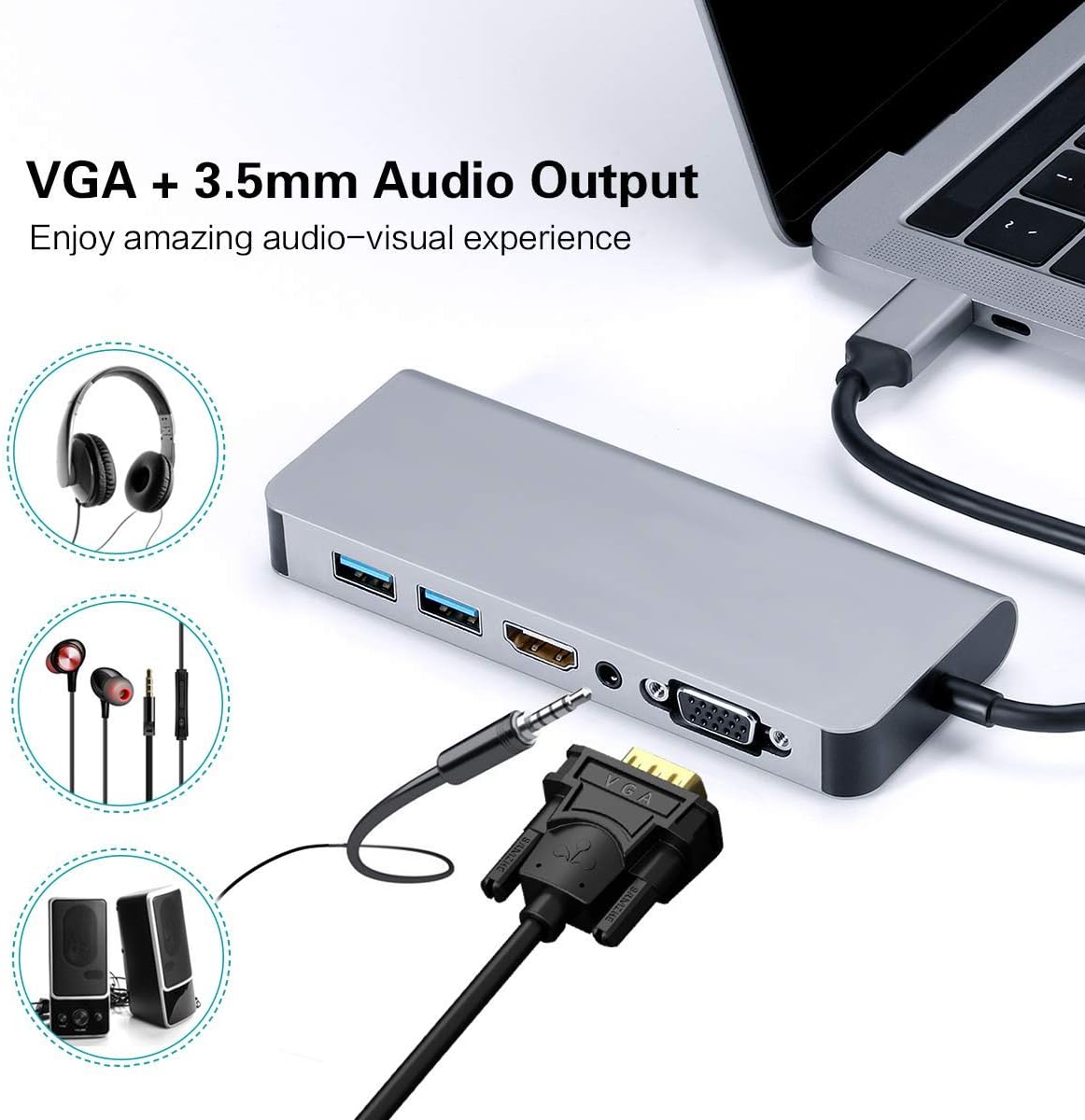
Figure 2: VGA and 3.5mm Audio Output for an enhanced audio-visual experience. - Povežite se na mrežu: For a stable wired internet connection, plug an Ethernet cable into the RJ45 port on the hub.
- Povežite USB uređaje: Plug your USB peripherals (e.g., mouse, keyboard, USB drive) into the USB 3.0 ports.
- Power the Host Device: If your host device requires charging, connect your USB-C power adapter to the Power Delivery (PD) port on the hub. This allows your device to charge while using the hub's other functions.

Figure 3: Power Delivery and Data Transfer via USB 3.0 ports.
6. Uputstvo za upotrebu
6.1 Načini prikaza
The hub supports both Mirror Mode and Extend Mode when connecting to external displays.
- MirrorMode: Duplicates your host device's screen onto the external display(s). This is ideal for presentations or sharing content.
- Prošireni način rada: Extends your desktop across multiple screens, allowing for increased workspace. This mode is typically supported by laptops.
Napomena: Extend Mode functionality is primarily for laptops. For smartphones, it typically mirrors the display or activates specific desktop environments like Samsung Dex.

6.2 Samsung Dex Experience
For compatible Samsung smartphones (S10/S10+/S10e/S9/S9+/S8/S8+/S8 Active/Huawei Mate10/Pro), the hub can enable a PC-like desktop experience via Samsung Dex. To activate Dex mode, ensure external power is supplied to the hub via the PD charging port.
Napomena: Samsung Dex functionality may require your phone's operating system to be upgraded to Windows 10 or above. Always ensure your device is compatible and updated.


6.3 Zvanični video proizvoda
Video 1: An official demonstration of the 7-in-1 USB C Multiport Hub by LC-Dolida, showcasing its various functions and connectivity options.
7. Otkrivanje problema
- Nema izlaza za prikaz:
- Provjerite da li USB-C port vašeg glavnog uređaja podržava video izlaz (DisplayPort Alternate Mode).
- Provjerite sve kablovske veze (USB-C na hub, HDMI/VGA na ekran).
- Verify the input source on your monitor/TV is set correctly (e.g., HDMI 1, VGA).
- Pokušajte ponovo pokrenuti svoj glavni uređaj.
- For Samsung Dex, ensure external power is connected to the hub.
- USB uređaji nisu prepoznati:
- Provjerite je li čvorište sigurno povezano s vašim glavnim uređajem.
- Try connecting the USB device directly to your host device to confirm it's functional.
- If using high-power USB devices, ensure external power is supplied to the hub via the PD port.
- Spora brzina Etherneta:
- Check your Ethernet cable for damage.
- Ensure your network drivers are up to date on your host device.
- Verify your router/modem is functioning correctly.
- Problemi s punjenjem:
- Ensure your USB-C power adapter is connected to the hub's PD port and is functional.
- Provjerite da vaš glavni uređaj podržava USB-C napajanje.
- Some devices, like the Samsung S8+, may not charge fully or quickly through the hub if the power input is insufficient for both the hub and the device.
8. Njega i održavanje
- Keep the hub away from water, fire, and corrosive materials.
- Izbjegavajte ispuštanje ili izlaganje glavčine jakim udarcima.
- Ne pokušavajte sami rastaviti ili popraviti uređaj. Obratite se korisničkoj podršci za pomoć.
- Clean the hub with a soft, dry cloth. Avoid using harsh chemicals or abrasive cleaners.
- Čuvajte glavčinu na hladnom i suvom mestu kada se ne koristi.
9. Garancija i podrška
LC-dolida products are designed for reliability and performance. For any issues or questions regarding your LC-dolida USB C Hub Adapter, please contact our customer support team. We are committed to providing assistance and ensuring your satisfaction.
Please refer to the product packaging or the official LC-dolida webstranicu za detalje o garanciji i kontakt informacije.
Povezani dokumenti - usb c to hdmi vga ethernet
 |
LC-dolida 3D Bluetooth maska za spavanje korisnički priručnik User manual for the LC-dolida 3D Bluetooth Sleep Mask, detailing package contents, product specifications, operating instructions, LED status lights, button functions, and care instructions for this wireless sleep mask with integrated headphones. |
 |
LC-dolida Bluetooth slušalice s trakom za glavu - uputstvo za upotrebu User manual for LC-dolida Bluetooth Headband Headphones, covering product specifications, connection procedures, operating instructions, charging, cleaning, and safety information. |
 |
LC-dolida Bluetooth Sleep Mask User Manual - Setup, Operation & Safety Comprehensive user manual for the LC-dolida Bluetooth Sleep Mask. Learn about product specifications, Bluetooth pairing, operating instructions, charging, cleaning, and safety guidelines. |
 |
LC-dolida Bluetooth slušalice s trakom za glavu - uputstvo za upotrebu User manual for LC-dolida Bluetooth Headband Headphones, detailing features, specifications, operation, care instructions, and support information. |
 |
LC-dolida 3D Bluetooth Sleep Mask User Manual - Features, Setup, and Care Get the most out of your LC-dolida 3D Bluetooth Sleep Mask with this comprehensive user manual. Learn about setup, functions, LED indicators, washing instructions, and product specifications. |
 |
LC-dolida 3D Bluetooth maska za spavanje korisnički priručnik Comprehensive user manual for the LC-dolida 3D Bluetooth Sleep Mask, covering features, specifications, operation, care instructions, warranty, and contact information. |
Ask a question about this manual
Ask about setup, troubleshooting, compatibility, parts, safety, or missing instructions. Manuals+ will review the question and use this page’s manual context to help answer it.