
1. Uvod
Hvala na kupoviniasing the MUSE M-10 Red Radio Alarm Clock. This manual provides essential information for the safe and efficient operation of your device. Please read these instructions carefully before use and retain them for future reference.

Figure 1: MUSE M-10 Red Radio Alarm Clock. This image shows the front view of the red alarm clock with its digital LED display showing '12:00' and various control buttons on the top panel.
2. Sigurnosna uputstva
- Pročitajte sve upute prije rukovanja uređajem.
- Do not expose this appliance to rain or moisture to prevent fire or shock hazards.
- Ensure the power adapter is easily accessible.
- Koristite samo dodatke/pribor koje je naveo proizvođač.
- Ne stavljajte proizvod na direktnu sunčevu svjetlost ili u blizinu izvora toplote.
- Avoid placing the product on surfaces that are unstable or subject to vibration.
- Ne otvarajte casing; sve servisne radove prepustite kvalifikovanom osoblju.
- Istrošene baterije odlažite odgovorno, poštujući lokalne propise.
3. Proizvod je gotovview
3.1 Prednja ploča i ekran
The front panel features a clear 0.6-inch white LED display for time and alarm indicators.
3.2 Kontrole na gornjoj ploči
The top panel houses all control buttons for easy access:
- MEM: Memory button for saving and recalling radio presets.
- SET: Button for setting time and alarm parameters.
- AL1: Alarm 1 setting button.
- AL2: Alarm 2 setting button.
- << HR: Hour adjustment button (backward).
- MIN >>: Minute adjustment button (forward).
- ODGODI: Activates the snooze function during an alarm.
- SPAVANJE: Aktivira funkciju tajmera za spavanje.
- DIMMER: Podešava osvetljenost ekrana.

Slika 2: Gotovoview of the MUSE M-10 Red Radio Alarm Clock's functions, including its 0.6-inch white LED display, PLL radio, 20 FM presets, dimmer, dual alarm, snooze, and sleep features.
4. Podešavanje
4.1 Priključak za napajanje
Connect the provided AC adapter to the DC IN jack on the rear of the unit and then plug it into a standard wall outlet. The unit will power on and the display will light up.
4.2 Instalacija rezervne baterije
For time and alarm settings backup during a power outage, install 2 x AAA batteries (not included) into the battery compartment located on the bottom of the unit. Ensure correct polarity (+/-) when inserting batteries.
5. Uputstvo za upotrebu
5.1 Postavljanje vremena
- Pritisnite i držite SET dugme dok cifre sati ne počnu treptati.
- Koristite << HR or MIN >> dugmad za podešavanje sata.
- Pritisnite SET again, and the minute digits will flash.
- Koristite << HR or MIN >> dugmad za podešavanje minuta.
- Pritisnite SET još jednom da biste potvrdili i izašli iz načina podešavanja vremena.
5.2 Podešavanje alarma (Alarm 1 i Alarm 2)
Uređaj ima dva nezavisna alarma.
- Pritisnite i držite AL1 (ili AL2) button until the alarm hour digits flash.
- Koristite << HR or MIN >> dugmad za podešavanje željenog sata alarma.
- Pritisnite AL1 (ili AL2) again, and the alarm minute digits will flash.
- Koristite << HR or MIN >> dugmad za podešavanje željenih minuta alarma.
- Pritisnite AL1 (ili AL2) again to select the alarm source: Zujalica or Radio.
- Pritisnite AL1 (ili AL2) once more to confirm and activate the alarm. An alarm icon will appear on the display.
5.3 Rad FM radija
The unit has a PLL FM radio with 20 preset stations.
- tuning: Pritisnite << HR or MIN >> buttons to manually tune the radio frequency. Press and hold these buttons for automatic scanning to the next available station.
- Čuvanje unaprijed postavljenih postavki: Podesite željenu stanicu. Pritisnite i držite MEM button until 'P01' (or the next available preset number) flashes. Use << HR or MIN >> da biste odabrali unaprijed postavljeni broj, a zatim pritisnite MEM opet za uštedu.
- Podsjećajući na unaprijed zadane postavke: Kratko pritisnite MEM dugme za kretanje kroz sačuvane predefinisane stanice.
5.4 Funkcija odgode
Kada se oglasi alarm, pritisnite dugme SNOOZE dugme da biste privremeno utišali alarm na otprilike 9 minuta. Alarm će se ponovo oglasiti nakon tog perioda.
5.5 Funkcija tajmera za spavanje
Pritisnite SLEEP button repeatedly to set a sleep timer (e.g., 90, 60, 30, 15 minutes, or OFF). The radio will play for the selected duration and then automatically turn off.
5.6 Zatamnjivač ekrana
Pritisnite DIMMER button repeatedly to cycle through display brightness levels: High, Low, or Off.

Figure 3: Key features of the MUSE M-10 Red Radio Alarm Clock, including snooze, radio or buzzer alarm, dimmable display, and FM PLL radio with 20 presets.
6. Održavanje
- čišćenje: Obrišite uređaj mekom, suhom krpom. Ne koristite abrazivna sredstva za čišćenje ili rastvarače.
- Zamjena baterije: Replace backup batteries annually or when the display shows signs of dimming during power outages.
- Skladištenje: Ako uređaj skladištite duži period, izvadite rezervne baterije kako biste spriječili curenje.
7. Otkrivanje problema
| Problem | Mogući uzrok | Rješenje |
|---|---|---|
| Nema napajanja/Ekran isključen | Adapter za napajanje nije priključen ili je neispravan. | Check power adapter connection. Try a different outlet. |
| Alarm se ne oglašava | Alarm nije aktiviran ili je pogrešno podešen. | Ensure alarm icon is visible on display. Re-check alarm time and source settings. |
| Loš radio prijem | FM antenna not extended or poor signal area. | Fully extend the FM wire antenna. Adjust its position for better reception. |
| Izgubljeno vrijeme/postavke nakon nestanka strujetage | Rezervne baterije nisu instalirane ili su ispražnjene. | Ugradite nove AAA baterije za rezervno napajanje. |
8. Specifikacije
- Model: M-10 RED
- Brand: MUSE
- Prikaz: 0.6-inch White LED, Digital
- radio: FM PLL Radio with 20 Presets
- Alarm: Dvostruki alarm (zujalica ili radio)
- Posebne karakteristike: Snooze, Sleep Timer, Display Dimmer (High/Low/Off)
- Izvor napajanja: AC Adapter (included), 2 x AAA batteries for backup (not included)
- Dimenzije (D x Š x V): 12 x 7 x 10.9 cm (približno 4.7 x 2.8 x 4.3 inča)
- Težina: 200 grama (približno 0.44 funti)
- Materijal: Plastika
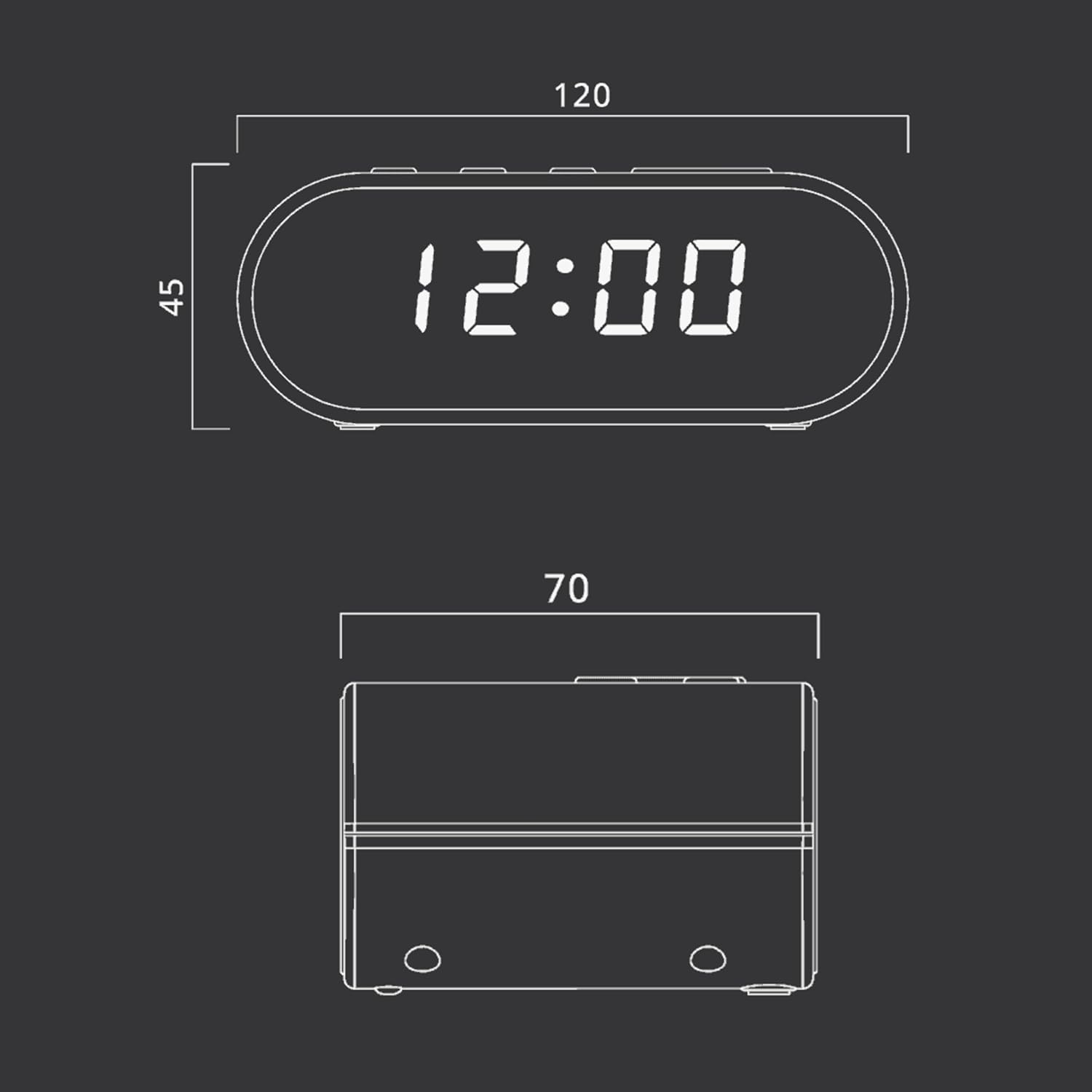
Figure 4: Dimensional drawing of the MUSE M-10 Red Radio Alarm Clock, showing its length (120mm), width (70mm), and height (45mm).
9. Garancija i podrška
For warranty information or technical support, please refer to the warranty card included with your product or contact your local MUSE distributor. Keep your purchase receipt as proof of purchase.