
Uvod
This manual provides essential information for setting up, operating, maintaining, and troubleshooting your VAIO SX12 laptop. Please read this manual thoroughly to ensure proper use and to maximize the performance and longevity of your device.

Slika 1: Prednja strana view of the VAIO SX12 laptop with the screen open.
Setup
1. Raspakivanje i prvi pregled
Pažljivo izvadite sve komponente iz pakovanja. Provjerite da li su sve stavke navedene u odjeljku 'Šta se nalazi u kutiji' prisutne i da li su neoštećene. Ako neke stavke nedostaju ili su oštećene, obratite se korisničkoj podršci.
- VAIO SX12 Laptop
- AC adapter
- Cloth Cloth
2. Connecting the AC Adapter
Connect the AC adapter to the power input port on the laptop and then plug the adapter into a wall outlet. The battery will begin charging automatically.
3. Početno uključivanje
Press the power button located on the top right of the keyboard. The laptop will boot up and guide you through the initial Windows 10 Pro setup process.
Operating
1. Tastatura i dodirna tabla
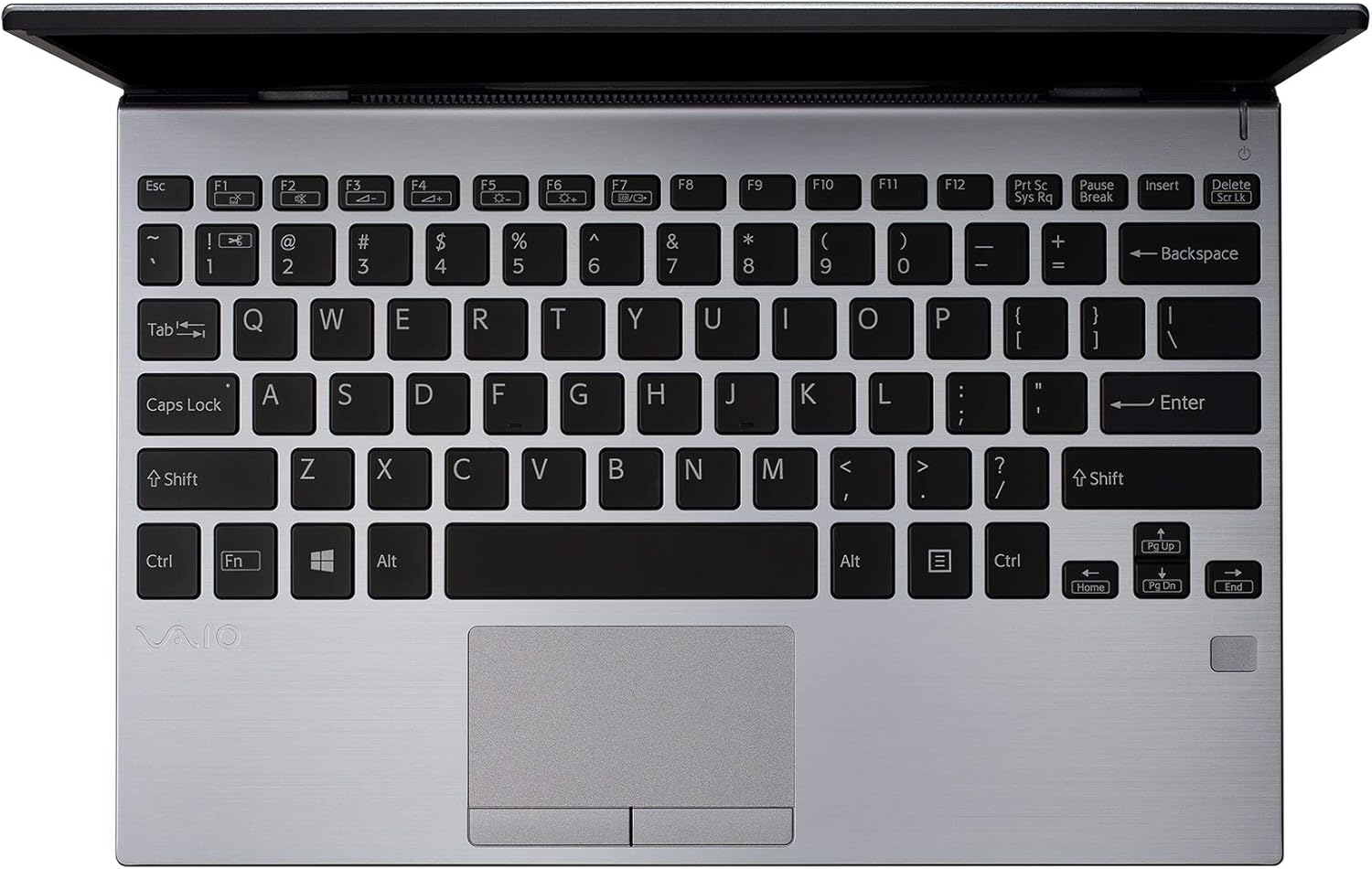
Slika 2: Od vrha prema dolje view of the VAIO SX12 keyboard and touchpad.
The VAIO SX12 features a full-sized keyboard and a precision touchpad. Familiarize yourself with the function keys (F1-F12) which control various system settings such as screen brightness, volume, and wireless connectivity.
- Funkcijski tasteri: Use the 'Fn' key in combination with F1-F12 for secondary functions.
- Touchpad: Supports multi-touch gestures for scrolling, zooming, and navigating.
2. Povezivanje perifernih uređaja
The VAIO SX12 offers a variety of ports for connecting external devices.

Slika 3: Lijeva strana view of the VAIO SX12, showing the power input, USB ports, HDMI, Ethernet, and VGA ports.

Slika 4: Desna strana view of the VAIO SX12, showing the SD card slot, USB ports, and audio jack.
- USB portovi: Povežite USB uređaje kao što su eksterni diskovi, tastature ili miševi.
- HDMI priključak: Povežite se s vanjskim ekranom ili projektorom.
- VGA port: Povežite se sa starijim eksternim ekranima ili projektorima.
- Ethernet priključak: Povežite se na žičanu mrežu.
- Utor za SD karticu: Insert an SD card for data transfer.
- Audio Jack: Povežite slušalice ili spoljne zvučnike.
Održavanje
1. Čišćenje laptopa
- Use the provided cleaning cloth or a soft, lint-free cloth to wipe the screen and exterior surfaces.
- Ne koristite jake hemikalije, abrazivna sredstva za čišćenje ili rastvarače.
- Prije čišćenja provjerite je li laptop isključen i iskopčan iz struje.
2. Održavanje baterije
- Da biste produžili vijek trajanja baterije, izbjegavajte često potpuno pražnjenje baterije.
- Laptop čuvajte na hladnom i suhom mjestu ako ga ne koristite duži period.
- The battery is internal and not user-replaceable. Contact authorized service for battery replacement.
3. Ažuriranja softvera
Redovno provjeravajte i instalirajte ažuriranja operativnog sistema i upravljačkih programa kako biste osigurali optimalne performanse i sigurnost.
Rješavanje problema
1. Laptop se ne uključuje
- Provjerite je li AC adapter sigurno priključen i na laptop i na ispravnu utičnicu.
- Provjerite da li je utičnica funkcionalna tako što ćete priključiti drugi uređaj.
- Ako je baterija potpuno prazna, ostavite je da se puni najmanje 30 minuta prije nego što je pokušate uključiti.
2. Problemi sa prikazom
- If the screen is blank, try adjusting the brightness using the function keys.
- If an external monitor is connected, ensure the display output is correctly configured (e.g., duplicate, extend).
- Ponovo pokrenite laptop.
3. Peripheral Not Recognized
- Provjerite je li periferni uređaj ispravno povezan s odgovarajućim priključkom.
- Try connecting the peripheral to a different port or another computer to rule out device malfunction.
- Provjerite upravitelj uređaja u sustavu Windows za probleme s upravljačkim programima.
Specifikacije
| Feature | Specifikacija |
|---|---|
| Naziv modela | VAIO SX12 |
| Broj modela stavke | VJS121C11L |
| Procesor | Intel Core i5-8265U (3.9 GHz max) |
| RAM | 8 GB LPDDR3 |
| Hard Drive | 512 GB PCIe SSD |
| Operativni sistem | Windows 10 Pro |
| Veličina ekrana | 12.5 inča |
| Rezolucija ekrana | 1920 x 1080 piksela (Full HD) |
| Graficka kartica | Integrisana Intel grafika |
| Bežično povezivanje | 802.11a/b/g/n/ac, Bluetooth |
| USB 3.0 portovi | 4 |
| Težina artikla | 1.97 funte |
| Dimenzije proizvoda | 11.3 x 8 x 0.62 inča |
| Boja | Srebro |
| Baterije | 1 litijum-jonska baterija (uključena) |
Garancija i podrška
For warranty information and technical support, please refer to the documentation included with your product or visit the official VAIO support webSačuvajte račun kao dokaz o kupovini za reklamacije u slučaju reklamacije.