
1. Proizvod je gotovview
The Schneider SC600SND is a versatile 2.0 channel soundbar designed to enhance your audio experience. It offers a total output power of 30W (15W x 2) and supports multiple connectivity options including Bluetooth, HDMI (ARC), Optical, and Aux. A unique feature of this soundbar is its convertible design, allowing it to be used as a single horizontal unit or split into two vertical speaker columns.

Image 1.1: The Schneider SC600SND Soundbar in its standard monoblock configuration.
2. Podešavanje
2.1 Raspakivanje i postavljanje
Carefully remove all components from the packaging. Ensure you have the soundbar unit, remote control, and 3.5mm Jack cable.
The SC600SND soundbar offers two primary placement options:
- Monoblock Configuration: Use the soundbar as a single horizontal unit, ideal for placing below your television.
- Split Column Configuration: The soundbar can be separated into two vertical speaker columns. This allows for flexible placement on either side of your television or entertainment unit. To split, gently twist and pull the two halves apart at the central connection point. Attach the provided bases to each column for stability.

Image 2.1: Detail of the central connection point, allowing the soundbar to be split into two columns.
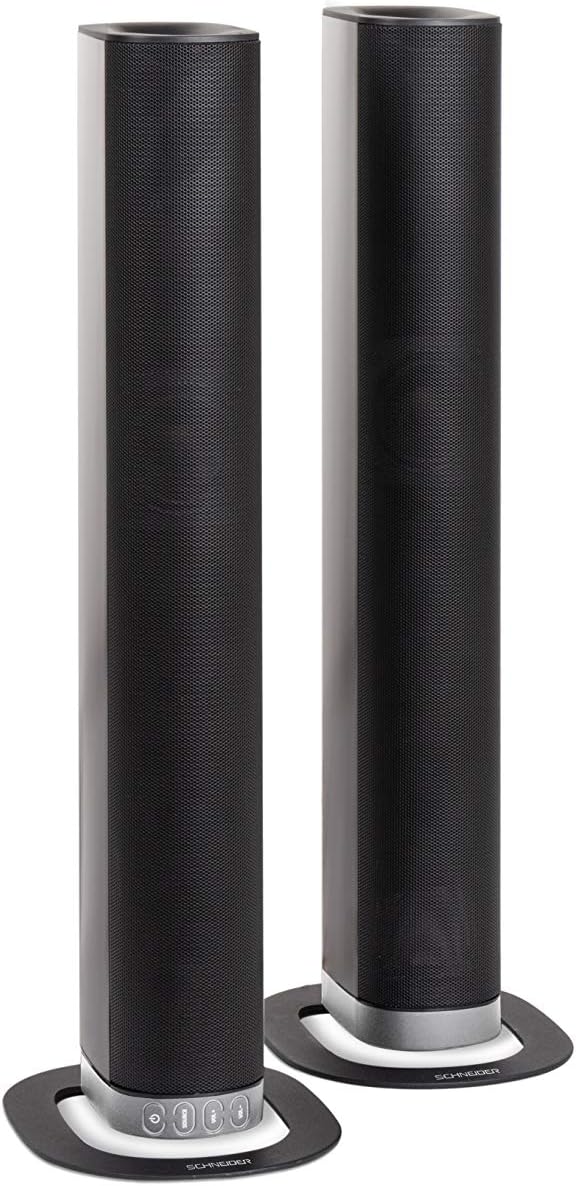
Image 2.2: The soundbar configured as two independent vertical speaker columns.
2.2 Priključivanje na napajanje
Connect the power cable to the soundbar's power input and then to a suitable wall outlet. The soundbar will enter standby mode.
2.3 Audio veze
Odaberite jednu od sljedećih metoda za povezivanje audio izvora:
- HDMI (ARC): For optimal audio quality and control, connect an HDMI cable from the soundbar's HDMI ARC port to your TV's HDMI ARC port. This allows your TV remote to control the soundbar's volume.
- optički: Connect an optical cable from the soundbar's OPTICAL input to your TV's optical output.
- AUX: Use the included 3.5mm Jack cable to connect the soundbar's AUX input to the headphone jack or audio output of your device (e.g., TV, smartphone, MP3 player).
- Bluetooth: For wireless connection, refer to the Bluetooth pairing instructions in the Operating section.
3. Uputstvo za upotrebu
3.1 Uključivanje/isključivanje napajanja
Pritisnite Snaga dugme na soundbaru ili daljinskom upravljaču da biste uključili ili isključili uređaj.
3.2 Odabir izvora
Pritisnite IZVOR button on the soundbar or the remote control to cycle through the available input sources: Bluetooth (BT), HDMI (ARC), Optical, and AUX.

Image 3.1: On-unit control buttons for power, source selection, and volume adjustment.
3.3 Kontrola jačine zvuka
Koristite VOL+ i VOL- dugmad na soundbaru ili daljinskom upravljaču za podešavanje jačine zvuka. Pritisnite MUTE dugme na daljinskom upravljaču da biste privremeno utišali zvuk.
3.4 Bluetooth uparivanje
- Select Bluetooth as the source input. The soundbar will enter pairing mode, indicated by a flashing LED.
- Na svom mobilnom uređaju (pametnom telefonu, tabletu itd.) omogućite Bluetooth i potražite dostupne uređaje.
- Select "SC600SND" from the list of devices.
- Once paired, the LED indicator on the soundbar will stop flashing and remain solid. You can now play audio wirelessly from your device.
3.5 režima zvuka
The remote control includes dedicated buttons for different sound modes to optimize your listening experience:
- VIJESTI: Poboljšava jasnoću glasa za informativne emisije i dijaloge.
- FILM: Provides a more immersive soundstage za filmove.
- MUZIKA: Optimizuje zvuk za reprodukciju muzike.

Image 3.2: The included remote control with dedicated buttons for power, source, volume, mute, and sound modes.
4. Održavanje
Da biste osigurali dugotrajnost i optimalne performanse vašeg soundbara, slijedite ove smjernice za održavanje:
- čišćenje: Use a soft, dry cloth to clean the exterior surfaces of the soundbar. Do not use liquid cleaners, aerosols, or abrasive materials, as these can damage the finish or internal components.
- ventilacija: Provjerite da ventilacijski otvori zvučne trake nisu blokirani. Pravilan protok zraka sprječava pregrijavanje.
- Skladištenje: If storing the soundbar for an extended period, disconnect it from power and store it in a cool, dry place, away from direct sunlight and extreme temperatures.
- Rukovanje: Izbjegavajte ispuštanje ili izlaganje soundbara jakim udarcima.
5. Otkrivanje problema
If you encounter issues with your SC600SND soundbar, refer to the following common problems and solutions:
- Nema napajanja:
- Provjerite je li kabel za napajanje sigurno spojen i na soundbar i na ispravnu utičnicu.
- Provjerite da li je utičnica funkcionalna tako što ćete uključiti drugi uređaj.
- Nema zvuka:
- Verify that the correct input source (HDMI, Optical, AUX, Bluetooth) is selected on the soundbar.
- Increase the volume on both the soundbar and your connected audio source (e.g., TV, smartphone).
- Ensure the soundbar is not muted.
- Check all audio cables for secure connections and damage. Try a different cable if possible.
- If using HDMI ARC, ensure your TV's HDMI ARC function is enabled in its settings.
- Poor Sound Quality / Distorted Audio:
- Adjust the volume levels to avoid distortion.
- Try switching between the different sound modes (NEWS, MOVIE, MUSIC) to see if one improves the audio for your content.
- Ensure the soundbar is placed on a stable surface and not vibrating excessively.
- If using Bluetooth, ensure your device is within range and there are no obstructions causing interference.
- Problemi sa Bluetooth uparivanjem:
- Ensure the soundbar is in Bluetooth pairing mode (flashing LED).
- Make sure your device's Bluetooth is enabled and it is searching for new devices.
- Približite uređaj soundbaru.
- Ako je prethodno bio uparen, pokušajte odvojiti uređaj od mreže i ponovo ga upariti.
- Daljinski upravljač ne radi:
- Provjerite i zamijenite baterije u daljinskom upravljaču.
- Provjerite da nema prepreka između daljinskog upravljača i senzora soundbara.
- Usmjerite daljinski direktno na soundbar.
6. Specifikacije
| Feature | Specifikacija |
|---|---|
| Broj modela | SC600SND |
| Kanali | 2.0 |
| Izlazna snaga | 30 W (15 W x 2) |
| Tehnologija povezivanja | Bluetooth, HDMI (ARC), Optical, Aux |
| Bežična komunikacija | Bluetooth |
| Kontrolni metod | Daljinski upravljač |
| Vrsta zvučnika | Soundbar |
| Veličina zvučnika | 2 inča |
| Izvor napajanja | Električni kabel |
| Product Dimensions (Monoblock) | 80.5 x 6.2 x 9 cm |
| Težina proizvoda | 2.5 kilograma |
| Uključene komponente | Remote Control, 3.5mm Jack Cable |
| Boja | Crna |
7. Garancija i podrška
7.1 Ograničena garancija
This Schneider SC600SND Soundbar is covered by a Limited Warranty. Please refer to the warranty card included with your product or contact your retailer for specific terms and conditions regarding warranty coverage and duration.
7.2 Korisnička podrška
For technical assistance, troubleshooting beyond this manual, or warranty claims, please contact the retailer where you purchased the product or visit the official Schneider webstranicu za informacije o podršci.