
1. Uvod
This manual provides detailed instructions for the installation, operation, and maintenance of your GAMDIAS Aeolus M2-1204R RGB Fan. This 120mm fan is designed to enhance cooling performance and aesthetics within your computer enclosure. Please read this manual thoroughly before installation and use to ensure proper function and longevity of the product.
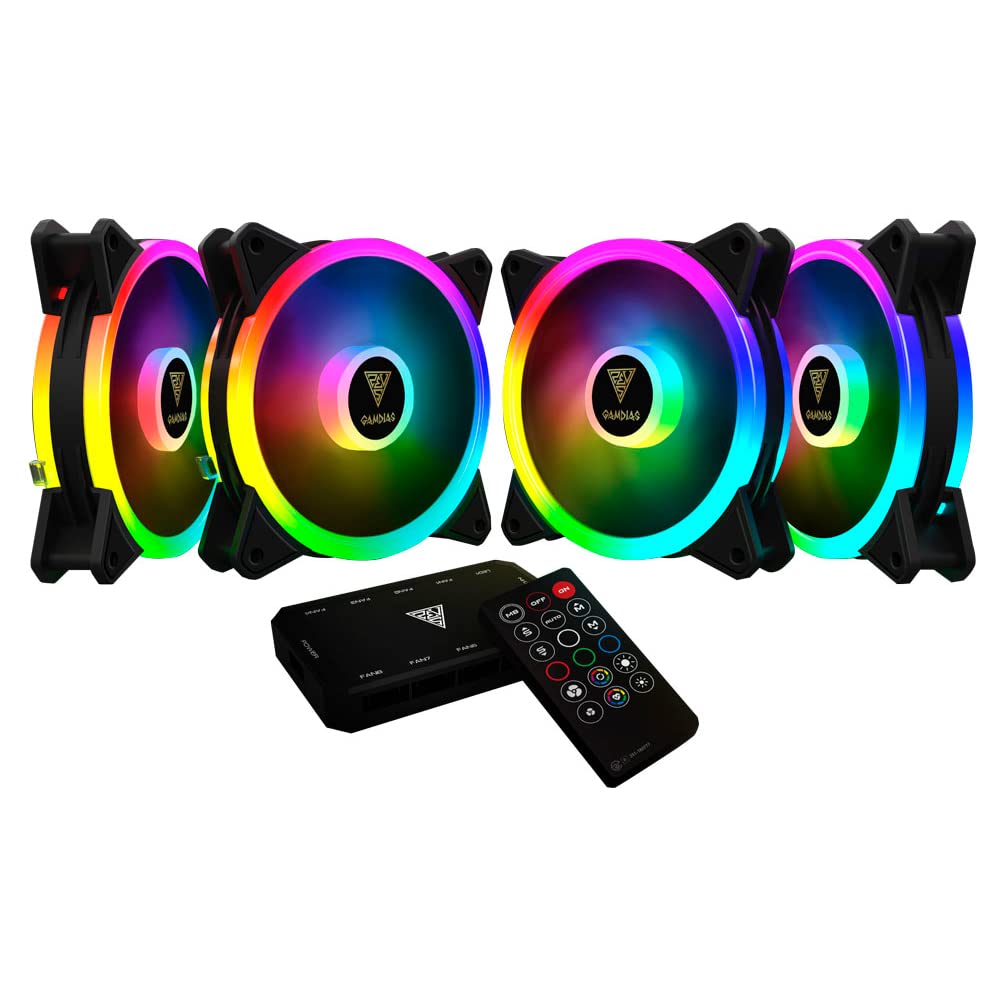
Slika 1.1: Prednja strana view of the GAMDIAS Aeolus M2-1204R RGB Fan, showcasing njegovim živopisnim RGB osvjetljenjem.
2. Sigurnosne informacije
Pridržavajte se sljedećih sigurnosnih uputa kako biste spriječili oštećenje proizvoda ili ozljede sebe:
- Ensure your computer system is powered off and disconnected from the main power supply before installation or maintenance.
- Handle the fan by its frame to avoid touching the blades, which can be delicate.
- Ne pokušavajte modificirati ventilator ili njegove komponente. Neovlaštene modifikacije mogu poništiti garanciju i predstavljati sigurnosne rizike.
- Držite ventilator dalje od tekućina i prekomjerne vlage.
- Ensure all cables are properly connected and routed to avoid interference with moving parts or other components.
3. Sadržaj paketa
Provjerite da li se sve stavke nalaze u vašem paketu:
- GAMDIAS Aeolus M2-1204R RGB Fan (1 unit)
- Montažni vijci
- Korisnički priručnik (ovaj dokument)
4. Postavljanje i instalacija
Follow these steps to properly install your GAMDIAS Aeolus M2-1204R RGB Fan:
4.1 Fizička instalacija
- Pripremite svoj računar: Power off your computer and unplug it from the wall outlet. Open your computer case.
- Identify mounting location: Locate an available 120mm fan mounting position in your PC case (e.g., front, rear, top, or bottom).
- Postavite ventilator: Place the fan in the desired mounting location, ensuring the airflow direction is correct. Typically, fans are installed to draw cool air into the case or exhaust hot air out. Arrows on the fan frame usually indicate airflow direction.
- Secure the fan: Use the provided mounting screws to secure the fan to the case. Tighten screws evenly but do not overtighten to avoid stripping or damaging the fan frame.
4.2 Ožičenje
- Priključite napajanje: Locate the 4-pin power connector on the fan cable. Connect this to an available 4-pin fan header on your motherboard or a fan controller. Ensure the connector is oriented correctly before pushing it firmly into place.
- Connect RGB (if applicable): The Aeolus M2-1204R features RGB lighting. Connect the RGB cable from the fan to a compatible RGB header on your motherboard (e.g., 5V 3-pin addressable RGB header) or to a dedicated GAMDIAS RGB controller. Refer to your motherboard or controller manual for specific RGB connection instructions.
- Upravljanje kablovima: Route all cables neatly to prevent interference with other components and to maintain good airflow within the case.

Slika 4.1: Razno views of the GAMDIAS Aeolus M2-1204R RGB Fan, illustrating its design and connection points.
5. Uputstvo za upotrebu
Once installed, the GAMDIAS Aeolus M2-1204R fan will begin operating when your computer is powered on. Its primary function is to provide airflow for cooling your PC components.
5.1 Kontrola brzine ventilatora
If connected to a 4-pin PWM (Pulse Width Modulation) fan header on your motherboard, the fan speed can be controlled via your motherboard's BIOS/UEFI settings or through compatible software provided by your motherboard manufacturer. This allows for dynamic adjustment of fan speed based on system temperature, optimizing for either performance or quiet operation.
5.2 Kontrola RGB osvjetljenja
The RGB lighting of the Aeolus M2-1204R can be controlled in one of two ways, depending on your setup:
- Softver matične ploče: If connected to a compatible addressable RGB header on your motherboard, you can use your motherboard's RGB synchronization software (e.g., ASUS Aura Sync, MSI Mystic Light Sync, Gigabyte RGB Fusion, ASRock Polychrome Sync) to customize lighting effects and colors.
- Dedicated Controller: If you are using a GAMDIAS RGB controller (often included with multi-fan packs or sold separately), the lighting can be controlled via the controller's buttons or remote control. Refer to the controller's specific manual for detailed instructions.
6. Održavanje
Redovno održavanje pomaže u osiguravanju optimalnih performansi i produžava vijek trajanja vašeg ventilatora.
6.1 Čišćenje
- Učestalost: It is recommended to clean your fan every 3-6 months, or more frequently in dusty environments.
- Procedura:
- Power off your computer and disconnect it from the power supply.
- Carefully open your computer case.
- Use compressed air to blow dust off the fan blades and frame. Hold the fan blades gently to prevent them from spinning rapidly during cleaning, which can damage the bearings.
- For stubborn dust, use a soft, dry cloth or a cotton swab to wipe the blades and frame. Do not use liquid cleaners.
- Ensure the fan is completely dry before closing the case and powering on the computer.
6.2 Opšta njega
- Avoid placing your computer in excessively dusty or humid environments.
- Ensure adequate space around your computer case for proper airflow.
7. Otkrivanje problema
If you encounter issues with your GAMDIAS Aeolus M2-1204R fan, refer to the following common problems and solutions:
| Problem | Mogući uzrok | Rješenje |
|---|---|---|
| Ventilator se ne okreće | Nema priključka za napajanje Faulty fan header Kvar ventilatora | Check if the 4-pin power connector is securely plugged into the motherboard/controller. Try connecting the fan to a different fan header on the motherboard. Ako se i dalje ne okreće, ventilator možda nije u redu. |
| RGB osvetljenje ne radi | Incorrect RGB connection Problem sa softverom Faulty RGB component | Ensure the RGB cable is correctly connected to a compatible 5V 3-pin addressable RGB header or controller. Verify that your motherboard's RGB software or dedicated controller is properly configured and running. Check for any physical damage to the RGB cable or LEDs. |
| Ventilator stvara neobičnu buku | Opstrukcija Labavi zavrtnji za montažu Bearing issue | Power off and check for any cables or objects obstructing the fan blades. Ensure all mounting screws are tightened securely. If the noise persists and there are no obstructions, the fan bearings may be worn. Consider replacement. |
8. Specifikacije
Key technical specifications for the GAMDIAS Aeolus M2-1204R RGB Fan:
- Model: AEOLUS M2-1204R
- Dimenzije ventilatora: 120 mm x 120 mm x 25 mm (4.72"D x 2.36"Š x 4.72"V)
- Materijal: Polikarbonat
- Priključak za napajanje: 4-Pin PWM
- Voltage: 12 Volts
- Wattage: 13.2 vati
- Način hlađenja: Vazduh
- Maksimalna brzina rotacije: 2000 RPM
- Kapacitet protoka zraka: 56 kubnih stopa u minuti (CFM)
- Nivo buke: 20 decibela (dB)
- Kompatibilni uređaji: Desktop
- Težina artikla: 5.6 unce

Slika 8.1: Bočna strana view of the GAMDIAS Aeolus M2-1204R RGB Fan, highlighting its profile.
9. Garancija i podrška
9.1 Informacije o garanciji
The GAMDIAS Aeolus M2-1204R RGB Fan comes with a manufacturer's warranty. Please refer to the warranty card included with your product or visit the official GAMDIAS webZa detaljne uslove garancije posjetite stranicu. Sačuvajte dokaz o kupovini za slučaj reklamacije.
9.2 Tehnička podrška
For technical assistance, troubleshooting beyond this manual, or warranty inquiries, please contact GAMDIAS customer support through their official website or the retailer from whom you purchased the product. Provide your product model number (AEOLUS M2-1204R) and a detailed description of the issue when seeking support.