
PRITECH Universal Remote Control (Compatible with LG)
Pritech Universal Remote Control (Compatible with LG) - User Manual
Model: Universal Remote Control (Compatible with LG)
Product Overview
The Pritech Universal TV Remote Control is designed as an ideal replacement for your old or faulty remote. This convenient control allows you to operate your television as if it were the original remote. Simply insert the batteries, and it's ready to use.
Ključne karakteristike:
- Perfect replacement for your existing TV remote.
- Guaranteed to work with all TV brands.
- Made from durable ABS material.
- Features soft plastic buttons for comfortable use.
- Lagan i ergonomski dizajn.
- Operating range of up to 10 meters.

Image: Pritech Universal Remote Control highlighting its compatibility with LG, high performance, 8-meter range, comfortable design, and quick access buttons.
Postavljanje i instalacija
The Pritech Universal Remote Control is designed for immediate use without complex setup. Follow these simple steps to begin using your remote.
1. Instalacija baterije
The remote requires AAA batteries (not supplied). Ensure correct polarity when inserting the batteries.
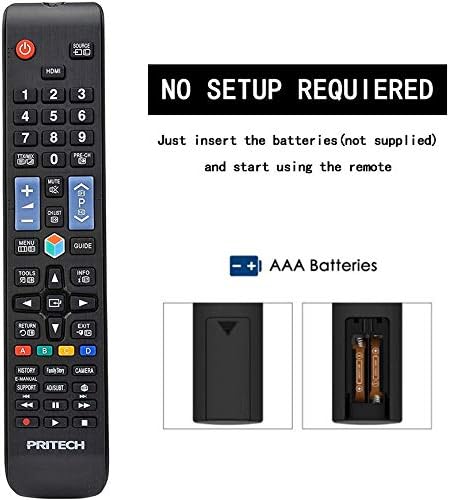
Image: A diagram illustrating the "NO SETUP REQUIRED" feature and the location for AAA battery insertion in the remote control.
- Uklonite poklopac baterije: Gently slide down the battery cover located on the back of the remote control.
- Umetnite baterije: Insert two AAA batteries, ensuring the positive (+) and negative (-) ends align with the markings inside the battery compartment.
- Zamijenite poklopac baterije: Gurnite poklopac baterije na svoje mjesto dok ne škljocne sigurno.

Image: A four-panel visual guide demonstrating the steps for battery installation: 1. Removing the battery cover, 2. Distinguishing positive and negative electrodes, 3. Snapping batteries into place, and 4. Ready to control your TV.
2. Početna upotreba
Once batteries are installed, the remote is ready to operate your LG compatible television. No programming or code entry is typically required.
Uputstvo za upotrebu
This universal remote control provides all the essential functions of your original LG TV remote. Familiarize yourself with the button layout for optimal use.

Slika: Čist prednji dio view of the Pritech Universal Remote Control, showing all buttons and their labels, including power, input, channel, volume, navigation, and smart TV functions.
Uobičajene funkcije:
- Dugme za napajanje (●): Uključuje ili isključuje TV.
- Ulaz/izvor: Switches between different video inputs (HDMI, AV, etc.).
- Kanal gore/dolje (▲/▼): Mijenja TV kanale.
- Jačina/stišavanje (+/-): Podešava jačinu zvuka.
- Isključi zvuk: Utišava zvuk televizora.
- Brojčani gumbi (0-9): Direktno unesite brojeve kanala.
- Navigacijska tipka (gore, dolje, lijevo, desno, OK): Koristi se za navigaciju kroz menije i potvrdu odabira.
- Dugme za početnu stranicu: Accesses the TV's main smart hub or home screen.
- Natrag/Izlaz: Vraća na prethodni ekran ili izlazi iz menija.
- Smart/My Apps: Direct access to smart TV features and installed applications.
For specific functions related to your LG TV model, refer to your television's user manual in conjunction with this remote control.
Održavanje i njega
To ensure the longevity and optimal performance of your Pritech Universal Remote Control, follow these maintenance guidelines:
- čišćenje: Za čišćenje daljinskog upravljača koristite meku, suhu krpu. Za tvrdokornu prljavštinu, laganoampen the cloth with water or a mild cleaning solution. Avoid abrasive cleaners or solvents.
- Zamjena baterije: Replace batteries when the remote's response becomes sluggish or stops working. Always replace both batteries at the same time.
- Skladištenje: Daljinski upravljač čuvajte na hladnom i suhom mjestu, dalje od direktne sunčeve svjetlosti i ekstremnih temperatura.
- Izbjegavajte kapi: While designed to be durable, avoid dropping the remote, as this can damage internal components.
- Izloženost tečnosti: Keep the remote away from liquids. If it gets wet, remove batteries immediately and allow it to dry completely before reinserting them.
Rješavanje problema
If you encounter issues with your Pritech Universal Remote Control, try the following troubleshooting steps:
| Problem | Mogući uzrok | Rješenje |
|---|---|---|
| Daljinski upravljač ne reaguje. | Prazne ili nepravilno umetnute baterije. Prepreka između daljinskog upravljača i TV-a. Daljinski upravljač je izvan dometa. | Check battery polarity and replace batteries if necessary. Ensure a clear line of sight to the TV's IR receiver. Move closer to the TV (within 10 meters). |
| Neki dugmići ne rade. | Dirt or debris under buttons. Internal malfunction. | Clean the remote surface. If problem persists, contact customer support. |
| Daljinski upravljač radi povremeno. | Slaba baterija. Smetnje. | Replace batteries. Remove any potential sources of infrared interference. |
| Remote does not control TV. | Not compatible with TV model (despite being universal). | While designed for broad compatibility, some specific TV models might not be fully supported. Verify compatibility or contact Pritech support. |
Specifikacije
| Feature | Detalj |
|---|---|
| Brand | PRITECH |
| Model | Universal Remote Control (Compatible with LG) |
| Boja | Black (Compatible with LG design) |
| Tehnologija povezivanja | Infracrveni |
| Kompatibilni uređaji | Television (specifically designed for LG compatibility) |
| Maksimalni domet | 10 metara |
| Materijal | ABS plastika |
| Izvor napajanja | 2 x AAA baterije (nisu uključene) |
| ASIN | B07SRPZYWC |
| Proizvođač | Pritech |
Garancija i podrška
Pritech offers a 2 godine garancije on this universal remote control. This warranty covers manufacturing defects and ensures the product functions as described.
For warranty claims, technical support, or further assistance, please contact Pritech customer service through their official webweb-mjesto ili prodavač gdje je proizvod kupljen. Sačuvajte dokaz o kupovini radi potvrde garancije.
Napomena: Garancija ne pokriva štetu uzrokovanu nepravilnom upotrebom, nezgodama, neovlaštenim modifikacijama ili normalnim habanjem.
Ask a question about this manual
Ask about setup, troubleshooting, compatibility, parts, safety, or missing instructions. Manuals+ will review the question and use this page’s manual context to help answer it.