
DALI Katch G2
DALI Katch G2 Prijenosni Bluetooth zvučnik Uputstvo za upotrebu
Model: Katch G2
Uvod
Thank you for choosing the DALI Katch G2 Portable Bluetooth Speaker. This manual provides essential information for setting up, operating, and maintaining your speaker. Please read it thoroughly before use to ensure optimal performance and longevity of your device.

Slika: Front view of the DALI Katch G2 Portable Bluetooth Speaker in Caramel White.
Sigurnosne informacije
- Ne izlažite zvučnik vodi ili prekomjernoj vlazi. Ovaj proizvod nije vodootporan.
- Izbjegavajte postavljanje zvučnika u blizinu izvora toplote ili na direktnu sunčevu svjetlost tokom dužeg perioda.
- Use only the charger supplied with the product.
- Ne pokušavajte rastavljati ili modificirati zvučnik. Za sve servisne radove obratite se kvalifikovanom osoblju.
- Čuvati van domašaja djece.
Sadržaj paketa
Provjerite da li su svi artikli prisutni u pakovanju:
- DALI Katch G2 Prijenosni Bluetooth zvučnik
- Adapter/punjač
- Kratki vodič (nije uključen u ovaj priručnik)
- Travel Pouch (may vary by region)
Product Overview
The DALI Katch G2 features a sleek design with intuitive controls and various connectivity options.
Kontrole i indikatori

Image: Top panel of the DALI Katch G2 showing power, Bluetooth, volume, and sound mode buttons.
- Dugme za napajanje: Pritisnite da uključite ili isključite zvučnik.
- Bluetooth dugme: Pritisnite za ulazak u način uparivanja.
- Dugmad za jačinu zvuka (+/-): Podesite jačinu zvuka reprodukcije.
- Dugme za režim zvuka: Cycle through available sound profiles.
- Indikatorska svjetla baterije: Display current battery level.
Portovi i veze

Image: Side panel of the DALI Katch G2 showing the charging port and auxiliary input.
- Port za punjenje: Connect the power adapter to the charging port on the speaker.
- Pomoćni ulaz od 3.5 mm: Connect external audio sources via a stereo mini-jack cable.
Interne komponente

Slika: Eksplodirano view illustrating the internal components of the DALI Katch G2 speaker, including drivers and circuit board.
Setup
1. Punjenje baterije
- Spojite priloženi adapter za napajanje na priključak za punjenje na zvučniku.
- Uključite adapter za napajanje u zidnu utičnicu.
- The battery indicator lights will illuminate to show charging status. A full charge takes approximately 2 hours.
- A fully charged battery provides up to 30 hours of playback.
2. Uključivanje / isključivanje napajanja
- Za uključivanje pritisnite i držite Dugme za napajanje until the indicator lights activate.
- Za isključivanje pritisnite i držite Dugme za napajanje ponovo dok se indikatorska svjetla ne ugase.
3. Bluetooth uparivanje
- Uvjerite se da je zvučnik uključen.
- Pritisnite Bluetooth dugme. The Bluetooth indicator light will flash, indicating pairing mode.
- Na svom uređaju (pametnom telefonu, tabletu itd.) omogućite Bluetooth i potražite dostupne uređaje.
- Select "DALI Katch G2" from the list.
- Once connected, the Bluetooth indicator light will glow solid.
4. Analog Connection
- Connect a 3.5mm stereo mini-jack cable from your audio source to the Auxiliary Input port on the speaker.
- Zvučnik će se automatski prebaciti u način rada pomoćnog ulaza.
5. Uparivanje putem pravog bežičnog stereo sistema (TWS)
Two DALI Katch G2 speakers can be paired together for a stereo sound experience.
- Ensure both DALI Katch G2 speakers are powered on and not connected to any other Bluetooth device.
- Na jednom zvučniku (ovo će biti primarni zvučnik) pritisnite i držite Bluetooth dugme until it enters pairing mode.
- On the second speaker, press the Bluetooth dugme jednom.
- The speakers will automatically connect to each other. The primary speaker's Bluetooth indicator will glow solid, and the secondary speaker's indicator will also confirm connection.
- Now, connect your audio source to the primary speaker via Bluetooth as described in step 3.
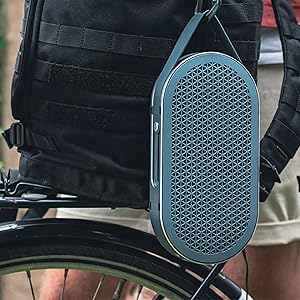
Image: Two DALI Katch G2 speakers set up for True Wireless Stereo pairing in a home environment.
Upravljanje zvučnikom
1. Reprodukcija zvuka
- Once connected via Bluetooth or auxiliary input, start playback from your audio source.
- Koristite Dugmad za jačinu zvuka (+/-) on the speaker or your connected device to adjust the volume.
2. Režimi zvuka
The DALI Katch G2 offers different sound profiles to suit your listening preference or environment.
- Pritisnite Dugme za način rada zvuka to cycle through the available sound modes (e.g., "Clear" and "Warm").
- Each mode provides a distinct audio characteristic.
3. Provjera nivoa baterije
- Kratko pritisnite Dugme za napajanje when the speaker is on to illuminate the battery indicator lights, showing the current charge level.
Održavanje
1. Čišćenje
- Obrišite zvučnik mekom, suhom krpom.
- Ne koristite abrazivna sredstva za čišćenje, voskove ili rastvarače.
2. Skladištenje
- Kada se ne koristi duži period, zvučnik čuvajte na hladnom i suhom mjestu.
- Izbjegavajte ekstremne temperature.
3. Održavanje baterije
- Da biste produžili vijek trajanja baterije, izbjegavajte često potpuno pražnjenje baterije.
- Redovno punite zvučnik, čak i ako ga ne koristite često.
Rješavanje problema
| Problem | Mogući uzrok | Rješenje |
|---|---|---|
| Zvučnik se ne uključuje. | Baterija je prazna. | Spojite zvučnik na adapter za napajanje i napunite ga. |
| Nema zvuka iz zvučnika. | Jačina zvuka je preniska ili utišana. Odabran je pogrešan ulazni izvor. Device not paired correctly. | Increase volume on speaker and connected device. Ensure correct input (Bluetooth/Aux) is active. Re-pair the Bluetooth device. |
| Bluetooth uparivanje nije uspjelo. | Zvučnik nije u načinu rada za uparivanje. Uređaj je previše udaljen od zvučnika. Interferencija. | Press the Bluetooth button to enter pairing mode. Približite uređaj zvučniku. Odmaknite se od drugih bežičnih uređaja. |
| True Wireless Stereo (TWS) pairing fails. | Zvučnici nisu u TWS načinu uparivanja. One speaker already connected to a device. | Ensure both speakers are disconnected from other devices and follow TWS pairing steps. |
Specifikacije
| Naziv modela | DALI Katch G2 |
| Brand | DALI |
| Vrsta zvučnika | Prijenosni Bluetooth zvučnik |
| Tehnologija povezivanja | Bluetooth 5.0 (apt-X, apt-X HD, AAC) |
| Način audio izlaza | Stereo |
| Maksimalna izlazna snaga zvučnika | 25 Watts |
| Kapacitet baterije | 3300 mAh |
| Trajanje baterije | Do 30 sati |
| Vrijeme punjenja | Približno 2 sata |
| Woofer Diameter | 3.5 inča |
| Prečnik visokotonca | 21 milimetara |
| Dimenzije proizvoda (D x Š x V) | 1.8" x 10.5" x 5.4" |
| Težina artikla | 2.42 funti (1.1 kilograma) |
| Kontrolni metod | Dodirnite |
| Vodootporan | br |
Informacije o garanciji
The DALI Katch G2 Portable Bluetooth Speaker comes with a Ograničena garancija. Specific terms and conditions of the warranty may vary by region and retailer. Please retain your proof of purchase for warranty claims. For detailed warranty information, refer to the documentation provided with your purchase or visit the official DALI website.
Korisnička podrška
If you encounter any issues not covered in this manual or require further assistance, please contact DALI customer support.
- Visit the official DALI webstranica za resurse podrške, često postavljana pitanja i kontakt informacije.
- Refer to your product packaging or purchase documentation for specific regional support contacts.
Ask a question about this manual
Ask about setup, troubleshooting, compatibility, parts, safety, or missing instructions. Manuals+ will review the question and use this page’s manual context to help answer it.