
1. Uvod
Thank you for choosing the Dacom Athlete G05 Bluetooth Headset. This manual provides comprehensive instructions to help you set up, operate, and maintain your new wireless headphones. Please read this manual carefully before use to ensure optimal performance and longevity of your device.
2. Sadržaj paketa
Provjerite da li se u vašem paketu nalaze sve dolje navedene stavke:
- 1 x Dacom Athlete G05 Bluetooth Headset
- 1 x USB kabl za punjenje
- 1 x Korisnički priručnik (ovaj dokument)
3. Proizvod je gotovview
The Dacom Athlete G05 is a wireless stereo earphone designed for sports and running, featuring a comfortable in-ear design with ear hooks for secure fit. It connects via Bluetooth V4.1.
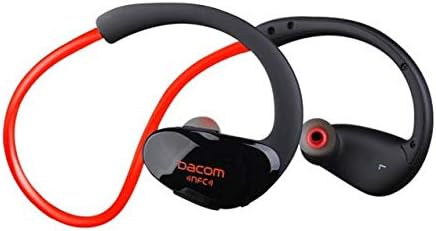
Slika 3.1: Front view of the Dacom Athlete G05 Bluetooth Headset, showing the earbud and ear hook design.
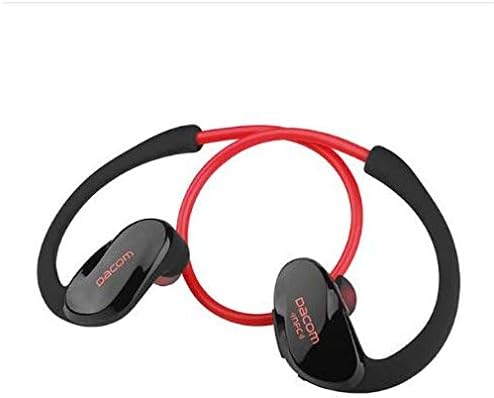
Slika 3.2: Pozadi view of the Dacom Athlete G05 Bluetooth Headset, illustrating the connecting cable between the two earbuds.
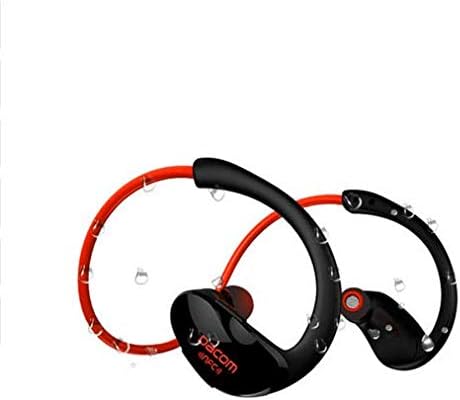
Slika 3.3: Dacom Athlete G05 Bluetooth Headset demonstrating water resistance, suitable for sports activities.
4. Podešavanje
4.1 Punjenje slušalica
Before first use, fully charge your Dacom Athlete G05 headset. A full charge typically takes approximately 1.5 to 2 hours.
- Connect the provided USB charging cable to the charging port on the headset.
- Connect the other end of the USB cable to a power adapter (DC5V 150mAh output recommended) or a computer's USB port.
- The battery indicator light will illuminate during charging and change color or turn off once fully charged.
A fully charged headset provides approximately 8 hours of talk time or music playback, and up to 180 hours of standby time.
4.2 Bluetooth uparivanje
To connect your headset to a Bluetooth-enabled device (e.g., smartphone, tablet):
- Provjerite jesu li slušalice potpuno napunjene i isključene.
- Press and hold the multi-function button on the headset until the Bluetooth indicator light flashes red and blue alternately, indicating it is in pairing mode.
- Na svom uređaju omogućite Bluetooth i potražite dostupne uređaje.
- Select "Dacom Athlete G05" (or similar name) from the list of found devices.
- Ako se od vas zatraži lozinka, unesite "0000" (četiri nule).
- Once paired, the Bluetooth indicator light will flash blue slowly or turn solid blue, and you will hear a confirmation tone.
The headset supports Bluetooth V4.1 and profiles such as Headset, Handsfree, A2DP, AVRC, and APT-X.
5. Uputstvo za upotrebu
5.1 Uključivanje/isključivanje napajanja
- Uključeno: Press and hold the multi-function button for approximately 3 seconds until the indicator light flashes blue and you hear a power-on tone.
- Iskljuciti: Press and hold the multi-function button for approximately 5 seconds until the indicator light flashes red and you hear a power-off tone.
5.2 Upravljanje pozivima
- Odgovori na poziv: Short press the multi-function button when a call comes in.
- Završi poziv: Short press the multi-function button during a call.
- odbiti poziv: Pritisnite i držite višenamjenski taster 2 sekunde kada primite poziv.
- Ponovno biranje zadnjeg broja: Dvaput pritisnite višenamjensko dugme kada niste u toku poziva.
5.3 Reprodukcija muzike
- Pusti/pauza: Kratko pritisnite višenamensko dugme.
- Sljedeća pjesma: Dugo pritisnite dugme za povećanje jačine zvuka.
- Prethodni zapis: Dugo pritisnite dugme za jačinu zvuka -.
- Povećavanje glasnoće: Kratko pritisnite dugme za povećanje jačine zvuka.
- Smanjivanje jačine zvuka: Kratko pritisnite dugme za jačinu zvuka -.
Note: The headset features touch control for various functions.
6. Održavanje i njega
- Keep the headset dry. Do not expose it to extreme temperatures or humidity.
- Clean the earbuds and charging contacts regularly with a soft, dry cloth.
- Izbjegavajte ispuštanje ili izlaganje slušalica jakim udarcima.
- Čuvajte slušalice na hladnom i suvom mestu kada se ne koriste.
- Ne pokušavajte rastavljati ili modificirati slušalice, jer će to poništiti garanciju.
7. Otkrivanje problema
| Problem | Moguće rješenje |
|---|---|
| Slušalice se ne uključuju. | Provjerite jesu li slušalice potpuno napunjene. Priključite ih na izvor napajanja i pokušajte ponovo. |
| Nije moguće uparivanje s uređajem. |
|
| Nema zvuka ili je jačina zvuka niska. |
|
| Povremena veza. |
|
8. Specifikacije
| Feature | Detalj |
|---|---|
| Naziv proizvoda | Athlete sports Bluetooth headset |
| Broj modela | G05 |
| Bluetooth verzija | V4.1 |
| Bluetooth klasa | Klasa 2 |
| Podržani Profiles | Headset, Handsfree, A2DP, AVRC, APT-X |
| Ulaz za punjenje | DC5V 150mAh (Power adapter output) |
| Vrsta baterije | High-performance lithium polymer battery |
| Vrijeme razgovora | Približno 8 sata |
| Vrijeme igranja | Približno 8 sata |
| Vrijeme pripravnosti | Približno 180 sata |
| Raspon audio frekvencija | 20Hz-20kHz |
| BT radio frekvencija | 2.400-2.481 GHz |
| Izlazna impedansa | 16Ω 3mW |
| Osjetljivost | 100-105dB |
| Form Factor slušalica | U uhu |
| Tehnologija povezivanja | Bežični |
| Kontrolni metod | Dodirnite |
| Materijal | Plastika |
| Boja | Crveni |
9. Garancija i podrška
Dacom products are manufactured to the highest quality standards. For warranty information or technical support, please refer to the warranty card included with your purchase or visit the official Dacom webMolimo sačuvajte dokaz o kupovini za potrebe reklamacije.


