
1. Uvod
The Divoom Macchiato is a palm-sized, portable Bluetooth speaker with an integrated FM radio tuner, designed to deliver high-quality audio in a compact form factor.
2. Sadržaj paketa
Molimo označite kućicu za sljedeće stavke:
- Divoom Macchiato Bluetooth Speaker
- USB kabl za punjenje
- Uputstvo za upotrebu
- (Dodatni pribor može varirati ovisno o regiji)
3. Proizvod je gotovview
Upoznajte se s komponentama i kontrolama zvučnika.
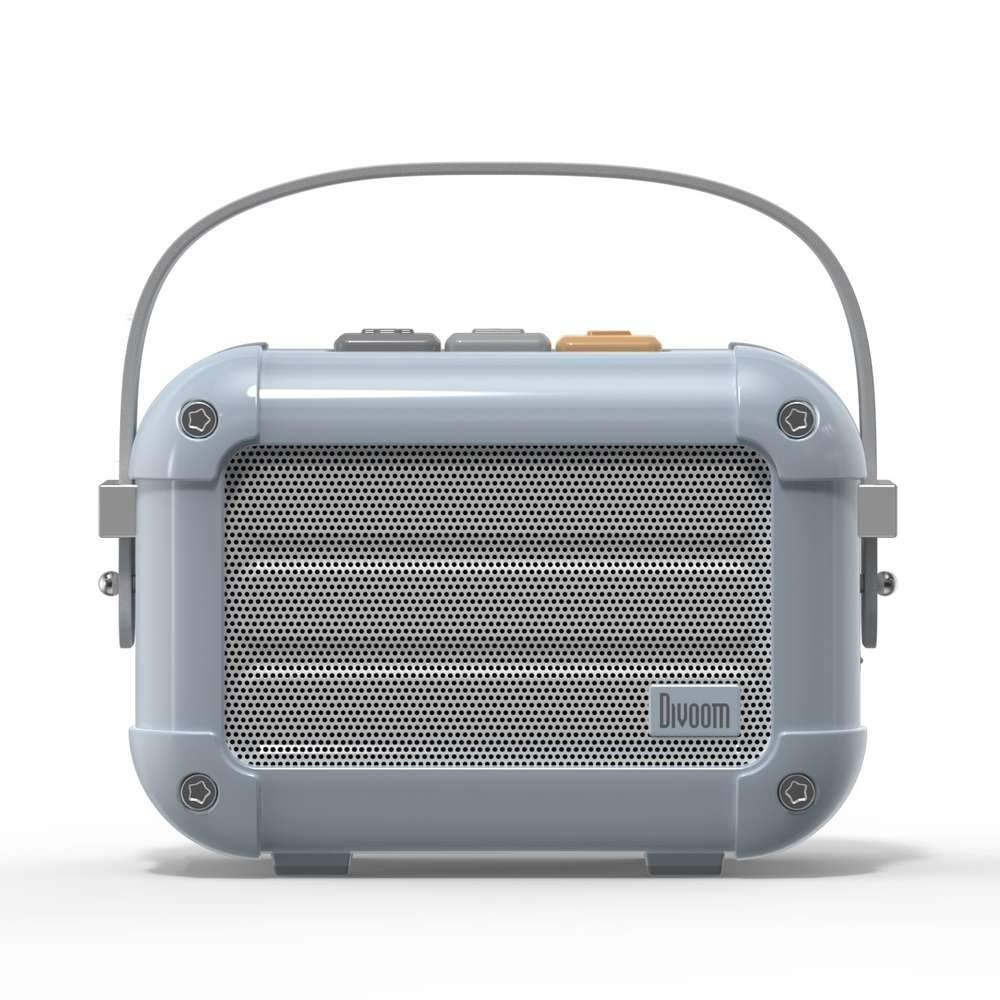
Slika 3.1: Prednja strana view of the Divoom Macchiato Bluetooth Speaker in blue.
3.1 Kontrole i portovi
The Divoom Macchiato speaker features intuitive controls for easy operation.
- Top Buttons: Typically control power, volume, track navigation, and mode selection (e.g., Bluetooth, FM).
- Port za punjenje: Usually a USB Type-C port for charging the device.
- Utor za TF karticu: Allows playback of music directly from a TF (MicroSD) card.
- FM antena: An extendable antenna for improved FM radio reception.

Slika 3.2: Natrag view of the Divoom Macchiato Bluetooth Speaker, showing the charging port and TF card slot.
4. Podešavanje
4.1 Uključivanje/isključivanje napajanja
- Za uključivanje: Press and hold the power button (usually one of the top buttons) for approximately 2-3 seconds until you hear an audible cue or see an indicator light.
- Za isključivanje: Press and hold the power button for approximately 2-3 seconds until you hear an audible cue or the indicator light turns off.
4.2 Bluetooth uparivanje
- Ensure the speaker is powered on and in Bluetooth pairing mode. The indicator light will typically blink rapidly.
- Na svom mobilnom uređaju (pametnom telefonu, tabletu itd.) omogućite Bluetooth.
- Traži "Divoom Macchiato" in the list of available Bluetooth devices.
- Select "Divoom Macchiato" to connect. Once connected, the speaker will provide an audible confirmation, and the indicator light will turn solid.
Napomena: Zvučnik će automatski pokušati ponovo da se poveže sa poslednjim uparenim uređajem kada se uključi.
4.3 Podešavanje FM radija
- Za optimalan prijem, potpuno izvucite FM antenu.
- Switch the speaker to FM radio mode using the mode button (refer to your specific model's button layout).
- Use the track navigation buttons (usually +/-) to scan for available FM stations.
- Some models may allow saving favorite stations; refer to your specific model's instructions for details.
5. Uputstvo za upotrebu
5.1 Music Playback (Bluetooth/TF Card)
- Pusti/pauza: Press the Play/Pause button (often integrated with the power button or a dedicated button).
- Kontrola jačine zvuka: Use the volume up (+) and volume down (-) buttons.
- Sljedeća pjesma: Press and hold or short press the next track button (often the + button).
- Prethodni zapis: Press and hold or short press the previous track button (often the - button).
- Reprodukcija TF kartice: Umetnite TF karticu sa MP3 files into the TF card slot. The speaker should automatically switch to TF card mode or require manual selection via the mode button.
5.2 App Features (if applicable)
For enhanced functionality, download the Divoom companion app from your device's app store. The app may offer features such as:
- Customizing sound profiles.
- Accessing additional audio sources.
- Managing FM radio stations.
- Ažuriranja firmvera.
6. Održavanje
- čišćenje: Koristite meku, suhu krpu za čišćenje površine zvučnika. Nemojte koristiti abrazivna sredstva za čišćenje ili rastvarače.
- Skladištenje: Čuvajte zvučnik na hladnom i suhom mjestu, dalje od direktne sunčeve svjetlosti i ekstremnih temperatura.
- Održavanje baterije: Da biste produžili vijek trajanja baterije, izbjegavajte često potpuno pražnjenje baterije. Redovno punite zvučnik, čak i ako ga ne koristite duži period.
- Otpornost na vodu: This model is NOT waterproof. Avoid exposure to water or high humidity.
7. Otkrivanje problema
| Problem | Rješenje |
|---|---|
| Zvučnik se ne uključuje. | Provjerite je li baterija napunjena. Spojite zvučnik na izvor napajanja pomoću USB kabela za punjenje. |
| Nije moguće uparivanje putem Bluetootha. |
|
| Nema zvuka ili je jačina zvuka niska. |
|
| Slab FM radio prijem. |
|
8. Specifikacije
| Feature | Detalj |
|---|---|
| Broj modela | MACCHIATO |
| Brand | Divoom |
| Tehnologija povezivanja | Bluetooth |
| Bežična komunikacijska tehnologija | Bluetooth |
| Maksimalna izlazna snaga zvučnika | 6 Watts |
| Vrsta zvučnika | Soundbar |
| Vrsta montaže | Tabletop Mount |
| Preporučena upotreba za proizvod | Muzika |
| Kontrolni metod | Glas |
| Vodootporan | FALSE (Not Waterproof) |
9. Garancija i podrška
For warranty information and customer support, please refer to the documentation included with your product or visit the official Divoom webSačuvajte račun kao dokaz o kupovini za reklamacije u slučaju reklamacije.