
1. Uvod
Thank you for choosing the Hoco E30 Wireless Earphone. This manual provides essential information for setting up, operating, and maintaining your earphone. Please read it carefully before use to ensure optimal performance and longevity of your device.
2. Sigurnosne informacije
Da biste spriječili oštećenje uređaja ili povrede sebe i drugih, molimo vas da se pridržavate sljedećih sigurnosnih mjera opreza:
- Izbjegavajte produženo izlaganje visokim nivoima glasnoće kako biste spriječili oštećenje sluha.
- Do not use the earphone while driving or in situations where you need to be aware of your surroundings.
- Držite uređaj dalje od vode, vlage i ekstremnih temperatura.
- Do not attempt to disassemble, repair, or modify the earphone. This will void the warranty.
- Koristite samo isporučene ili certificirane kablove i adaptere za punjenje.
- Čuvati van domašaja djece i kućnih ljubimaca.
3. Sadržaj paketa
Molimo označite kućicu za sljedeće stavke:
- Hoco E30 Wireless Earphone
- USB kabl za punjenje
- Uputstvo za upotrebu
4. Proizvod je gotovview
Familiarize yourself with the components of your Hoco E30 Wireless Earphone:

Slika 4.1: Side view of the Hoco E30 Wireless Earphone, highlighting its sleek design and ear hook.

Slika 4.2: The Hoco E30 Wireless Earphone positioned next to a smartphone, illustrating its compact size and wireless connectivity.
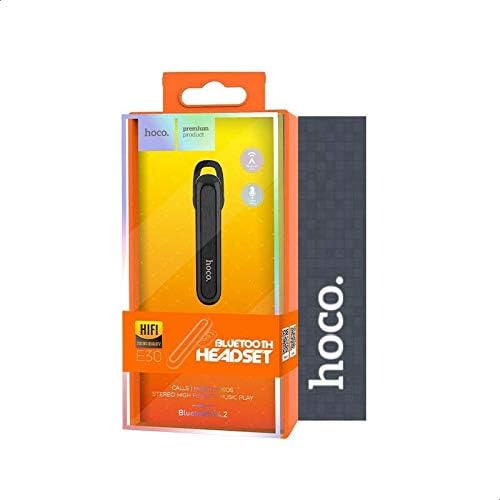
Slika 4.3: The retail packaging for the Hoco E30 Wireless Earphone, displaying branding and key features.
5. Podešavanje
5.1 Punjenje slušalica
Before first use, fully charge your Hoco E30 earphone.
- Connect the provided USB charging cable to the charging port on the earphone.
- Connect the other end of the USB cable to a DC 5V power source (e.g., a USB wall adapter or computer USB port).
- Indikatorska lampica punjenja će se upaliti.
- Charging typically takes approximately 2 hours. The indicator light will change or turn off once charging is complete.
5.2 Uparivanje s uređajem
To connect your Hoco E30 earphone to your smartphone or other Bluetooth-enabled device:
- Ensure the earphone is fully charged and turned off.
- Pritisnite i držite višenamjensko dugme na slušalicama dok indikatorska lampica ne počne naizmjenično treperiti crveno i plavo, što ukazuje na to da su u režimu uparivanja.
- Na svom uređaju omogućite Bluetooth i potražite dostupne uređaje.
- Select "Hoco E30" from the list of found devices.
- Once paired, the indicator light on the earphone will flash blue slowly, and you will hear a confirmation tone.
- The earphone has a transmission range of up to 10 meters (33 feet).
6. Uputstvo za upotrebu
6.1 Uključivanje/isključivanje napajanja
- Uključeno: Press and hold the multi-function button for approximately 3 seconds until the blue indicator light flashes and you hear a power-on tone.
- Iskljuciti: Press and hold the multi-function button for approximately 5 seconds until the red indicator light flashes and you hear a power-off tone.
6.2 Upravljanje pozivima
- Odgovori na poziv: Briefly press the multi-function button when an incoming call rings.
- Završi poziv: Briefly press the multi-function button during a call.
- odbiti poziv: Press and hold the multi-function button for 2 seconds when an incoming call rings.
- Ponovno biranje zadnjeg broja: Dvaput pritisnite višenamjensko dugme kada niste u toku poziva.
6.3 Reprodukcija muzike
- Pusti/pauza: Briefly press the multi-function button to play or pause music.
- Sljedeća pjesma: Press and hold the multi-function button for 2 seconds to skip to the next track.
- Prethodni zapis: Press and hold the multi-function button for 2 seconds (during playback) to go to the previous track.
Note: The Hoco E30 supports A2DP and AVRCP protocols for high-quality audio streaming and remote control. Volume control is typically managed via the connected device.
6.4 Battery Status Display
The Hoco E30 earphone supports battery level display on compatible Apple iOS devices and some Android smartphones. Check your device's notification bar or Bluetooth settings for this feature.
7. Održavanje
- čišćenje: Use a soft, dry cloth to clean the earphone. Do not use harsh chemicals or abrasive materials.
- Skladištenje: Slušalice čuvajte na hladnom i suhom mjestu, dalje od direktne sunčeve svjetlosti i ekstremnih temperatura.
- Održavanje baterije: Da biste produžili vijek trajanja baterije, izbjegavajte često potpuno pražnjenje slušalica. Redovno ih punite, čak i ako ih ne koristite duži period.
8. Otkrivanje problema
If you encounter issues with your Hoco E30 earphone, try the following solutions:
| Problem | Rješenje |
|---|---|
| Slušalica se ne uključuje. | Ensure the earphone is fully charged. Connect it to a power source and try again. |
| Nije moguće uparivanje s uređajem. |
|
| Nema zvuka ili je kvalitet zvuka loš. |
|
| Punjenje ne funkcioniše. |
|
9. Specifikacije
| Feature | Detalj |
|---|---|
| Model | E30 |
| Bluetooth verzija | V4.2 WT |
| Podržani protokoli | Slušalice, Hands-free, A2DP, AVRCP |
| Raspon prenosa | 10 metara (33 stopa) |
| Frekvencija prenosa | 2.4 GHz |
| Charging Voltage | DC 5V |
| Vrijeme punjenja | Pribl. 2 sati |
| Kapacitet baterije | 60 mAh |
| Vrijeme razgovora | Pribl. 3.5 sati |
| Vrijeme reprodukcije muzike | Pribl. 3.5 sati |
| Vrijeme pripravnosti | Pribl. 110 sati |
| Neto težina proizvoda | 6 grama |
| Dimenzije (D x Š x V) | 58 mm x 14 mm x 25 mm |
| Materijal | Plastika |
| Kontrolni metod | Dodirnite |
| Boja | Crna i srebrna |
10. Garancija i podrška
Hoco products are designed and manufactured to the highest quality standards. This product is covered by a limited warranty from the date of purchase. Please refer to the warranty card included in your package for specific terms and conditions.
For technical support or warranty claims, please contact your local Hoco distributor or visit the official Hoco webweb mjesto za više informacija.