
1. Uvod
This manual provides detailed instructions for the installation, operation, maintenance, and troubleshooting of the SEAFRONT SKI780 VFD Inverter Frequency Converter. This device is designed for precise motor speed control in various industrial and commercial applications. Please read this manual thoroughly before installation and operation to ensure safe and efficient use of the product.

Slika 1: Općenito view of the SEAFRONT SKI780 VFD Inverter Frequency Converter.
2. Sigurnosne informacije
Uvijek se pridržavajte sljedećih sigurnosnih mjera opreza kako biste spriječili tjelesne ozljede ili oštećenje opreme:
- Ensure that installation and wiring are performed by qualified personnel only.
- Disconnect all power sources before performing any wiring, maintenance, or inspection.
- Proverite da li je ulazna voltage odgovara specifikacijama pretvarača.
- Do not touch electrical components immediately after power-off, as residual voltage may be present. Wait at least 5 minutes.
- Install the inverter in a clean, dry, and well-ventilated environment, away from direct sunlight, corrosive gases, and flammable materials.
- Osigurajte pravilno uzemljenje opreme.
3. Proizvod je gotovview
The SEAFRONT SKI780 VFD Inverter is a versatile device offering advanced control features for various motor applications.
Ključne karakteristike:
- Integrated synchronous control and proportional timing control.
- Six speed control modes for automatic operation.
- Ability to lock all or part of the keys (analog potentiometer unlocked).
- Normally open relay and two high configuration outputs with 100 optional channels.
- Integrated user-defined counter/meter.
- 0-100% adjustable torque output at zero speed, with zero-speed brake function.
- V/F control and output torsion control.
- Integrated communication interface.
- Equipped with a speed potentiometer and an external panel.
- Five opto-isolated digital inputs, 100 optional channels.
- One analog input, two analog output channels.
- Textile pendulum frequency function, suitable for textile equipment.

Slika 2: Prednja strana view of the inverter showing the control panel and terminals.
4. Specifikacije
| Specifikacija | Vrijednost |
|---|---|
| Broj modela | SKI780-0D75G-1 |
| Brand | SEAFRONT |
| Ulazni voltage | 220 volti (AC) |
| Output Voltage | 220 volti (AC) |
| Izlazna snaga | 750 Watts |
| Vršna izlazna snaga | 1500 Watts |
| Inverter Power (VA) | 2200 VA |
| Izlazni talasni oblik | Modifikovani sinusni talas |
| Dimenzije (D x Š x V) | 14.2D x 11Š x 8.5V centimetara (5.6 x 4.3 x 3.3 inča) |
| Broj utičnica | 1 |
| Izvor napajanja | Vehicle DC Power Socket (Note: Product description indicates AC input) |
| Zemlja porijekla | Kina |
| GTIN/UPC | 736342831933 |

Figure 3: Dimensions of the SKI780 VFD Inverter.
5. Podešavanje
Careful installation and wiring are crucial for the proper functioning of the VFD inverter.
5.1 Montaža
- Mount the inverter vertically on a stable, non-flammable surface.
- Osigurajte dovoljan prostor oko uređaja za pravilnu ventilaciju i odvođenje toplote.
- Avoid mounting in areas with excessive vibration, dust, or moisture.
5.2 Ožičenje
Refer to the wiring diagram provided with your specific unit for detailed connections. General wiring steps include:
- Power Input (L, N): Connect the main AC power supply to the L and N terminals. Ensure correct voltage (220V AC).
- Izlazna snaga motora (U, V, W): Connect the three-phase motor leads to the U, V, and W terminals.
- Uzemljenje (PE): Connect the ground wire to the PE terminal for safety.
- Brake Resistor (P+, PB): If a brake resistor is used, connect it to the P+ and PB terminals.
- Kontrolni terminali: Connect external control signals (digital inputs, analog inputs, relay outputs) to the respective terminals as per your application requirements.

Figure 4: Close-up of the inverter's terminal block for wiring connections.
5.3 External Panel Compatibility
If using an external control panel, ensure it is compatible with the inverter. The new panel design is specifically for new inverter models.

Figure 5: Correct connection of a new external panel to the inverter.
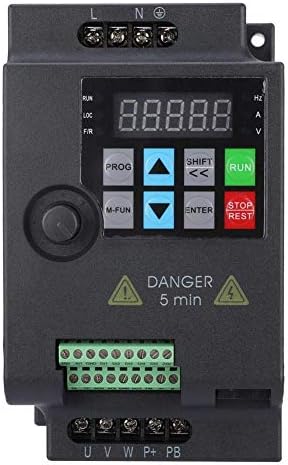
Figure 6: Incorrect connection of an old external panel to the inverter. Ensure panel compatibility.
6. Uputstvo za upotrebu
The inverter features a control panel for setting parameters and operating the motor.
6.1 Kontrolna tabla prekoview
Kontrolna ploča obično uključuje:
- Prikaz: Shows frequency, voltage, struja i drugi parametri.
- PROG dugme: Ulazi/izlazi iz načina podešavanja parametara.
- M-FUN Button: Multi-function button, often used for quick access to common functions.
- Strelice gore/dolje: Navigate through menus and adjust parameter values.
- SHIFT/Left/Right Arrows: Move cursor or change digits during parameter entry.
- Dugme ENTER: Confirms selections and saves parameter changes.
- Dugme RUN: Pokreće motor.
- Dugme STOP/RESET: Stops the motor or resets fault conditions.
6.2 Osnovni rad
- Uključeno: Apply power to the inverter. The display will light up.
- Postavite frekvenciju: Use the Up/Down arrows or the external potentiometer to set the desired output frequency.
- Pokretanje motora: Pritisnite RUN dugme za pokretanje motora. Motor će ubrzati do postavljene frekvencije.
- Zaustavi motor: Pritisnite STOP/RESET button to stop the motor. The motor will decelerate and stop.
6.3 Podešavanje parametara
To configure advanced settings:
- Pritisnite PROG button to enter parameter setting mode.
- Koristite strelice gore/dolje za navigaciju kroz grupe parametara i pojedinačne parametre.
- Pritisnite ENTER da odaberete parametar.
- Use the Up/Down arrows and SHIFT buttons to adjust the parameter value.
- Pritisnite ENTER da sačuvate novu vrijednost.
- Pritisnite PROG da biste izašli iz načina podešavanja parametara.
7. Održavanje
Regular maintenance ensures the longevity and reliable operation of your VFD inverter.
- čišćenje: Periodically clean the inverter's exterior and ventilation openings to prevent dust accumulation. Use a soft, dry cloth. Do not use liquid cleaners.
- inspekcija: Regularly inspect wiring connections for tightness and signs of damage or corrosion. Check for any unusual noises or odors during operation.
- ventilatori za hlađenje: Ensure cooling fans are operating correctly and are free from obstructions. Replace noisy or faulty fans.
- Uslovi okoline: Provjerite da li radno okruženje ostaje unutar specificiranih raspona temperature i vlažnosti.
- Vijek trajanja kondenzatora: Electrolytic capacitors have a finite lifespan. Consider professional inspection and replacement after several years of continuous operation.
8. Otkrivanje problema
Ovaj odjeljak pruža rješenja za uobičajene probleme s kojima se možete susresti.
| Problem | Mogući uzrok | Rješenje |
|---|---|---|
| Inverter se ne uključuje | No input power; Blown fuse; Faulty wiring | Provjerite napajanje; Zamijenite osigurač; Provjerite spojeve ožičenja. |
| Motor ne radi | Incorrect parameters; Motor wiring error; Overload | Check frequency and control parameters; Verify motor wiring (U, V, W); Reduce motor load. |
| Overcurrent fault (OC) | Sudden load change; Short circuit in motor; Acceleration/deceleration time too short | Check motor and load; Increase acceleration/deceleration time parameters. |
| Overvoltagkvar (OV) | Ulazni voltage too high; Regeneration during deceleration | Provjerite ulaznu voltage; Increase deceleration time; Install a brake resistor if necessary. |
| Undervoltagkvar (UV) | Ulazni voltage too low; Power supply instability | Provjerite ulaznu voltage; Ensure stable power supply. |
| Overheat fault (OH) | Poor ventilation; Ambient temperature too high; Fan failure | Improve ventilation; Reduce ambient temperature; Check and replace cooling fan. |
For persistent issues or faults not listed, please contact technical support.
9. Podrška
For technical assistance, product inquiries, or service requests, please contact SEAFRONT customer support through your purchase channel or the official SEAFRONT website. Please have your model number (SKI780-0D75G-1) and serial number ready when contacting support.