
Uvod
This manual provides comprehensive instructions for the Hoco ES20 Original Series Wireless V5.0 Earphones. Please read this manual carefully before using the product to ensure proper operation and to maximize your user experience. Keep this manual for future reference.
Product Overview
The Hoco ES20 earphones are designed for wireless audio playback and hands-free communication. The package includes two wireless earphones and a portable charging case.

Slika 1: Hoco ES20 Wireless Earphones. This image displays both the left and right earphones, highlighting their in-ear design and compact form factor.
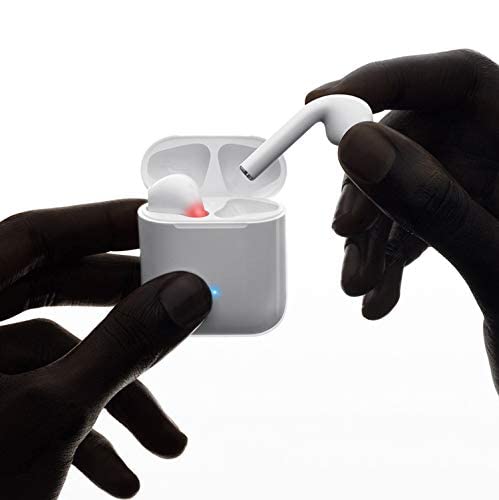
Slika 2: Hoco ES20 Earphones in Charging Case. The earphones are shown placed inside their charging case, indicating the charging status with an illuminated LED.
Specifikacije
| Feature | Detalj |
|---|---|
| Bežična verzija | V5.0 |
| Podržani protokoli | Headset, Hands-free, A2DP, Avrcp |
| Frekvencija prenosa | 2.4GHz |
| Raspon prenosa | 10 metara |
| Charging Voltage | DC5V |
| Vrijeme punjenja (slušalice) | Otprilike 1 sat |
| Vrijeme razgovora | 2 sati |
| Vrijeme reprodukcije muzike | 2 sati |
| Futrola za punjenje Kapacitet baterije | 400mAh |
| Earphone Battery Capacity (Each) | 40mAh |
| Vrijeme pripravnosti | 200 sati |
| Ukupna težina (sa kutijom) | 44.8g |
| Težina jedne slušalice | 3.8g |
| Uključene komponente | Bluetooth Headphones, 1 Charging Cable |
Setup
1. Punjenje slušalica i futrole
- Stavite obje slušalice u kutijicu za punjenje. Provjerite da li su pravilno postavljene.
- Connect the charging cable to the charging port on the case and to a DC5V power source (e.g., USB wall adapter, computer USB port).
- The indicator light on the charging case will show charging status. A full charge for the earphones takes approximately 1 hour. The charging case itself has a 400mAh battery capacity.
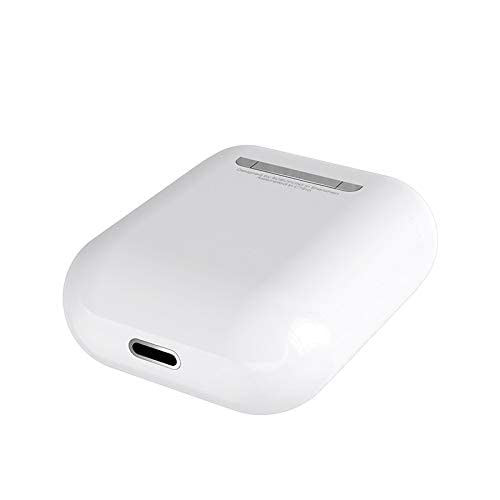
Slika 3: Hoco ES20 Charging Case Port. This image shows the charging port located at the bottom of the charging case, where the charging cable is connected.
2. Uparivanje sa uređajem
- Uvjerite se da su slušalice napunjene.
- Otvorite kućište za punjenje. Slušalice će automatski ući u način rada za uparivanje.
- Na pametnom telefonu ili drugom uređaju s omogućenom Bluetooth vezom idite na postavke Bluetootha.
- Traži available devices and select "Hoco ES20" (or similar name) from the list.
- Once connected, the earphones will indicate successful pairing (e.g., an audio prompt or LED change).
- For Apple phones and some Android phones, the battery level of the earphones may be displayed on your device.
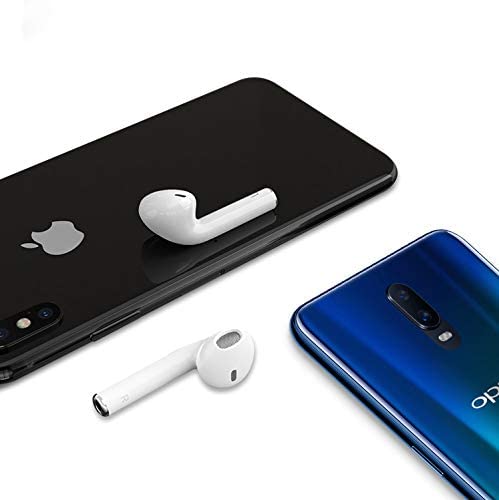
Slika 4: Hoco ES20 Earphones with Smartphones. This image illustrates the earphones positioned near two different smartphones, demonstrating their compatibility with various mobile devices.
Uputstvo za upotrebu
Basic Functions (Touch Control)
- Uključeno: Earphones power on automatically when removed from the charging case.
- Iskljuciti: Earphones power off automatically when placed back into the charging case.
- Pusti/pauza: Jednom dodirnite područje osjetljivo na dodir na bilo kojoj slušalici.
- Odgovori/Završi poziv: Tap the touch area on either earphone once during an incoming call or an active call.
- odbiti poziv: Press and hold the touch area on either earphone for approximately 2 seconds during an incoming call.
- Sljedeća pjesma: Dvaput dodirnite dodirnu oblast na desnoj slušalici.
- Prethodni zapis: Dvaput dodirnite dodirno područje na lijevoj slušalici.
- Aktivirajte glasovnog asistenta: Triple-tap the touch area on either earphone.
Održavanje
- Slušalice i kutijicu za punjenje održavajte čistima i suhima.
- Izbjegavajte izlaganje proizvoda ekstremnim temperaturama, vlazi ili korozivnim supstancama.
- Ne pokušavajte rastavljati ili modificirati slušalice ili kutijicu za punjenje, jer će to poništiti garanciju i može uzrokovati oštećenje.
- Use a soft, dry cloth to clean the earphones and charging contacts.
- Kada se ne koriste, slušalice čuvajte u kutijici za punjenje kako biste ih zaštitili i održali napunjenima.
Rješavanje problema
Uobičajeni problemi i rješenja
- Slušalice se ne uparuju:
- Provjerite jesu li obje slušalice napunjene.
- Place earphones back in the case, close it, then open it again.
- Isključite i uključite Bluetooth na svom uređaju.
- Delete "Hoco ES20" from your device's Bluetooth list and try pairing again.
- Samo jedna slušalica radi:
- Provjerite jesu li obje slušalice napunjene.
- Place both earphones back in the charging case, close the lid, wait a few seconds, then open the lid and remove them together.
- If the issue persists, try resetting the earphones (refer to manufacturer's website if a specific reset procedure is not in this manual).
- Nema zvuka ili je jačina zvuka niska:
- Provjerite nivo jačine zvuka i na uređaju i na slušalicama.
- Provjerite jesu li slušalice pravilno povezane s vašim uređajem.
- Pokušajte reproducirati zvuk iz druge aplikacije ili izvora.
- Problemi s punjenjem:
- Provjerite je li kabel za punjenje sigurno spojen i na kućište i na izvor napajanja.
- Provjerite je li priključak za punjenje na kućištu čist i bez nečistoća.
- Pokušajte koristiti drugi kabel za punjenje ili adapter za napajanje.
- Poor connection/intermittent audio:
- Ensure your device is within the 10-meter transmission range.
- Avoid obstacles between your device and the earphones.
- Minimizirajte smetnje od drugih bežičnih uređaja.
Garancija i podrška
The Hoco ES20 Wireless Earphones come with a 6-mjesečna garancija od datuma kupovine. Ova garancija pokriva proizvodne nedostatke. Molimo sačuvajte dokaz o kupovini za reklamacije u slučaju garancije.
For technical support or warranty inquiries, please contact your retailer or the official Hoco support channels. Refer to the product packaging or Hoco's official webstranica za kontakt informacije.