
1. Uvod
This manual provides instructions for the Macally BTDYNAMOUSE Wireless Bluetooth Mouse. This device is designed for comfortable and quiet operation across various platforms.
The Macally BTDYNAMOUSE is a slim, ambidextrous Bluetooth mouse featuring silent click buttons and adjustable DPI settings. It connects wirelessly to compatible devices, offering a clutter-free workspace.
2. Šta se nalazi u kutiji
- Macally BTDYNAMOUSE Wireless Bluetooth Mouse
- 2 x AAA baterije
3. Značajke proizvoda
- Podesivi DPI: Switch between 800, 1200, and 1600 DPI for precise cursor control.
- Dugmad za tihi klik: Designed for quiet operation, reducing click noise by 90% compared to traditional mice.
- Slim and Ambidextrous Design: Comfortable for both left and right-handed users, with a low-profile faktor oblika.
- Bluetooth bežično povezivanje: Connects wirelessly up to 10 meters (30 feet).
- Dug vijek trajanja baterije: Two AAA batteries provide up to 3 months of use (based on 8 hours daily use). Battery life may vary.
- Kompatibilnost: Works with Windows and macOS operating systems.
4. Upute za postavljanje
4.1. Instalirajte baterije
1. Locate the battery compartment on the underside of the mouse.
2. Otvorite poklopac odeljka za baterije.
3. Insert two AAA batteries, ensuring correct polarity (+/-).
4. Zatvorite poklopac odjeljka za baterije.

Slika 1: Instalacija baterije
4.2. Bluetooth uparivanje
1. Turn on the mouse using the ON/OFF switch located on the underside.
2. Press and hold the Bluetooth pairing button (usually a small button near the ON/OFF switch or sensor) for 2-3 seconds until the LED indicator starts blinking, indicating it's in pairing mode.
3. On your computer or device (Mac, Windows, iPad, Tablet):
- Idite na Bluetooth postavke.
- Traži novi uređaji.
- Select "Macally BTDYNAMOUSE" from the list of available devices.
- Pratite sve upite na ekranu da dovršite proces uparivanja.
Once successfully paired, the LED indicator on the mouse will stop blinking and remain solid or turn off, depending on the mouse model.

Figure 2: Mouse with Laptop, indicating multi-device compatibility
5. Uputstvo za upotrebu
The Macally BTDYNAMOUSE features a standard 3-button layout with a scroll wheel for intuitive navigation.
- Lijevi klik: Primary action, typically used for selecting items or opening links.
- Desni klik: Secondary action, typically used to open context menus.
- Točak za pomicanje: Koristi se za vertikalno skrolovanje kroz dokumente i web pages. The scroll wheel can also be pressed for a middle-click action, depending on software configuration.

Slika 3: Ergonomski dizajn za udobnu upotrebu

Figure 4: Quiet Click Buttons in Action
6. DPI podešavanje
The mouse features a DPI switch button to adjust cursor sensitivity. This allows you to fine-tune the mouse's responsiveness to your preference.
To change the DPI setting, press the small button located behind the scroll wheel. Each press cycles through the available DPI levels: 800, 1200, and 1600.
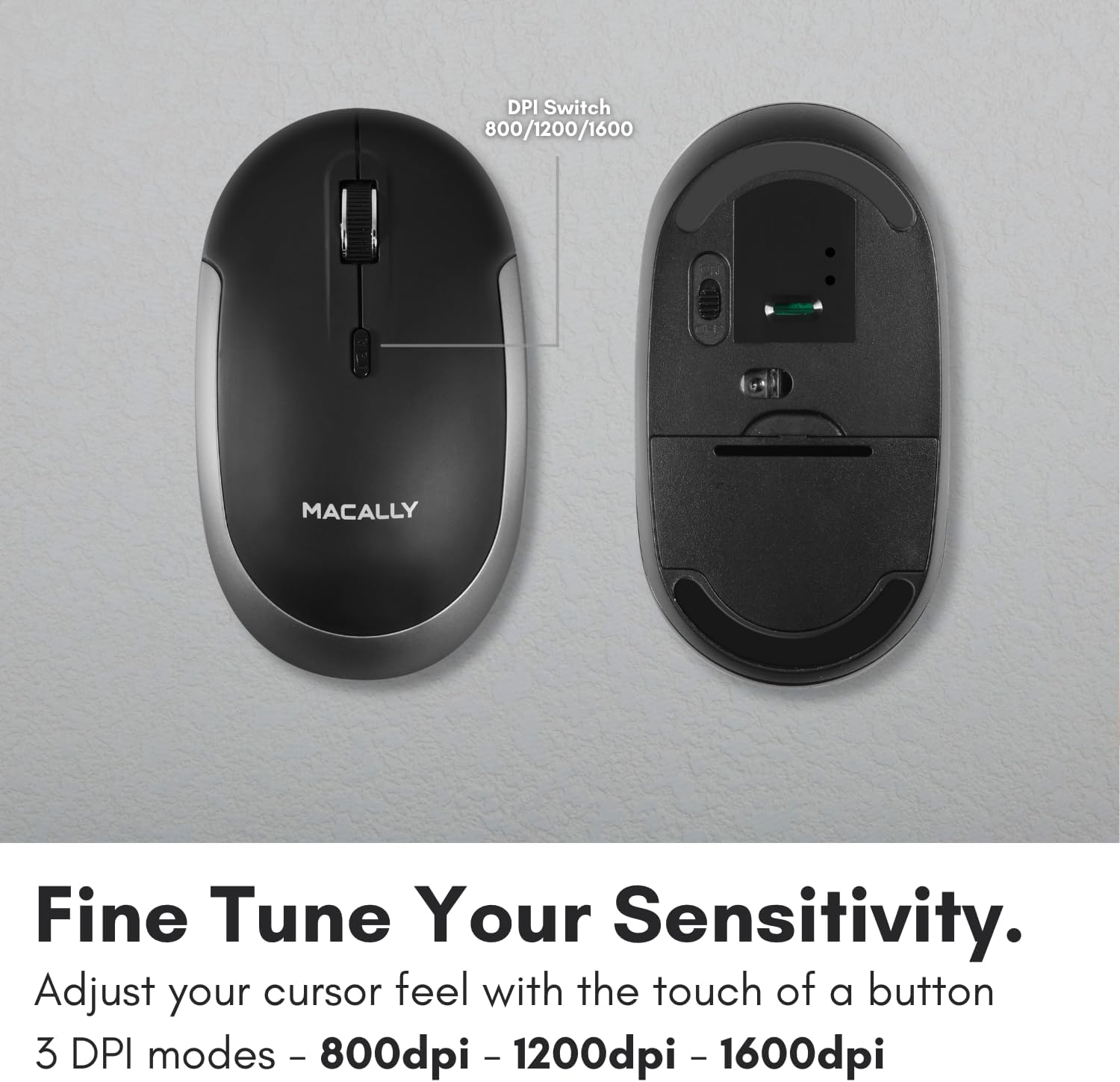
Figure 5: DPI Switch Location
7. Informacije o bateriji
The Macally BTDYNAMOUSE uses two AAA batteries. For optimal performance and battery life, it is recommended to use high-quality alkaline batteries.
- Vrsta baterije: 2 x AAA
- Procijenjeni vijek trajanja baterije: Up to 3 months (based on 8 hours of daily use). Actual battery life may vary based on usage patterns and computing conditions.
When the battery level is low, the mouse's LED indicator may flash or change color to alert you. Replace batteries promptly to ensure uninterrupted use.
8. Održavanje
To ensure the longevity and optimal performance of your Macally BTDYNAMOUSE, follow these maintenance guidelines:
- čišćenje: Za čišćenje miša koristite meku, suhu krpu. Za tvrdokornu prljavštinu, laganoamp Može se koristiti krpa, ali pazite da vlaga ne uđe u uređaj.
- Izbjegavajte tečnosti: Ne izlažite miš tekućinama ili prekomjernoj vlazi.
- Skladištenje: Čuvajte miša na hladnom i suhom mjestu kada ga ne koristite duži period.
- Zamjena baterije: Replace batteries as needed. Dispose of old batteries according to local regulations.
9. Otkrivanje problema
| Problem | Mogući uzrok | Rješenje |
|---|---|---|
| Miš se ne povezuje putem Bluetootha | Mouse is off or batteries are low. Not in pairing mode. Device's Bluetooth is off. | Ensure mouse is on and batteries are fresh. Put mouse in pairing mode. Check device's Bluetooth settings. Try re-pairing. |
| Cursor is erratic or unresponsive | Dirty optical sensor. Mouse used on unsuitable surface. Low battery. | Clean the optical sensor. Use a mouse pad or a smooth, non-reflective surface. Replace batteries. |
| Mouse clicks are not silent | This mouse is designed for 90% noise reduction, not complete silence. | The mouse provides a significantly quieter click than standard mice, but a faint sound may still be audible. |
| Kratko trajanje baterije | Frequent usage. Low-quality batteries. | Use high-quality alkaline batteries. Turn off the mouse when not in use for extended periods. |
10. Specifikacije
| Feature | Detalj |
|---|---|
| Brand | Macally |
| Naziv modela | BTDYNAMOUSE |
| Tehnologija povezivanja | Bluetooth, bežični |
| Tehnologija detekcije pokreta | Optički |
| DPI postavke | 800 / 1200 / 1600 |
| Dugmad | 4 (Left, Right, Scroll Click, DPI Switch) |
| Hand Orientation | Ambidextrous |
| Kompatibilni uređaji | Laptop, Personal Computer (Windows, macOS) |
| bežični domet | Do 10 m (30 stopa) |
| Vrsta baterije | 2 x AAA (uključeno) |
| Trajanje baterije | Up to 3 months (estimated) |
| Težina artikla | 73 grama |
| Materijal | Silicone (Enclosure) |
| Boja | Crna |
11. Zvanični videozapisi proizvoda
11.1. Bluetooth Optical Silent Click Mouse - White
Ovaj video daje krajview of the Macally BTDYNAMOUSE, highlighting its slim design, ambidextrous body, simple 3-button layout, 90% noise reduction, and easy DPI adjustability (800/1200/1600).
11.2. Macally Wireless Bluetooth Mouse for Windows PC and Mac
This video demonstrates the Macally BTDYNAMOUSE's features, including its Bluetooth wireless technology, comfortable ambidextrous design, simple 3-button/scroll wheel layout, silent click buttons, and easy DPI adjustability.
12. Garancija i podrška
For warranty information and technical support, please refer to the official Macally webweb-mjesto ili kontaktirajte njihovu korisničku službu. Sačuvajte račun za kupovinu u slučaju reklamacije.