
1. Uvod
Welcome to the user manual for your new HONOR View 20 smartphone. This guide provides essential information to help you set up, operate, and maintain your device. The HONOR View 20 is a powerful Dual-SIM 4G/LTE smartphone featuring a stunning design, advanced camera capabilities, and robust performance.
Key features include a 6.4-inch IPS LCD display, a 48-megapixel primary camera, a 25-megapixel front camera, a HiSilicon Kirin 980 octa-core processor, 6GB of RAM, and 128GB of internal storage. It runs on Android 9.0 (Pie) with HONOR's Magic UI.
2. Podešavanje
2.1. Instalacija SIM kartice
The HONOR View 20 supports Dual-SIM functionality. To install your SIM cards:
- Pronađite ladicu za SIM karticu sa strane uređaja.
- Koristite priloženi alat za izbacivanje SIM kartice da biste otvorili ladicu.
- Carefully place your Nano-SIM cards into the designated slots. Ensure they are correctly oriented.
- Lagano gurnite ladicu nazad u uređaj dok ne klikne na svoje mjesto.
Mrežna kompatibilnost:
This smartphone is compatible with GSM networks such as AT&T and T-Mobile. It will NOT work with CDMA networks like Verizon, Sprint, or US Cellular. Please verify network compatibility with your provider before use.
2.2. Početno uključivanje
Press and hold the Power button (located on the right side of the device) until the HONOR logo appears. Follow the on-screen instructions to complete the initial setup, including language selection, Wi-Fi connection, and Google account setup.

Slika 2.1: Bočna strana view of the HONOR View 20, highlighting the SIM card tray and physical buttons.
3. Upravljanje vašim uređajem
3.1. Prikaz i korisnički interfejs
The HONOR View 20 features a 6.4-inch IPS LCD capacitive touchscreen with a resolution of 1080 x 2310 pixels. The device runs on Android 9.0 (Pie) with HONOR's Magic UI, offering a smooth and intuitive user experience. The front camera is integrated into a 'punch-hole' cutout in the display, maximizing screen real estate.
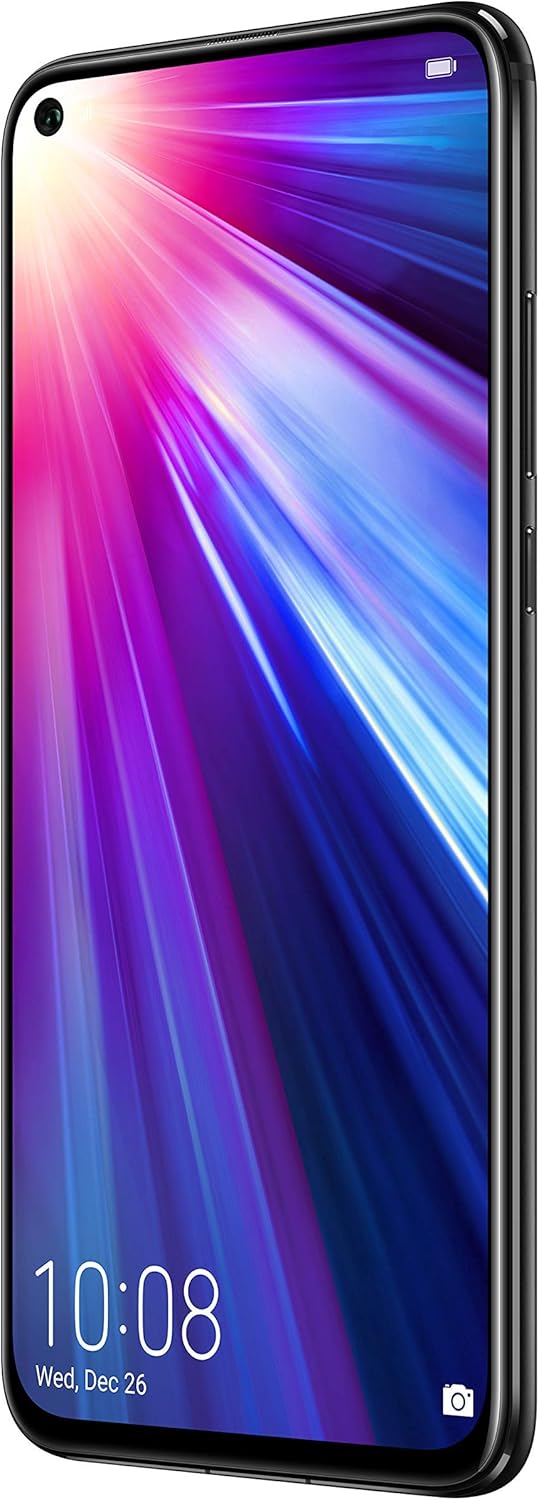
Slika 3.1: Prednja strana view of the HONOR View 20, showcasing the 6.4-inch display and punch-hole front camera.
3.2. Senzor otiska prsta
For secure and convenient unlocking, the HONOR View 20 is equipped with a rear-mounted fingerprint sensor. Simply place your registered finger on the sensor to unlock the device or authorize payments.

Slika 3.2: Pozadi view of the HONOR View 20, highlighting the fingerprint sensor and the distinctive V-pattern design.
3.3. Baterija i punjenje
The device is powered by a 4000mAh Lithium-Polymer battery, offering an average life of 96 hours under typical usage. It supports fast charging via its USB Type-C port located at the bottom of the device.

Slika 3.3: Dno view of the HONOR View 20, showing the USB Type-C port for charging and data transfer.
3.4. Procesor i performanse
The HONOR View 20 is powered by the HiSilicon Kirin 980 (7 nm) octa-core processor, ensuring smooth multitasking and efficient performance for demanding applications and games. It comes with 6GB of RAM for seamless operation.
3.5.Audio
The device includes a 3.5mm headphone jack, allowing you to connect your preferred wired headphones for audio playback.
4. Karakteristike kamere
The HONOR View 20 is equipped with advanced camera technology for both photography and videography.
4.1. Sistem zadnje kamere
The rear camera system features a powerful 48-megapixel primary sensor (f/1.8, 1/2", 0.8µm, PDAF) for high-resolution photos. It is complemented by a TOF 3D stereo camera, which measures time-of-flight to accurately gauge depth, enabling advanced augmented reality (AR) features and artificial bokeh effects.
4.2. Prednja kamera
For selfies and video calls, the device has a 25-megapixel front camera (f/2.0, 27mm) integrated into the display's punch-hole cutout. It supports HDR for improved image quality in various lighting conditions.
4.3. Video snimanje
The HONOR View 20 can record videos at 4K resolution at 30 frames per second (fps), 1080p at 30fps, and 720p at 960fps, with gyro-EIS for enhanced stabilization.
4.4. Camera Modes and AI Features
The camera offers a variety of modes and AI-powered enhancements:
- 48MP AI Ultra Clarity: Utilizes artificial intelligence to boost scene details for incredibly clear and high-resolution still images, especially suitable for scenery and static objects.
- Noćni način rada: Enhances low-light images, capturing more detail and brightness in dark environments.
- Portretni način: Creates a blurred background (bokeh effect) to make subjects stand out, effectively isolating people in photos.
- Način rada blende: Allows adjustment of the aperture for creative depth-of-field control.
- Usporeni snimak: Records videos at high frame rates for dramatic slow-motion playback.
- Slikanje svjetlom: A specialized mode for capturing light trails, such as traffic lights or star trails.
- Vremenski interval: Compresses long periods of time into short video clips.
- Artist Mode: Applies artistic filters and effects to your photos.
- filter: A selection of filters to enhance the mood and style of your images.
- 3D Panorama: Captures immersive panoramic shots.
- HDR (visoki dinamički raspon): Improves detail in both bright and dark areas of a photo.
- AR Lens: Utilizes the TOF 3D camera for augmented reality applications and effects.
5. Specifikacije
| Feature | Detalj |
|---|---|
| Brand | ČAST |
| Naziv modela | View 20 |
| Operativni sistem | Android 9.0 (Pie) |
| Procesor | HiSilicon Kirin 980 (7 nm), Octa-core |
| RAM | 6 GB |
| Skladištenje | 128 GB (neproširivo) |
| Veličina ekrana | 6.4 inča |
| Display Type | IPS LCD |
| Rezolucija | 1080 x 2310 piksela |
| Zadnja kamera | 48 MP (f/1.8) + TOF 3D stereo camera |
| Prednja kamera | 25 MP (f/2.0) |
| Rezolucija video snimanja | 4K (30 fps) |
| Kapacitet baterije | 4000 mAh |
| Broj utora za SIM kartice | Dual SIM |
| Tehnologija povezivanja | Wi-Fi, 4G LTE, GSM |
| Biometrijska sigurnost | Fingerprint Recognition (rear-mounted) |
| Priključak za slušalice | 3.5 mm |
| Težina artikla | 180 grama |
| Boja | Midnight Black |
6. Otkrivanje problema
If you encounter issues with your HONOR View 20, consider the following general troubleshooting steps:
- Uređaj ne reagira: Pritisnite i držite dugme za napajanje oko 10-15 sekundi da biste prisilno ponovo pokrenuli računar.
- Problemi s mrežnom vezom: Ensure your SIM cards are correctly inserted. Check your network settings (Settings > Wireless & networks > Mobile network). Verify with your carrier that your plan supports the device's network bands.
- Pražnjenje baterije: Close unused apps running in the background. Reduce screen brightness. Disable unnecessary features like Wi-Fi, Bluetooth, or GPS when not in use.
- Padovi aplikacije: Clear the cache and data for the problematic app (Settings > Apps > [App Name] > Storage > Clear cache/Clear data). If the issue persists, uninstall and reinstall the app.
- Ažuriranja softvera: Ensure your device's software is up to date (Settings > System > Software update). Updates often include bug fixes and performance improvements.
7. Održavanje
To ensure the longevity and optimal performance of your HONOR View 20, follow these maintenance guidelines:
- Održavajte čistoću: Regularly wipe the screen and back of the device with a soft, lint-free cloth. Avoid harsh chemicals or abrasive materials.
- Ažuriranja softvera: Install system updates as they become available to benefit from the latest features, security patches, and performance enhancements.
- Održavanje baterije: Izbjegavajte ekstremne temperature. Ne dozvolite da se baterija često potpuno isprazni. Za optimalno punjenje koristite originalni punjač.
- Sigurnosna kopija podataka: Regularly back up your important data (photos, contacts, documents) to cloud storage or a computer to prevent loss.
- Zaštitni pribor: Razmislite o korištenju zaštitne folije za ekran i zaštitne futrole kako biste se zaštitili od ogrebotina i slučajnih padova.
8. Garancija i podrška
For detailed warranty information and customer support, please refer to the official HONOR webweb-mjesto ili kontaktirajte lokalnog prodavača. Sačuvajte dokaz o kupovini za slučaj reklamacije.