
1. Uvod
The Optex ORT 8930-HD is a digital terrestrial receiver designed to receive free-to-air digital programs broadcast in MPEG2/MPEG4 format, compatible with DVB-T2 and HEVC/H.265 standards. This device connects to your television via HDMI or SCART. It features a USB input for future software updates, multimedia file playback (photos, music, videos), and direct recording to an external USB storage device (not included).
This manual provides detailed instructions for the proper installation, operation, and maintenance of your Optex ORT 8930-HD receiver. Please read it thoroughly before use to ensure optimal performance and to prevent damage.
2. Sigurnosne informacije
- Osigurajte odgovarajuću ventilaciju oko uređaja kako biste spriječili pregrijavanje.
- Do not expose the receiver to rain, moisture, or extreme temperatures.
- Izbjegavajte postavljanje uređaja u blizini izvora topline kao što su radijatori ili peći.
- Koristite samo strujni adapter koji je isporučen s jedinicom.
- Ne otvarajte casing; sve servisne radove prepustite kvalifikovanom osoblju.
- Isključite utikač iz zidne utičnice tokom oluje sa grmljavinom ili kada se uređaj ne koristi duži period.
3. Sadržaj paketa
Provjerite da li su sve stavke prisutne u paketu:
- 1 x Optex ORT 8930-HD Digital Receiver
- 1 x daljinski upravljač
- 1 x Uputstvo za upotrebu
4. Proizvod je gotovview
4.1 Prednja ploča

Slika 1: Front view of the Optex ORT 8930-HD receiver, showing the display, USB port, and control buttons.
The front panel includes a digital display for channel numbers, a USB 2.0 port for external storage, and basic control buttons (CH+, CH-, Power).
4.2 Zadnja ploča
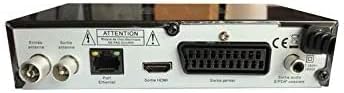
Slika 2: Pozadi view of the Optex ORT 8930-HD receiver, displaying various connectivity ports.
Zadnja ploča pruža sljedeće priključke:
- Ulaz/izlaz antene: IEC 9.52 mm connectors for terrestrial antenna.
- HDMI izlaz: For connecting to an HD television.
- SCART Connector: For connecting to older televisions.
- S/PDIF Coaxial Audio: Digitalni audio izlaz.
- Ulazna snaga: For the external power adapter.
4.3 Daljinski upravljač

Slika 3: The remote control unit for the Optex ORT 8930-HD receiver.
The remote control allows full operation of the receiver, including power, channel selection, volume, menu navigation, recording functions, and multimedia playback controls.
5. Podešavanje
5.1 Povezivanje antene
- Connect your terrestrial antenna cable to the "Antenna In" port on the rear panel of the receiver.
- If you wish to loop the antenna signal to another device, connect a coaxial cable from the "Antenna Out" port to the input of the next device.
5.2 Povezivanje s televizorom
Odaberite jedan od sljedećih načina povezivanja:
- HDMI (Recommended for HD): Connect an HDMI cable from the "HDMI Output" port on the receiver to an available HDMI input on your television.
- SCART: Connect a SCART cable from the "SCART Connector" on the receiver to the SCART input on your television.
5.3 Priključak za napajanje
- Connect the power adapter to the power input port on the receiver.
- Uključite adapter za napajanje u odgovarajuću zidnu utičnicu.
5.4 Početno skeniranje kanala
- Turn on your television and select the correct input source (HDMI or SCART) corresponding to your connection.
- Power on the Optex ORT 8930-HD receiver.
- The first-time setup wizard should appear. Follow the on-screen instructions to perform an automatic channel search. This will scan for all available digital terrestrial channels in your area.
- If the wizard does not appear, navigate to the "Menu" > "Installation" > "Automatic Search" using the remote control.
6. Uputstvo za upotrebu
6.1 Osnovni rad
- Uključivanje/isključivanje: Pritisnite POWER dugme na daljinskom upravljaču ili prednjoj ploči.
- Odabir kanala: Koristite CH+ / CH- buttons or enter the channel number directly using the numeric keypad.
- Kontrola jačine zvuka: Koristite VOL+ / VOL- dugmad.
- Isključi zvuk: Pritisnite MUTE dugme za privremeno utišavanje zvuka.
6.2 Upravljanje kanalima
- Automatic/Manual Search: Pristup kroz Meni > Instalacija to rescan for channels.
- LCN funkcija: The Logical Channel Numbering (LCN) function automatically sorts channels into a logical order. This can usually be enabled/disabled in the installation menu.
- Lista omiljenih: Create personalized lists of your preferred channels for quick access. Refer to the on-screen menu for instructions on adding and managing favorite channels.
6.3 Snimanje i reprodukcija
To use recording and multimedia playback features, connect a USB storage device (e.g., USB flash drive or external hard drive) to the USB port on the front panel.
- USB snimanje: Pritisnite REC button on the remote control to start recording the current program. Press STOP da prekinete snimanje.
- Timeshift Function: This allows you to pause live TV and resume watching later. Activate Timeshift via the remote control (usually a dedicated button or through the menu).
- Reprodukcija multimedije: Access the multimedia player via the Meni. You can browse and play music, photo, and video files stored on your connected USB device.
6.4 Elektronski programski vodič (EPG)
Pritisnite EPG dugme na daljinskom upravljaču za view the Electronic Program Guide, which displays program schedules for upcoming broadcasts.
6.5 Roditeljsko zaključavanje
Set up a parental lock to restrict access to certain channels or programs. This feature is typically found in the Meni > System Settings > Roditeljska kontrola odjeljak.
6.6 Funkcija tajmera
The timer function allows you to schedule the receiver to turn on/off or record a specific program at a set time. Access this feature through the Meni.
6.7 Software Update via USB
Povremeno provjeravajte proizvođačeve website for available software updates. Download the update file to a USB drive and follow the instructions in the Meni > System Settings > Ažuriranje softvera section to install it.
7. Održavanje
- čišćenje: Use a soft, dry cloth to clean the exterior of the receiver. Do not use liquid or aerosol cleaners.
- ventilacija: Ensure that the ventilation slots on the device are not blocked to prevent overheating.
- softver: Keep the receiver's software updated to ensure optimal performance and access to the latest features.
8. Otkrivanje problema
| Problem | Mogući uzrok | Rješenje |
|---|---|---|
| Nema struje | Kabl za napajanje isključen; utičnica neispravna. | Provjerite priključak kabela za napajanje; pokušajte s drugom utičnicom. |
| Nema signala / Nema kanala | Antenna not connected; incorrect input source on TV; no channel scan performed. | Check antenna connection; select correct TV input; perform an automatic channel scan. |
| Daljinski upravljač ne radi | Batteries depleted; obstruction between remote and receiver. | Replace batteries; ensure clear line of sight to the receiver's IR sensor. |
| Snimanje na USB ne radi | USB device not connected or formatted incorrectly; insufficient storage space. | Ensure USB device is properly connected; format USB device (FAT32/NTFS); check available space. |
| Uređaj se zamrzava ili prestaje reagirati | Privremeni softverski kvar. | Disconnect power for a few seconds, then reconnect. If problem persists, check for software updates. |
9. Specifikacije
| Feature | Detalj |
|---|---|
| Model | ORT 8930-HD |
| Brand | Optex |
| Tip tjunera | zemaljski (DVB-T2) |
| Video Decoding | HEVC/H.265, MPEG-2.5 |
| Povezivanje | 1x HDMI, 1x SCART, 1x USB 2.0, 1x S/PDIF Coaxial Audio, Antenna In/Out |
| Kapacitet kanala | Over 1000 channels |
| Snimanje | External USB media (PVR function) |
| Reprodukcija multimedije | Music, Photos, Videos |
| Posebne karakteristike | Timeshift, EPG, Parental Lock, Favorite List, Multi-language Menu, LCN, 5V Antenna Power, Timer Function, Dolby Digital+ compatible |
| Način audio izlaza | [SOM] |
| Konfiguracija surround zvuka zvučnika | 5.1 |
| Izlazna snaga | 5 Watts |
| Težina proizvoda | 600 g |
10. Garancija i podrška
Specific warranty information is not provided within this manual. Please refer to the warranty card included with your purchase, contact your retailer, or visit the official Optex webstranicu za detaljne uslove i odredbe garancije.
For technical support or service inquiries, please contact your local Optex distributor or the customer service department as indicated on the product packaging or manufacturer's website.


