
1. Uvod
The KING KS1000 Swift Range Extender and WiFiMax Router system is designed to enhance your Wi-Fi experience, particularly in mobile environments like RVs. This system combines a high-gain, omnidirectional roof-mounted antenna (KING Swift) with a powerful Wi-Fi router (KING WiFiMax) to provide reliable and secure internet access.
Ključne karakteristike uključuju:
- Fully automatic, omnidirectional Wi-Fi antenna for extended range.
- Provides fast, reliable, and secure long-range signal acquisition.
- Simple setup using the free KING Wi-Fi app (Android and iOS).
- Effortless connection for multiple mobile devices.
- Antenna extends 2.4GHz for optimal range, while the router provides 5GHz for faster speeds.
2. Šta se nalazi u kutiji
Provjerite da li su sve komponente prisutne u vašem paketu:
- KING Swift Omnidirectional Antenna
- KING WiFiMax Router
- Nosač za montažu antene
- 9V napajanje
- 11' Coax Cable

Image: The KING Swift omnidirectional antenna and the KING WiFiMax router, shown together as a complete system.

Image: Close-up of the KING Swift omnidirectional antenna with its mounting bracket and cable.
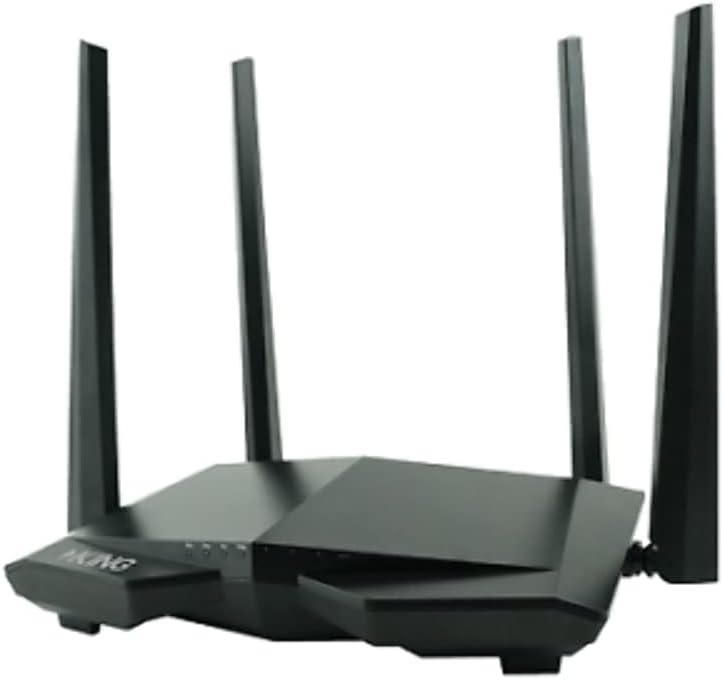
Image: The KING WiFiMax router, a black device with multiple external antennas.
3. Upute za postavljanje
Follow these steps to set up your KING KS1000 system:
- Mount the KING Swift Antenna: Install the KING Swift omnidirectional antenna on the roof of your RV or desired location using the provided mounting bracket. Ensure a clear line of sight for optimal signal reception. Route the 11' coax cable from the antenna to the interior of your vehicle where the WiFiMax router will be placed.
- Connect the WiFiMax Router: Connect the coax cable from the KING Swift antenna to the designated antenna input on the KING WiFiMax router. Plug the 9V power supply into the WiFiMax router and then into a power outlet.
- Download the KING Wi-Fi App: Download the free KING Wi-Fi app from the Apple App Store (for iOS devices) or Google Play Store (for Android devices).
- Initial Configuration via App:
- Open the KING Wi-Fi app on your smartphone or tablet.
- Follow the on-screen instructions to connect to the KING WiFiMax's default Wi-Fi network.
- The app will guide you through scanning for available Wi-Fi networks, selecting your desired network (e.g., campground Wi-Fi), and entering any necessary passwords.
- You will then configure your personal Wi-Fi network name (SSID) and password for the KING WiFiMax router. This is the network your devices will connect to.
- Povežite svoje uređaje: Once the setup is complete, connect your phones, tablets, laptops, smart TVs, and other Wi-Fi-enabled devices to the new Wi-Fi network broadcast by your KING WiFiMax router using the SSID and password you created.
Napomena: A Wi-Fi source is required for the system to function. The KING Swift antenna cannot be used as a standalone Wi-Fi hotspot.
4. Uputstvo za upotrebu
Once the KING KS1000 system is set up, operating it is straightforward:
- Automatic Network Acquisition: The KING Swift antenna automatically seeks and acquires available Wi-Fi signals.
- Connecting to a New Wi-Fi Source: If you move to a new location with a different Wi-Fi network, open the KING Wi-Fi app. The app will allow you to scan for new networks and connect to them, extending that signal through your WiFiMax router. Your personal devices will remain connected to your WiFiMax network without needing to re-enter credentials.
- Dvopojasni rad: The system utilizes the 2.4 GHz frequency band for extended range and the 5 GHz frequency band (via the WiFiMax router) for faster data speeds, optimizing performance based on your needs and environment.
- sigurnost: The WiFiMax router creates a secure, private Wi-Fi network within your RV, protecting your devices from unsecured public networks.
5. Održavanje
To ensure the longevity and optimal performance of your KING KS1000 system, consider the following maintenance tips:
- čišćenje: Periodically clean the exterior of the KING Swift antenna and WiFiMax router with a soft, damp tkanina. Izbjegavajte korištenje jakih kemikalija ili abrazivnih sredstava za čišćenje.
- Inspekcija kablova: Regularly inspect the coax cable for any signs of wear, damage, or loose connections. Ensure all connections are secure.
- Ažuriranja firmvera: Check the KING website or the KING Wi-Fi app periodically for any available firmware updates for the WiFiMax router. Keeping the firmware updated can improve performance and security.
- Zaštita životne sredine: While the KING Swift antenna is designed for outdoor use, ensure the WiFiMax router is kept in a dry, protected environment, away from extreme temperatures and direct sunlight.
6. Otkrivanje problema
If you encounter issues with your KING KS1000 system, try the following troubleshooting steps:
- No Power to WiFiMax Router:
- Ensure the 9V power supply is securely plugged into the router and a working power outlet.
- Check the power indicator lights on the router.
- Cannot Connect to External Wi-Fi:
- Verify that the external Wi-Fi source (e.g., campground Wi-Fi) is active and accessible.
- Ensure the KING Swift antenna is properly connected to the WiFiMax router via the coax cable.
- Use the KING Wi-Fi app to rescan for networks and re-enter credentials if necessary.
- Confirm that the external Wi-Fi signal strength is adequate for the antenna to acquire.
- Devices Cannot Connect to WiFiMax Network:
- Ensure the WiFiMax router is powered on and broadcasting its network.
- Verify that you are entering the correct Wi-Fi network name (SSID) and password for your WiFiMax router.
- Restart the WiFiMax router by unplugging and replugging the power supply.
- Spore brzine interneta:
- The overall speed is dependent on the external Wi-Fi source. If the source signal is weak or slow, the extended network will also be slow.
- Ensure the KING Swift antenna has a clear line of sight to the external Wi-Fi source.
- Reduce interference by moving other electronic devices away from the router if possible.
- Problemi s aplikacijom:
- Ensure your smartphone or tablet is connected to the WiFiMax router's network.
- Pokušajte ponovo pokrenuti aplikaciju ili je ponovo instalirati.
Ako ovi koraci ne riješe problem, pogledajte odjeljak za podršku.
7. Specifikacije
| Feature | Detalj |
|---|---|
| Brand | KING |
| Naziv modela | KS1000 |
| Dimenzije proizvoda | 7 x 11 x 8.7 inča |
| Težina artikla | 4 unce |
| Tehnologija povezivanja | Wi-Fi |
| Klasa frekvencijskog opsega | Dvofrekventni (2.4 GHz, 5 GHz) |
| Standard bežične komunikacije | 2.4 GHz radio frekvencija, 5 GHz radio frekvencija |
| Voltage | 9 Volts |
| Posebna karakteristika | WPS (Wi-Fi zaštićena postavka) |
| Kompatibilni uređaji | Phones, tablets, laptops, smart TVs, appliances, Wi-Fi-enabled speakers, and more |
| Preporučena upotreba | Camping, kamp-kućice |
8. Garancija i podrška
For specific warranty information regarding your KING KS1000 Swift Range Extender and WiFiMax Router, please refer to the documentation included with your product or visit the official KING website. KING provides customer support for product assistance, technical inquiries, and warranty claims.
Proizvođač: KING
Webstranica: www.kingconnect.com
Please have your model number (KS1000) and purchase date available when contacting support.