
1. Uvod
Hvala na kupoviniasing the GooDee Mini Projector GD-DE-9. This manual provides essential information for setting up, operating, and maintaining your projector. Please read it thoroughly before use to ensure optimal performance and safety.
The GooDee GD-DE-9 is a portable LED projector designed for home entertainment, gaming, and presentations. It features a native resolution of 800x480p, supports up to 1080p input, and offers multiple connectivity options including HDMI, VGA, USB, AV, and SD card. Its advanced cooling system ensures quiet operation, and the integrated 2W speaker provides clear audio.

Slika 1.1: Prednja strana view of the GooDee Mini Projector GD-DE-9.
2. Sigurnosne informacije
Da biste spriječili požar, strujni udar ili ozljede, molimo vas da se pridržavate sljedećih sigurnosnih mjera opreza:
- Ne otvarajte projektor casing. Za sve servisne radove obratite se kvalifikovanom servisnom osoblju.
- Ne izlažite projektor kiši ili vlazi kako biste spriječili požar ili strujni udar.
- Osigurajte odgovarajuću ventilaciju. Ne blokirajte ventilacijske otvore.
- Koristite samo adapter za napajanje koji dolazi s projektorom.
- Izbjegavajte gledanje direktno u sočivo projektora kada je lamp je uključen.
- Postavite projektor na stabilnu, ravnu površinu.
- Isključite projektor iz električne utičnice tokom oluje sa grmljavinom ili kada se ne koristi duži period.
3. Sadržaj paketa
Molimo Vas da provjerite da li su svi artikli uključeni u Vaš paket:
- GooDee Mini Projector GD-DE-9
- Adapter za napajanje
- Daljinski upravljač
- HDMI kabl
- AV kabel
- Uputstvo za upotrebu
4. Proizvod je gotovview
4.1 Komponente projektora

Slika 4.1: Bočna strana view sa ulazno/izlaznim portovima.
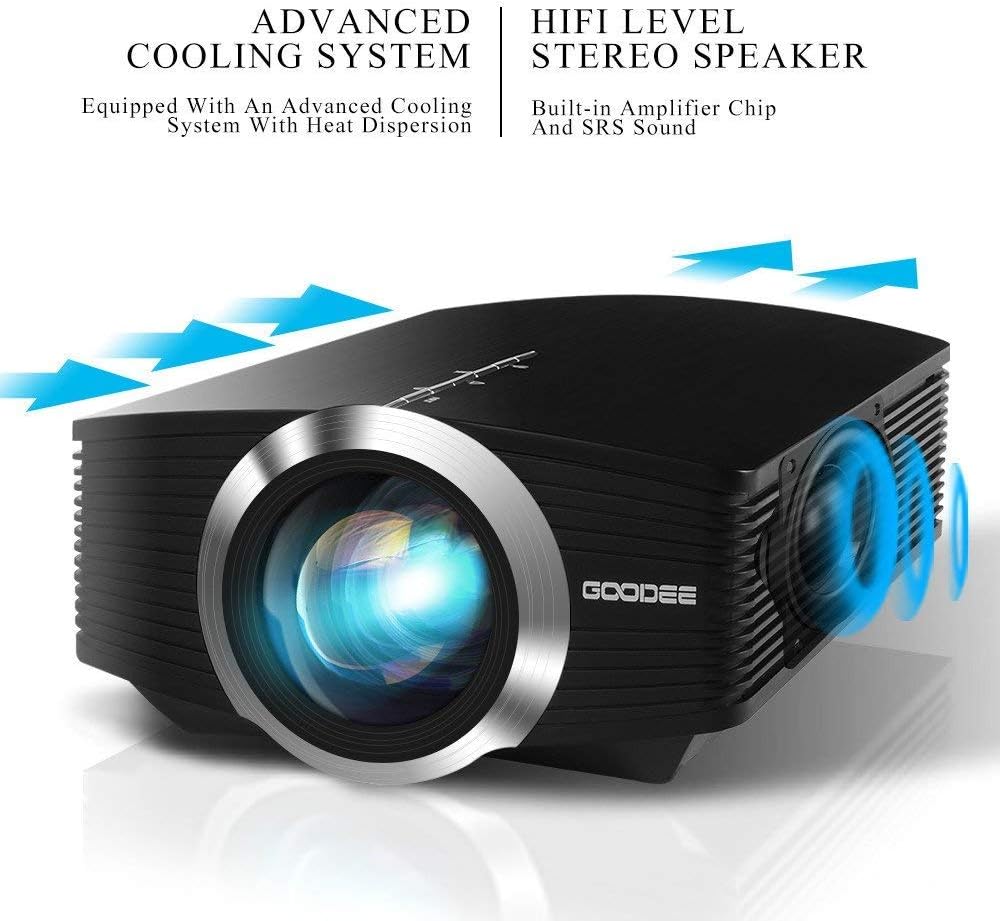
The projector features a direct light path optical technology for enhanced brightness and an advanced cooling system for quiet operation.

Figure 4.2: Advanced Cooling System and HIFI Stereo Speaker.
4.2 Daljinski upravljač
The remote control allows you to operate the projector from a distance. Insert two AAA batteries (not included) into the remote control before use.

Slika 4.3: Daljinski upravljač.
5. Podešavanje
5.1 Postavljanje i udaljenost projekcije
The image size is adjusted by changing the projection distance. For optimal viewing, a projection distance between 1.5 to 4 meters is recommended, yielding screen sizes from 50 to 130 inches. The best projection size is typically 80-100 inches at a distance of 6.6-8 feet.

Figure 5.1: Projection Distance and Screen Size Chart.
Slika 5.2: Prample Projector Placement.
5.2 Priključak za napajanje
Connect the power adapter to the projector's power input port, then plug the adapter into a power outlet.
5.3 Povezivanje ulaznih uređaja
The projector supports various input sources including HDMI, VGA, USB, AV, and SD card. It can connect to PCs, laptops, DVD players, PS3/4, Xbox ONE, and smartphones/tablets (via MHL cable and adapter, not included).

Figure 5.3: Multimedia Connection Diagram.
To connect a smartphone or tablet, ensure your device supports MHL functionality. You will need an MHL cable and a suitable adapter (not included).

Figure 5.4: Connecting Smartphones/Tablets.
5.4 Focus Adjustment and Keystone Correction
Adjust the focus ring on the projector lens until the image is clear. Use the keystone correction feature to adjust the image if it appears trapezoidal. The projector supports a ±15° keystone correction.
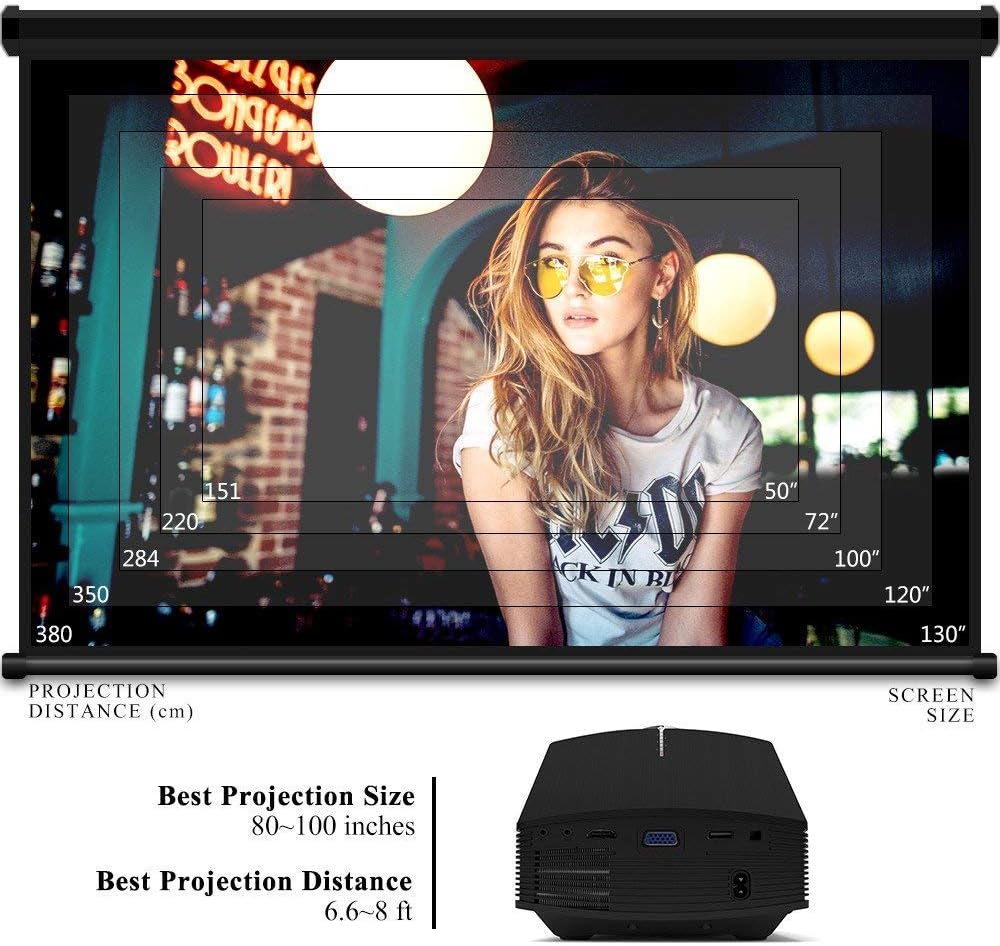
Figure 5.5: Focus and Keystone Adjustment.
6. Uputstvo za upotrebu
6.1 Uključivanje/isključivanje napajanja
Press the power button on the projector or the remote control to turn the projector on or off.
6.2 Odabir izvora
Press the 'Source' button on the projector or remote control to cycle through available input sources (HDMI, VGA, USB, AV, SD). Select the desired input source corresponding to your connected device.
6.3 Navigacija izbornikom
Use the arrow buttons on the projector or remote control to navigate through the on-screen menu. Press 'OK' or 'Enter' to confirm selections. Use the 'Menu' button to access settings and 'Exit' or 'Return' to go back.
6.4 Audio izlaz
The projector has a built-in 2W speaker. For external audio, connect speakers or headphones to the 3.5mm audio output jack on the projector.
7. Održavanje
7.1 Čišćenje objektiva
Use a soft, lint-free cloth or lens cleaning paper to gently wipe the projector lens. Do not use abrasive cleaners or solvents.
7.2 Cleaning Air Vents
Regularly clean the air vents to ensure proper airflow and prevent overheating. Use a soft brush or compressed air to remove dust accumulation.
7.3 Skladištenje
Kada se ne koristi, projektor čuvajte na hladnom i suhom mjestu, dalje od direktne sunčeve svjetlosti i ekstremnih temperatura. Koristite originalno pakovanje ili zaštitnu futrolu kako biste spriječili prašinu i oštećenja.
8. Otkrivanje problema
| Problem | Mogući uzrok | Rješenje |
|---|---|---|
| Nema prikazane slike | Incorrect input source selected; Cable not connected properly; Device not powered on. | Select the correct input source; Check all cable connections; Ensure the source device is powered on. |
| Slika je mutna | Fokus nije podešen; Projektor je preblizu/predaleko od platna. | Podesite prsten za fokusiranje; Podesite udaljenost projekcije. |
| Slika je trapezoidna | Projektor nije okomit u odnosu na platno. | Adjust keystone correction. |
| Nema zvuka | Volume too low; Muted; External audio device not connected/configured. | Povećajte jačinu zvuka; Uključite zvuk; Provjerite vanjske audio veze i postavke. |
| Daljinski upravljač ne radi | Baterije su slabe/prazne; Prepreka između daljinskog upravljača i projektora; Senzor daljinskog upravljača je blokiran. | Replace batteries; Remove obstructions; Ensure remote sensor is clear. |
9. Specifikacije
| Feature | Detalj |
|---|---|
| Brand | GooDee |
| Broj modela | GD-DE-9 |
| Display Type | LCD |
| Native Resolution | 800 x 480 piksela |
| Podržana rezolucija | Do 1080p |
| Osvetljenost | 3000 lumena (LED) |
| Lamp Život | 30,000 sata |
| Tehnologija povezivanja | HDMI, USB, VGA, AV, SD kartica |
| Hardversko sučelje | HDMI, USB, VGA |
| Integrisani zvučnik | Stereo zvučnik od 2 W |
| Udaljenost projekcije | 1.5 - 4 meters (6.6 - 8 feet recommended) |
| Veličina ekrana | 50 - 130 inches (80 - 100 inches recommended) |
| Ispravka Keystone-a | ±15° Ručno |
| Form Factor | Prijenosni |
| Vrsta montaže | Tabletop Mount |
| Boja | Crna |
| Dimenzije paketa | 33 x 21.6 x 11.8 cm |
| Težina artikla | 1.48 kg |
| Preporučena upotreba | Igre, Kućno kino |
| Kompatibilni uređaji | Smartphone, PC, Laptop, DVD Player, PS3/4, Xbox ONE, Fire TV Stick |
10. Garancija i podrška
GooDee offers a 3-year warranty for this projector. If you encounter any issues or are not completely satisfied with your purchase, please contact GooDee customer support. A refund or replacement is available within the first 2 months of purchase. Customer satisfaction is our top priority.
For support, please refer to the contact information provided on the GooDee official webweb-stranicu ili vašu platformu za kupovinu.