
Uvod
The Aputure 120D Mark II is a high-performance 180W daylight-balanced LED video light designed for professional film and photography applications. It features enhanced brightness, improved color accuracy (CRI 96+, TLCI 97+), and a redesigned integrated controller-power unit for a streamlined setup. This manual provides essential information for the safe and effective use of your Aputure 120D Mark II.
Sigurnosne informacije
- Do not look directly into the light source when operating.
- Ensure proper ventilation to prevent overheating. The unit features an ultra-silent fan for cooling.
- Koristite samo navedeni adapter za napajanje i kablove.
- Držite uređaj dalje od vode i drugih tečnosti.
- Ne pokušavajte rastavljati ili modificirati uređaj. Za sve servisne radove obratite se kvalifikovanom osoblju.
- Always secure the light head properly on a stand or mounting point.
Sadržaj paketa
Provjerite da li se sve stavke nalaze u vašem paketu:
- Aputure 120D Mark II LED Light Head
- Integrated Controller-Power Unit
- Standardni reflektor
- Daljinski upravljač
- Power Cable
- Connecting Cables
- Torba za nošenje
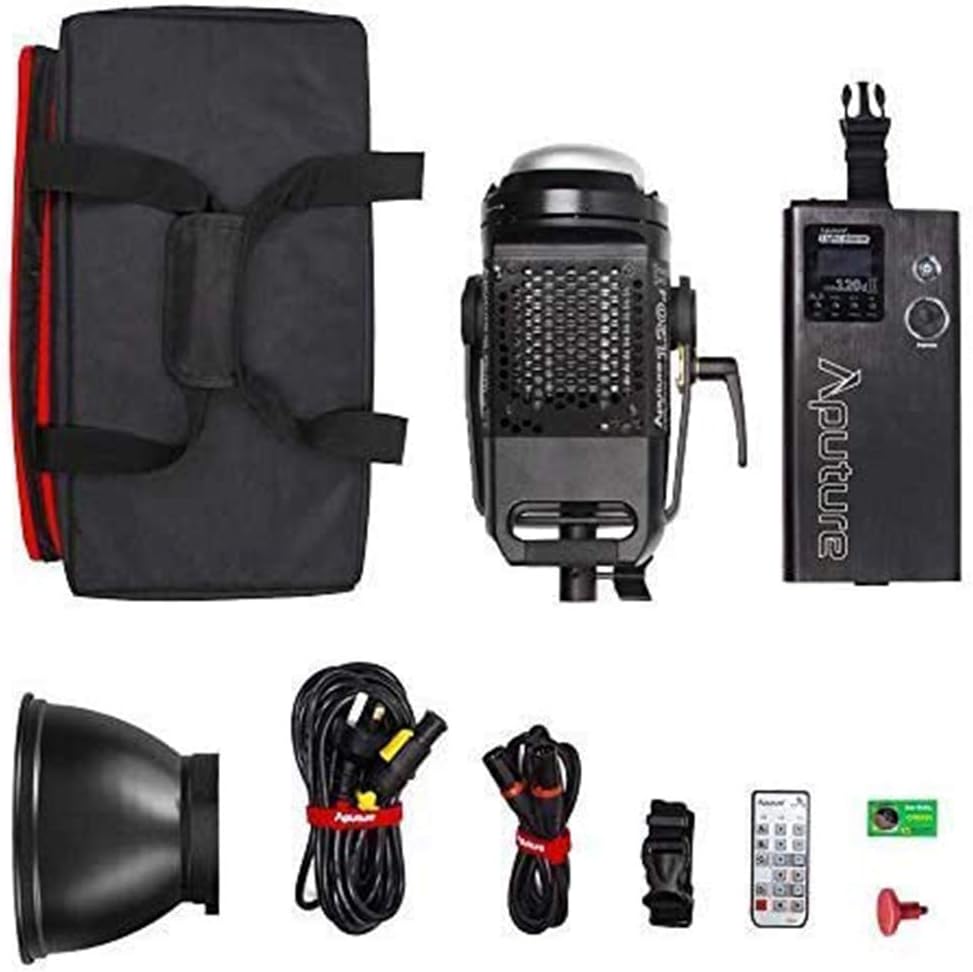
Image: All components included in the Aputure 120D Mark II package, neatly arranged.
Setup
- Mounting the Light Head: Attach the Aputure 120D Mark II light head to a compatible light stand using its handbrake locking yoke. Ensure it is securely fastened.
- Connecting the Controller-Power Unit: Connect the light head to the integrated controller-power unit using the provided Neutrik locking cables. The unified design simplifies cabling.
- Pričvršćivanje dodatne opreme: The light features a universal Bowens mount. To attach the standard reflector or other Bowens-mount modifiers (like a softbox or Fresnel lens), align the accessory with the mount on the light head and twist until it locks into place. Press the release switch to detach.
- Priključak za napajanje: Connect the power cable from the controller-power unit to a suitable power outlet.

Image: The Aputure 120D Mark II light head, showcasing its compact design and handle, alongside its dedicated carrying bag.

Image: Close-up of the Aputure 120D Mark II light head with a standard reflector, emphasizing its robust aircraft-grade aluminum construction and the versatile Bowens mount.
Video: Uvodni dioview of the Aputure 120D Mark II LED Video Light, demonstrating its features and basic setup.
Operating
- Uključivanje/isključivanje: Press the power button on the controller-power unit to turn the light on or off.
- Podešavanje svjetline: Use the control knob on the unit to adjust the brightness from 0% to 100%. The C120D II allows for fine adjustments even below 10%.
- DMX kontrola: The C120D II supports DMX lighting functions, allowing integration into professional lighting setups for precise control.
- Pre-Programmed Lighting Effects: Access and select from 5 pre-programmed lighting effects (e.g., thunder, fireworks) via the controller.
- Bežična kontrola: The light can be controlled wirelessly using the included remote control or a compatible mobile application.

Image: The integrated controller-power unit of the Aputure 120D Mark II, showing its display and intuitive control knobs for brightness and settings.

Image: The Aputure 120D Mark II in an outdoor environment, illustrating its powerful and adjustable brightness output.

Image: A visual representation of the Aputure 120D Mark II's accurate color rendition, featuring a color chart and the light illuminating a scene.
Održavanje
- čišćenje: Use a soft, dry cloth to clean the exterior of the light head and controller. Avoid using harsh chemicals or abrasive materials.
- Održavanje ventilatora: The ultra-silent fan is designed for longevity. Ensure the fan vents are clear of dust and obstructions to maintain optimal cooling performance.
- Skladištenje: When not in use, store the Aputure 120D Mark II in its dedicated carrying bag in a cool, dry place, away from direct sunlight and extreme temperatures.

Slika: Detaljna view of the Aputure 120D Mark II light head, highlighting its ultra-silent fan system designed for efficient temperature control.
Rješavanje problema
- Svjetlo se ne pali: Check all cable connections, especially the Neutrik locking cables between the light head and controller. Ensure the power cable is securely plugged into a working outlet.
- Buka ventilatora: The 120D Mark II features an ultra-silent fan. If unusual noise occurs, check for obstructions in the fan vents. If the issue persists, contact customer support.
- Problemi s daljinskim upravljanjem: Ensure the remote control has fresh batteries and is within range. Verify that the light and remote are set to the same channel and group.
- Nedosljedna svjetlina: Check for loose cable connections. If using DMX, verify DMX settings.
Specifikacije
| Feature | Specifikacija |
|---|---|
| Brand | Aputure |
| Broj modela | LS C120d II |
| Potrošnja energije | 180W maksimalno |
| Temperatura boje | 5500K (balansirano dnevno svjetlo) |
| CRI | ≥96 |
| TLCI | ≥97 |
| Osvetljenost | 30,000 lux@0.5m (with Reflector) |
| Tehnologija povezivanja | DMX, 2.4GHz Wireless |
| Težina artikla | 16.53 funti |
Garancija i podrška
The Aputure 120D Mark II LED Video Light comes with a manufacturer's warranty. Please refer to the warranty card included in your product packaging for specific terms and conditions. For technical support, troubleshooting assistance, or warranty claims, please contact Aputure customer service through their official websajt ili ovlašćeni distributeri.
Za dodatne resurse i informacije o proizvodu, posjetite Aputure Store na Amazonu.