
Uvod
This manual provides detailed instructions for the setup, operation, and maintenance of your Zerone BN59-01179A Replacement Remote Control. Please read this manual carefully before using the product to ensure proper functionality and longevity.
Product Overview
The Zerone BN59-01179A is a universal replacement remote control designed for compatible Smart TVs. It offers a compact design and a comprehensive set of buttons for various functions.
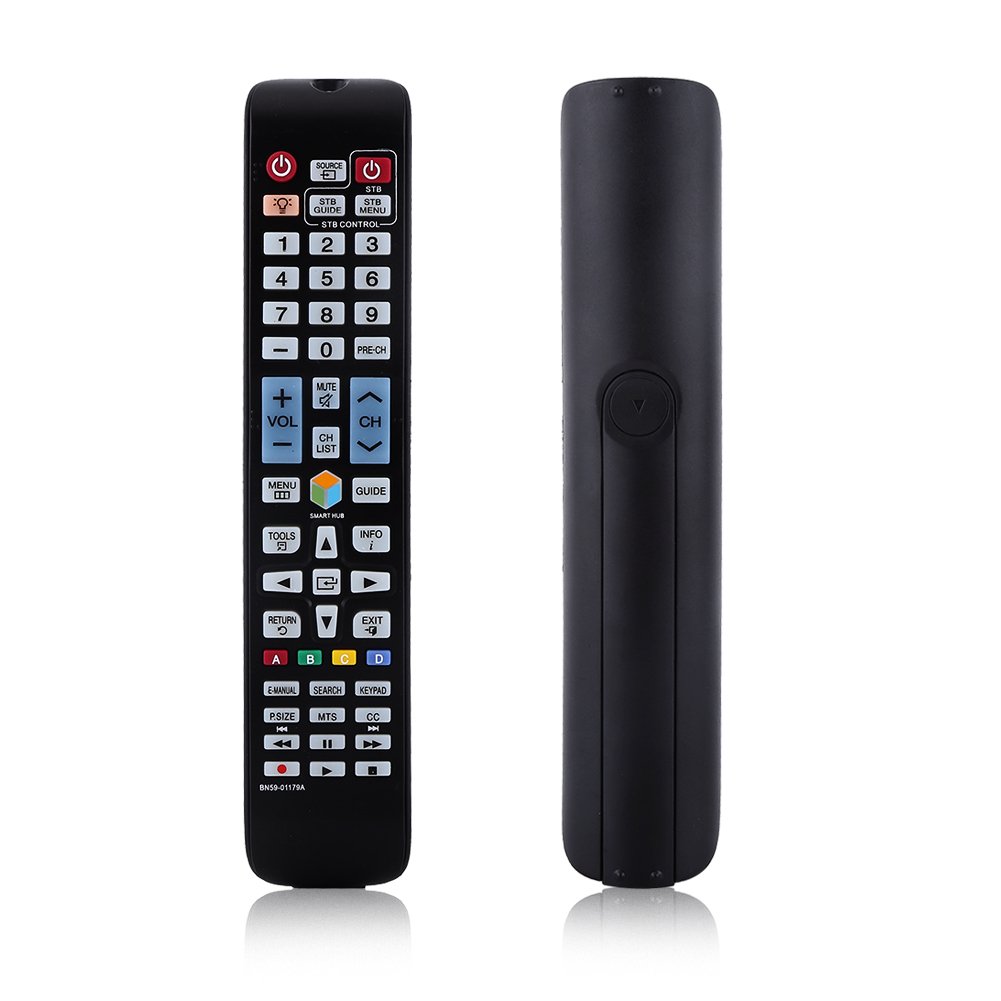
Slika: Front view of the Zerone BN59-01179A remote control, showing its full layout and approximate dimensions (23cm length, 4.7cm width, 2cm thickness).
Setup
Instalacija baterije
- Pronađite odeljak za baterije na poleđini daljinskog upravljača.
- Pomaknite poklopac baterije prema dolje ili pritisnite zasun i podignite da biste ga otvorili.
- Umetnite dvije (2) AAA baterije, pazeći da pozitivni (+) i negativni (-) terminali budu pravilno poravnati s oznakama unutar odjeljka.
- Vratite poklopac baterije tako što ćete ga gurnuti nazad na mjesto dok ne klikne sigurno.
Napomena: Batteries are not included with the remote control. Please use new AAA batteries for optimal performance.

Image: The back of the remote control with the battery cover removed, showing the empty battery compartment ready for two AAA batteries.
Uputstvo za upotrebu
This remote control is designed for immediate use with compatible TVs without requiring programming. Simply insert batteries and point the remote towards your television.
Ključne funkcije

Image: A hand holding the Zerone remote control, with inset close-ups highlighting the power/source buttons and the navigation/Smart Hub buttons.
- Napajanje (crveno dugme): Uključuje ili isključuje TV.
- Izvor: Odabire ulazne izvore (HDMI, AV, itd.).
- STB/DTV: Switches between Set-Top Box and Digital TV modes.
- Brojčani gumbi (0-9): Direktan odabir kanala.
- PRE-CH: Vraća se na prethodni kanal.
- Volumen (+/-): Podešava nivo jačine zvuka.
- Isključi zvuk: Isključuje ili uključuje zvuk televizora.
- Kanal (CH gore/dolje): Sekvencijalno mijenja TV kanale.
- CH LISTA: Prikazuje listu kanala.
- MENI: Pristupa glavnom meniju televizora.
- Smart Hub: Opens the Smart Hub interface for apps and streaming services.
- VODIČ: Prikazuje elektronski programski vodič.
- INFO: Shows information about the current program.
- ALATI: Accesses quick settings or contextual options.
- Navigacijski tasteri (Gore/Dole/Lijevo/Desno/Enter): Navigacija kroz menije i odabir opcija.
- POVRATAK: Vraća se na prethodni ekran ili meni.
- IZLAZ: Izlazi iz trenutnog menija ili aplikacije.
- Dugmad u boji (A, B, C, D): Funkcionalnost varira ovisno o modelu televizora i aplikaciji.
- E-PRIRUČNIK: Accesses the TV's electronic manual.
- PRETRAŽI: Otvara funkciju pretraživanja.
- TASTATURA: Displays an on-screen keypad.
- P.VELIČINA: Podešava veličinu/omjer slike.
- MTS: Multi-channel Television Sound (SAP).
- CC: Titlovi.
- Dugmad za kontrolu medija (Reprodukcija, Pauza, Stop, Premotavanje unazad, Premotavanje unaprijed): Kontrolira reprodukciju medija.
Održavanje
- čišćenje: Za čišćenje daljinskog upravljača koristite meku, suhu krpu. Ne koristite tekuća sredstva za čišćenje ili abrazivne materijale.
- Zamjena baterije: Replace batteries when the remote's response becomes sluggish or stops working. Always replace both batteries at the same time with new ones.
- Skladištenje: Ako daljinski upravljač nećete koristiti duži period, izvadite baterije kako biste spriječili curenje i oštećenje.
- Izbjegavajte izloženost: Keep the remote away from direct sunlight, heat sources, and moisture.
Rješavanje problema
- Daljinski ne reaguje:
- Provjerite da li su baterije pravilno umetnute s ispravnim polaritetom.
- Zamijenite stare baterije novim AAA baterijama.
- Check for any obstructions between the remote and the TV's infrared sensor.
- Pazite da je daljinski upravljač usmjeren direktno prema TV-u.
- Ograničeni domet:
- Zamijenite baterije.
- Ensure there are no strong light sources or electronic devices interfering with the signal.
- Određeni tasteri ne rade:
- Očistite daljinski upravljač, posebno oko tipki koje ne reagiraju, kako biste uklonili prljavštinu ili ostatke.
- If the issue persists after battery replacement and cleaning, the remote may be faulty.
Specifikacije
| Feature | Opis |
|---|---|
| Brand | Zerone |
| Naziv modela | Zerone32687x9gqs (BN59-01179A compatible) |
| Tehnologija povezivanja | Infracrveni |
| Kompatibilni uređaji | Television (specifically for Samsung BN59-01179A compatible models) |
| Maksimalni broj podržanih uređaja | 8 (Universal functionality) |
| Količina dugmadi | 12 (referring to main function groups, actual count is higher) |
| Tip kontrolera | Kontrola dugmadi |
| Maksimalni domet | 8 metara |
| Vrsta baterije | AAA |
| Broj baterija | Potrebne 2 AAA baterije (nisu uključene) |
| Posebna karakteristika | Universal replacement, no programming required |
Garancija i podrška
Zerone provides a service guarantee for this product. If you encounter any questions or issues regarding your remote control, please contact the seller or manufacturer for assistance. They will provide follow-up services to address your concerns.
For specific warranty details and support contact information, please refer to your purchase documentation or the retailer's website.