
Integra CDC-3.4
Integra CDC-3.4
6-Disc CD Carousel Changer User Manual
Uvod
This manual provides detailed instructions for the proper setup, operation, and maintenance of your Integra CDC-3.4 6-Disc CD Carousel Changer. Please read this manual thoroughly before using the unit to ensure optimal performance and longevity. The Integra CDC-3.4 is designed for high-fidelity audio playback from compact discs, featuring a robust carousel mechanism for convenient disc management.
Važne informacije o sigurnosti
Da biste smanjili rizik od električnog udara, požara ili oštećenja uređaja, molimo vas da se pridržavate sljedećih sigurnosnih mjera opreza:
- Pročitajte uputstva: Pročitajte sva sigurnosna uputstva i uputstva za upotrebu pre upotrebe uređaja.
- Upute za čuvanje: Sačuvajte sigurnosne i upute za uporabu za buduću upotrebu.
- Obratite pažnju na upozorenja: Pridržavajte se svih upozorenja na uređaju i u uputama za upotrebu.
- Slijedite uputstva: Slijedite sva uputstva za upotrebu i upotrebu.
- Voda i vlaga: Nemojte koristiti ovaj aparat u blizini vode.
- čišćenje: Čistite samo suhom krpom.
- ventilacija: Ne blokirajte ventilacijske otvore. Instalirajte u skladu s uputama proizvođača.
- toplina: Ne postavljajte u blizini izvora toplote kao što su radijatori, grejni registri, peći ili drugi uređaji (uključujući ampLifiers) koji proizvode toplotu.
- Zaštita kabela za napajanje: Zaštitite kabl za napajanje od gaženja ili priklještenja, posebno na utikačima, utičnicama i na mjestu gdje izlaze iz uređaja.
- Isključite utikač tokom oluje: Isključite ovaj aparat iz struje tokom oluja sa grmljavinom ili kada se ne koristi duži vremenski period.
- servisiranje: Sav servis prepustite kvalifikovanom servisnom osoblju. Servisiranje je potrebno kada je uređaj oštećen na bilo koji način, kao što je oštećen kabl za napajanje ili utikač, prolivena tečnost ili su predmeti upali u aparat, ako je uređaj bio izložen kiši ili vlazi, ne radi normalno , ili je odbačeno.
Šta je u kutiji
Carefully unpack your Integra CDC-3.4 and ensure all the following items are present:
- Integra CDC-3.4 CD Player
- Kabl za napajanje
- Basic manual (this document)
- RCA Cable (for analog audio connection)
- RI Cable (for system remote integration)
- Remote Control (RC-778C)
- 2 AAA baterije (za daljinski upravljač)
Setup
1. Plasman
Place the Integra CDC-3.4 on a stable, level surface with adequate ventilation. Ensure there is sufficient space around the unit for proper airflow to prevent overheating. Avoid placing it near heat sources or in direct sunlight.
2. Povezivanje audio kablova
The CDC-3.4 offers multiple audio output options. Choose the connection type that best suits your audio receiver or ampdizalica:
- Analogni audio izlaz (RCA): Connect the supplied RCA cable from the ANALOG OUTPUT (L/R) jacks on the CDC-3.4 to the corresponding analog audio input jacks on your receiver/amplifier.
- Digitalni koaksijalni izlaz: For a digital audio connection, use a coaxial digital cable (not supplied) to connect the COAXIAL jack on the CDC-3.4 to a digital coaxial input on your receiver/amplifier.
- Digitalni optički izlaz: For an optical digital audio connection, use an optical digital cable (not supplied) to connect the OPTICAL jack on the CDC-3.4 to a digital optical input on your receiver/amplifier.
3. Connecting RI Cable (Remote Interactive)
Ako vaš prijemnik/amplifier supports Integra's RI (Remote Interactive) system, connect the supplied RI cable from the REMOTE CONTROL (RI) jack on the CDC-3.4 to the RI jack on your receiver/amplifier. This allows for integrated control functions between the components.
4. Povezivanje napajanja
After all audio and control cables are connected, plug the supplied power cord into the AC INLET on the rear of the CDC-3.4, and then plug the other end into a wall outlet.
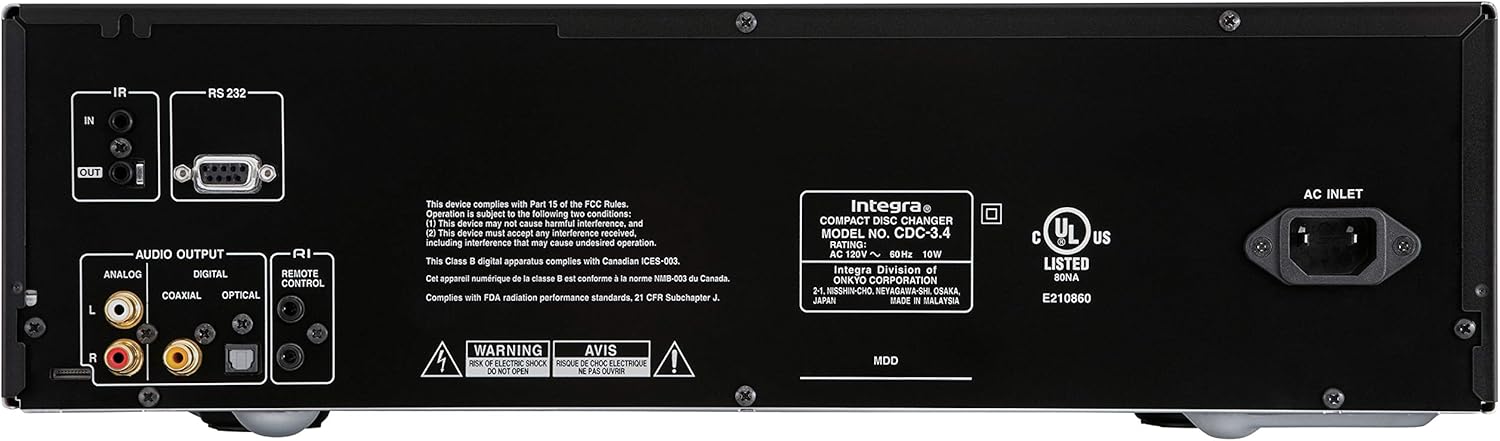
Figure 1: Rear panel connections of the Integra CDC-3.4.
Uputstvo za upotrebu
1. Uključivanje/isključivanje
Pritisnite Standby/On dugme na prednjoj ploči ili On dugme na daljinskom upravljaču da biste uključili ili isključili uređaj.
2. Učitavanje diskova
The CDC-3.4 is a 6-disc carousel changer. To load discs:
- Pritisnite Otvori/Zatvori button on the front panel or remote to open the disc tray.
- Place a CD onto an empty disc well, ensuring it is seated correctly. The disc wells are numbered 1 through 6.
- You can swap up to 5 discs while the 6th disc continues to play.
- Pritisnite Otvori/Zatvori ponovo da zatvorite tacnu.
3. Odabir diska
To select a specific disc for playback:
- On the front panel, use the Odabir diska buttons (1-6) to directly choose a disc.
- On the remote control, use the numbered buttons (1-6) to select a disc.
4. Kontrole reprodukcije
Use the following buttons on the front panel or remote control for playback:
- Play/Pause (►/▐▐): Pokreće ili pauzira reprodukciju.
- Zaustavi (■): Zaustavlja reprodukciju.
- Skip (◀◀/►►): Preskače na prethodnu ili sljedeću pjesmu.
- Search (◀◀◀/►►►): Fast forwards or reverses within a track (hold down).
5. Režimi reprodukcije
- nasumično: Pritisnite Slučajno dugme za reprodukciju pjesama nasumičnim redoslijedom.
- ponoviti: Pritisnite Ponovi dugme za ponavljanje trenutne pjesme, trenutnog diska ili svih diskova.

Figure 2: Front panel controls of the Integra CDC-3.4.

Figure 3: Integra RC-778C Remote Control.
Održavanje
Čišćenje jedinice
To clean the exterior of the unit, use a soft, dry cloth. For stubborn stains, slightly dampen the cloth with water or a mild, non-abrasive cleaner. Do not use harsh chemicals, solvents, or abrasive cleaning pads, as these can damage the finish.
Disc Care
Handle CDs by their edges to avoid fingerprints and scratches. Store discs in their cases when not in use. If a disc is dirty, wipe it gently from the center outwards with a soft, lint-free cloth. Do not use abrasive materials or solvents.
Interno održavanje
The Integra CDC-3.4 contains no user-serviceable parts. Do not attempt to open the casing or perform any internal maintenance. Refer all servicing to qualified service personnel.
Rješavanje problema
If you experience issues with your Integra CDC-3.4, please consult the table below before contacting support.
| Problem | Mogući uzrok | Rješenje |
|---|---|---|
| Nema struje | Kabl za napajanje nije sigurno priključen. | Provjerite je li kabel za napajanje čvrsto priključen u uređaj i zidnu utičnicu. |
| Zidna utičnica nije aktivna. | Testirajte utičnicu drugim uređajem. | |
| Nema zvuka | Audio cables not connected correctly. | Check all audio cable connections between the CDC-3.4 and your receiver/amplifier. |
| Incorrect input selected on receiver/amplifier. | Select the correct input source on your receiver/amplifier. | |
| Disc not playing or reading | Disk je prljav ili ogreban. | Clean the disc with a soft, lint-free cloth. Try another disc. |
| Disk je pogrešno umetnut. | Ensure the disc is placed correctly in the disc well with the label side up. | |
| Daljinski upravljač ne radi | Batteries are depleted or inserted incorrectly. | Zamijenite baterije novim AAA baterijama, pazeći na ispravan polaritet. |
| Prepreka između daljinskog upravljača i uređaja. | Ensure there is a clear line of sight between the remote and the unit's IR sensor. |
Specifikacije
| Feature | Detalj |
|---|---|
| Broj modela | CDC-3.4 |
| Disc Capacity | 6 Discs (CD Carousel Changer) |
| Digital to Analog Converters (DACs) | Dual High Quality Wolfson 192 kHz / 24-bit |
| overaampling | 128 times oversampling |
| Signal Path Technology | Vector Linear Shaping Circuitry (VLSC) for Noise-free Signal Path, Proprietary Direct Digital Path |
| Audio izlazi | Analog (RCA L/R), Digital Coaxial, Digital Optical |
| Upravljačka sučelja | RS232, IR (Infrared), RI (Remote Interactive) |
| Dimenzije proizvoda (Š x V x D) | Približno 17.1 x 9.8 x 21 inča (43.4 x 24.9 x 53.3 cm) |
| Težina artikla | 15.2 funte (6.9 kg) |
| Zahtjevi za napajanje | AC 120V ~ 60Hz |
| Uključena dodatna oprema | Remote Control, RCA Cable, RI Cable, Power Cord, AAA Batteries |
Garancija i podrška
Garancija proizvođača
The Integra CDC-3.4 typically comes with a manufacturer's warranty, which may vary by region. Please refer to the warranty card included with your product or visit the official Integra (Onkyo) website for specific warranty terms and conditions. It is recommended to retain your proof of purchase for warranty claims.
Korisnička podrška
For technical assistance, troubleshooting beyond this manual, or warranty inquiries, please contact Integra customer support. You can find contact information, including phone numbers and online support resources, on the official Onkyo/Integra website.
Ask a question about this manual
Ask about setup, troubleshooting, compatibility, parts, safety, or missing instructions. Manuals+ will review the question and use this page’s manual context to help answer it.