
1. Proizvod je gotovview
The Integra DTM-7 is a Network A/V Stereo Receiver designed to integrate modern digital audio and video technologies with traditional stereo sound. It supports advanced HDMI switching for 4K and HDR10 content, offers robust network connectivity for streaming services, and includes wireless audio capabilities. The receiver is built with a focus on sound quality and versatile control options.
Slika 1.1: Front view of the Integra DTM-7 Network A/V Stereo Receiver. This image displays the front panel controls, display, and input jacks.
Ključne karakteristike:
- Velika izlazna snaga: Delivers 100 Watts per channel (8 Ohms, 20 Hz-20 kHz, 0.08% THD, 2 Channels Driven, FTC) with 4-ohm stability, housed in an anti-resonant steel chassis and audiophile-grade aluminum front panel.
- Advanced HDMI Connectivity: Features 4 HDMI inputs and 1 HDMI output, supporting 4K/60 Hz, HDR10, HLG (Hybrid Log-Gamma), Dolby Vision, and BT.2020 Pass-thru with HDCP 2.2, 4:4:4 Color Space, and WCG (Wide Color Gamut).
- Integracija sa Sonosom: Compatible with existing Sonos Home Sound Systems or as a starting point for a new one, allowing for music streaming capability with Sonos Connect and a firmware update.
- Extensive Network and Wireless Audio: Includes Wi-Fi and Bluetooth compatibility, providing access to internet radio sources such as Tidal, Pandora, Spotify, Deezer, and TuneIn. Supports Chromecast Built-In, DTS Play-Fi technology, and AirPlay for wireless audio streaming.
- Analog Connectivity: Features a built-in phono preamp for turntable connection.
- Fleksibilne opcije upravljanja: Controllable via the included IR remote, the Integra Control Pro app (for iOS and Android devices), or through 3rd party control systems utilizing IP or RS232C.
2. Šta se nalazi u kutiji
Provjerite da li se u paketu nalaze sve dolje navedene stavke:
- Integra DTM-7 Network A/V Stereo Receiver
- Kabl za napajanje
- Sobna FM antena
- AM okvirna antena
- Mikrofon za podešavanje zvučnika
- Basic manual (this document provides detailed instructions)
- Daljinski upravljač
- 2 AAA baterije (za daljinski upravljač)
3. Podešavanje
3.1 Povezivanje komponenti
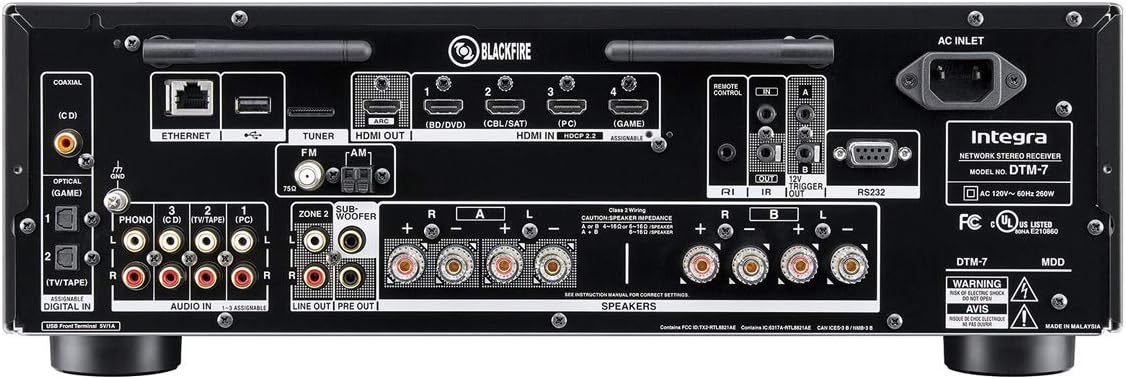
Before making any connections, ensure the receiver and all components are powered off and unplugged from the wall outlet. Refer to the rear panel diagram for connection points.

Slika 3.1: Rear panel connections of the Integra DTM-7. This image illustrates the various input and output ports for audio, video, and network connections.
- Priključci zvučnika: Connect your passive speakers to the SPEAKER terminals on the rear panel. Ensure correct polarity (+ to + and - to -) for each speaker. The DTM-7 supports 4-ohm compatible speakers. For optimal performance, use high-quality speaker cables.
- HDMI priključci: Connect your video sources (e.g., Blu-ray player, game console, streaming device) to the HDMI IN ports. Connect your TV or projector to the HDMI OUT port. The HDMI ports support 4K/60 Hz, HDR10, Dolby Vision, and HDCP 2.2.
- Mrežna veza: For wired network access, connect an Ethernet cable from your router to the ETHERNET port. For wireless network access, ensure the Wi-Fi antennas are properly attached and positioned.
- Analogne audio veze: Connect analog audio sources (e.g., CD player, cassette deck) to the AUDIO IN ports. For turntables, connect to the PHONO input, which includes a built-in preamplifier.
- Antenski priključci: Spojite isporučene FM i AM antene na odgovarajuće priključke za radio prijem.
- Priključak za napajanje: After all other connections are made, connect the power cord to the AC INLET on the receiver and then to a wall outlet.
3.2 Početno podešavanje i kalibracija
After connecting your components, perform the initial setup:
- Uključeno: Pritisnite ON / STANDBY dugme na prednjoj ploči ili daljinskom upravljaču da biste uključili prijemnik.
- On-Screen Setup Guide: Follow the on-screen instructions displayed on your TV for initial configuration, including language selection and network settings.
- Kalibracija zvučnika: Use the supplied speaker setup microphone. Connect it to the dedicated port on the front panel. Place the microphone at your primary listening position and follow the on-screen prompts to automatically calibrate your speakers for optimal sound.
4. Uputstvo za upotrebu
4.1 Osnovni rad
- Uključivanje/isključivanje: Pritisnite ON / STANDBY dugme na prednjoj ploči ili daljinskom upravljaču.
- Odabir ulaza: Koristite INPUT selector buttons on the front panel or the remote control to choose your desired audio/video source (e.g., HDMI 1, CD, NET).
- Kontrola jačine zvuka: Podesite MASTER VOLUME dugme na prednjoj ploči ili VOLUMEN +/- dugmad na daljinskom upravljaču.
- Kontrola tonova: Koristite BASS i TREBLE knobs on the front panel to adjust the sound characteristics to your preference.
4.2 Network and Wireless Features
The DTM-7 offers a range of network and wireless audio capabilities:
- Usluge prijenosa: Access integrated streaming services such as Tidal, Pandora, Spotify, Deezer, and TuneIn directly from the receiver's menu. A stable internet connection is required.
- Ugrađeni Chromecast: Cast audio from compatible apps on your smartphone, tablet, or computer directly to the receiver.
- DTS Play-Fi: Enjoy high-quality wireless audio from your mobile device or PC to the receiver and other DTS Play-Fi enabled products.
- AirPlay: Stream audio from your Apple devices (iPhone, iPad, Mac) to the receiver over your home network.
- Bluetooth: Uparite svoje uređaje s omogućenom Bluetooth vezom kako biste bežično strimovali zvuk na prijemnik.
4.3 Opcije kontrole
- IR daljinski upravljač: Use the included remote for direct control of all receiver functions. Ensure line of sight to the receiver's IR sensor.
- Integra Control Pro App: Download the free Integra Control Pro app for iOS and Android devices. This app provides comprehensive control over the receiver's functions, including input selection, volume, network features, and settings.
- 3rd Party Control: The DTM-7 supports integration with custom installation systems via IP control or RS232C for advanced home automation.
5. Održavanje
To ensure the longevity and optimal performance of your Integra DTM-7 receiver, follow these maintenance guidelines:
- čišćenje: Gently wipe the exterior surfaces with a soft, dry cloth. Do not use abrasive cleaners, waxes, or solvents, as they can damage the finish.
- ventilacija: Ensure adequate ventilation around the receiver. Do not block the ventilation openings on the top or sides. Avoid placing the unit in an enclosed cabinet without proper airflow.
- Uklanjanje prašine: Povremeno koristite meku četku ili usisivač sa nastavkom za četku kako biste uklonili prašinu sa ventilacionih rešetki.
- Kabl za napajanje: Regularly check the power cord for any signs of damage. If damaged, discontinue use and contact customer support for a replacement.
6. Otkrivanje problema
If you encounter issues with your DTM-7 receiver, refer to the following common troubleshooting steps:
- Nema napajanja:
- Provjerite je li kabel za napajanje sigurno priključen i u prijemnik i u ispravnu zidnu utičnicu.
- Provjerite da li zidna utičnica radi tako što ćete uključiti drugi uređaj.
- Nema zvuka:
- Provjerite da li je odabran ispravan ulazni izvor.
- Provjerite sve spojeve zvučnika na ispravan polaritet i sigurno prianjanje.
- Pazite da jačina zvuka nije postavljena na minimum ili isključena.
- Confirm that your speakers are functional.
- Nema videa:
- Ensure the HDMI cables are securely connected to both the source device, the receiver's HDMI IN, and the TV's HDMI OUT.
- Verify that the correct HDMI input is selected on the receiver and the correct HDMI input is selected on your TV.
- Pokušajte s drugim HDMI kabelom ili priključkom.
- Problemi s mrežnom vezom:
- For wired connections, ensure the Ethernet cable is properly connected to the receiver and your router.
- For Wi-Fi, check your router's status and ensure the receiver is within range. Re-enter Wi-Fi credentials if necessary.
- Ponovo pokrenite ruter i prijemnik.
- Daljinski upravljač ne radi:
- Zamijenite baterije u daljinskom upravljaču.
- Provjerite da nema prepreka između daljinskog upravljača i IR senzora prijemnika.
If the problem persists after trying these steps, please refer to the Integra support websajtu ili kontaktirajte korisničku podršku.
7. Specifikacije
| Feature | Specifikacija |
|---|---|
| Izlazna snaga | 100 W/Ch. (8 Ohms, 20 Hz-20 kHz, 0.08% THD, 2 Channels Driven, FTC) |
| HDMI ulazi/izlazi | 4 In / 1 Out |
| HDMI karakteristike | 4K/60 Hz, HDR10, HLG, Dolby Vision, BT.2020 Pass-thru, HDCP 2.2, 4:4:4 Color Space, WCG |
| Tehnologija povezivanja | AirPlay, Bluetooth, HDMI, Wi-Fi, Ethernet |
| Wireless Audio Features | Chromecast Built-In, DTS Play-Fi, AirPlay, Spotify, Pandora, Tidal, Deezer, TuneIn |
| Način audio izlaza | Stereo |
| Konfiguracija kanala surround zvuka | 2.1 |
| Phono ulaz | Yes (Built-in phono preamp) |
| Tip kontrole | IR Remote, Android/iOS App (Integra Control Pro), IP, RS232C |
| Dimenzije proizvoda (Š x V x D) | 17.1 x 5.9 x 12.9 inča (približno) |
| Težina artikla | 18.7 funte |
| Proizvođač | Onkyo |
8. Garancija i podrška
For detailed warranty information, please refer to the warranty card included with your product or visit the official Integra website. For technical support, product registration, or service inquiries, please contact Integra customer support or visit their official webstranica za najažurnije informacije.
Manufacturer: Onkyo