
1. Uvod
Thank you for choosing the X.Cell M100 Wireless Mouse. This manual provides essential information for setting up, operating, and maintaining your new wireless mouse. Please read these instructions carefully before use to ensure optimal performance and longevity of your device.
2. Sadržaj paketa
Provjerite da li se sve stavke nalaze u vašem paketu:
- X.Cell M100 Wireless Mouse
- USB nano prijemnik
- AA baterija (može biti unaprijed instalirana ili uključena zasebno)
- Korisnički priručnik (ovaj dokument)
3. Podešavanje
- Umetnite bateriju: Locate the battery compartment on the underside of the mouse. Open the cover and insert the provided AA battery, ensuring correct polarity (+/-). Close the battery compartment cover.
- Povežite USB prijemnik: Remove the USB Nano Receiver from its storage slot, usually located inside the battery compartment or near it. Plug the receiver into an available USB port on your computer (PC or Mac).
- Uključeno: Turn on the mouse using the power switch, typically located on the underside. The mouse is designed for plug-and-play functionality, meaning it should automatically connect to your computer within a few seconds.
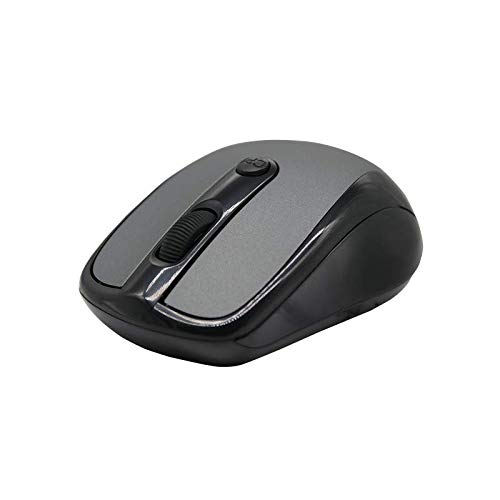
This image shows the X.Cell M100 Wireless Mouse from a top-down perspective, highlighting its ergonomic design and button layout.
4. Uputstvo za upotrebu
The X.Cell M100 Wireless Mouse utilizes 2.4 GHz wireless technology, providing a stable connection with an operating range of up to 10 meters. It is compatible with both PC and Mac systems.
- Lijevo dugme: Primarna funkcija klika za odabir stavki, otvaranje files, itd.
- Desno dugme: Funkcija sekundarnog klika za kontekstne menije i dodatne opcije.
- Točak za pomicanje: Pomaknite se gore ili dolje za navigaciju dokumentima i web stranice. Kotačić za pomicanje također funkcionira kao srednje dugme za klik.
- DPI Button (if present): Some models may include a DPI button to adjust cursor sensitivity. Refer to the mouse's physical design for this feature.

A hand demonstrates the comfortable grip and usage of the X.Cell M100 Wireless Mouse during operation.
5. Održavanje
- čišćenje: Za čišćenje miša koristite meku, suhu krpu. Za tvrdokornu prljavštinu, lagano je očistite.ampIsperite krpu vodom. Izbjegavajte upotrebu jakih hemikalija ili abrazivnih materijala.
- Zamjena baterije: When the mouse performance degrades or it stops responding, replace the AA battery. Follow the steps in the 'Setup' section for battery insertion. The mouse is designed for approximately 12 months of battery life under typical usage.
- Skladištenje: When not in use for extended periods, turn off the mouse to conserve battery life. Store the USB Nano Receiver in its designated slot to prevent loss.
6. Otkrivanje problema
| Problem | Rješenje |
|---|---|
| Miš ne reaguje |
|
| Kretanje kursora je nepravilno ili sporo |
|
| Problemi sa vezom |
|
7. Specifikacije
- Model: XL-M-100-BLK
- Povezivanje: 2.4 GHz bežični
- Radni opseg: Do 10 metara
- Kompatibilnost: PC & Mac
- Izvor napajanja: 1 x AA baterija
- Procijenjeni vijek trajanja baterije: 12 mjeseca
- Dimenzije (D x Š x V): 2.4 x 6.4 x 4.6 cm
- Težina: 80 grama
- Boja: Crna
8. Garancija i podrška
Specific warranty details and direct support contact information are not provided in the product description. Please refer to the product packaging or the official X.Cell website for the most current warranty policy and customer support options. Keep your purchase receipt as proof of purchase for any warranty claims.