
Uvod
This manual provides essential instructions for the safe operation, maintenance, and troubleshooting of your Best Choice Products 3-in-1 Robot Vacuum Cleaner, Model SKY4719. This device is designed to vacuum, sweep, and mop various floor types, offering automated cleaning with smart features.
Molimo vas da pažljivo pročitate ovaj priručnik prije upotrebe proizvoda i sačuvate ga za buduću upotrebu.
Sadržaj paketa
Pažljivo raspakujte kutiju i provjerite da li su sve dolje navedene stavke prisutne i u dobrom stanju. Ako neke stavke nedostaju ili su oštećene, obratite se korisničkoj podršci.

This image displays the complete package contents, including the robot vacuum, remote control, mop pads, HEPA filters, water tank, dust bin, power adapter, cleaning brush, and charging dock station.
- 1 x BCP Cleaning Robot
- 1 x daljinski upravljač
- 2 x krpe za brisanje
- 1 x spremnik za vodu
- 3 x HEPA filtera
- 1 x kanta za prašinu
- 6 x bočne četke
- 1 x adapter za napajanje
- 1 x Uputstvo za upotrebu
- 1 x Charging Dock Station
- 1 x četka za čišćenje
Product Overview
The Best Choice Products SKY4719 robot vacuum is a versatile cleaning device designed for efficiency and convenience. It integrates vacuuming, sweeping, and mopping functionalities into one compact unit.
The robot vacuum cleaner features a sleek black design with a central control panel and a lift-up cover for the dustbin.
Ključne karakteristike:
- 3-u-1 čišćenje: Sweeps, vacuums, and mops for comprehensive floor care.
- Samopunjenje: Automatski se vraća na bazu za punjenje kada je baterija slaba.
- Više načina čišćenja: Includes Spot, Zig-Zag, Auto, and Edge cleaning.
- Pametni senzori: Equipped with anti-collision and fall prevention technology.
- Rad sa niskim nivoom buke: Designed for quiet cleaning.
- Remote & Voice Control: Convenient control options for ease of use.

A view of the robot's underside reveals the main brush, side brushes for sweeping, and the removable mop pad, designed for effective cleaning on various surfaces.
Setup
1. Postavljanje baze za punjenje
Postavite bazu za punjenje uz zid na otvorenom i neuređenom mjestu. Osigurajte najmanje 1 metar (3 stope) čistog prostora ispred baze i 0.5 metara (1.5 stope) sa svake strane. Uključite adapter za napajanje u bazu za punjenje, a zatim u zidnu utičnicu.
2. Početno punjenje
Before first use, fully charge the robot vacuum. Place the robot onto the charging base, ensuring the charging contacts align. The indicator lights on the robot will show charging status. A full charge typically takes 4-5 hours.
3. Attaching Side Brushes
Snap the two side brushes onto the posts on the bottom of the robot. Ensure they are securely attached.
4. Filling Water Tank (for Mopping)
If using the mopping function, remove the water tank from the robot. Open the water tank cap, fill it with clean water (do not use cleaning solutions that may clog the nozzle), and securely close the cap. Reinsert the water tank into the robot until it clicks into place. Attach a clean mop pad to the bottom of the water tank.
Uputstvo za upotrebu
Uključivanje/isključivanje
Press and hold the power button on the robot or the remote control to turn the device on or off.
Režimi čišćenja
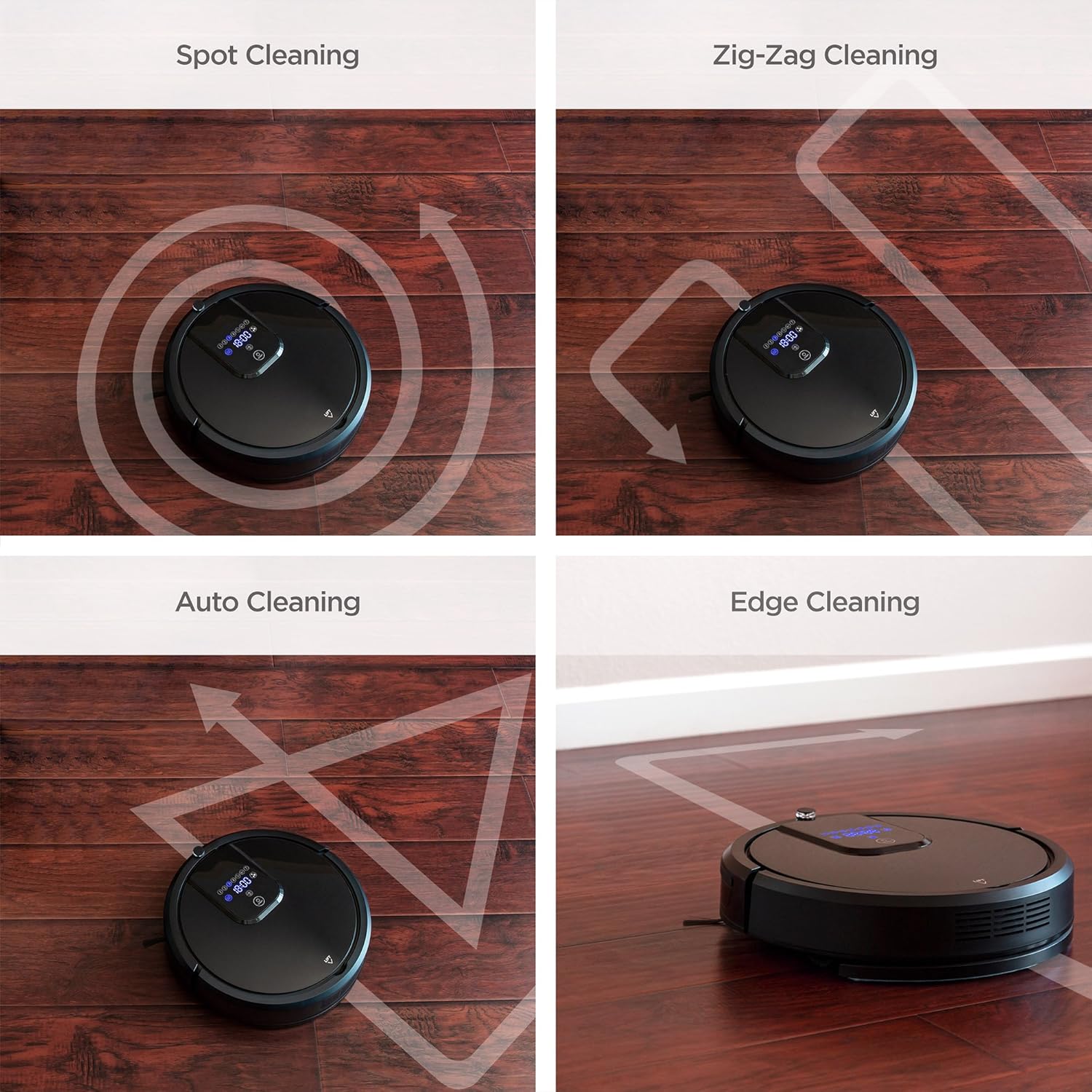
The robot vacuum offers several cleaning modes to suit different needs. These can be selected via the remote control or the control panel on the robot.

Four distinct cleaning patterns are illustrated: Spot cleaning for concentrated areas, Zig-Zag for systematic coverage, Auto cleaning for general use, and Edge cleaning for walls and corners.
- Automatsko čišćenje: The robot automatically navigates and cleans the entire floor area.
- Čišćenje na licu mjesta: Concentrates cleaning on a specific dirty area. The robot will clean in a spiral pattern.
- Čišćenje ivica: Robot čisti uz zidove i rubove namještaja.
- Zig-Zag Cleaning: The robot cleans in a systematic back-and-forth pattern, ideal for large, open spaces.

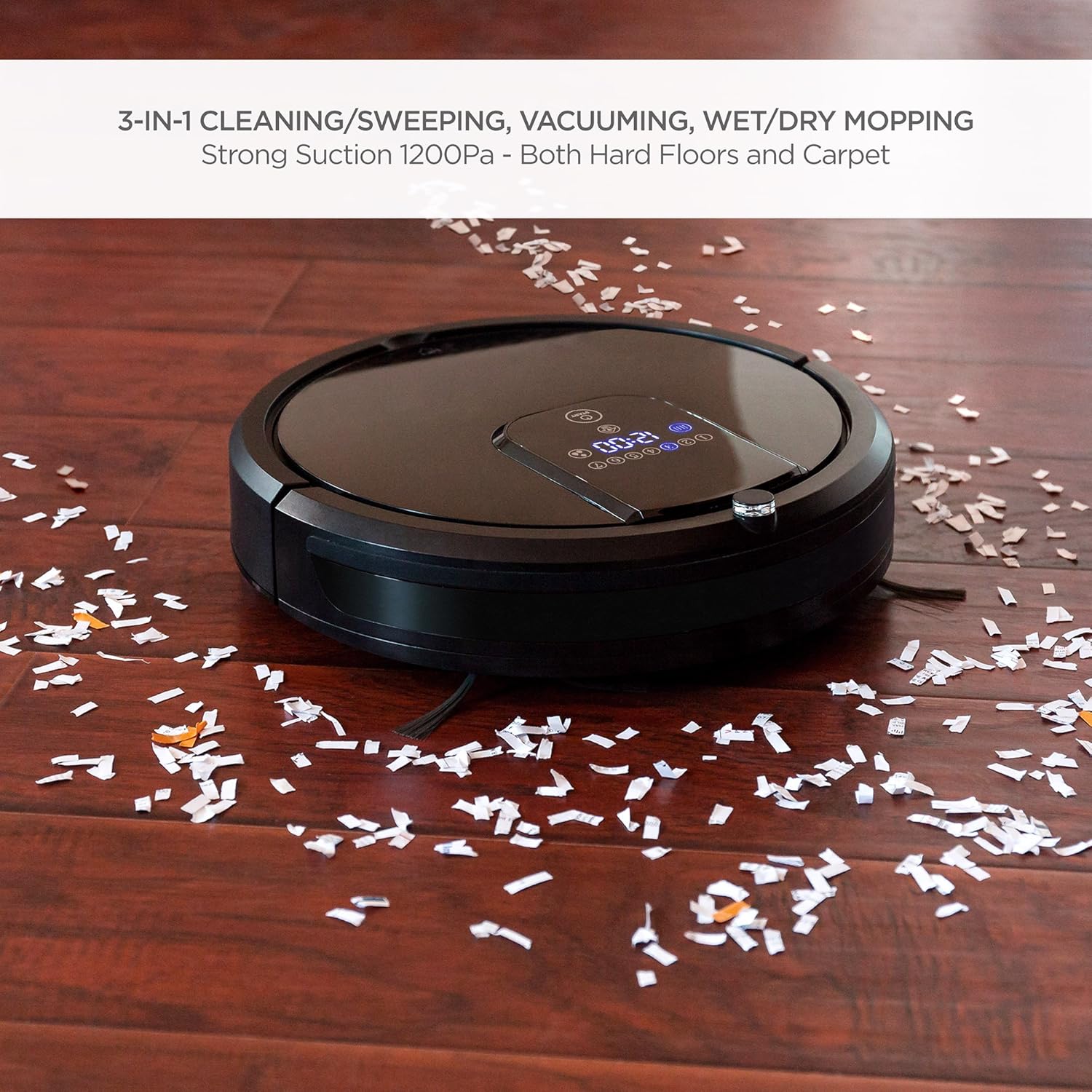
The robot vacuum is shown effectively collecting small debris from a hardwood floor, demonstrating its powerful vacuuming capability.
The robot vacuum is shown actively mopping a hardwood floor, highlighting its wet/dry mopping capability.
Daljinski upravljač
Use the included remote control to start/stop cleaning, select cleaning modes, direct the robot manually, set cleaning schedules, and send the robot back to its charging base.
Voice Control
The robot vacuum is compatible with Amazon Echo devices. Follow the instructions in your Amazon Echo app to connect and enable voice commands for your robot vacuum.
Samo-punjenje
When the battery level is low, the robot will automatically return to its charging base to recharge. Ensure the charging base is accessible and unobstructed.
Sigurnosne karakteristike

This image illustrates the robot vacuum's intelligent features: automatic return to charging base, obstacle avoidance, ability to climb over small thresholds, and sensors to prevent falls down stairs.
- Zaštita od sudara: Built-in sensors detect obstacles and allow the robot to navigate around them, preventing damage to furniture and the robot itself.
- penjanje: The robot can climb over small thresholds and carpets up to a certain height.
- Prevencija pada: Cliff sensors prevent the robot from falling down stairs or off elevated surfaces.
This video provides a visual guide to the robot vacuum's capabilities, including its 3-in-1 cleaning functions, self-charging, remote control, and voice control integration.
Održavanje
Redovno održavanje osigurava optimalne performanse i produžava vijek trajanja vašeg robotskog usisivača.
1. Pražnjenje posude za prašinu
After each cleaning cycle, or when the dust bin is full, remove it from the robot and empty its contents into a trash receptacle. Clean the dust bin with a dry cloth.
2. Čišćenje filtera
The HEPA filters should be cleaned regularly. Tap them gently to remove dust. Replace filters every 1-3 months depending on usage. Do not wash HEPA filters with water.
3. Čišćenje bočnih četki
Periodically check the side brushes for tangled hair or debris. Use the included cleaning brush or scissors to remove any obstructions. Replace worn brushes as needed.
4. Cleaning Mop Cloths
After each mopping session, remove the mop cloth and wash it with water. Allow it to air dry completely before reattaching or storing.
5. Čišćenje senzora i kontakata za punjenje
Wipe the cliff sensors, anti-collision sensors, and charging contacts on both the robot and the charging base with a clean, dry cloth to ensure proper function.
Rješavanje problema
Ako imate problema s robotskim usisivačem, pogledajte sljedeće uobičajene probleme i rješenja:
| Problem | Mogući uzrok | Rješenje |
|---|---|---|
| Robot se ne uključuje. | Slaba baterija; isključeno napajanje. | Charge the robot; ensure the main power switch is in the 'ON' position. |
| Robot se često zaglavi. | Prepreke (kablovi, tepisi); uski prostori. | Clear the cleaning area of small obstacles; use boundary strips if available. |
| Loše performanse čišćenja. | Full dust bin; dirty filters/brushes. | Empty dust bin; clean or replace filters and brushes. |
| Robot se ne vraća na bazu za punjenje. | Charging base obstructed; base not powered. | Ensure clear path to base; check power connection to base. |
| Daljinski upravljač ne radi. | Dead batteries; out of range. | Replace remote batteries; operate within range of the robot. |
If the problem persists after trying these solutions, please contact Best Choice Products customer support.
Specifikacije
| Feature | Detalj |
|---|---|
| Brand | Najbolji izbor proizvoda |
| Broj modela | SKY4719 |
| Surface Recommendation | Hardwood, Tile, Laminate, Carpet |
| Posebna karakteristika | Programmable, Self-Charging, Anti-Collision, Fall Prevention |
| Boja | Crna |
| Tip kontrolera | Daljinski upravljač, upravljanje glasom |
| Filter Type | Cartridge (HEPA Type) |
| Trajanje baterije | Do 1.5 sati |
| Vrsta baterije | Lithium Ion |
| Kapacitet kante za prašinu | 0.9 litara |
| Izvor napajanja | Corded Electric (Charging Base) |
| Težina artikla | 10.8 funti |
| Nivo buke | 60 decibela |
| Kompatibilni uređaji | Amazon Echo |
| Form Factor | Robotski |
Garancija i podrška
For warranty information or technical support, please refer to the warranty card included in your package or visit the official Best Choice Products website. Please have your model number (SKY4719) and purchase details ready when contacting support.