
1. Uvod
Hvala na kupoviniasing the Homtime D2qi Bluetooth Speaker with Wireless Charging and Alarm Clock. This device is designed to provide a versatile audio experience with convenient features for your daily life. Please read this manual carefully before use to ensure proper operation and to maximize the product's lifespan.
2. Sigurnosne informacije
- Ne izlažite uređaj ekstremnim temperaturama, vlazi ili direktnoj sunčevoj svjetlosti.
- Čuvati dalje od vode i drugih tečnosti.
- Ne rastavljajte niti pokušavajte sami popraviti uređaj. Sve servisne radove prepustite kvalifikovanom osoblju.
- Koristite samo isporučeni ili preporučeni adapter za napajanje.
- Izbjegavajte ispuštanje ili izlaganje uređaja jakim udarima.
3. Sadržaj paketa
Molimo Vas da provjerite paket za sljedeće stavke:
- Homtime D2qi Bluetooth Speaker
- Adapter za napajanje
- Uputstvo za upotrebu
4. Proizvod je gotovview
The Homtime D2qi combines a high-quality Bluetooth speaker with a digital alarm clock and a convenient wireless charging pad. It features intuitive controls for easy operation.

Slika 4.1: Prednja strana view of the Homtime D2qi speaker with a smartphone placed on its top surface for wireless charging.

Figure 4.2: The Homtime D2qi speaker positioned on a book, showcasing its compact design and the digital clock display.

Figure 4.3: The Homtime D2qi speaker in a home setting, demonstrating wireless charging functionality.
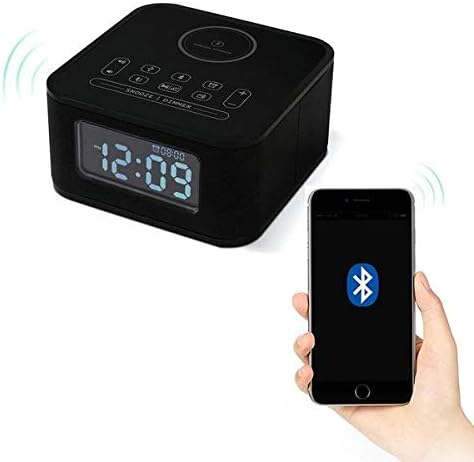
Figure 4.4: The Homtime D2qi speaker connected via Bluetooth to a smartphone.
5. Podešavanje
5.1 Priključak za napajanje
- Connect the provided power adapter to the DC input port on the back of the Homtime D2qi.
- Uključite adapter za napajanje u standardnu zidnu utičnicu.
- The display will light up, indicating the device is powered on.
5.2 Početno podešavanje vremena
Upon first power-on or after a power outage, you may need to set the time. Refer to the 'Operating Instructions' section for detailed steps on setting the clock.
6. Uputstvo za upotrebu
6.1 Bluetooth veza
- Pritisnite Bluetooth dugme on the top panel to enter Bluetooth pairing mode. The Bluetooth indicator will flash.
- Na pametnom telefonu ili audio uređaju omogućite Bluetooth i potražite dostupne uređaje.
- Select "Homtime D2qi" from the list.
- Once connected, the Bluetooth indicator will stop flashing and remain solid. You can now play audio through the speaker.
6.2 Bežično punjenje
- Place your Qi-compatible smartphone centrally on the wireless charging pad located on the top surface of the speaker.
- Ensure the phone is properly aligned with the charging coil.
- The charging indicator on your phone will show that charging has begun.
6.3 Funkcija budilnika
- Pritisnite Dugme za alarm za ulazak u način podešavanja alarma.
- Koristite +/- tasteri za podešavanje sata i minute.
- Pritisnite Dugme za alarm ponovo da biste potvrdili svaku postavku.
- Da biste aktivirali/deaktivirali alarm, pritisnite dugme Dugme za alarm briefly when not in setting mode.
- Da biste odložili alarm, pritisnite Dugme za odlaganje/zatamnjenje kada se oglasi alarm.
6.4 Radio funkcija
- Pritisnite Dugme za način rada za prebacivanje na FM radio mod.
- Pritisnite i držite Dugme za reprodukciju/pauzu to auto-scan and save available stations.
- Koristite Dugmad Prethodno/Sljedeće to navigate through saved stations.
6.5 Javljanje na poziv
Kada je povezan putem Bluetootha, zvučnik se može koristiti za hands-free pozive.
- Da biste odgovorili na dolazni poziv, pritisnite Dugme za reprodukciju/pauzu.
- Da biste prekinuli poziv, pritisnite Dugme za reprodukciju/pauzu opet.
7. Održavanje
- Uređaj čistite mekom, suhom krpom. Ne koristite abrazivna sredstva za čišćenje ili rastvarače.
- Keep the charging pad free of dust and debris to ensure efficient wireless charging.
- Uređaj čuvajte na hladnom i suhom mjestu kada se ne koristi duži period.
8. Otkrivanje problema
| Problem | Mogući uzrok | Rješenje |
|---|---|---|
| Nema struje | Adapter za napajanje nije priključen ili je utičnica neispravna. | Provjerite je li adapter za napajanje sigurno priključen u uređaj i ispravnu zidnu utičnicu. |
| Nema zvuka iz zvučnika | Bluetooth not connected; volume too low; incorrect mode. | Ensure Bluetooth is paired. Increase volume on both the speaker and your device. Check if the speaker is in the correct mode (Bluetooth/Radio). |
| Bežično punjenje ne radi | Phone not Qi-compatible; phone not aligned; phone case too thick. | Verify phone supports Qi wireless charging. Realign phone on the charging pad. Remove thick phone cases. |
| Buttons difficult to locate in the dark | Buttons are flush with the surface. | Familiarize yourself with button layout during daylight. Use the dimmer function to adjust display brightness. |
| Bluetooth disconnects automatically | Power saving feature; device out of range. | Reconnect Bluetooth manually. Keep devices within Bluetooth range (approx. 10 meters). |
9. Specifikacije
| Feature | Detalj |
|---|---|
| Brand | Homtime |
| Broj modela | D2qi |
| Boja | Crna |
| Vrsta zvučnika | Bluetooth zvučnici |
| Povezivanje | Bežični |
| Kompatibilni uređaji | Smartphones |
| Izlazna snaga | 5 - 10 W |
| Težina proizvoda | 0.5 kg |
| Dimenzije paketa | 19.6 x 18.8 x 14.8 cm |
| Hardversko sučelje | Audio/Video Port |
10. Garancija i podrška
Homtime products are manufactured to the highest quality standards. For warranty information and customer support, please refer to the warranty card included in your package or visit the official Homtime webSačuvajte račun kao dokaz o kupovini.