
Uvod
Thank you for choosing the Bluesound WM200 Universal Wall Mount. This manual provides essential information for the safe and correct installation, operation, and maintenance of your wall mount. Please read these instructions thoroughly before installation and retain them for future reference.
The WM200 wall mount is specifically designed for use with Bluesound PULSE, PULSE 2, PULSE 2i, PULSE MINI, and PULSE MINI 2i speakers, offering a secure and aesthetically pleasing rješenje za montažu.
Sigurnosne informacije
- Pročitajte sva uputstva: Before installation, carefully read and understand all instructions.
- Provjerite strukturu zida: Ensure the mounting surface can safely support the combined weight of the wall mount and your speaker. Consult a professional if unsure.
- Koristite odgovarajuće alate: Use only the recommended tools and hardware for installation.
- Sigurna instalacija: Improper installation can result in serious injury or damage to equipment. Ensure all fasteners are tightened securely.
- Čuvati izvan dohvata djece: Mali dijelovi mogu predstavljati opasnost od gušenja.
Sadržaj paketa
Molimo Vas da provjerite da li su sve komponente prisutne prije početka instalacije:
- 1 x Bluesound WM200 Universal Wall Mount
- Pribor za montažu (vijci, zidni tiplovi)
- Uputstvo za upotrebu (ovaj dokument)
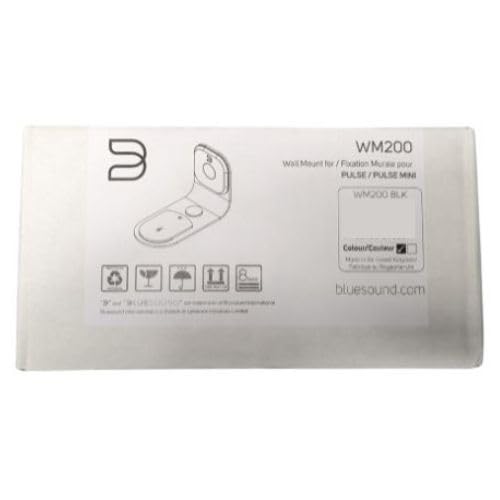
Figure 1: Bluesound WM200 Wall Mount product packaging.
Postavljanje i instalacija
Follow these steps to securely install your Bluesound WM200 Universal Wall Mount:
- Odaberite lokaciju: Select a suitable wall location, ensuring it is structurally sound and free from electrical wires or plumbing. Consider the optimal listening height and desired swivel range.
- Označite tačke bušenja: Hold the wall mount against the wall at the desired height and use a pencil to mark the drilling points for the mounting screws. Ensure the mount is level.
- Izbušite rupe: Using an appropriate drill bit for your wall type (e.g., masonry for brick, wood bit for studs), drill pilot holes at the marked locations. If drilling into drywall without a stud, insert the provided wall anchors.
- Attach Wall Mount: Align the wall mount with the drilled holes. Insert the mounting screws and tighten them securely. Do not overtighten. The mount is constructed from durable steel for reliable support.
- Ruta kablova: The WM200 features rubber mouldings designed for flexible wire management. Route your speaker's power and audio cables through these mouldings to keep them tidy and protected.
- Attach Speaker: Carefully slide your compatible Bluesound speaker onto the wall mount. Ensure it is seated firmly and securely.

Figure 2: Bluesound WM200 Wall Mount with compatible speaker (speaker sold separately).
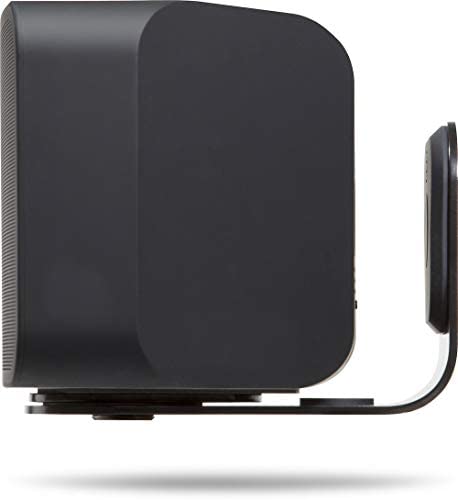
Slika 3: Bočna strana view of the WM200 mount securely holding a Bluesound speaker.
Operacija
The Bluesound WM200 Universal Wall Mount offers a 120° total swivel control. This allows you to adjust the direction of your speaker to optimize sound projection and listening experience. Gently pivot the speaker and mount assembly to achieve the desired angle.
Održavanje
To ensure the longevity and appearance of your Bluesound WM200 Wall Mount, follow these simple maintenance guidelines:
- čišćenje: Wipe the mount with a soft, dry cloth to remove dust. For stubborn marks, a slightly damp Može se koristiti krpa, nakon čega slijedi odmah sušenje. Izbjegavajte abrazivna sredstva za čišćenje ili rastvarače.
- Periodične kontrole: Periodically check all mounting screws to ensure they remain tight and secure. Do not overtighten.
Rješavanje problema
If you encounter any issues with your WM200 Wall Mount, consider the following:
- Nosač se čini labavim: Ensure all mounting screws are securely fastened to the wall and that the speaker is correctly seated on the mount. Re-check the wall structure for stability.
- Speaker not fitting: Verify that your speaker model is compatible with the WM200 mount (PULSE, PULSE 2, PULSE 2i, PULSE MINI, PULSE MINI 2i).
- Difficulty swiveling: Ensure no cables are obstructing the swivel mechanism. The swivel should operate smoothly with gentle force.
Specifikacije
| Broj modela | WM200 |
| Brand | Bluesound |
| Boja | Crna |
| Materijal | Čelik |
| Vrsta montaže | Zidni nosač |
| Dimenzije artikla (D x Š x V) | 19 x 13 x 9.5 centimetara |
| Težina artikla | 1.02 kilograma |
| Kontrola okretanja | 120° total |
| Upravljanje žicama | Integrated rubber mouldings |

Slika 4: Prample installation of the Bluesound WM200 Wall Mount in a living space.
Informacije o garanciji
Bluesound products are manufactured to the highest quality standards. This product is covered by a limited warranty against defects in materials and workmanship. The specific terms and duration of the warranty may vary by region. Please refer to the warranty card included with your product or visit the official Bluesound webza detaljne informacije o garanciji.
Podrška
For technical assistance, troubleshooting, or further inquiries regarding your Bluesound WM200 Universal Wall Mount, please visit the official Bluesound support website or contact their customer service department. You can typically find contact information and FAQs on the Bluesound webstranica: