
Uvod
This manual provides detailed instructions for the setup, operation, and maintenance of your Homtime C1mini Bedside Alarm Clock. This device features a clear display, dual USB charging ports, and user-friendly controls designed for convenience.

Slika: Front view of the Homtime C1mini alarm clock, highlighting its compact design and dual USB charging ports.
Setup
1. Priključak za napajanje
Connect the provided AC adapter to the alarm clock and plug it into a standard wall outlet. The clock display will illuminate.
For battery backup functionality, insert three AAA batteries (not included) into the battery compartment. This ensures time and alarm settings are retained during power outages, though it does not support charging in battery mode.
2. Podešavanje trenutnog vremena
- Press and hold the main rotary button on top of the clock until the time display begins to flash.
- Rotate the main button clockwise or counter-clockwise to adjust the hours.
- Press the main button again to switch to minute adjustment. Rotate the button to set the minutes.
- Press the main button one more time to confirm the time setting.
To switch between 12-hour and 24-hour display formats, locate the small button on the back of the unit and press it.
Refer to the video below for a visual guide on powering on and setting the time:
Video: Demonstrates how to power on the Homtime C1mini alarm clock and set the current time using the main rotary button.
Uputstvo za upotrebu
1. Postavljanje alarma
- Press the small alarm button located next to the main rotary button. The alarm time will appear and flash.
- Rotate the main button to adjust the alarm hours.
- Press the main button again to switch to minute adjustment. Rotate the button to set the alarm minutes.
- Press the main button one more time to confirm the alarm setting. An alarm icon will appear on the display, indicating the alarm is active.

Image: Visual steps for setting the alarm time on the Homtime C1mini alarm clock.
2. Funkcija odgode alarma
When the alarm sounds, tap the main rotary button to activate the snooze function. The alarm will pause and sound again after a short interval.
3. Podešavanje svjetline ekrana
The display has 4 brightness levels: High, Medium, Low, and Off. To adjust the brightness, tap the main rotary button repeatedly. Each tap cycles through the brightness levels.

Image: Illustrates the four adjustable brightness levels (High, Medium, Low, Off) of the Homtime C1mini display.
4. Dvostruko USB punjenje
The alarm clock is equipped with two USB charging ports (2 x 1A) on the side. Connect your devices (e.g., smartphone, tablet) to these ports for convenient charging. Built-in safeguards protect against overcharging and overheating.
5. Canceling the Alarm
To turn off the alarm for the current day, press and hold the main rotary button for approximately three seconds when the alarm is sounding or when the alarm icon is displayed. The alarm icon will disappear, indicating the alarm is deactivated for that day but will reset for the next day at the same time.
To permanently disable the alarm function, press the small alarm button until the alarm icon is no longer visible on the display.
The video below demonstrates setting the alarm, snooze, and canceling the alarm, as well as using the dual USB charging ports:
Video: Shows how to set the alarm, activate snooze, cancel the alarm, and utilize the dual USB charging feature on the Homtime C1mini alarm clock.
Održavanje
To maintain your alarm clock, wipe the exterior with a soft, dry cloth. Avoid using abrasive cleaners or solvents, as these can damage the finish. Ensure the USB ports are free from dust and debris.
Rješavanje problema
- Alarm is too loud: The alarm volume is fixed and cannot be adjusted. The alarm starts softly and gradually increases in volume.
- Display is reflective/hard to read: The clock face may be reflective in certain lighting conditions. Adjust the clock's position or utilize the 4-level brightness control to find an optimal viewpostavka.
- Clock loses time during power outage: Ensure three AAA batteries are correctly installed in the battery compartment for backup power. The clock will retain settings but will not function as a charger in battery mode.
- USB punjenje ne radi: Verify the AC adapter is securely plugged in. Ensure your device's charging cable is properly connected to both the clock's USB port and your device.
Specifikacije
| Brand | Homtime |
| Broj modela | C1mini |
| Boja | Crna |
| Display Type | LCD |
| Posebna karakteristika | Port za punjenje |
| Dimenzije proizvoda | 3.39 cm Š x 2.17 cm V |
| Izvor napajanja | AC Adapter (Battery Powered for backup) |
| Zahtjevi za bateriju | 3 AAA baterije (nisu uključene) |
| Težina artikla | 5.6 unce |
| Materijal | Plastika |
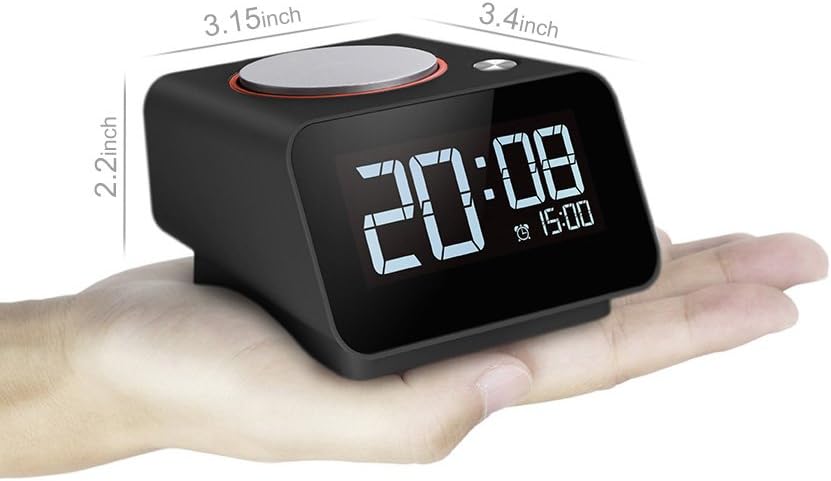
Image: Diagram showing the dimensions of the Homtime C1mini alarm clock.
Garancija i podrška
This Homtime C1mini alarm clock comes with an 18-mjesečna garancija na proizvod. The device is FCC certified, ensuring compliance with safety and quality standards.
For technical support or warranty claims, please refer to the contact information provided with your purchase or visit the official Homtime website.