
1. Proizvod je gotovview
The Huawei Band 2 is a versatile smart fitness wristband designed to enhance your daily health and fitness tracking. It features a 5ATM water-resistant design, making it suitable for various activities including swimming. Key functionalities include continuous heart rate monitoring, comprehensive activity tracking, scientific sleep analysis, and smart notifications from your paired smartphone.

Slika 1: Prednja strana view of the Huawei Band 2 Smart Fitness Wristband. The display shows time, date, step count, and battery status.

Figure 2: Diagram highlighting key features of the Huawei Band 2, including ergonomic curves, Bluetooth 4.2 connectivity, seamless comfort design, multi-sport tracking, PMOLED screen with touch key, advanced sleep tracking, heart rate monitoring, and 5ATM water resistance.
2. Vodič za postavljanje
2.1 Početno punjenje
Before first use, fully charge your Huawei Band 2. Connect the charging cradle to a USB power source and attach your band to the cradle. The band will display a charging indicator.
2.2 Uparivanje sa vašim pametnim telefonom
- Ensure your smartphone is running Android 4.4 or higher, or iOS 8.0 or higher.
- Download and install the official Huawei Wear app from your smartphone's app store.
- Open the Huawei Wear app and follow the on-screen instructions to create an account or log in.
- Omogućite Bluetooth na svom pametnom telefonu.
- In the Huawei Wear app, select 'Add Device' and choose 'Huawei Band 2'.
- Potvrdite zahtjev za uparivanje i na pametnom telefonu i na narukvici.
2.3 Podešavanje jezika
For optimal functionality and display, it is recommended to set your smartphone's language to English (United States) during the initial setup of the Huawei Band 2.
3. Rukovanje uređajem
The Huawei Band 2 features a PMOLED screen with a touch-sensitive key for navigation and interaction.
3.1 Osnovna navigacija
- Tap the Touch Key: To wake up the screen or cycle through different display modes (e.g., time, steps, heart rate).
- Press and Hold the Touch Key: To initiate specific functions, such as starting a workout or confirming a selection.
3.2 Praćenje aktivnosti
Narukvica automatski prati vaše dnevne korake, udaljenost i potrošene kalorije. Možete view these statistics directly on the band's display or in detail within the Huawei Wear app.
3.3 Multi-Sport način rada
The Huawei Band 2 supports various sports modes, including running and swimming. To start a workout:
- Cycle through the band's display until you find the desired sport mode (e.g., 'RUN' or 'SWIM').
- Press and hold the touch key to start the workout.
- The band will record workout data such as duration, heart rate, and distance.
- Press and hold the touch key again to end the workout.
3.4 Praćenje otkucaja srca
The band provides continuous, automatic heart rate monitoring. You can view your current heart rate on the band's display. Detailed heart rate data and analysis are available in the Huawei Wear app.
3.5 Scientific Sleep Tracking
The Huawei Band 2 tracks your sleep patterns, identifying light, deep, and REM sleep stagkako bi pružili uvid u kvalitet vašeg sna. View your sleep data in the Huawei Wear app.
3.6 Pametna obavještenja
Once paired with your smartphone, the band can display notifications for incoming calls, messages, and other app alerts. Ensure notification permissions are granted in the Huawei Wear app.

Figure 3: Visual representation of the Huawei Band 2's functions and report displays, including band face, run mode, swim mode, heart rate, step count, breath, alarm, message, and call notifications. Also shown are workout and daily report summaries.
4. Održavanje
4.1 Cleaning the Band
Regularly clean your Huawei Band 2 and its strap with a soft, damp krpom. Izbjegavajte upotrebu jakih hemikalija ili abrazivnih materijala. Prije punjenja provjerite jesu li kontakti za punjenje čisti i suhi.
4.2 Otpornost na vodu
The Huawei Band 2 has a 5ATM water resistance rating, meaning it can withstand pressures equivalent to a depth of 50 meters. This makes it suitable for showering, swimming in shallow water, and everyday use. However, it is not recommended for diving, high-speed water sports, or prolonged submersion in hot water.

Figure 4: The Huawei Band 2 shown with a water splash, illustrating its 5ATM water resistance capability.
4.3 Njega baterija
To prolong battery life, avoid exposing the band to extreme temperatures. Charge the device fully when the battery is low. The typical battery life is up to 504 hours (approximately 21 days) depending on usage.
5. Otkrivanje problema
- Traka se ne uključuje: Ensure the band is fully charged. Connect it to the charging cradle and a power source.
- Nije moguće upariti uređaj sa pametnim telefonom: Check that Bluetooth is enabled on your phone and the band is within range. Restart both the band and your phone. Ensure the Huawei Wear app is updated.
- Netačna očitanja otkucaja srca: Pazite da narukvica čvrsto prianja uz zglob, da nije previše zategnuta ili previše labava. Očistite senzor na poleđini narukvice.
- Obavještenja se ne prikazuju: Verify that notification permissions are enabled for the Huawei Wear app in your phone's settings. Check that the band is properly connected via Bluetooth.
- Kratko trajanje baterije: Reduce the frequency of heart rate monitoring or turn off continuous monitoring if not needed. Ensure the screen brightness is not excessively high.
If issues persist, refer to the official Huawei support webstranicu ili kontaktirajte korisničku službu za dodatnu pomoć.
6. Specifikacije
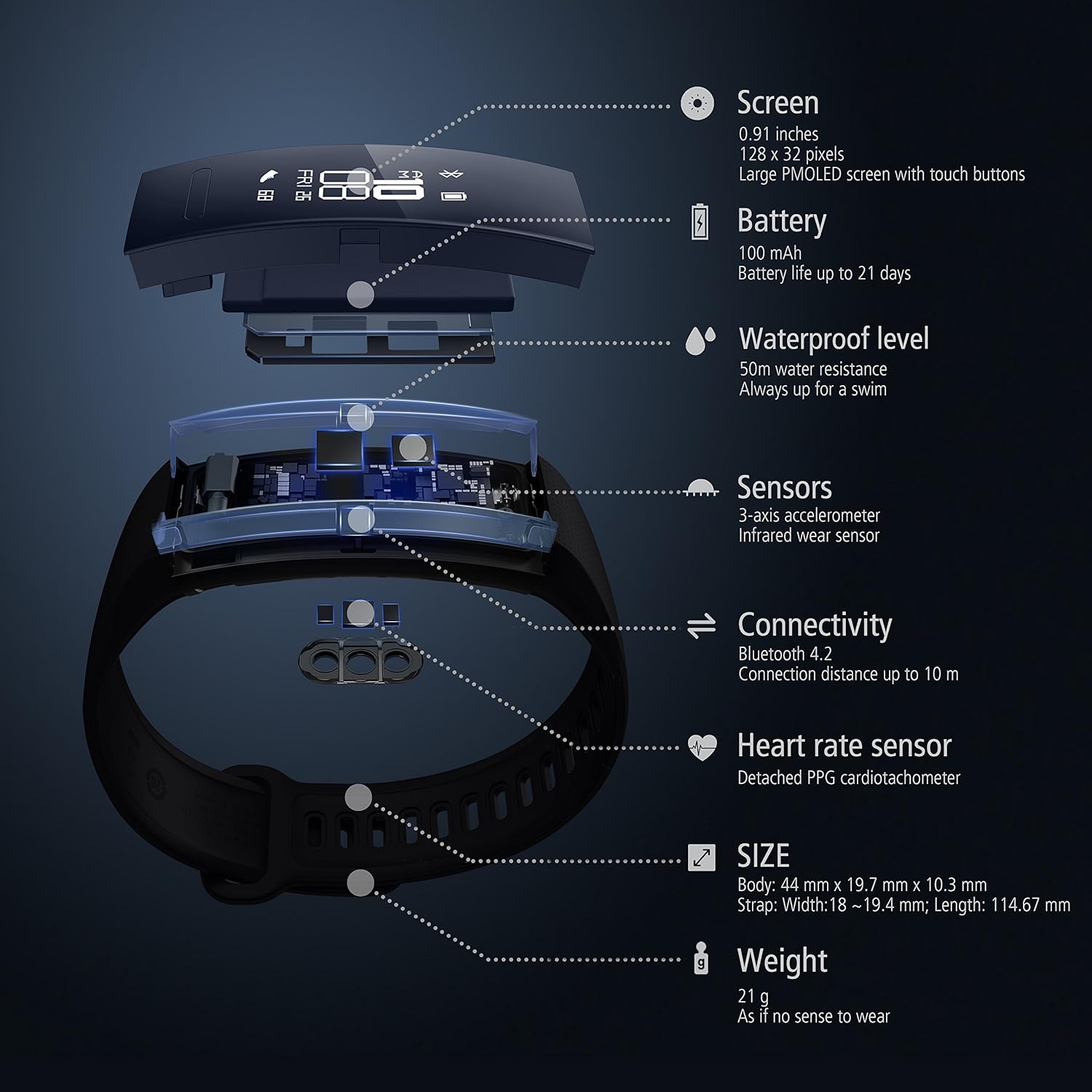
Slika 5: Eksplodirao view of the Huawei Band 2, detailing internal components and key specifications such as screen, battery, waterproof level, sensors, connectivity, heart rate sensor, size, and weight.
| Feature | Specifikacija |
|---|---|
| Broj modela | Eris-B19 |
| Ekran | 0.91 inches, 128 x 32 pixels, Large PMOLED screen with touch buttons |
| Baterija | 100 mAh litijum-jonska (uključena) |
| Trajanje baterije | Up to 504 hours (approx. 21 days) |
| Nivo vodootpornosti | 5ATM (50m water resistance) |
| Senzori | 3-axis accelerometer, Infrared wear sensor, Detached PPG cardiotachometer (Heart rate sensor) |
| Povezivanje | Bluetooth 4.2, Connection distance up to 10m |
| Kompatibilni uređaji | Android 4.4+ / iOS 8.0+ |
| Dimenzije proizvoda | Body: 44 mm x 19.7 mm x 10.3 mm; Strap: Width: 18–19.4 mm; Length: 114.67 mm |
| Težina artikla | 21 g (without strap) / 23 g (total) |
| Uključene komponente | Smart band, Charging cradle, Charging cable, Quick start guide, Warranty card |
7. Garancija i podrška
7.1 Informacije o garanciji
Your Huawei Band 2 comes with a warranty. Please refer to the included warranty card for specific terms, conditions, and duration of coverage. Retain your proof of purchase for warranty claims.
7.2 Korisnička podrška
For technical support, service, or further inquiries, please visit the official HUAWEI support website or contact their customer service department. Contact details can typically be found on the warranty card or the official HUAWEI website.