
Uvod
This manual provides instructions for the proper use and care of your Helios 77M-4 50mm F1.8 vintage lens. Designed for Sony E-mount cameras, this manual focus lens offers a classic photographic experience with its distinct optical characteristics. Please read this manual thoroughly before using the lens to ensure optimal performance and longevity.
Komponente objektiva
Familiarize yourself with the main components of your Helios 77M-4 lens.
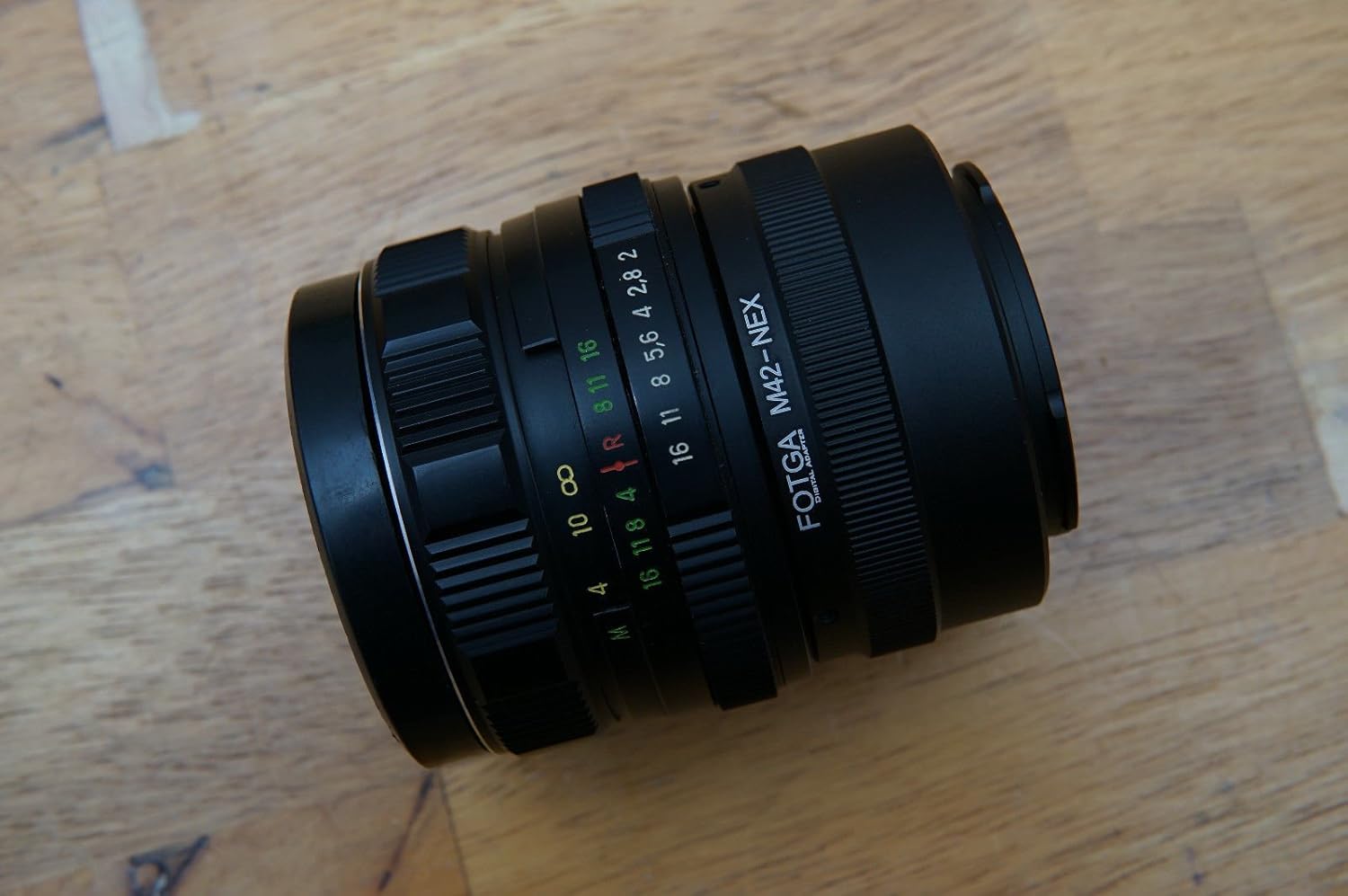
Image: The Helios 77M-4 50mm F1.8 lens, displaying its manual focus ring, aperture ring, and depth of field scale. This view highlights the robust construction and clear markings essential for manual operation.
- Prsten za fokus: Used to adjust the focus manually.
- Prsten blende: Used to set the desired aperture (f-stop).
- Skala dubine polja: Pruža indikaciju dubinske oštrine pri različitim otvorima blende.
- Montažni prsten: Povezuje objektiv sa tijelom fotoaparata.
Setup
Montiranje objektiva
- Provjerite je li vaša kamera isključena.
- Remove the rear lens cap from the Helios 77M-4 lens and the body cap from your Sony E-mount camera.
- Align the white index mark on the lens barrel with the corresponding white index mark on the camera body.
- Umetnite objektiv u nosač kamere i okrećite ga u smjeru kazaljke na satu dok ne klikne na mjesto. Nemojte silom pritiskati objektiv.
- Once mounted, remove the front lens cap.

Image: The Helios 77M-4 lens securely attached to a Sony E-mount camera body. This illustrates the correct mounting position, ready for use.
Postavke kamere
Since this is a manual lens, you will need to adjust your camera settings:
- Postavite kameru na Priručnik (M) or Prioritet otvora blende (A) način rada.
- Omogući "Release without lens" or "Shoot without lens" in your camera's menu, as the camera will not detect an electronic connection to the lens.
- Consider using "Focus Peaking" i "Magnified View" features on your camera for easier manual focusing. Refer to your camera's manual for specific instructions on these features.
Upravljanje objektivom
Podešavanje otvora blende
The aperture is controlled directly on the lens using the aperture ring. Rotate the ring to select your desired f-stop. A wider aperture (smaller f-number like F1.8) allows more light and creates a shallower depth of field, ideal for portraits. A narrower aperture (larger f-number) allows less light and creates a deeper depth of field, suitable for landscapes.
Ručno fokusiranje
To focus, rotate the focus ring on the lens barrel until your subject appears sharp in the viewfinder or on the LCD screen. Utilize your camera's focus peaking and magnification features for precise focusing, especially at wider apertures.
- Fokus Peaking: Highlights in-focus areas with a colored outline.
- Uvećano View: Zooms in on a portion of the image for critical focus assessment.
Održavanje
Čišćenje sočiva
- Use a soft, lint-free microfiber cloth specifically designed for optical surfaces to clean the front and rear elements.
- Za tvrdokorne mrlje, nanesite malu količinu sredstva za čišćenje sočiva na krpu, a ne direktno na sočivo.
- Koristite četku za puhanje kako biste uklonili čestice prašine prije brisanja kako biste spriječili ogrebotine.
- Nikada ne koristite abrazivne materijale ili jake hemikalije.
Skladištenje
- Uvijek pričvrstite prednji i zadnji poklopac objektiva kada se objektiv ne koristi.
- Čuvajte objektiv na hladnom i suhom mjestu, dalje od direktne sunčeve svjetlosti i ekstremnih temperatura.
- If storing for extended periods, consider using a dehumidifying agent to prevent fungus growth.
Rješavanje problema
| Problem | Mogući uzrok | Rješenje |
|---|---|---|
| Camera does not recognize lens / Cannot take photos | Manual lens, no electronic contacts. | Enable "Release without lens" or "Shoot without lens" in camera settings. |
| Slike su mutne | Incorrect focus or camera shake. | Ensure proper manual focus using focus peaking/magnification. Use a faster shutter speed or tripod to prevent camera shake. |
| Images are too dark/bright | Nepravilne postavke ekspozicije (blenda, brzina zatvarača, ISO). | Adjust aperture on the lens. Adjust shutter speed and ISO on the camera to achieve desired exposure. |
| Dust or smudges on images | Dirty lens elements. | Clean lens elements carefully using a blower brush and microfiber cloth. |
Specifikacije
| Feature | Detalj |
|---|---|
| Model | Helios 77M-4 |
| Focal Length | 50 mm |
| Maksimalni otvor blende | F1.8 |
| Lens Type | Standardni glavni objektiv |
| Kompatibilni nosači | Sony E-Mount (NEX, A7 series, 6500, a6300, a6000, a5100, a5000, a3000) |
| Focus Type | Manual Focus |
| Proizvođač | 77M-4 (as per product data) |
Garancija i podrška
This product is a vintage lens. Specific warranty information may vary depending on the seller and purchase conditions. Please refer to your purchase documentation for details regarding any applicable warranty.
For technical support or inquiries, please contact the retailer or the original manufacturer if contact information is available. As a vintage item, direct manufacturer support may be limited.