
Uvod
This manual provides detailed instructions for the setup, operation, and maintenance of your Intex Wi-Fi HD Camera, model IT-101. Please read this manual thoroughly before using the device to ensure proper functionality and safety.
Product Overview
The Intex Wi-Fi HD Camera IT-101 is a compact security camera designed for monitoring. It features HD video resolution, night vision capabilities, and Wi-Fi connectivity for remote access.
Ključne karakteristike:
- HD video rezolucija: Captures video at 1280x720 pixels (720p) with a frame rate of 25 frames per second.
- Wide Lens View: Features a 77-degree lens view angle for broader coverage.
- noćni vid: Equipped with Infrared LED illumination for clear night vision up to 10 meters.
- Podrška za SD karticu: Supports up to 64GB SD card for local storage.
- Bežična povezanost: Connects via Wi-Fi for remote monitoring through mobile or computer applications.
- Kompatibilnost: Supports Android and iOS operating systems.
Sadržaj paketa:
- Intex Wi-Fi HD Camera IT-101
- Adapter za napajanje (DC 5V/1A)
- Korisnički priručnik (ovaj dokument)
- Pribor za montažu (ako je uključen)
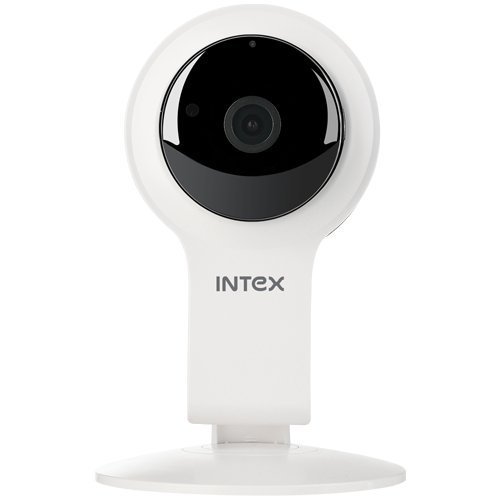
Slika 1: Prednja strana view of the Intex Wi-Fi HD Camera IT-101. This image shows the camera lens and the main body of the device.
Setup
1. Uključivanje kamere:
- Connect the provided DC 5V/1A power adapter to the camera's power input port.
- Uključite adapter za napajanje u standardnu električnu utičnicu.
- The camera will power on, and an indicator light will illuminate (refer to the camera's physical indicators for specific light behavior).
2. Installing an SD Card (Optional):
To enable local video recording, an SD card (up to 64GB) can be installed.
- Locate the SD card slot on the camera (consult the camera's physical design for exact location).
- Gently insert the SD card into the slot with the contacts facing the correct direction until it clicks into place.
- To remove, press the SD card inward until it springs out.
3. Connecting to Wi-Fi and Mobile App:
The camera requires a mobile application for initial setup and remote viewing. The specific app name is not provided in the product details, please refer to the packaging or a quick start guide for the correct app to download from your device's app store (Android/iOS).
- Download and install the designated mobile application on your smartphone or tablet.
- Open the application and create an account or log in if you already have one.
- Follow the in-app instructions to add a new device. This typically involves scanning a QR code on the camera or manually entering its device ID.
- Connect the camera to your home Wi-Fi network through the app. Ensure your Wi-Fi network is 2.4GHz, as 5GHz networks may not be supported.
- Once connected, the camera's indicator light will change (e.g., solid blue), and you should see the live feed in the app.
Uputstvo za upotrebu
Uživo View:
Access the live video feed from your camera through the mobile application. This allows real-time monitoring of the camera's view.
Snimanje:
- Ručno snimanje: Most applications offer a manual record button to start and stop video recording directly to your phone or the installed SD card.
- Planirano snimanje: Configure recording schedules within the app to automatically record at specific times.
- Snimanje otkrivanja pokreta: Enable motion detection in the app settings. The camera will automatically record when motion is detected within its field of view.
Reprodukcija:
Snimljeno footage stored on the SD card can be accessed and played back through the mobile application. Navigate to the "Playback" or "History" section within the app.
noćni vid:
The camera automatically switches to night vision mode in low-light conditions. The Infrared LED illuminates the area, allowing for clear black and white video capture up to 10 meters.
Postavke:
The mobile application provides various settings to customize your camera's operation, including:
- Video quality adjustment
- Osetljivost detekcije pokreta
- Postavke obavještenja
- Sinhronizacija vremena i datuma
- SD card management (formatting, viewing storage)
Održavanje
- čišćenje: Za čišćenje objektiva i tijela kamere koristite meku, suhu krpu. Izbjegavajte upotrebu jakih hemikalija ili abrazivnih materijala.
- Ažuriranja firmvera: Periodically check the mobile application for available firmware updates for your camera. Keeping the firmware updated ensures optimal performance and security.
- Upravljanje SD karticama: Regularly back up important recordings from your SD card. Consider formatting the SD card periodically through the app to maintain performance.
- Uslovi okoline: Ensure the camera is operated within its specified temperature and humidity ranges. The camera is not water-resistant, so avoid exposure to moisture.
Rješavanje problema
Kamera se ne uključuje:
- Provjerite je li adapter za napajanje sigurno spojen i na kameru i na ispravnu električnu utičnicu.
- Verify that the power adapter is the correct DC 5V/1A model.
Nije moguće povezati se na Wi-Fi:
- Confirm your Wi-Fi network is 2.4GHz. The camera may not support 5GHz networks.
- Provjerite je li kamera unutar dometa vašeg Wi-Fi rutera.
- Check that the Wi-Fi password entered in the app is correct.
- Restart your Wi-Fi router and the camera, then attempt to reconnect.
- If issues persist, try resetting the camera to factory defaults (refer to the camera's physical buttons or app for reset option).
Nema video feeda u aplikaciji:
- Provjerite je li kamera uključena i povezana na Wi-Fi.
- Provjerite internetsku vezu na svom mobilnom uređaju.
- Close and reopen the mobile application.
- Ensure the camera's privacy mode (if available) is not activated.
SD Card Not Recording or Recognized:
- Provjerite da li je SD kartica pravilno umetnuta.
- Verify the SD card is not full. Format it through the app if necessary (this will erase all data).
- Check if the SD card is damaged. Try a different compatible SD card.
- Confirm that recording settings (manual, scheduled, motion detection) are properly configured in the app.
Specifikacije
| Feature | Detalj |
|---|---|
| Naziv modela | IT-101 |
| Senzor slike | H42 1/4 CMOS Sensor |
| Rezolucija video snimanja | 1280x720 Pixels (720p HD) |
| Frame Rate | 25 fps |
| Objektiv View Ugao | 77 stepeni |
| Lens Type | 3.6 mm, Zoom |
| Focus Type | Auto Focus |
| Udaljenost noćnog vida | 10 meters (Infrared LED Illumination) |
| Dan/Noćni način rada | Yes (Automatic switching) |
| Tehnologija povezivanja | bežični (Wi-Fi) |
| Podrška za SD karticu | Do 64 GB |
| Video Supported Format | H.264, MP4 |
| Podržani format slike | JPEG |
| Kompatibilnost operativnog sistema | Android, iOS |
| Napajanje | DC 5V/1A |
| Bruto težina | 260g |
| Boja | Bijelo |
| Nivo vodootpornosti | Nije vodootporan |
| Stabilizacija slike | br |
Garancija i podrška
For warranty information and technical support, please refer to the documentation included with your purchase or visit the official Intex webSačuvajte dokaz o kupovini za slučaj reklamacije.
Proizvođač: Intex
Brand: Intex