
1. Uvod
This manual provides essential instructions for the proper setup, operation, and maintenance of your YI YAS.1616.INT 4K Action Camera Kit. Please read this manual thoroughly before using the product to ensure optimal performance and safety. Keep this manual for future reference.
2. Proizvod je gotovview
2.1 Sadržaj kompleta
The YI YAS.1616.INT 4K Action Camera Kit includes the following components:
- YI 4K Action Camera
- YI Monopod
- Bluetooth Remote
- Punjiva baterija
- USB kabel
- Uputstvo za upotrebu

Image 2.1: Contents of the YI 4K Action Camera Kit.
2.2 Karakteristike kamere
The YI 4K Action Camera is designed for high-quality video and photo capture, featuring:
- 4K/30fps Video Recording: Captures video at 60mbps, offering 4 times the quality of standard 1080p.
- Advanced Imaging Hardware: Equipped with an Amarelle A9SE75 chip, Sony IMX377 image sensor, and 7-layer optical glass lenses with an F2.8 large aperture for enhanced light intake.
- 2.19" LCD ekran osjetljiv na dodir: A 640 x 360 high-resolution display with Gorilla Glass Retina for easy previewing, shooting, and scratch resistance.
- Dug vijek trajanja baterije: A 1400mAh 4.4V lithium-ion battery provides up to 120 minutes of 4K/30fps video recording on a single charge.
- Efikasan sistem hlađenja: Prevents overheating during extended recording sessions.
- Povezivanje: Built-in Wi-Fi for smartphone app control and Bluetooth for remote control.
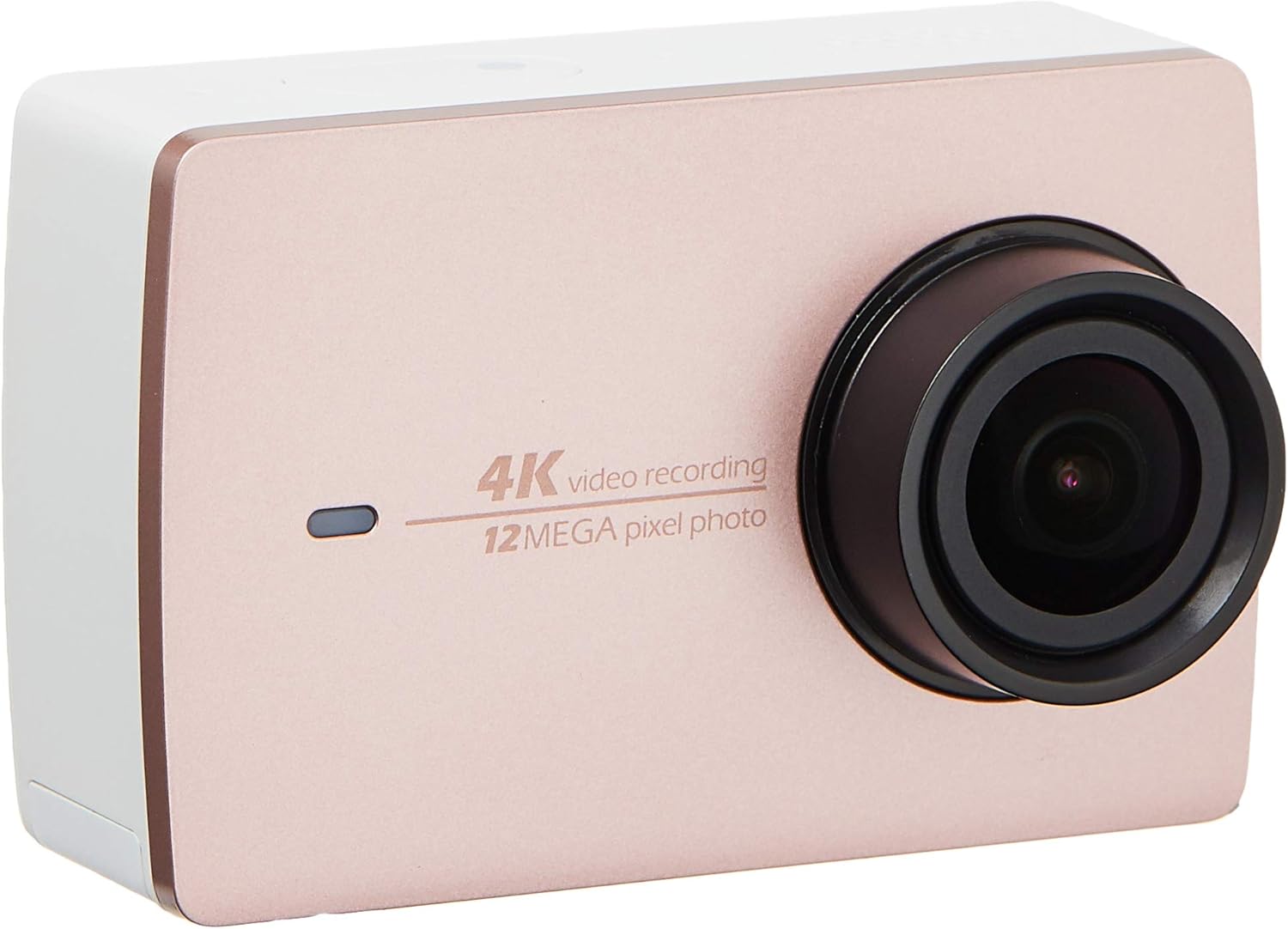
Slika 2.2: Prednja strana view of the YI 4K Action Camera.
3. Podešavanje
3.1 Ugradnja i punjenje baterije
- Pronađite odeljak za bateriju na fotoaparatu.
- Insert the 1400mAh lithium-ion battery, ensuring correct polarity.
- Čvrsto zatvorite odeljak za baterije.
- Povežite kameru na izvor napajanja pomoću priloženog USB kabla za punjenje. Indikator punjenja će zasvijetliti.
3.2 Instalacija memorijske kartice
The YI 4K Action Camera supports SDHC and SmartMedia flash memory types.
- Otvorite poklopac slota za memorijsku karticu.
- Insert a compatible memory card (not included) into the slot with the contacts facing the correct direction. Push until it clicks into place.
- Zatvorite poklopac slota za memorijsku karticu.
3.3 Uključivanje/isključivanje
- Za uključivanje: Pritisnite i držite dugme za napajanje dok se ekran ne osvijetli.
- Za isključivanje: Pritisnite i držite dugme za napajanje dok se kamera ne isključi.
3.4 Connecting the Bluetooth Remote
The included Bluetooth remote allows for convenient control of the camera.
- Uvjerite se da je kamera uključena.
- Activate Bluetooth pairing mode on the camera via the settings menu.
- Follow the remote's instructions to enter pairing mode.
- Once paired, the remote can be used to switch between video and photo modes and trigger recording/capture.

Image 3.1: The YI Monopod, included in the kit.
4. Upravljanje kamerom
4.1 Navigacija putem ekrana osjetljivog na dodir
The 2.19" LCD touchscreen provides intuitive control:
- Prevucite: Navigate through different modes (Video, Photo, Time-lapse, etc.) and settings.
- Dodirnite: Select options, adjust settings, or start/stop recording.
- Preview: View tvoj zarobljeni footage and photos directly on the screen.
4.2 Video snimanje
- Select the Video mode on the touchscreen.
- Adjust video resolution (e.g., 4K/30fps) and other settings as desired.
- Press the Shutter button or tap the record icon on the screen to start recording.
- Press the Shutter button or tap the record icon again to stop recording.
4.3 Snimanje fotografija
- Select the Photo mode on the touchscreen.
- Adjust photo settings such as resolution, exposure, and white balance.
- Press the Shutter button or tap the capture icon on the screen to take a photo.
4.4 Wi-Fi povezivost i korištenje aplikacija
The camera's built-in Wi-Fi allows connection to a smartphone app for remote control, live previewi upravljanje sadržajem.
- Download the official YI Action Camera app from your device's app store.
- Enable Wi-Fi on the camera via the settings menu.
- Connect your smartphone to the camera's Wi-Fi network (SSID and password displayed on camera screen).
- Open the YI Action Camera app to control the camera, view footage, i transfer files.
5. Održavanje
5.1 Čišćenje
- Use a soft, lint-free cloth to clean the camera body and touchscreen.
- Za objektiv koristite specijaliziranu krpu i otopinu za čišćenje objektiva. Izbjegavajte abrazivne materijale.
- Provjerite da li su svi priključci bez prašine i ostataka.
5.2 Skladištenje
- Čuvajte kameru na hladnom i suhom mjestu, dalje od direktne sunčeve svjetlosti i ekstremnih temperatura.
- Remove the battery if storing for extended periods to prevent leakage.
5.3 Ažuriranja firmvera
Periodically check the official YI website or the YI Action Camera app for available firmware updates. Keeping your camera's firmware updated ensures optimal performance and access to new features.
6. Otkrivanje problema
6.1 Uobičajeni problemi i rješenja
- Kamera se ne uključuje: Provjerite je li baterija potpuno napunjena i pravilno umetnuta.
- Snimanje se neočekivano zaustavlja: Check if the memory card has sufficient space or if it's a high-speed card suitable for 4K recording. Ensure the battery is not depleted.
- Ekran na dodir ne reaguje: Try restarting the camera. If the issue persists, ensure the screen is clean and dry.
- Bluetooth daljinski upravljač se ne povezuje: Ensure both the camera and remote are in pairing mode and within range. Check the remote's battery.
- Problemi sa Wi-Fi vezom: Verify the camera's Wi-Fi is enabled and your smartphone is connected to the correct network. Try restarting both devices.
For further assistance, refer to the official YI support resources.
7. Specifikacije
| Proizvođač | YI |
| Broj modela | 90010 |
| Dimenzije proizvoda | 6.6 x 3 x 4.3 cm |
| Težina | 96.39 g |
| Tehnologija foto senzora | CMOS |
| Rezolucija video snimanja | 4K |
| Maksimalna žižna daljina | 1 |
| Maksimalni otvor blende | 2.8 milimetara |
| Vrsta Flash memorije | SDHC, SmartMedia |
| Format video snimanja | MP4 |
| Podržani audio format | AAC, MP3 |
| Veličina ekrana | 2.19 inča |
| Tehnologija povezivanja | Wi-Fi |

Image 7.1: YI 4K Action Camera with monopod, illustrating approximate dimensions.
8. Garancija i podrška
8.1 Informacije o garanciji
Ovaj proizvod dolazi sa a 1 godina lokalne (Singapur) garancijeMolimo sačuvajte dokaz o kupovini za potrebe reklamacije. Garancija pokriva proizvodne nedostatke u normalnim uslovima upotrebe.
8.2 Korisnička podrška
For technical support, service, or warranty inquiries, please visit the official YI Technology website or contact their authorized service centers in Singapore. Contact information can typically be found on the product packaging or the official website.