
1. Uvod
The GAMDIAS Hermes GKB3000 is a mechanical gaming keyboard designed for enhanced durability and performance. It features GAMDIAS Certified Blue Switches with a 50 million actuation lifecycle, a 7-color spectrum backlight with 14 lighting effects, and various functional keys for an optimized gaming and typing experience. This manual provides instructions for setting up, operating, and maintaining your keyboard.
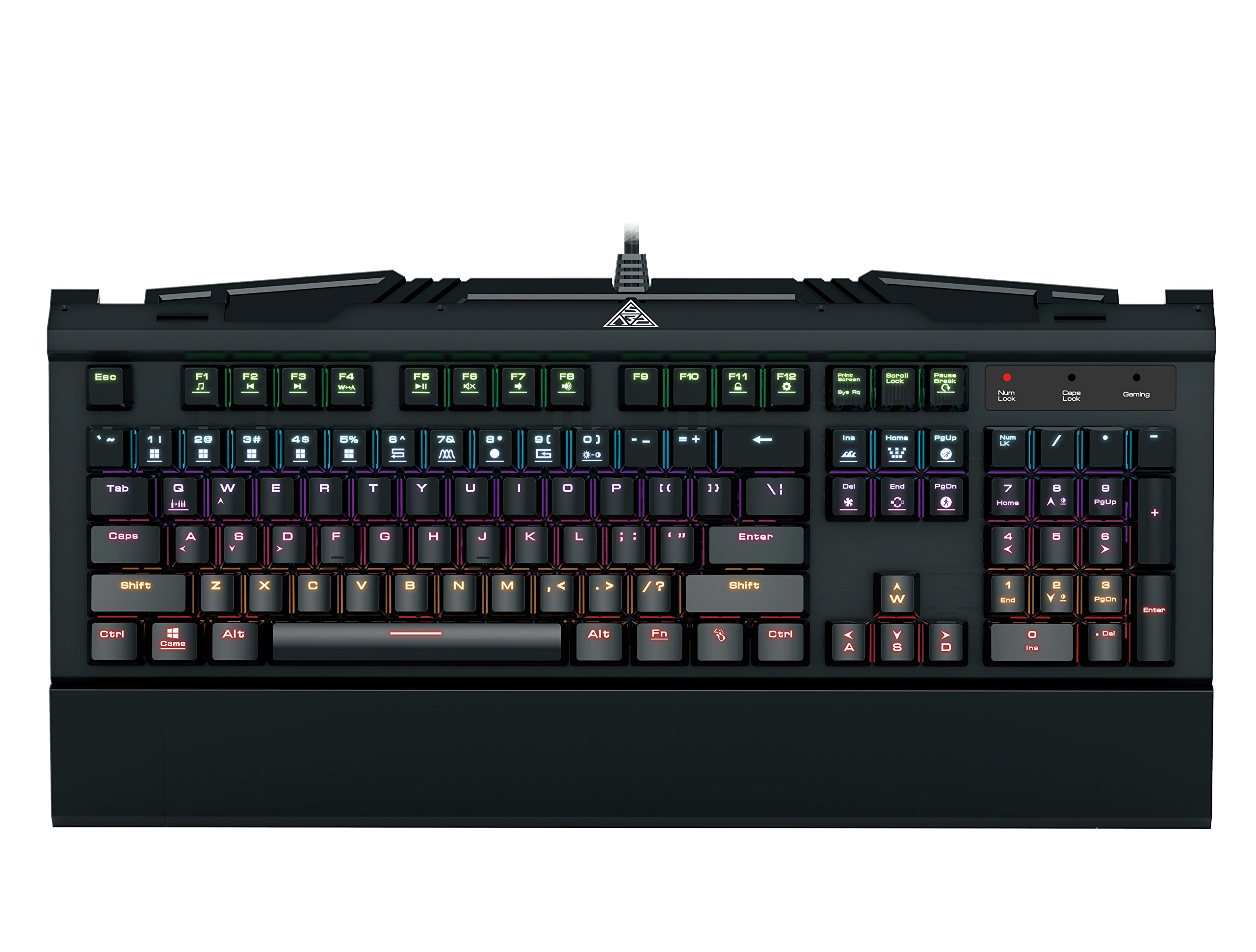
Image 1.1: The GAMDIAS Hermes GKB3000 Mechanical Gaming Keyboard. This image displays the full keyboard with its key layout and design, highlighting its compact yet robust build.
2. Sadržaj paketa
Molimo Vas da prilikom raspakivanja provjerite sadržaj paketa kako biste bili sigurni da su svi artikli prisutni i neoštećeni.
- GAMDIAS Hermes GKB3000 Mechanical Gaming Keyboard
- Korisnički priručnik (ovaj dokument)
3. Podešavanje
Follow these steps to set up your GAMDIAS Hermes GKB3000 keyboard:
- Raspakujte tastaturu: Pažljivo izvadite tastaturu iz ambalaže.
- Povežite se na računar: Uključite USB-A konektor kabla tastature u dostupan USB port na računaru.
- Instalacija drajvera: The keyboard is plug-and-play. Your operating system (e.g., Windows) will automatically detect and install the necessary drivers. No additional software installation is typically required for basic functionality.
- plasman: Place the keyboard on a stable, flat surface for comfortable use.
4. Uputstvo za upotrebu
4.1. Svjetlosni efekti
The Hermes GKB3000 features a 7-color spectrum backlight with 14 sets of lighting effects. These include 9 preset effects and 5 customizable patterns.
- Efekti prebacivanja: Use the dedicated function keys (often combined with the Fn key) to cycle through the preset lighting effects. Refer to the keyboard's keycap legends for specific combinations.
- Prilagođavanje efekata: The keyboard supports 5 customizable lighting patterns. Instructions for programming these patterns are typically found in the full software suite available for download from the GAMDIAS website, if applicable.
- Podešavanje svjetline: Adjust backlight brightness using designated function key combinations.
4.2. Multimedia Control Keys
Access multimedia functions quickly using the dedicated multimedia control keys, often activated by holding the Fn key in combination with the F-keys (F1-F12).
- Kontrola jačine zvuka: Pojačajte, smanjite ili isključite zvuk.
- Reprodukcija medija: Reprodukcija/pauza, zaustavljanje, prethodna pjesma, sljedeća pjesma.
- Ostale funkcije: May include opening default browser, email client, or calculator.
4.3. Special Gaming Functions
- WASD-Arrow Key Swap: This feature allows you to swap the functionality of the WASD keys with the arrow keys. This is useful for certain games or user preferences. Activate this function using a specific Fn key combination (e.g., Fn + W).
- Consecutive Attack Mode: This mode enhances rapid key input for gaming. Refer to the keyboard's specific documentation or GAMDIAS software for activation and configuration details.
- Zaključavanje tastature: Temporarily disable the keyboard input to prevent accidental presses. Activate using a Fn kombinacija tastera.
- Windows Key Disable: Prevent accidental presses of the Windows key during gaming, which can minimize your game. Activate using a Fn key combination (e.g., Fn + Win key).
- N-Key Rollover: The GKB3000 supports N-key rollover, meaning multiple keys can be pressed simultaneously without ghosting or missed inputs. This ensures accurate and responsive commands during intense gaming sessions.
5. Održavanje
Pravilno održavanje osigurava dugotrajnost i optimalne performanse vaše tastature.
- čišćenje:
- Prije čišćenja isključite tastaturu iz računara.
- Koristite meku krpu koja ne ostavlja dlačiceampvodom ili blagim rastvorom za čišćenje da biste obrisali površinu.
- Za prašinu i nečistoće između tipki koristite komprimirani zrak.
- Izbjegavajte upotrebu jakih hemikalija, abrazivnih sredstava za čišćenje ili rastvarača.
- Skladištenje: Tastaturu čuvajte na hladnom i suhom mjestu, dalje od direktne sunčeve svjetlosti i ekstremnih temperatura kada se ne koristi duži period.
- Rukovanje: Avoid dropping the keyboard or exposing it to excessive force, as this can damage the mechanical switches or internal components.
6. Otkrivanje problema
If you encounter issues with your GAMDIAS Hermes GKB3000 keyboard, refer to the following common solutions:
| Problem | Moguće rješenje |
|---|---|
| Tastatura ne reaguje. |
|
| Pozadinsko osvjetljenje ne radi ili je prigušeno. |
|
| Određeni tasteri ne rade. |
|
| WASD keys are acting as arrow keys. |
|
If the problem persists after trying these solutions, please contact GAMDIAS customer support for further assistance.
7. Specifikacije
The following are the technical specifications for the GAMDIAS Hermes GKB3000 Mechanical Gaming Keyboard:
| Feature | Detalj |
|---|---|
| Brand | GAMDIAS |
| Broj modela | GKB3000 |
| Tip prekidača | GAMDIAS Certified Mechanical Blue Switches |
| Actuation Lifecycle | 50 miliona pritisaka na tastere |
| Pozadinsko osvetljenje | 7-Color Spectrum, 14 Lighting Effects (9 preset, 5 customizable) |
| Anti-Ghosting | N-Key Rollover |
| Povezivanje | USB-A |
| Operativni sistem | Windows |
| Težina artikla | 2.42 funte (otprilike 1.1 kg) |
| Dimenzije proizvoda (DxŠxV) | 18.8 x 10.5 x 2 inča (približno 47.75 x 26.67 x 5.08 cm) |
| Materijal | Plastic with Elegant Metal Plate Design |
8. Garancija i podrška
GAMDIAS products are manufactured to the highest quality standards. For information regarding warranty coverage, terms, and conditions, please refer to the warranty card included with your product or visit the official GAMDIAS website.
For technical support, troubleshooting assistance, or any product-related inquiries, please contact GAMDIAS customer support through their official webweb-mjesto ili kontakt informacije navedene u pakovanju vašeg proizvoda.
Službenik GAMDIAS-a Webstranica: www.gamdias.com