
WASABI MANGO UHD430 SE
Wasabi Mango UHD430 4K monitor - uputstvo za upotrebu
Model: UHD430 SE
Uvod
The Wasabi Mango UHD430 Real 4K HDMI 2.0 Monitor is a high-performance display featuring a 43-inch LG AH-IPS panel, delivering stunning 3840 x 2160 UHD 4K resolution. Designed for clarity and vibrant colors, this monitor supports 10-bit color depth and offers wide viewing angles.
Ključne karakteristike uključuju:
- 43-inch LG AH-IPS LED Backlit Panel for superior image quality.
- UHD 4K (3840 x 2160) resolution for incredibly detailed visuals.
- 1.06 billion colors (10-bit) for rich and accurate color reproduction.
- Multiple connectivity options: HDMI 2.0 (x2), HDMI 1.4a (x2), DisplayPort 1.2 (x1), D-Sub, USB 3.0 Hub.
- 60Hz refresh rate via DisplayPort 1.2 and HDMI 2.0 for smooth motion.
- Built-in 10W + 10W speakers for integrated audio.

Slika: Front view of the Wasabi Mango UHD430 4K monitor, showcasing its sleek design and a remote control for operation.
Sadržaj paketa
Molimo označite kućicu za sljedeće stavke:
- Wasabi Mango UHD430 Monitor
- DisplayPort kabel
- HDMI kabl
- Remote Control (Note: Text on remote may be in Korean)
- Power Cable (110~240V adapter + US plug)
- USB hub kabl
- Screws for stand
- Optički audio kabel
- Uputstvo za upotrebu
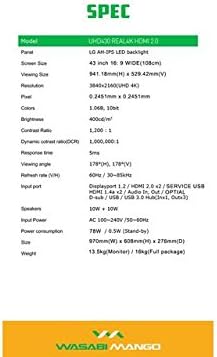
Image: A visual representation of the monitor's dimensions and a list of all accessories included in the package, such as various cables, remote control, and stand screws.
Setup
1. Sastavljanje postolja
- Pažljivo postavite monitor licem prema dolje na meku, čistu površinu kako biste spriječili ogrebotine.
- Attach the stand base to the monitor using the provided screws. Ensure it is securely fastened.
2. Spajanje na izvor napajanja
- Connect the power cable to the monitor's power input port.
- Uključite drugi kraj kabla za napajanje u uzemljenu električnu utičnicu.
3. Povezivanje s izvornim uređajem
The monitor supports various input types. Choose the appropriate cable for your device:
- DisplayPort 1.2: For optimal 4K @ 60Hz performance, use the included DisplayPort cable. Connect one end to the monitor's DisplayPort input and the other to your computer's DisplayPort output.
- HDMI2.0: For 4K @ 60Hz, use an HDMI 2.0 cable. Connect to one of the HDMI 2.0 ports on the monitor.
- HDMI 1.4a: Supports 4K @ 30Hz. Connect to one of the HDMI 1.4a ports.
- D-Sub: For analog connections.
- USB 3.0 čvorište: Connect the USB Hub cable from your computer to the monitor's USB 3.0 input to enable the monitor's USB ports.
Note: Using a longer (over 1.5m) or low-quality DisplayPort/HDMI cable may limit the refresh rate to 30Hz at 4K resolution.
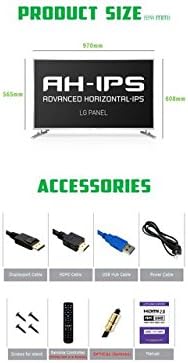
Image: The back panel of the monitor, illustrating the arrangement of power input, DisplayPort, HDMI, D-Sub, and USB ports for connection.
Rukovanje monitorom
Uključivanje/isključivanje
- Press the power button on the monitor or the remote control to turn the monitor on or off.
Odabir ulaza
- Use the "Input" button on the remote control to cycle through available input sources (DisplayPort, HDMI1, HDMI2, HDMI3, HDMI4, D-Sub).
On-Screen Display (OSD) meni
The OSD menu allows you to adjust various display settings. Use the remote control to navigate:
- Press the "Menu" button to open the OSD.
- Use the arrow keys (Up/Down/Left/Right) to navigate through menu options.
- Press "OK" or "Enter" to select an option or confirm a setting.
- Press "Exit" or "Menu" again to close the OSD.
Uobičajene postavke OSD-a uključuju:
- Postavke slike: Brightness, Contrast, Color Temperature, Sharpness.
- Audio postavke: Jačina zvuka, Isključivanje zvuka.
- Odaberite ulaz: Manual input source selection.
- OSD postavke: OSD Language, OSD Transparency, OSD Timeout.
- Ostale postavke: Aspect Ratio, ECO Mode.

Image: The monitor displaying content, with the remote control visible, indicating its use for navigating the monitor's functions and settings.
Održavanje
Čišćenje monitora
- Uvijek isključite monitor iz električne utičnice prije čišćenja.
- Koristite meku krpu koja ne ostavlja dlačiceampvodom ili neabrazivnim sredstvom za čišćenje ekrana.
- Ne prskajte sredstvo za čišćenje direktno na ekran.
- Avoid using benzene, thinner, ammonia, or abrasive cleaners, as these can damage the display surface.
- Pažljivo obrišite ekran kako biste uklonili prašinu i mrlje.
Opća njega
- Držite monitor dalje od direktne sunčeve svjetlosti, izvora toplote i prekomjerne prašine.
- Osigurajte odgovarajuću ventilaciju oko monitora kako biste spriječili pregrijavanje.
- Ne stavljajte teške predmete na monitor ili njegove kablove.
- Izbjegavajte ispuštanje ili izlaganje monitora jakim udarcima.
Rješavanje problema
| Problem | Mogući uzrok | Rješenje |
|---|---|---|
| Nema snage | Kabl za napajanje nije priključen; utičnica ne radi. | Provjerite je li kabel za napajanje sigurno spojen na monitor i utičnicu. Testirajte utičnicu s drugim uređajem. |
| Nema signala / Prazan ekran | Odabran je pogrešan ulazni izvor; Video kabel je labav ili neispravan; Izvorni uređaj nije uključen. | Press "Input" button on remote to select correct source. Check video cable connections. Ensure source device is on and outputting video. |
| Slika je iskrivljena ili mutna | Incorrect resolution setting; Faulty video cable; Graphics card driver issue. | Set display resolution to 3840x2160. Try a different video cable. Update graphics card drivers. |
| Nema zvuka | Volume too low or muted; Audio cable not connected (if using external speakers); Incorrect audio output selected on source device. | Increase volume or unmute. Ensure audio is routed correctly from source device to monitor. |
| Daljinski upravljač ne radi | Batteries are dead or incorrectly inserted; Obstruction between remote and monitor. | Replace batteries. Ensure clear line of sight to the monitor's IR receiver. |
Specifikacije
| Feature | Detalj |
|---|---|
| Naziv modela | UHD430 Real 4K HDMI 2.0 |
| Tip panela | LG AH-IPS LED Backlight |
| Veličina ekrana | 43 inches (109.2 cm), 16:9 Wide |
| Rezolucija | 3840 x 2160 UHD 4K |
| Boje | 1.06 Billion (10-bit) |
| Kontrast Ratio | 1200:1 |
| Dinamički omjer kontrasta | 1,000,000:1 |
| Osvetljenost | 400 cd/m² |
| Vrijeme odgovora | 5 ms (G do G) |
| Viewing Angle | 178 stepeni horizontalno, 178 stepeni vertikalno |
| Refresh Rate | 60 Hz (DisplayPort 1.2 & HDMI 2.0), 30 Hz (HDMI 1.4a) |
| Ulazni portovi | DisplayPort 1.2 x1, HDMI 2.0 x2, HDMI 1.4a x2, D-Sub x1, USB 3.0 Hub (In x1, Out x3) |
| Audio | 10W + 10W Speakers |
| Power Input | AC 100-240V / 50-60Hz |
| Potrošnja energije | 78W (Operating) / 0.5W (Stand-by) |
| Dimenzije (Š x V x D) | 970 mm x 608 mm x 276 mm (sa postoljem) |
| Težina | 13.5 kg (Monitor) / 18 kg (Full package) |
Image: A graphic detailing the technical specifications of the UHD430 monitor, such as screen size, resolution, and refresh rate.
Garancija i podrška
The Wasabi Mango UHD430 monitor comes with a manufacturer's warranty. Please refer to the warranty card included in your package for specific terms and conditions.
Defective Pixel Policy: For the UHD430 SE model, 0-15 defective pixels (including dead/stuck/sub pixels) are permitted under the warranty policy.
For technical support or service inquiries, please contact your retailer or the official Wasabi Mango support channels. Keep your purchase receipt and product serial number handy for faster service.
Ask a question about this manual
Ask about setup, troubleshooting, compatibility, parts, safety, or missing instructions. Manuals+ will review the question and use this page’s manual context to help answer it.