
Coby CBC-52-WHT
Coby Retro LCD Alarm Clock
Model: CBC-52-WHT
Uvod
Thank you for choosing the Coby Retro LCD Alarm Clock, model CBC-52-WHT. This user manual provides essential information for setting up, operating, and maintaining your new alarm clock. Designed for clear and precise visibility, this clock features a sleek 3.5" LCD screen that displays time, date, and indoor temperature.
Ključne karakteristike:
- Perpetual Calendar Display: Always know the current date.
- On-The-Hour Chime: Optional audible chime for every hour.
- LCD Time and Temperature Display: Clear digital readout of time and indoor temperature.
- Alarm & 10 Minute Snooze Function: Reliable alarm with a convenient snooze option.
- Na baterije: Portable design, requires 2 AAA batteries (not included).
Sadržaj paketa
Molimo Vas da pažljivo provjerite paket kako biste bili sigurni da su svi artikli prisutni i u dobrom stanju.
- 1 x Coby Retro LCD Alarm Clock (CBC-52-WHT)
- 1 x Korisnički priručnik (ovaj dokument)
Note: 2 AAA batteries are required for operation and are not included in the package.
Product Overview i kontrole

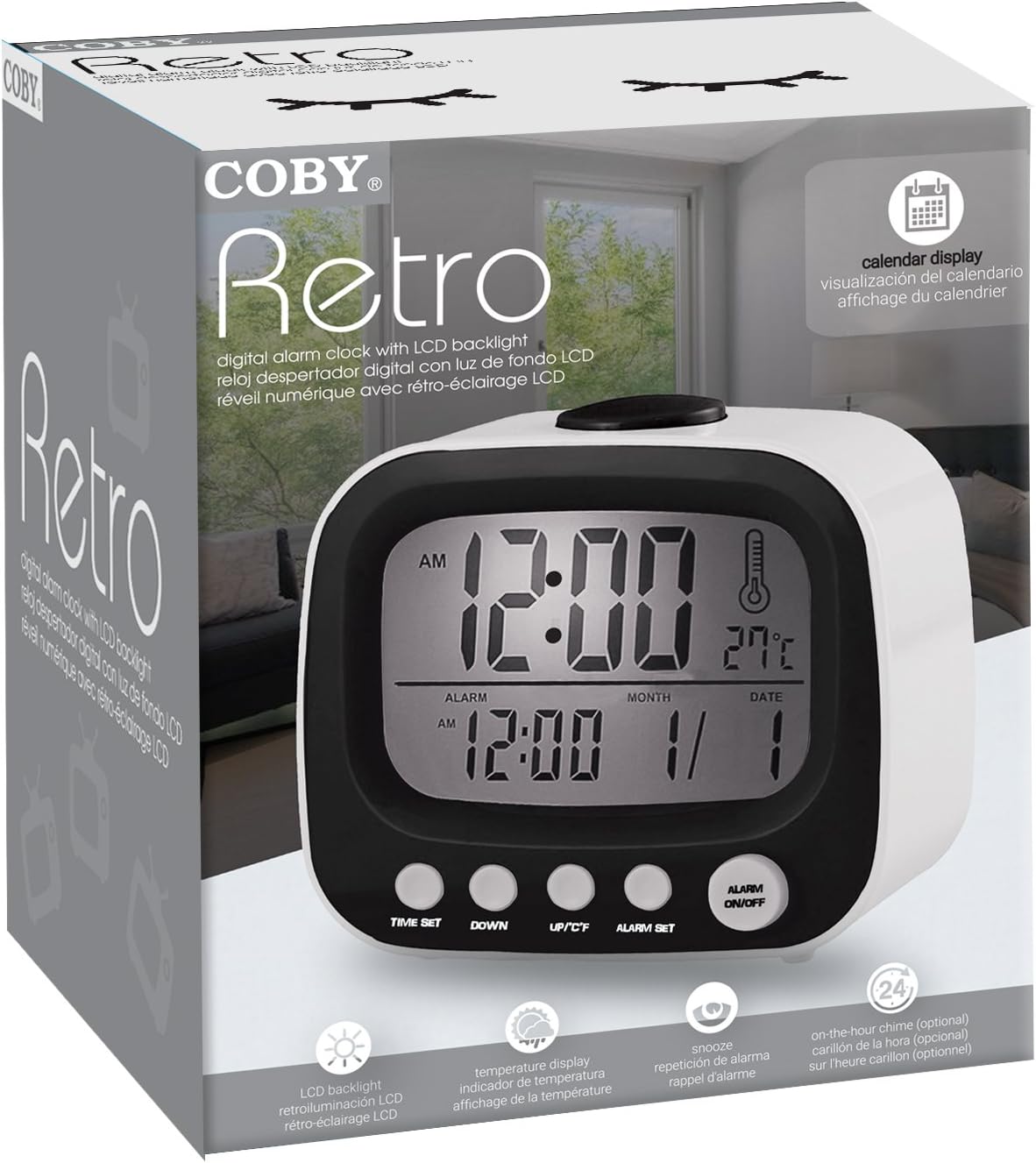
Slika 1: Front view of the Coby Retro LCD Alarm Clock, highlighting the digital display and control buttons.
Elementi prikaza:
- Prikaz vremena: Shows current time (AM/PM indicator).
- Prikaz vremena alarma: Prikazuje postavljeno vrijeme alarma.
- Month/Date Display: Prikazuje trenutni mjesec i dan.
- Prikaz temperature: Shows indoor temperature in Celsius or Fahrenheit.
- Ikona alarma: Indicates when the alarm is active.
- Chime Icon: Indicates when the hourly chime is active.
Control Buttons (Front Panel):
- POSTAVLJENO VRIJEME: Used to enter time/date setting mode.
- DOLJE: Decreases values during setting, or navigates options.
- UP/°C/°F: Increases values during setting, navigates options, or switches temperature unit.
- ALARM POSTAVLJEN: Koristi se za ulazak u režim podešavanja alarma.
- ALARM UKLJUČEN/ISKLJUČEN: Uključuje ili isključuje funkciju alarma.
Gornje dugme:
- SNOOZE / SVJETLO: Activates snooze during an alarm, or temporarily illuminates the display backlight.
Setup
1. Instalacija baterije
- Pronađite poklopac pretinca za baterije na stražnjoj strani budilnika.
- Pomaknite poklopac prema dolje da biste ga otvorili.
- Insert two (2) new AAA batteries, ensuring the correct polarity (+ and -) as indicated inside the compartment.
- Vratite poklopac pretinca za baterije tako što ćete ga gurnuti nazad na mjesto dok ne klikne.
Note: The clock will power on automatically once batteries are inserted. The display may show default values or "12:00 AM".
Uputstvo za upotrebu
1. Podešavanje vremena i datuma
- Pritisnite i držite TIME SET dugme otprilike 3 sekunde dok cifre sati ne počnu treptati.
- Koristite UP/°C/°F or DOLJE dugmad za podešavanje sata. Obratite pažnju na indikator AM/PM.
- Pritisnite TIME SET ponovo da biste prešli na podešavanje minuta. Koristite UP/°C/°F or DOLJE za podešavanje minuta.
- Pritisnite TIME SET again to move to the year setting. Adjust with UP/°C/°F or DOLJE.
- Pritisnite TIME SET again to move to the month setting. Adjust with UP/°C/°F or DOLJE.
- Pritisnite TIME SET again to move to the date setting. Adjust with UP/°C/°F or DOLJE.
- Pritisnite TIME SET one last time to exit the setting mode. The display will stop flashing.
2. Postavljanje alarma
- Pritisnite i držite ALARM SET button for approximately 3 seconds until the alarm hour digits begin to flash.
- Koristite UP/°C/°F or DOLJE buttons to adjust the alarm hour. Observe the AM/PM indicator for the alarm.
- Pritisnite ALARM SET again to move to the alarm minute setting. Use UP/°C/°F or DOLJE za podešavanje minuta alarma.
- Pritisnite ALARM SET one last time to exit the alarm setting mode. The alarm time will stop flashing.
3. Aktiviranje/Deaktiviranje alarma
- Da uključite alarm ON: Pritisnite ALARM UKLJUČEN / ISKLJUČEN button once. An alarm icon (bell symbol) will appear on the display, indicating the alarm is active.
- Da uključite alarm OFF: Pritisnite ALARM UKLJUČEN / ISKLJUČEN button again. The alarm icon will disappear from the display.
4. Funkcija odgode alarma
- Kada se oglasi alarm, pritisnite veliko dugme SNOOZE / LIGHT dugme na vrhu sata. Alarm će se privremeno zaustaviti i ponovo oglasiti nakon otprilike 10 minuta.
- To cancel the snooze and turn off the alarm completely, press any other button on the front panel (e.g., ALARM UKLJUČEN / ISKLJUČEN).
5. Pozadinsko osvetljenje ekrana
Slika 2: The Coby Retro LCD Alarm Clock with its backlight activated, providing visibility in low-light conditions.
- To temporarily illuminate the display, press the large SNOOZE / LIGHT button on top of the clock. The backlight will stay on for a few seconds.
6. Promjena temperaturne jedinice (°C/°F)
- U režimu normalnog prikaza vremena, pritisnite UP/°C/°F button once to toggle between Celsius (°C) and Fahrenheit (°F) temperature readings.
7. On-The-Hour Chime
This model features an optional on-the-hour chime. The method to activate/deactivate this feature is typically integrated with the time setting or a dedicated button. If a chime icon is visible on the display, it indicates the chime is active. Consult the quick start guide if provided, or experiment with pressing the UP/°C/°F or DOLJE buttons in normal mode to see if a chime icon appears/disappears.
Održavanje
čišćenje:
- Obrišite površinu sata mekom, suhom krpom.
- Ne koristite abrazivna sredstva za čišćenje, voskove ili rastvarače jer mogu oštetiti završnu obradu.
- Avoid exposing the clock to excessive moisture or submerging it in water.
Zamjena baterije:
- When the display becomes dim or the clock functions erratically, it's time to replace the batteries.
- Follow the "Battery Installation" steps in the Setup section to replace the two AAA batteries.
- Always use new batteries of the same type.
- Stare baterije odlažite odgovorno u skladu sa lokalnim propisima.
Rješavanje problema
| Problem | Mogući uzrok | Rješenje |
|---|---|---|
| Ekran je prazan ili taman. | Baterije su prazne ili umetnute pogrešno. | Zamijenite baterije novima, vodeći računa o ispravnom polaritetu. |
| Alarm se ne oglašava. | Alarm function is not activated, or alarm time is incorrect. | Ensure the alarm icon is visible on the display. Re-check alarm time setting. |
| Vrijeme/datum je netačan. | Time/Date was not set correctly or batteries were removed. | Follow the "Setting the Time and Date" instructions to reset. |
| Očitavanje temperature izgleda netačno. | Sat se postavlja blizu izvora toplote ili ventilacije. | Premjestite sat na mjesto sa stabilnom temperaturom okoline. |
Specifikacije
| Brand: | Coby |
| Broj modela: | CBC-52-WHT |
| Boja: | Bijelo |
| Vrsta prikaza: | Digitalni LCD |
| Izvor napajanja: | 2 x AAA baterije (nisu uključene) |
| Dimenzije proizvoda: | 20.32 x 7.62 x 10.16 cm (8 x 3 x 4 inča) |
| Težina artikla: | 249.47 g (0.55 lbs) |
| Posebne karakteristike: | Alarm, Calendar Display, Snooze, Temperature Display, On-The-Hour Chime |
| Proizvođač: | Summit Electronics, SAD |
Garancija i podrška
Coby products are designed for reliability and performance. For information regarding warranty coverage, technical support, or service inquiries, please refer to the warranty card included with your purchase or visit the official Coby webMolimo sačuvajte dokaz o kupovini za potrebe reklamacije.
For further assistance, you may contact Coby customer support through their official channels. Always provide your product model number (CBC-52-WHT) when seeking support.
Ask a question about this manual
Ask about setup, troubleshooting, compatibility, parts, safety, or missing instructions. Manuals+ will review the question and use this page’s manual context to help answer it.