
1. Uvod
Hvala na kupoviniasing the COBY DTV-700 Digital to Analog TV Converter. This device allows you to receive digital broadcast television signals and convert them for display on older analog televisions. It also functions as a multimedia player, supporting various audio, video, and image formats via its USB port, and offers recording capabilities. Please read this manual thoroughly before operating the device to ensure proper use and to maximize your viewing iskustvo.
2. Sadržaj paketa
Molimo označite kućicu za sljedeće stavke:
- COBY DTV-700 Digital to Analog TV Converter
- Daljinski upravljač
- AC/DC adapter za napajanje
- AV kabel (RCA)
- Korisnički priručnik (ovaj dokument)
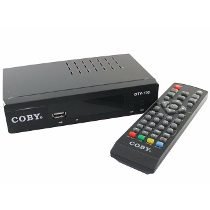
Image 2.1: The COBY DTV-700 Digital to Analog TV Converter. This image shows the compact design of the converter unit, typically black with various ports and indicators.
3. Sigurnosne informacije
Da biste osigurali siguran rad i spriječili oštećenja, molimo vas da se pridržavate sljedećih mjera opreza:
- Ne izlažite uređaj kiši, vlazi ili ekstremnim temperaturama.
- Ne otvarajte casing; sve servisne radove prepustite kvalifikovanom osoblju.
- Osigurajte odgovarajuću ventilaciju oko jedinice kako biste spriječili pregrijavanje.
- Koristite samo isporučeni adapter za napajanje.
- Držite uređaj dalje od direktne sunčeve svjetlosti, izvora toplote i jakih magnetnih polja.
- Odgovorno odložite baterije i elektronički otpad u skladu s lokalnim propisima.
4. Proizvod je gotovview
4.1 Prednja ploča
Prednja ploča obično uključuje:
- Indikator napajanja: Svijetli kada je jedinica uključena.
- Dugmad za gore/dolje kanala: For changing channels.
- Dugme menija: Pristup glavnom meniju.
- USB port: For connecting USB storage devices for media playback and recording.
4.2 Zadnja ploča
Zadnja ploča sadrži sve potrebne priključke:
- MRAV U: Connects to your antenna for receiving digital signals.
- HDMI IZLAZ: Connects to an HDMI-compatible TV for high-definition output.
- AV OUT (RCA): Connects to older analog TVs using composite video (yellow) and stereo audio (red/white) cables.
- KOAKSIJALNI IZLAZ: Digital audio output (if available).
- DC IN: Connects to the provided AC/DC power adapter.
5. Podešavanje
5.1 Connecting the Converter
- Spojite antenu: Povežite svoju digitalnu antenu na ANT IN port on the rear of the DTV-700.
- Povežite se s TV-om:
- For Analog TVs: Use the supplied AV cable. Connect the yellow plug to the video input of your TV, and the red/white plugs to the corresponding audio inputs. Connect the other end to the AV OUT ports on the DTV-700.
- For Digital/HDTVs: Use an HDMI cable (not included). Connect one end to the HDMI OUT port on the DTV-700 and the other end to an available HDMI input on your TV.
- Priključite napajanje: Plug the AC/DC power adapter into the DC IN port on the DTV-700, then plug the adapter into a wall outlet.
5.2 Početno podešavanje i skeniranje kanala
- Turn on your TV and select the correct input source (e.g., AV1, HDMI1) that corresponds to your connection.
- Power on the DTV-700 using the remote control or the power button on the front panel.
- The first time you power on, an initial setup wizard may appear. Follow the on-screen prompts to select your language and country.
- Initiate an automatic channel scan. This will search for all available digital channels in your area. This process may take several minutes. Do not interrupt the scan.
- Once the scan is complete, the converter will tune to the first available channel.
6. Uputstvo za upotrebu
6.1 Funkcije daljinskog upravljača
The remote control provides full functionality for your DTV-700. Ensure two AAA batteries are inserted correctly (batteries not included).
- SNAGA: Uključuje ili isključuje jedinicu.
- CH +/-: Mijenja kanale gore ili dolje.
- VOL +/-: Podešava jačinu zvuka.
- MENI: Pristup glavnom meniju.
- IZLAZ: Izlazi iz trenutnog menija ili funkcije.
- INFO: Prikazuje informacije o trenutnom kanalu.
- U redu / Navigacijski gumbi: Potvrđuje odabire i kreće se kroz menije.
- REC: Starts recording the current program.
- PLAY/PAUSE, STOP, FF, REW: Kontrole za reprodukciju medija.
- USB: Switches to USB media playback mode.
6.2 Navigacija kanalima
Koristite CH +/- buttons on the remote or front panel to browse channels. You can also directly enter a channel number using the numeric keypad on the remote.
6.3 Glavni meni
Pritisnite MENU button to access settings for Program, Picture, Sound, Time, Option, and System. Use the navigation buttons to select options and OK za potvrdu.
7. Reprodukcija medija
The DTV-700 supports media playback from a USB storage device (e.g., USB flash drive, external hard drive). Insert your USB device into the USB port on the front panel.
7.1 Podržani formati
- muzika: MP3, WMA
- foto: JPG, BMP, PNG
- video: MKV, AVI, DIVX, XVID, MOV, VOB, FLV, DAT, MPEG, MP4, TS
7.2 Reprodukcija medija
- Umetnite USB uređaj za skladištenje u USB port.
- Pritisnite USB button on the remote control or navigate to the 'Multimedia' section in the main menu.
- Select the desired media type (Music, Photo, Video) and browse your files.
- Koristite navigacijske tipke za odabir file i pritisnite OK igrati.
8. Funkcije snimanja
The DTV-700 allows you to record live TV programs to a connected USB storage device.
8.1 Trenutno snimanje
Dok gledate program, pritisnite dugme REC button on the remote control to start recording. Press STOP da završite snimanje.
8.2 Scheduled Recording (PVR)
Access the PVR (Personal Video Recorder) or Schedule menu via the main menu to set up timed recordings. You will need to specify the channel, start time, end time, and date for the recording.
9. Otkrivanje problema
| Problem | Mogući uzrok / rješenje |
|---|---|
| Nema slike ili zvuka |
|
| Poor picture quality / No channels |
|
| Daljinski upravljač ne radi |
|
| USB medij se ne reproducira |
|
10. Specifikacije
- Model: DTV-700
- Brand: Coby
- Unos: Digital TV Antenna (ATSC/DVB-T/T2 compatible, depending on region)
- Izlaz: HDMI, AV (RCA Composite Video/Audio)
- USB port: Yes (for media playback and PVR)
- Podržani medijski formati:
- Music: MP3, WMA
- Fotografija: JPG, BMP, PNG
- Video: MKV, AVI, DIVX, XVID, MOV, VOB, FLV, DAT, MPEG, MP4, TS
- Snaga: AC/DC Adapter (Input: 100-240V ~ 50/60Hz, Output: typically 5V-12V DC)
- Dimenzije: Approximately 20 x 15.6 x 6.2 cm (Package dimensions)
- Težina: Approximately 490 g (Package weight)
- Baterije za daljinski upravljač: 2 x AAA (nije uključeno)
11. Održavanje
To ensure the longevity and optimal performance of your DTV-700 converter:
- čišćenje: Za čišćenje vanjske strane uređaja koristite meku, suhu krpu. Ne koristite tekuća sredstva za čišćenje ili abrazivne hemikalije.
- ventilacija: Uvjerite se da otvori za ventilaciju nisu blokirani kako biste spriječili pregrijavanje.
- Skladištenje: Ako uređaj skladištite duži period, isključite ga iz struje i čuvajte ga na hladnom i suhom mjestu.
12. Garancija i podrška
For warranty information and technical support, please refer to the warranty card included with your product or visit the official Coby webSačuvajte račun kao dokaz o kupovini u slučaju bilo kakvih reklamacija.
Coby is committed to providing quality products and customer satisfaction. If you encounter any issues not covered in this manual, please contact Coby customer service for assistance.