
1. Uvod
The Perixx PERIDUO-712B is a compact wireless keyboard and mouse combo designed for efficiency and convenience. This set includes a space-saving mini keyboard and a 3-button optical mouse, ideal for various environments such as home, office, or travel. It features a stable 2.4 GHz wireless connection and plug-and-play setup for immediate use.

Image 1.1: The Perixx PERIDUO-712B Wireless Mini Keyboard and Mouse Set, showcasing its compact design and included nano receiver.
Sadržaj paketa:
- 1 x bežična tastatura
- 1 x bežični miš
- 1 x USB nano prijemnik
- 1 x Korisnički priručnik (ovaj dokument)
2. Početak rada (Podešavanje)
Follow these steps to set up your Perixx PERIDUO-712B wireless keyboard and mouse set.
2.1 Instalacija baterije
- tastatura: Locate the battery compartment on the underside of the keyboard. Insert two (2) AA alkaline batteries (not included), ensuring correct polarity.
- miš: Locate the battery compartment on the underside of the mouse. Insert one (1) AA alkaline battery (not included), ensuring correct polarity.
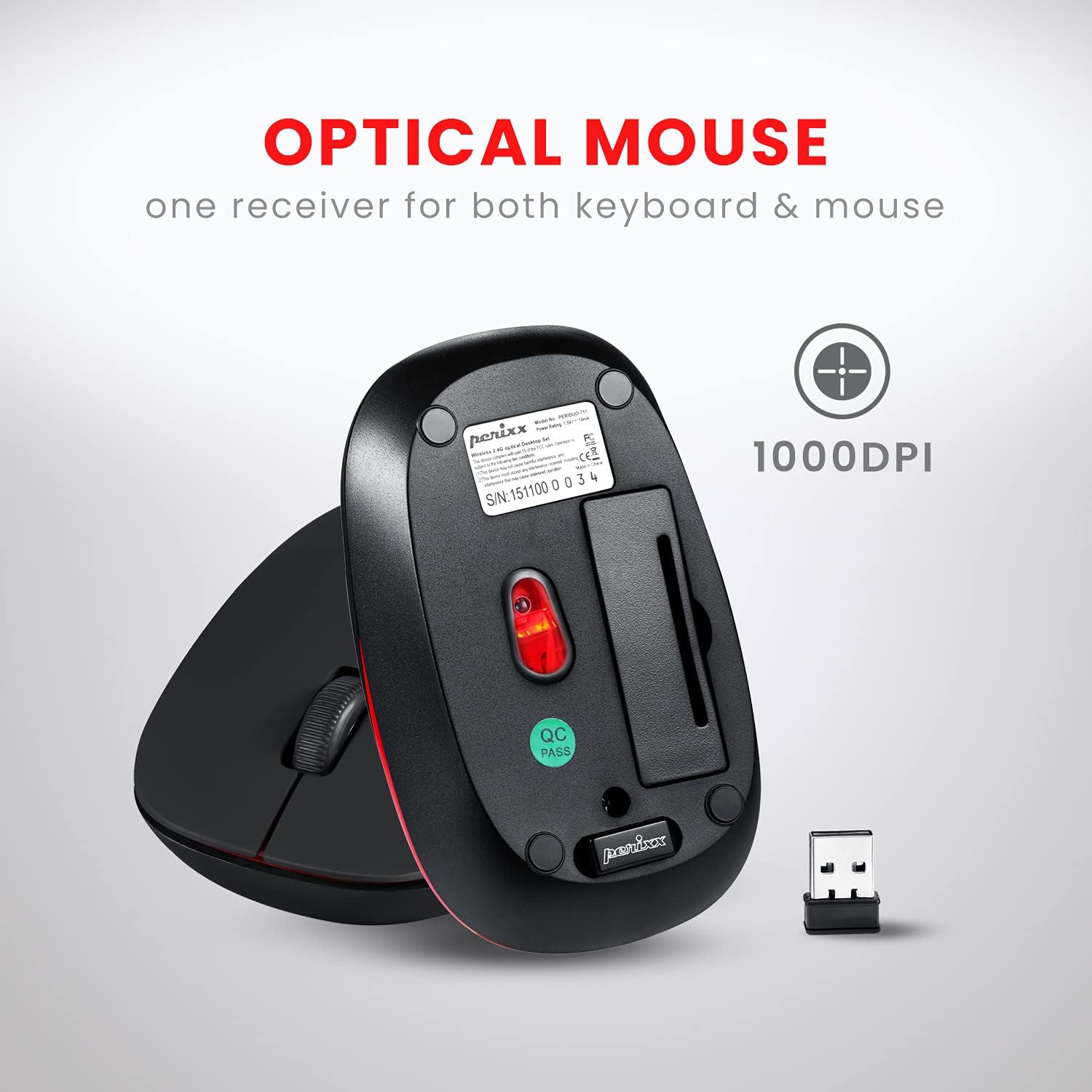
Image 2.1: Underside of the mouse, indicating the battery compartment and the storage slot for the USB nano receiver.
2.2 Povezivanje prijemnika
The USB nano receiver connects both the keyboard and mouse to your computer.
- Remove the USB nano receiver from its storage slot on the underside of the mouse.
- Uključite USB nano prijemnik u dostupan USB priključak na računaru.
- Your computer will automatically detect and install the necessary drivers. No additional software is required.
- Tastatura i miš su sada spremni za upotrebu.
3. Uputstvo za upotrebu
3.1 Upotreba tastature
Tastatura ima niskoprocesorskifile design with membrane switches for comfortable and quiet typing. It has a standard US English QWERTY layout.

Image 3.1: Detailed diagram illustrating the keyboard layout, including standard keys and function key assignments.
Multimedia Function Keys (Fn + F1-F12):
The keyboard includes 12 integrated multimedia hotkeys for quick access to various functions. To activate these functions, press and hold the Fn key, then press the corresponding F-taster (F1-F12).
- Fn+Esc: Media Player
- Fn+F1: Previous Track
- Fn+F2: Pusti/Pauza
- Fn+F3: Next Track
- Fn+F4: Mute
- Fn+F5: Utišavanje zvuka
- Fn+F6: Volume Up
- Fn+F7: Dom
- Fn+F8: PRETRAGA
- Fn+F9: Email
- Fn+F10: Kalkulator
- Fn+F11: Favoriti
- Fn+F12: Moj kompjuter

Image 3.2: Visual guide to the multimedia function keys and their corresponding actions.
3.2 Upotreba miša
The 3-button optical mouse provides precise tracking and a comfortable grip with its soft rubber coating. It operates at 1000 DPI.
- Lijevi klik: Standardni odabir i aktivacija.
- Desni klik: Context menu access.
- Točak za pomicanje: Pomicanje dokumenata i web stranice. Može se pritisnuti i za funkcionalnost klika srednjim tasterom miša.

Image 3.3: The Perixx mouse, highlighting its ergonomic design, nano receiver, 3-button functionality, 30 ft operating range, and 75g weight.
4. Njega i održavanje
- čišćenje: Use a soft, dry cloth to clean the keyboard and mouse. For stubborn dirt, slightly dampOperite krpu vodom ili blagim rastvorom za čišćenje. Izbjegavajte jake hemikalije ili abrazivne materijale.
- Zamjena baterije: Replace batteries when performance degrades. Always use fresh alkaline batteries of the specified type (AA).
- Skladištenje: When not in use for extended periods, remove batteries to prevent leakage. Store the USB nano receiver in its dedicated slot on the mouse to prevent loss.
- Okruženje: Izbjegavajte izlaganje uređaja ekstremnim temperaturama, direktnoj sunčevoj svjetlosti ili prekomjernoj vlazi.
5. Otkrivanje problema
If you encounter issues with your PERIDUO-712B set, refer to the following common solutions:
| Problem | Rješenje |
|---|---|
| Tastatura ili miš ne reagiraju |
|
| Povremena veza ili kašnjenje |
|
| Problemi s praćenjem miša |
|
| Caps Lock indicator light behaves erratically |
|
6. Tehničke specifikacije

Image 6.1: Technical drawing showing precise dimensions of the keyboard and mouse.
| Feature | Detalj |
|---|---|
| Model | PERIDUO-712B |
| Povezivanje | 2.4 GHz bežični |
| Operativni opseg | Do 30 stopa (10 m) |
| Dimenzije tastature | 11.46 × 5.43 × 0.77 inča (291 x 138 x 19.5 mm) |
| Težina tastature | 0.78 funte (približno 354 g) |
| Raspored tipkovnice | US English QWERTY, 84 keys |
| Dimenzije miša | 4.09 × 2.44 × 1.33 inča (104 x 62 x 34 mm) |
| Weight Weight | Pribl. 75g |
| DPI miša | 1000 DPI |
| Izvor napajanja | Keyboard: 2 x AA batteries; Mouse: 1 x AA battery (not included) |
| Kompatibilan OS | Windows 7, 8, 10, 11 (and older versions like XP, Vista) |
7. Garancija i podrška
7.1 Informacije o garanciji
The Perixx PERIDUO-712B Wireless Mini Keyboard and Mouse Set is backed by a 12-mjesečna ograničena garancijaOva garancija pokriva nedostatke u proizvodnji od datuma kupovine. Molimo sačuvajte dokaz o kupovini za potrebe reklamacije.
7.2 Korisnička podrška
For technical assistance, warranty claims, or general inquiries, please visit the official Perixx website or contact their customer support directly. Information regarding spare USB receivers can also be found on the Perixx website or Amazon.
Proizvođač: Perixx Computer GmbH
Za više informacija posjetite: Perixx trgovina na Amazonu