
1. Uvod
Hvala na kupoviniasing the ELECOM M-XGM10DBBK Wireless 5-Button BlueLED Mouse. This mouse is designed for comfort and precision, featuring an ergonomic shape that fits naturally in your hand and BlueLED technology for reliable tracking on various surfaces. This manual provides essential information for proper setup, operation, and maintenance of your device.
2. Proizvod je gotovview
The M-XGM10DBBK mouse is part of the "EX-G" series, known for its ergonomic design and comfortable grip. It features five buttons, including dedicated back and forward buttons, to enhance productivity.
Ključne karakteristike:
- Ergonomski dizajn: Shaped to fit the hand for ultimate grip comfort.
- BlueLED Sensor: Provides precise tracking on a wide range of surfaces, including glass and fabric.
- 5-Button Functionality: Includes left, right, scroll wheel, and dedicated back/forward buttons.
- 2.4GHz bežična veza: Offers a stable connection with a range of approximately 10 meters (3 meters on steel desks).
- Prilagodljiva dugmad: Button functions can be re-assigned using the free "ELECOM Mouse Assistant" software (Windows/Mac only).
- Indikator baterije: A lamp indicates remaining battery life.
Komponente:
Familiarize yourself with the mouse components:

Slika 2.1: Vrh view of the mouse, highlighting the main buttons.
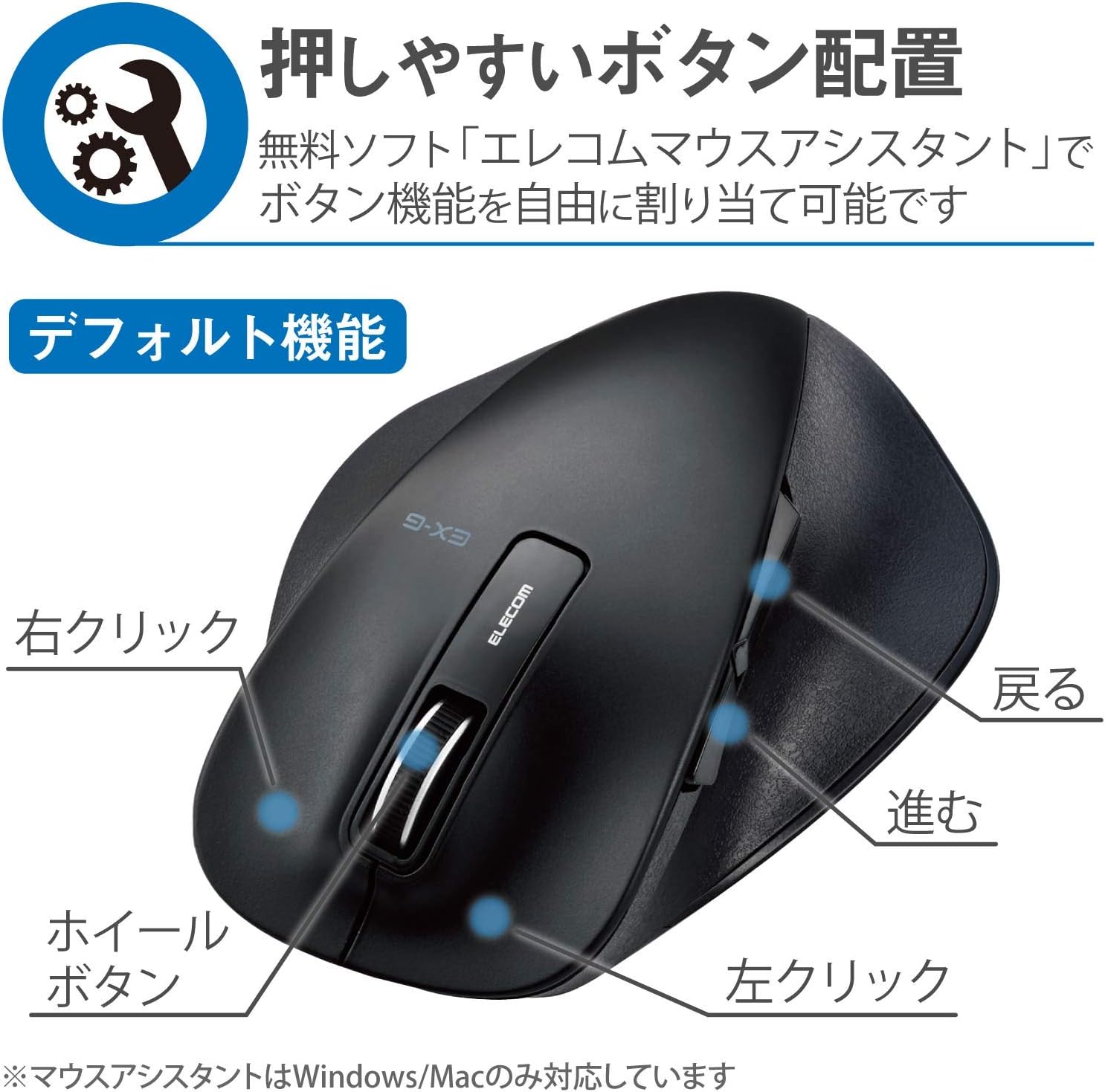
Slika 2.2: Bočna strana view of the mouse, showing the back and forward buttons.
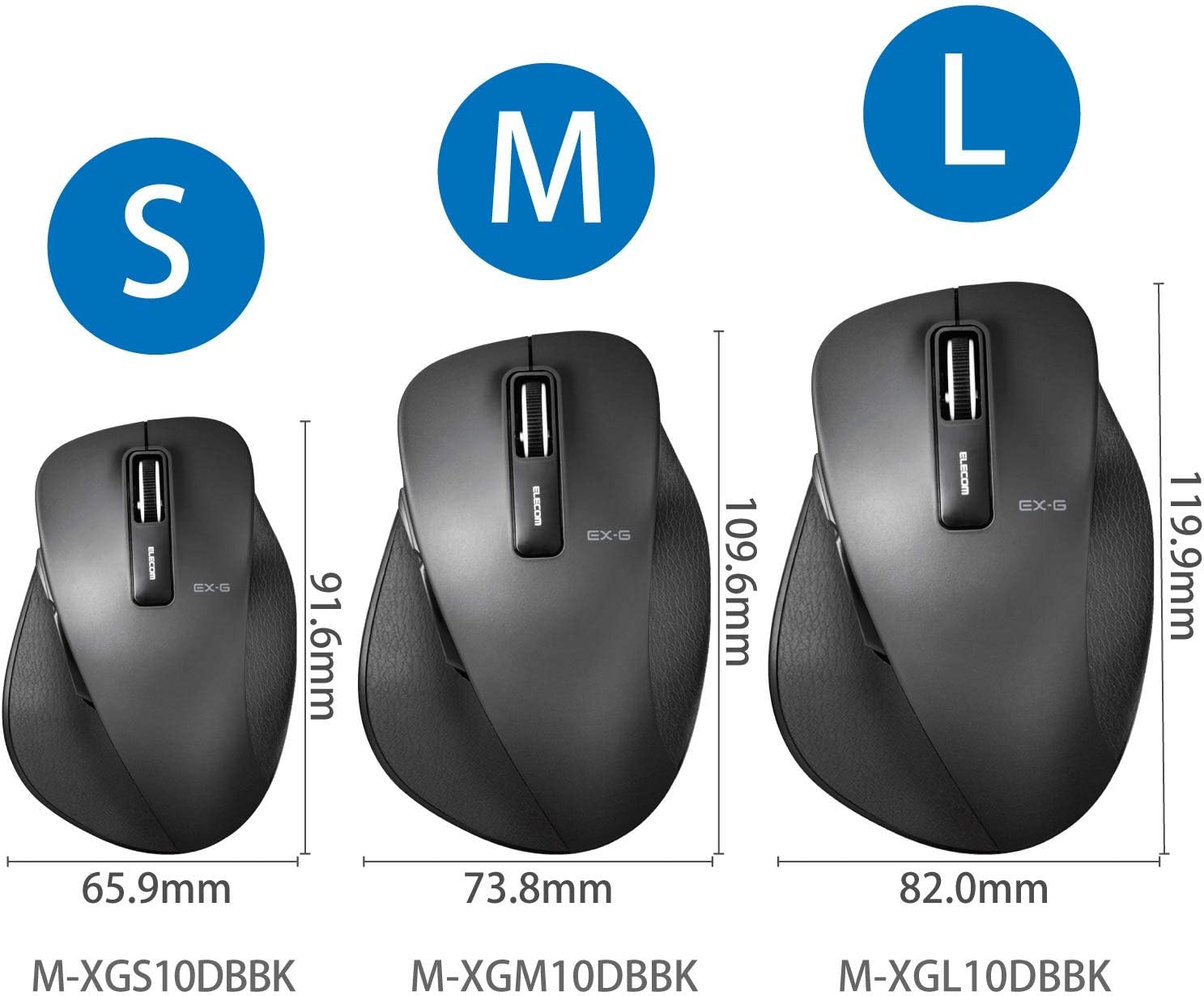
Figure 2.3: Size comparison of EX-G mice (S, M, L). The M-XGM10DBBK is the M size.

Slika 2.4: Dno view of the mouse, indicating the optical sensor, power switch, and receiver storage compartment.

Figure 2.5: Illustration of the durable Omron switches used for the left and right click buttons.
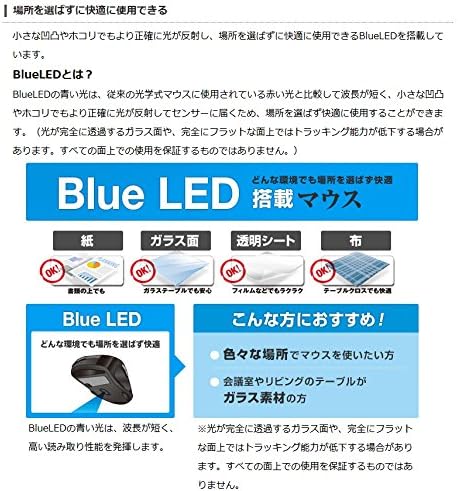
Figure 2.6: Explanation of BlueLED technology, demonstrating its versatility on different surfaces. Note: Tracking performance may decrease on completely transparent or perfectly flat surfaces.

Figure 2.7: Details on 2.4GHz wireless, battery indicator, and 2000 DPI resolution for smooth operation.

Figure 2.8: The ELECOM M-XGM10DBBK mouse is certified to work with Chromebooks.
3. Podešavanje
3.1 Instalacija baterije
- Locate the battery cover on the bottom of the mouse.
- Otvorite poklopac.
- Insert one AA alkaline, manganese, or nickel-metal hydride battery, ensuring correct polarity (+/-).
- Čvrsto zatvorite poklopac baterije.
3.2 Veza sa prijemnikom
- Remove the USB receiver from its storage compartment on the bottom of the mouse.
- Uključite USB prijemnik u dostupan USB-A priključak na računaru.
- Vaš računar bi trebao automatski prepoznati i instalirati potrebne upravljačke programe. Ovo može potrajati nekoliko trenutaka.
3.3 Uključivanje
- Slide the power switch on the bottom of the mouse to the "ON" position.
- Miš je sada spreman za upotrebu.
4. Uputstvo za upotrebu
4.1 Osnovne funkcije
- Lijevi klik: Primarna selekcija i aktivacija.
- Desni klik: Otvara kontekstne menije.
- Točak za pomicanje: Pomiče dokumente i web pages vertically. Can also be clicked for middle-click functionality.
4.2 Back/Forward Buttons
The dedicated back and forward buttons located on the side of the mouse allow for quick navigation in web pretraživači i file istraživači.
- Pritisnite Nazad button to go to the previous page or folder.
- Pritisnite Naprijed button to go to the next page or folder.
4.3 Customizing Buttons (ELECOM Mouse Assistant)
For advanced customization, download the free "ELECOM Mouse Assistant" software from the official ELECOM website. This software allows you to re-assign functions to the mouse buttons according to your preferences. Please note that this software is compatible with Windows and macOS only.
5. Održavanje
5.1 Čišćenje
Da biste održali optimalne performanse i higijenu, redovno čistite miš:
- Isključite miš pomoću prekidača za napajanje.
- Koristite meku, suhu krpu za brisanje površine miša.
- Za tvrdokornu prljavštinu, lagano dampNamočite krpu vodom ili blagim rastvorom za čišćenje, a zatim odmah obrišite suhom krpom.
- Izbjegavajte upotrebu jakih hemikalija, abrazivnih sredstava ili rastvarača.
- Gently clean the optical sensor area on the bottom of the mouse with a cotton swab if tracking issues occur.
5.2 Zamjena baterije
When the battery indicator lamp flashes or the mouse performance degrades, replace the battery:
- Isključite miš.
- Otvorite poklopac baterije.
- Izvadite staru bateriju i odložite je u skladu s lokalnim propisima.
- Umetnite novu AA bateriju, pazeći na ispravan polaritet.
- Close the battery cover and turn the mouse back on.
6. Otkrivanje problema
Ako imate problema s mišem, pogledajte sljedeće uobičajene probleme i rješenja:
| Problem | Mogući uzrok | Rješenje |
|---|---|---|
| Miš ne reaguje | Low battery; Power switch off; Receiver not connected; Receiver interference. | Replace battery; Turn power switch ON; Ensure receiver is firmly plugged in; Try a different USB port; Move closer to the receiver. |
| Nepravilno kretanje kursora | Prljav optički senzor; Neodgovarajuća površina; Smetnje. | Clean optical sensor; Use on a suitable mouse pad or surface; Reduce interference from other wireless devices. |
| Dugmad ne rade | Software conflict; Driver issue. | Restart computer; Reinstall mouse drivers; Check for conflicting software. |
| Problemi sa bežičnom vezom | Distance too far; Obstructions; Interference. | Ensure mouse is within range (10m); Remove obstructions between mouse and receiver; Avoid using near other 2.4GHz devices. |
7. Specifikacije
| Feature | Detalj |
|---|---|
| Broj modela | M-XGM10DBBK |
| Način povezivanja | 2.4 GHz bežično (USB-A prijemnik) |
| Tip senzora | BlueLED Optical |
| Dugmad | 5 buttons (Left, Right, Scroll Wheel, Back, Forward) |
| Rezolucija | 2000 DPI |
| Dimenzije (Š x D x V) | 73.8 x 109.6 x 40.8 mm (M Size) |
| Težina | Pribl. 151.95 g (uključujući bateriju) |
| Izvor napajanja | 1 x AA battery (Alkaline, Manganese, or Ni-MH) |
| Procijenjeni vijek trajanja baterije | Approx. 722 days (based on typical usage) |
| Kompatibilan OS | Windows 11, 10, RT8.1, 8.1, 7, Vista; macOS High Sierra 10.13, OS X 10.10; Chrome OS |
| Boja | Crna |
8. Garancija i podrška
8.1 Informacije o garanciji
Ovaj proizvod dolazi sa a 6-mjesečna garancija from the date of purchase. Please retain your proof of purchase for warranty claims. The warranty covers manufacturing defects under normal use. It does not cover damage caused by misuse, accidents, unauthorized modifications, or normal wear and tear.
8.2 Korisnička podrška
For technical assistance, troubleshooting, or warranty inquiries, please visit the official ELECOM website or contact ELECOM customer support. Contact details can typically be found on the ELECOM webweb-mjesto u odjeljku 'Podrška' ili 'Kontaktirajte nas'.