
Uvod
This manual provides detailed instructions for the setup, operation, and maintenance of your Homtime C12PRO Docking Station Speaker. The C12PRO integrates a Bluetooth speaker, FM radio, alarm clock, and dual USB charging capabilities, designed for convenient everyday use.
Sadržaj paketa
Molimo Vas da provjerite da li se u Vašem paketu nalaze sve dolje navedene stavke:
- 1 x Homtime C12PRO Speaker Unit
- 1 x adapter za napajanje
- 1 x Uputstvo za upotrebu
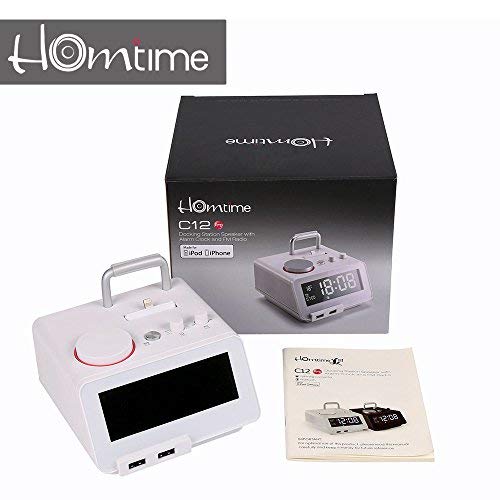
slika: Contents of the Homtime C12PRO package, showing the main speaker unit, power adapter, and the user manual.
Product Overview
Familiarize yourself with the various components and controls of your C12PRO unit.

slika: Front view of the Homtime C12PRO with an iPhone docked. The large digital display shows time and temperature, and the front features dual USB charging ports.

slika: Front view of the Homtime C12PRO without a phone docked. This image clearly shows the digital display, the docking connector, and the control buttons on the top surface.
Prednja ploča i ekran
- Veliki LCD ekran od 4.2 inča: Shows time, alarm status, and room temperature (Celsius or Fahrenheit). Brightness is adjustable.
- Dvostruki USB portovi za punjenje: Located at the front base for convenient charging of external devices.
Kontrole na gornjoj ploči
- Priključni konektor: Apple Certified Lightning connector for iPod/iPhone.
- Kontrolni tasteri/dugmad: For setting time, alarm, volume, mode selection, and FM radio tuning.
Priključci na stražnjoj ploči
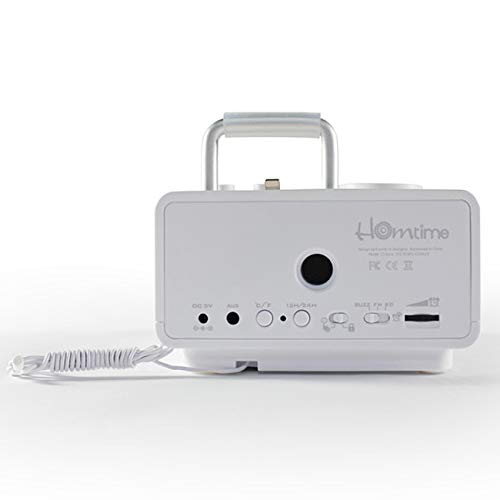
slika: Pozadi view of the Homtime C12PRO. This image displays the DC 9V power input, AUX-in port, 12H/24H time format button, and other rear controls.
- DC 9V Ulaz napajanja: Ovdje priključite priloženi adapter za napajanje.
- AUX-in priključak: 3.5 mm priključak za povezivanje eksternih audio izvora.
- 12H/24H Button: Toggles between 12-hour and 24-hour time display formats.
- Ostale kontrole: May include snooze/dimmer, alarm on/off, and FM antenna connection.
Setup
- Raspakujte jedinicu: Carefully remove the C12PRO speaker and all accessories from the packaging.
- Priključite napajanje: Insert the DC plug of the power adapter into the DC 9V input port on the rear of the unit. Plug the power adapter into a standard wall outlet. The display will illuminate.
- Početno podešavanje vremena:
- Pritisnite i držite TIME SET button (location may vary, typically on top or rear).
- Koristite +/- buttons or rotary knob to adjust the hour. Press TIME SET ponovo za potvrdu.
- Adjust the minute using the +/- buttons or rotary knob. Press TIME SET za potvrdu i izlazak iz načina podešavanja vremena.
- Za prebacivanje između 12-satnog i 24-satnog formata, pritisnite 12H/24H dugme na zadnjoj ploči.
- Podesite svjetlinu ekrana: Pritisnite SNOOZE / DIMMER button (often combined) repeatedly to cycle through brightness levels.
- Postavljena jedinica temperature: Ako je primjenjivo, pritisnite ° C / ° F button to switch between Celsius and Fahrenheit display for room temperature.
Uputstvo za upotrebu
Uključivanje/isključivanje
Pritisnite POWER button to turn the unit on or off. When off, the clock display remains active.
Postavljanje alarma
- Pritisnite i držite ALARM SET dugme. Sat alarma će treptati.
- Koristite +/- buttons or rotary knob to adjust the alarm hour. Press ALARM SET za potvrdu.
- Adjust the alarm minute. Press ALARM SET za potvrdu.
- Select the alarm source (Buzzer, FM Radio, or Docked Device). Use +/- or rotary knob and press ALARM SET za potvrdu.
- Da biste aktivirali/deaktivirali alarm, pritisnite dugme ALARM UKLJUČEN / ISKLJUČEN button. An alarm icon will appear on the display when active.
- Kada se oglasi alarm, pritisnite SNOOZE button to temporarily silence it for a few minutes. Press POWER da isključite alarm za taj dan.
Rad FM radija
- Pritisnite MODE dugme dok se na ekranu ne pojavi "FM".
- For automatic station scanning, press and hold the PLAY/PAUSE button (or a dedicated SCAN button). The radio will scan and save available stations.
- Za ručno podešavanje koristite PRETHODNO/SLJEDEĆE buttons or rotary knob to adjust the frequency.
- To select a saved station, press the PRESET dugme i zatim koristite PRETHODNO/SLJEDEĆE za navigaciju.
- Podesite jačinu zvuka pomoću VOLUME dugme ili dugmad.
Bluetooth uparivanje
- Pritisnite MODE button until "BT" or "Bluetooth" appears on the display. The Bluetooth indicator will flash, indicating pairing mode.
- Na svom mobilnom uređaju omogućite Bluetooth i potražite nove uređaje.
- Select "Homtime C12PRO" from the list of available devices.
- Once paired, the Bluetooth indicator on the C12PRO will stop flashing and remain solid. You can now play audio wirelessly from your device.
- Adjust volume on both the C12PRO and your connected device.
Korištenje priključne stanice
The C12PRO features an Apple Certified Lightning connector for compatible iPod/iPhone devices.
- Carefully align your iPhone/iPod with the Lightning connector on the top of the unit.
- Gently push down until the device is securely seated.
- The C12PRO will automatically charge your device and can play audio from it.
- Pritisnite MODE button to select the docking station as the audio source.
USB punjenje
The unit includes dual USB ports for charging other devices.
- Connect your USB charging cable to one of the USB ports on the front of the C12PRO.
- Connect the other end of the cable to your device (e.g., Android phone, tablet).
- The C12PRO will provide power to charge your device.
AUX-in priključak
Connect external audio players via the 3.5mm AUX-in port.
- Connect a 3.5mm audio cable (not included) from your external audio device's headphone jack to the AUX-in port on the rear of the C12PRO.
- Pritisnite MODE dugme dok se na ekranu ne pojavi "AUX".
- Play audio from your external device. Adjust volume on both the C12PRO and the external device.
Održavanje
- čišćenje: Disconnect the power adapter before cleaning. Use a soft, dry cloth to wipe the exterior surfaces. Do not use abrasive cleaners, waxes, or solvents.
- Skladištenje: Ako uređaj skladištite duži period, isključite ga iz struje i čuvajte ga na hladnom i suhom mjestu, dalje od direktne sunčeve svjetlosti i ekstremnih temperatura.
- baterija: The unit contains a CR2 battery (included) for clock memory backup. This battery is not user-replaceable for general operation and should only be replaced by qualified service personnel if necessary.
Rješavanje problema
| Problem | Mogući uzrok | Rješenje |
|---|---|---|
| Nema napajanja/Ekran isključen | Adapter za napajanje nije priključen ili je utičnica neispravna. | Provjerite je li adapter za napajanje sigurno priključen u uređaj i ispravnu zidnu utičnicu. |
| Nema zvuka iz zvučnika | Volume too low; incorrect source selected; device not connected properly. | Povećajte jačinu zvuka. Pritisnite MODE to select the correct audio source (BT, FM, Dock, AUX). Reconnect Bluetooth device or docked phone. |
| Bluetooth uparivanje nije uspjelo | C12PRO not in pairing mode; device too far; interference. | Ensure C12PRO is in BT mode and flashing. Move device closer. Turn off other Bluetooth devices. |
| Statički šum/slab prijem na FM radiju | Slab signal; antena nije izvučena. | Extend the FM antenna fully. Reposition the unit for better reception. Perform auto-scan again. |
| Alarm se ne oglašava | Alarm not activated; alarm volume too low. | Ensure the alarm icon is visible on the display. Check alarm volume settings. |
| Device not charging via USB/Dock | Problem s kablom; uređaj nije kompatibilan; jedinica nije uključena. | Try a different USB cable. Ensure the C12PRO is powered on. Verify device compatibility with the Lightning dock. |
Specifikacije

slika: A table detailing the specifications of the Homtime C12PRO, including driver units, S/N ratio, Bluetooth version, range, radio frequency, power, and dimensions.
| Model | C12 Pro |
| Jedinice vozača | 2x40mm |
| S/N odnos | >70dB |
| Bluetooth verzija | 2.1 + EDR |
| Bluetooth domet | 10M |
| Domet radio frekvencija | 87.5 MHz - 108 MHz |
| Kompatibilni uređaji | iPad, iPhone, Android, Windows Phone, Computer |
| Adapter za napajanje | AC100-240V, 50/60Hz, DC 5V 3A |
| Izlazna snaga | 3W + 3W (6 Watts total) |
| Dimenzije (DxŠxV) | 12.8 x 12.9 x 10.7 cm |
| Težina artikla | 800 g |
| Audio izvori | Apple Lightning, USB, Bluetooth, Aux-in |
| Display Type | Digital LCD (4.2 inches) |
| Baterije | 1 CR2 battery required (included for clock memory) |
Garancija i podrška
Informacije o garanciji
The Homtime C12PRO comes with a 1-godišnja ograničena garancija from the date of purchase. This warranty covers manufacturing defects in materials and workmanship under normal use. It does not cover damage caused by misuse, accidents, unauthorized modifications, or external causes.
Molimo sačuvajte svoj dokaz o kupovini za zahtjeve u vezi s garancijom.
Korisnička podrška
For technical assistance, troubleshooting not covered in this manual, or warranty inquiries, please contact Homtime customer support. Refer to the contact information provided with your product packaging or visit the official Homtime webstranicu za najnovije detalje o podršci.