
Hatco TQ-1800H
Hatco TQ-1800H Toast Qwik Conveyor Toaster
Model: TQ-1800H
Uvod
The Hatco TQ-1800H Toast Qwik Conveyor Toaster is a high-performance commercial appliance designed for efficient and consistent toasting of various bread products. This manual provides essential information for the safe and effective operation, maintenance, and troubleshooting of your TQ-1800H toaster. Please read all instructions carefully before operating the unit.
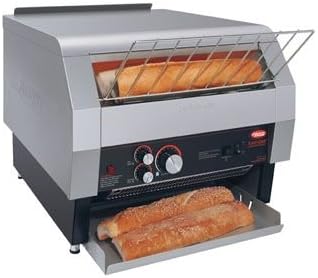
Figure 1: Hatco TQ-1800H Toast Qwik Conveyor Toaster. This image displays the Hatco TQ-1800H Toast Qwik Conveyor Toaster, a commercial-grade unit designed for high-volume toasting. The toaster features a horizontal conveyor system, a 3-inch opening for various bread types, and a pull-out crumb tray at the bottom. The control panel, visible on the front, includes knobs for adjusting settings.
Setup
- Raspakivanje: Carefully remove the toaster from its packaging. Inspect the unit for any shipping damage. Report any damage to the carrier immediately. Retain packaging materials for future transport or storage.
- plasman: Place the toaster on a stable, level, non-combustible surface. Ensure adequate clearance around the unit for proper ventilation. Maintain at least 6 inches (15 cm) of clear space from walls and other equipment. Do not block air vents.
- Priključak za napajanje: Osigurajte da električno napajanje odgovara jačinitage i wattage requirements specified on the product label. Plug the toaster into a grounded electrical outlet. Do not use extension cords.
- Početno čišćenje: Before first use, wipe down all exterior and interior surfaces with a damp cloth. Ensure the crumb tray is properly inserted.
Uputstvo za upotrebu
The TQ-1800H features electronic controls and a Colorguard Sensing System for consistent toasting results.
- Uključeno: Turn the main power switch to the "ON" position. Allow the toaster to preheat for approximately 10-15 minutes until the heating elements glow.
- Adjusting Toasting Settings:
- Conveyor Speed Control: Use the speed control knob to adjust the conveyor belt speed. A slower speed results in darker toast, while a faster speed results in lighter toast.
- Kontrola topline: The toaster features independent heat controls for the top and bottom elements. Adjust these knobs to achieve desired browning on both sides of the product.
- Učitavanje proizvoda: Place bread, bagels, or other products onto the loading rack. The 3-inch opening accommodates a variety of items. Ensure products are placed flat and do not overlap.
- Proces tostiranja: The conveyor will automatically move the product through the heating chamber. Once toasted, the product will exit onto the collection tray.
- Iskljuciti: After use, turn the main power switch to the "OFF" position. Allow the unit to cool down before cleaning.
Sigurnosna napomena: The exterior surfaces of the toaster can become very hot during operation. Use caution and avoid direct contact with hot surfaces. Always unplug the unit before cleaning or servicing.
Održavanje
Regular cleaning and maintenance will ensure optimal performance and longevity of your Hatco TQ-1800H toaster.
- Dnevno čišćenje:
- Provjerite je li uređaj isključen iz struje i ohlađen.
- Remove and empty the crumb tray. Wipe it clean with a damp cloth and mild detergent. Rinse and dry thoroughly before reinserting.
- Obrišite vanjske površine oglasomamp tkanina. Nemojte koristiti abrazivna sredstva za čišćenje ili jastučiće za ribanje.
- Weekly/Regular Cleaning:
- With the unit unplugged and cool, carefully remove the conveyor belt assembly if accessible (refer to manufacturer's detailed cleaning instructions if needed). Clean the conveyor belt and the interior of the toaster to remove any accumulated crumbs or debris.
- Inspect heating elements for any obstructions.
- Opšta njega: Do not immerse the toaster in water or spray water directly onto the unit. Avoid using sharp objects to clean the interior, as this may damage heating elements or other components.
Rješavanje problema
Ovaj odjeljak se bavi uobičajenim problemima na koje možete naići. Za probleme koji nisu ovdje navedeni, obratite se korisničkoj podršci.
| Problem | Mogući uzrok | Rješenje |
|---|---|---|
| Toaster does not power on. | Unit unplugged; circuit breaker tripped; power switch off. | Ensure unit is plugged in securely. Check circuit breaker. Verify power switch is in "ON" position. |
| Uneven toasting or no browning. | Incorrect heat settings; conveyor speed too fast; heating elements dirty or faulty. | Adjust heat controls. Decrease conveyor speed. Clean heating elements (when cool and unplugged). If problem persists, contact service. |
| Conveyor belt not moving. | Motor issue; obstruction in conveyor path. | Check for obstructions. If clear, motor may require service. Contact customer support. |
| Prekomjeran miris dima ili paljevine. | Accumulated crumbs or food debris; product stuck. | Immediately unplug the unit. Allow to cool. Clean crumb tray and interior thoroughly. Ensure product is not stuck. |
Specifikacije
| Feature | Detalj |
|---|---|
| Model | TQ-1800H |
| Brand | Hatco |
| Wattage | 1600 vati |
| Visina otvaranja | 3 inča |
| Kapacitet | Approximately 20 slices per minute |
| Kontrole | Electronic, Colorguard Sensing System |
| Tip završetka | Polirano |
| Proizvođač | Hatco |
| ASIN | B00Z2C9ZAW |
Garancija i podrška
For detailed warranty information, please refer to the warranty card included with your product or visit the official Hatco webstranica. Uslovi i odredbe garancije mogu se razlikovati.
For technical assistance, parts, or service inquiries, please contact Hatco customer support. Have your model number (TQ-1800H) and serial number (if applicable) ready when contacting support.
Kontakt informacije obično možete pronaći na proizvođačevoj websajtu ili u pakovanju proizvoda.
Ask a question about this manual
Ask about setup, troubleshooting, compatibility, parts, safety, or missing instructions. Manuals+ will review the question and use this page’s manual context to help answer it.