
1. Podešavanje
1.1 Raspakivanje i uključene komponente
Pažljivo izvadite televizor i sve komponente iz ambalaže. Provjerite da li su prisutne sve dolje navedene stavke:
- Sharp LC-55LE653U 55-Inch Smart LED TV
- Daljinski upravljač
- TV stalak
- AA baterije (2)
- Kabl za napajanje
- Dokumentacija (Vodič za brzi početak, Sigurnosne informacije)
1.2 Instaliranje TV postolja
To install the TV stand, place the television screen-down on a soft, clean surface to prevent scratches. Align the stand with the mounting holes on the bottom of the TV and secure it using the provided screws. Refer to the diagram below for proper alignment.

Slika 1.2.1: Bočna strana view of the TV showing the stand attachment point.
1.3 Povezivanje vanjskih uređaja
The Sharp LC-55LE653U offers various ports for connecting external devices. Ensure the TV is powered off before making any connections.

Slika 1.3.1: Detaljno view ulaznih i izlaznih portova televizora.
- HDMI portovi (3): Connect Blu-ray players, gaming consoles, cable/satellite boxes, or other HDMI-compatible devices. One HDMI port supports MHL (Mobile High-Definition Link).
- USB portovi (1): Spojite USB uređaje za pohranu podataka za reprodukciju medija.
- Component/Video Input: For older devices using component (YPbPr) or composite video connections.
- Optički audio izlaz: Za povezivanje sa soundbarom ili kućnim kinom.
- Ethernet priključak: Za žičanu internet vezu.
- Ulaz za antenu/kablovsku televiziju: Za povezivanje antene ili kablovskog TV signala.
1.4 Powering On the TV
After connecting all desired devices, plug the power cord into the TV and then into a wall outlet. Press the Power button on the remote control or on the TV itself to turn on the television.
2. Uputstvo za upotrebu
2.1 Daljinski upravljač prekoview
The included remote control provides full functionality for your Sharp TV. Insert the two AA batteries into the remote control, observing polarity.

Figure 2.1.1: Layout of the Sharp TV remote control.
- Dugme za napajanje: Uključuje ili isključuje TV.
- Dugme za unos: Selects the input source (HDMI, USB, Component, etc.).
- Pojačavanje/stišavanje glasnoće: Podešava jačinu zvuka.
- Kanal gore/dolje: Mijenja TV kanale.
- pametno dugme: Accesses the Smart Central Apps interface.
- Dugme menija: Otvara glavni meni postavki televizora.
- Navigacijska tipka (gore/dolje/lijevo/desno/Enter): Navigacija kroz menije i odabir opcija.
- Netflix dugme: Direktan pristup Netflix aplikaciji.
2.2 Smart Central Apps
The Smart Central Apps feature provides access to various streaming services and online content. Press the 'Smart' button on your remote to access this interface.

Figure 2.2.1: The Smart Central Apps home screen.
Available applications include Netflix, YouTube, Pandora, Vudu, and Hulu Plus. An internet connection (Wi-Fi or Ethernet) is required to use Smart Central Apps.
2.3 Postavke slike i zvuka
Access the TV's menu to adjust picture and sound settings. Key features include:
- AquoMotion 120: Enhances motion clarity for fast-moving scenes. This setting can be adjusted to suit viewing preferences.
- rezolucija: The TV supports 1080p Full HD resolution.
- Omjer širine i visine: Adjust to 16:9 or other available options to fit the content.
- Izlaz zvuka: The TV features built-in 20-watt speakers. External audio systems can be connected via the optical audio output or HDMI ARC (if available on your sound system).
2.4 Wallpaper Mode
When the TV is turned off, Wallpaper Mode allows it to display virtually any image, transforming the screen into a large photo frame. This feature can be configured in the TV's settings menu.
3. Održavanje
3.1 Čišćenje televizora
Da biste očistili ekran, nježno ga obrišite mekom, suhom krpom koja ne ostavlja dlačice. Za tvrdokorne mrlje, lagano ga obrišiteampen the cloth with water or a specialized screen cleaner. Do not use harsh chemicals or abrasive materials. For the TV casing, koristite meku, suhu krpu.
3.2 Ažuriranja softvera
Periodically check for software updates through the TV's settings menu. Updates can improve performance, add new features, or resolve issues. An active internet connection is required for software updates.
4. Otkrivanje problema
Ako naiđete na probleme s televizorom, pogledajte sljedeća uobičajena rješenja prije nego što kontaktirate podršku.
| Problem | Moguće rješenje |
|---|---|
| TV se ne uključuje. |
|
| No picture or poor picture quality. |
|
| Nema zvuka ili je kvalitet zvuka loš. |
|
| Smart features (Netflix, YouTube) not working. |
|
5. Specifikacije
Below are the key technical specifications for the Sharp LC-55LE653U TV.
| Feature | Detalj |
|---|---|
| Naziv modela | LC-55LE653U |
| Veličina ekrana | 55 inča (54.6" dijagonalno) |
| Display Technology | LCD LED |
| Rezolucija | 1080p full HD |
| Refresh Rate | 60 Hz (AquoMotion 120) |
| Aspect Ratio | 16:9 |
| Kontrast Ratio | 4,000,000:1 |
| Vrijeme odgovora | 2 milisekundi |
| Povezivanje | Wi-Fi, Ethernet |
| HDMI portovi | 3 (one with MHL support) |
| USB portovi | 1 |
| Audio izlaz | Optical, Built-in speakers (20 Watts) |
| Dimenzije proizvoda (sa postoljem) | 48.82" Š x 30.08" V x 13.19" D |
| Težina artikla (sa postoljem) | 38.6 funti |
| Voltage | 120 Volts |
| Uključene komponente | TV, Remote Control, Stand, Batteries |
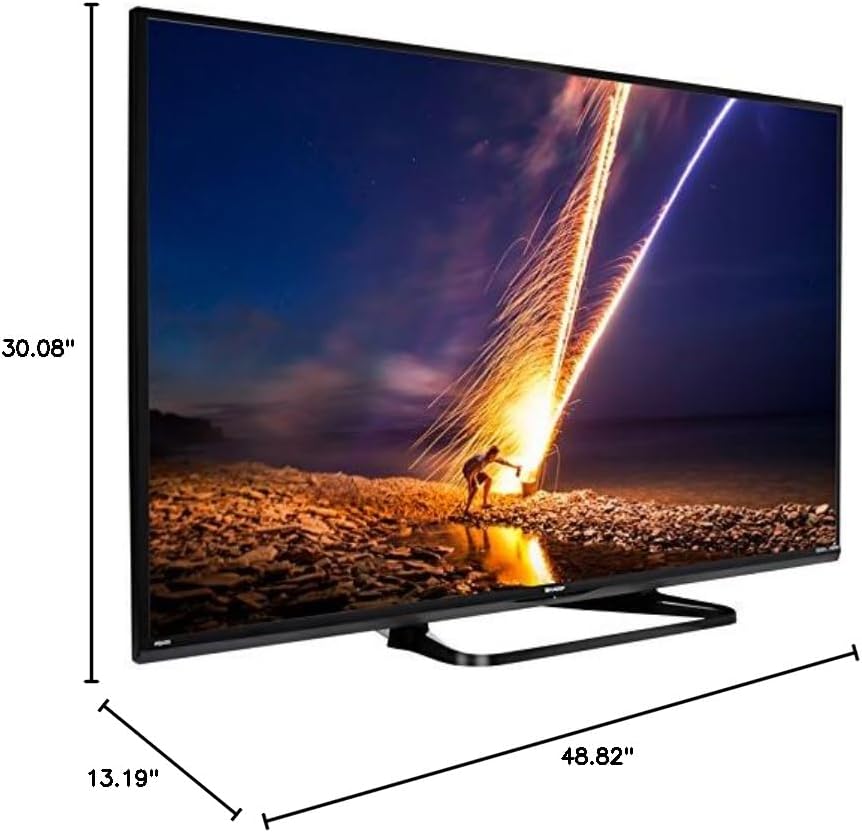
Figure 5.1.1: Product dimensions of the Sharp LC-55LE653U TV.
6. Informacije o garanciji
The Sharp LC-55LE653U television comes with a 1 godine ograničene garancije from the date of purchase. This warranty covers manufacturing defects and workmanship under normal use. For specific terms, conditions, and limitations, please refer to the warranty documentation included with your product or contact Sharp customer support.
7. Korisnička podrška
For technical assistance, service, or warranty claims, please contact Sharp customer support. Have your TV model number (LC-55LE653U) and purchase information ready when you call.
- Proizvođač: Sharp Electronics FOB
- Refer to the official Sharp website or your product documentation for the most current contact information.