
1. Podešavanje
1.1 Raspakivanje i sadržaj
Pažljivo izvadite TV i svu dodatnu opremu iz ambalaže. Provjerite da li su sve komponente prisutne:
- Sharp LC-40LE653U 40-Inch Smart LED TV
- Daljinski upravljač
- 2 AA baterije
1.2 Instalacija postolja
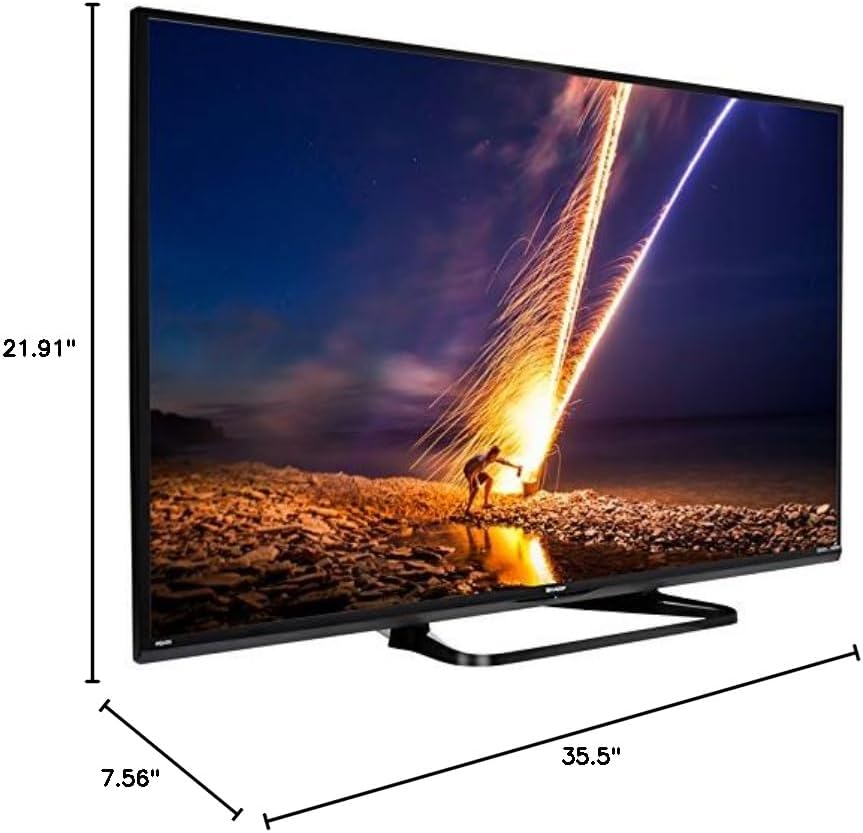
If placing the TV on a table, attach the included stand. Refer to the diagram below for proper assembly. Ensure all screws are securely fastened.
1.3 Povezivanje vanjskih uređaja
Connect your external devices such as cable boxes, Blu-ray players, or gaming consoles to the TV's input ports. The TV features multiple connectivity options.


Available ports include:
- HDMI: 2 ports for high-definition audio and video. One HDMI port supports MHL (Mobile High-Definition Link).
- USB: 1 port for media playback or connecting a USB device.
- Ethernet: Za žičanu mrežnu vezu.
- Component/Video: For older video devices.
- DTV/TV (Antenna): Za povezivanje antene ili kablovske televizije.
- Audio izlaz: Optical for digital audio, and RCA for analog audio.
1.4 Priključak za napajanje
After connecting all necessary devices, plug the TV's power cord into a wall outlet.
1.5 Početno podešavanje
Upon first power-on, the TV will guide you through an initial setup process. This includes language selection, time zone, and network configuration. For Wi-Fi setup, select your network and enter the password.
2. Uputstvo za upotrebu
2.1 Funkcije daljinskog upravljača
The remote control allows you to access all TV functions. Insert the two AA batteries into the remote control, ensuring correct polarity.

- Napajanje (crveno dugme): Uključuje ili isključuje TV.
- Unos: Selects the input source (HDMI, TV, USB, etc.).
- VOL +/-: Podešava nivo jačine zvuka.
- CH +/-: Mijenja TV kanale.
- Navigacijski tasteri (Gore/Dole/Lijevo/Desno/Enter): Koristi se za navigaciju kroz menije i odabir opcija.
- PAMETNO: Accesses the Smart Central Apps menu.
- MENI: Opens the main TV menu for settings adjustments.
- NETFLIX: Dugme za direktan pristup aplikaciji Netflix.
2.2 Smart TV Features (Smart Central Apps)
The Sharp LC-40LE653U features Smart Central Apps, providing access to various online services and a web browser. Ensure your TV is connected to the internet via Wi-Fi or Ethernet.

- Pristup aplikacijama: Press the 'SMART' button on your remote to open the Smart Central Apps menu.
- Podržane usluge: Includes Hulu Plus, Netflix, Pandora, Vudu, and YouTube.
- Web Preglednik: Koristite ugrađeni web browser for general internet browsing. Navigation is done via the remote control.
2.3 Wallpaper Mode
When the TV is turned off, Wallpaper Mode can display virtually any image. To use this feature, connect a USB drive containing your desired images to the TV's USB port. Navigate to the Wallpaper Mode settings in the TV menu to select and configure your images.
3. Održavanje
3.1 Čišćenje televizora
Da biste očistili ekran, nježno ga obrišite mekom, suhom krpom koja ne ostavlja dlačice. Za tvrdokorne mrlje, lagano ga obrišiteampen the cloth with water or a specialized screen cleaner. Avoid using harsh chemicals, abrasive cleaners, or direct spraying of liquids onto the screen or cabinet.
Clean the TV cabinet with a soft, dry cloth. Ensure the TV is unplugged before cleaning.
3.2 Ažuriranja softvera
Periodically check for software updates through the TV's settings menu to ensure optimal performance and access to the latest features. Updates can be performed via the internet connection.
4. Otkrivanje problema
If you encounter issues with your Sharp LC-40LE653U TV, refer to the following common solutions:
- Nema napajanja: Ensure the power cord is securely plugged into both the TV and a working wall outlet. Check if the power indicator light on the TV is on.
- Nema slike/zvuka: Verify the correct input source is selected using the 'Input' button on the remote. Check all cable connections (HDMI, component, etc.) are secure.
- Loš kvalitet slike: Podesite postavke slike (svjetlinu, kontrast, oštrinu) u TV meniju. Provjerite da li ulazni izvor pruža visokokvalitetni signal.
- Nema internetske veze: Check your Wi-Fi router or Ethernet cable connection. Re-enter your Wi-Fi password in the TV's network settings. Restarting your router may resolve connectivity issues.
- Daljinski upravljač ne radi: Zamijenite baterije u daljinskom upravljaču. Provjerite da nema prepreka između daljinskog upravljača i infracrvenog senzora televizora.
For more detailed troubleshooting steps, consult the full online manual or contact customer support.
5. Specifikacije
Key technical specifications for the Sharp LC-40LE653U 40-Inch Smart LED TV:
| Feature | Specifikacija |
|---|---|
| Broj modela | LC-40LE653U |
| Veličina ekrana | 39.5 inča (klasa od 40 inča) |
| Display Technology | LCD |
| Rezolucija | 1080p (Full HD) |
| Refresh Rate | 60 Hz |
| Aspect Ratio | 16:9 |
| Tehnologija povezivanja | Wi-Fi |
| Hardversko sučelje | Ethernet, HDMI, USB |
| Total Number of HDMI Ports | 2 (one with MHL support) |
| Ukupni USB portovi | 1 |
| Audio ulaz | HDMI, Optical, USB |
| Maksimalna izlazna snaga zvučnika | 20 Watts |
| Dimenzije proizvoda (D x Š x V) | 7.56" x 35.5" x 21.91" |
| Težina artikla | 16.3 funti |
| Vrsta montaže | Table Mount |
| Podržane Internet usluge | Hulu Plus, Netflix, Pandora, Vudu, YouTube |
| Certifikat Energy Star | Da |
6. Garancija i podrška
6.1 Jamstvo za proizvod
This Sharp LC-40LE653U TV comes with a 1 godine ograničene garancijeMolimo sačuvajte dokaz o kupovini za potrebe reklamacije. Garancija pokriva proizvodne nedostatke u normalnim uslovima upotrebe.
6.2 Korisnička podrška
For technical assistance, troubleshooting beyond this manual, or warranty service, please contact Sharp customer support. Refer to the official Sharp webnajnovije kontakt informacije potražite na web stranici ili na svojoj kartici za registraciju proizvoda.