
Uvod
The Detex ProxiPen Kit is a comprehensive guard tour verification system designed for reliable tracking and reporting. It utilizes RFID proximity tags to record patrol activities, ensuring accountability and efficiency. The system is built for durability and ease of use, featuring a robust design and intuitive operation.
Sadržaj paketa
Nakon raspakivanja, molimo Vas da provjerite da li su prisutne sve dolje navedene komponente:
- 1 x Proximity Pen
- 1 x Data Transfer Unit (Cradle) with USB Cable
- 1 x TopGuard Patrol Software CD
- 20 x 30mm RFID Tags
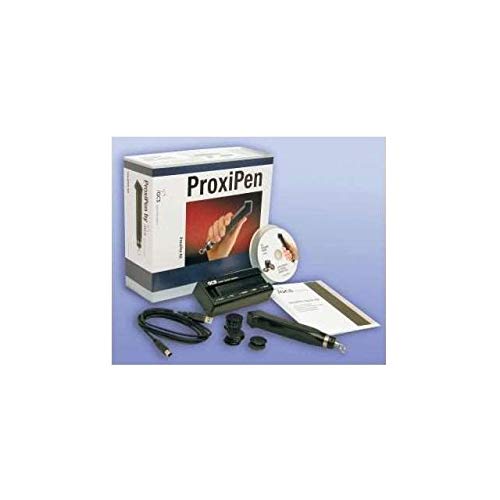
Figure 1: Contents of the Detex ProxiPen Kit. This image displays the ProxiPen device, its data transfer cradle, a software CD, and a set of RFID tags, all packaged alongside the product box.
Setup
- Install TopGuard Patrol Software: Insert the TopGuard Patrol Software CD into your computer's CD/DVD drive. Follow the on-screen instructions to complete the software installation. Ensure your system meets the minimum requirements for the software.
- Connect Data Transfer Unit: Connect the Data Transfer Unit (Cradle) to your computer using the provided USB cable. The computer should recognize the device automatically.
- Insert Battery into Proximity Pen: The Proximity Pen is powered by one "AA" commercial battery. Locate the battery compartment, insert the battery with the correct polarity, and secure the compartment cover.
Uputstvo za upotrebu
The ProxiPen is designed for simple and efficient operation.
- Čitanje RFID -a Tags: To record a patrol point, hold the Proximity Pen near an RFID tag. The pen will provide both visible (light indicator) and audible (beep) indications to confirm that the RFID tag has been successfully read and recorded.
- Prijenos podataka: Periodically, connect the Proximity Pen to the Data Transfer Unit. The unit, when connected to your computer, will facilitate the transfer of recorded patrol data to the TopGuard Patrol Software. Refer to the software's user guide for detailed data download procedures.
- Upotreba softvera: Utilize the TopGuard Patrol Software to manage patrol routes, view recorded data, generate reports, and configure system settings.
Održavanje
- Zamjena baterije: When the Proximity Pen's performance diminishes or it fails to provide clear indications, replace the "AA" battery. Always use a fresh, high-quality commercial "AA" battery.
- čišćenje: The Proximity Pen features a tough waterproof polycarbonate housing. Clean the exterior with a soft, damp krpom. Izbjegavajte upotrebu abrazivnih sredstava za čišćenje ili rastvarača koji bi mogli oštetiti materijal.
- Ažuriranja softvera: Regularly check for updates to the TopGuard Patrol Software to ensure optimal performance and access to the latest features. Information on updates can typically be found through the software's help menu or the manufacturer's website.
Rješavanje problema
| Problem | Mogući uzrok | Rješenje |
|---|---|---|
| Proximity Pen not reading tags. | Low or dead battery; Tag not within range; Damaged tag. | Replace "AA" battery; Ensure pen is held close to the tag; Try a different tag. |
| Data not transferring to software. | USB cable disconnected; Data Transfer Unit not powered; Software not running or configured correctly. | Check USB cable connection; Ensure Data Transfer Unit is properly connected to PC; Verify TopGuard Patrol Software is open and configured for data import. |
| No visible/audible indication from pen. | Battery issue; Pen malfunction. | Replace battery; If problem persists, contact support. |
Specifikacije
- Model: A3W_DE-GCSPPKIT
- Power Source (Proximity Pen): One "AA" commercial battery
- Housing Material (Proximity Pen): Tough waterproof polycarbonate
- RFID Tag Kompatibilnost: 30mm RFID Tags
- Kompatibilnost softvera: TopGuard Patrol Software
Garancija i podrška
Detex provides the following warranty coverage for the components of the ProxiPen Kit:
- Proximity Pen: Guaranteed against defects for three (3) years from the date of purchase.
- Data Transfer Unit (Downloader): Guaranteed against defects for one (1) year from the date of purchase.
Additionally, one year of software and system support is included directly from the seller with the purchase of this package. This support includes a training session to assist with system setup and operation.
For warranty claims or technical assistance, please refer to the contact information provided by your seller or visit the official Detex webstranica za resurse podrške.