
1. Uvod
This manual provides essential information for the safe and efficient operation of your InFocus IN2126a WXGA Network Projector. Please read this manual thoroughly before using the projector and retain it for future reference. The InFocus IN2126a is designed for versatile use in various environments, offering high brightness and network capabilities.
2. Sigurnosne informacije
Pridržavajte se sljedećih sigurnosnih mjera opreza kako biste spriječili oštećenje projektora i osigurali sigurnost korisnika:
- Ne blokirajte ventilacijske otvore. Osigurajte dovoljan protok zraka oko projektora.
- Ne gledajte direktno u sočivo projektora kada je lamp je uključeno. Jarko svjetlo može uzrokovati oštećenje oka.
- Avoid placing the projector in direct sunlight, near heat sources, or in environments with high humidity or excessive dust.
- Koristite samo kabel za napajanje koji dolazi s projektorom.
- Za sve servisne radove obratite se kvalifikovanom servisnom osoblju. Ne pokušavajte sami otvarati ili popravljati projektor.
3. Proizvod je gotovview
Familiarize yourself with the components and features of your InFocus IN2126a projector.
3.1 Komponente projektora
Slika 1: Prednja strana view of the InFocus IN2126a projector, showing the lens and ventilation.

Slika 2: Bočna strana view of the InFocus IN2126a projector, highlighting the ventilation grilles.
3.2 Priključci stražnje ploče
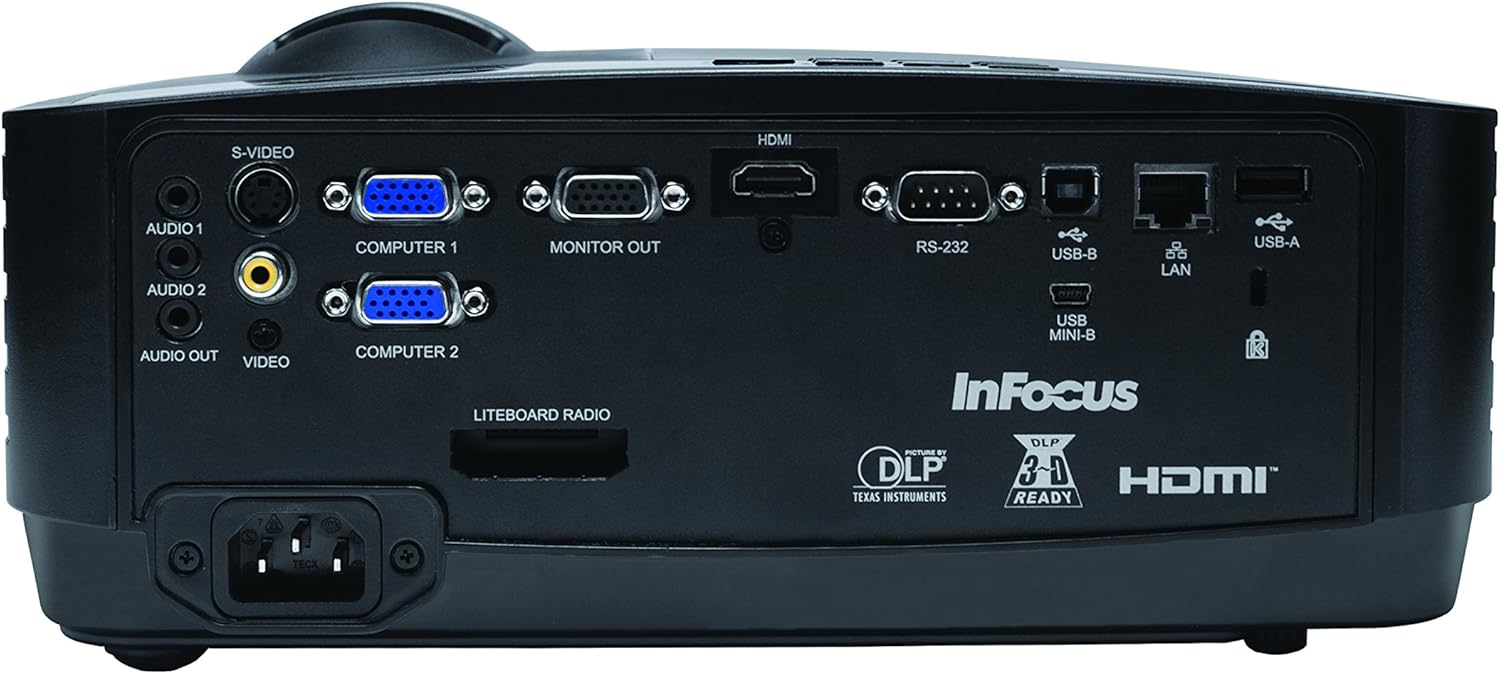
The rear panel provides various input and output ports for connecting external devices.
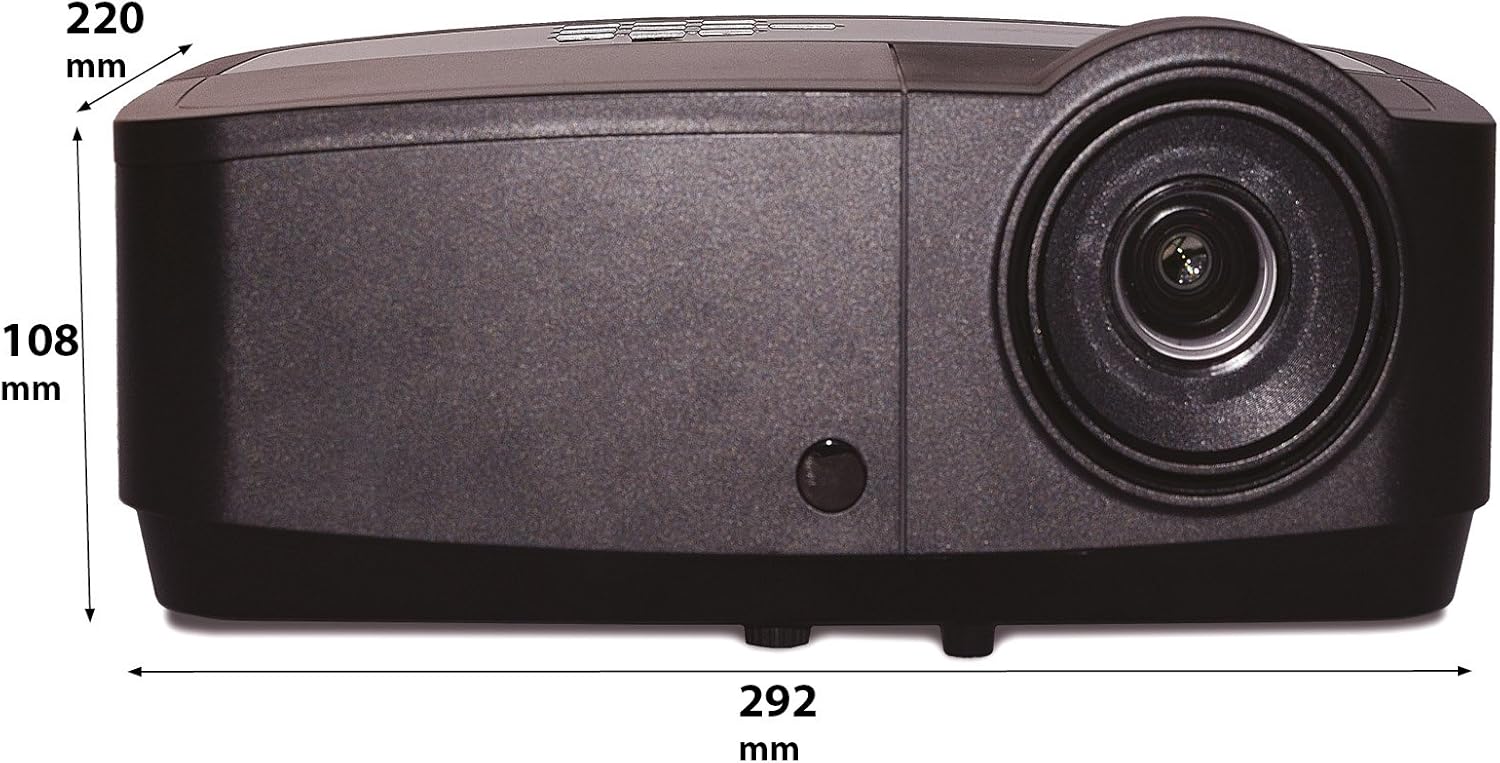
Figure 3: Rear panel of the InFocus IN2126a projector, displaying various connectivity ports including HDMI, VGA, USB, and LAN.
- HDMI: Za digitalni video i audio ulaz.
- COMPUTER 1 / COMPUTER 2 (VGA): Za analogni video ulaz sa računara.
- MONITOR OUT (VGA): For connecting an external monitor.
- USB-B / USB Mini-B: For service or specific USB functions.
- USB-A: For connecting USB devices, such as a wireless adapter.
- Lokalna mreža (RJ45): Za mrežnu povezanost.
- RS-232: Za serijsku kontrolu.
- AUDIO 1 / AUDIO 2 (RCA): Za audio ulaz.
- AUDIO IZLAZ: Za povezivanje eksternih audio sistema.
- VIDEO (RCA): Za kompozitni video ulaz.
- S-VIDEO: Za S-Video ulaz.
- Ulaz za napajanje: Za spajanje kabla za napajanje.
3.3 Kontrole na gornjoj ploči
The top panel features controls for basic projector functions and image adjustments.

Figure 4: Top panel of the InFocus IN2126a projector, showing the control buttons and focus/zoom rings.
- Dugme za napajanje: Uključuje ili isključuje projektor.
- Menu/Exit Button: Accesses or exits the on-screen display (OSD) menu.
- Navigacijski gumbi (gore, dolje, lijevo, desno): Navigacija kroz opcije menija.
- Dugme Enter: Potvrđuje odabire u meniju.
- Tipka Izvor: Bira ulazne izvore.
- Blank Button: Temporarily blanks the screen.
- Automatsko dugme: Automatski prilagođava postavke slike.
- Prsten za fokus: Podešava oštrinu slike.
- Prsten za zumiranje: Podešava veličinu slike.
3.4 Dimenzije
Understanding the physical dimensions is important for installation and placement.

Figure 5: Diagram illustrating the dimensions of the InFocus IN2126a projector (292mm length, 220mm width, 108mm height).
4. Podešavanje
4.1 Postavljanje projektora
Place the projector on a stable, flat surface or mount it securely. Ensure the projector is positioned at an appropriate distance from the screen to achieve the desired image size. Maintain sufficient space around the projector for proper ventilation.
4.2 Povezivanje uređaja
- Priključak za napajanje: Spojite kabel za napajanje na utičnicu za napajanje projektora, a zatim na uzemljenu električnu utičnicu.
- Video izvor:
- For digital sources (e.g., Blu-ray player, laptop), use an HDMI cable to connect to the HDMI port.
- For analog computer sources, use a VGA cable to connect to the COMPUTER 1 or COMPUTER 2 port.
- For other video sources, use the appropriate S-VIDEO or VIDEO (RCA) connections.
- Izvor zvuka: If your video source does not transmit audio via HDMI, connect audio cables to the AUDIO 1 or AUDIO 2 ports.
- Mrežna veza: Za pristup žičanoj mreži, priključite Ethernet kabel na LAN priključak.
- Bežična povezanost: If using a compatible wireless adapter (sold separately), insert it into the USB-A port.
4.3 Uključivanje/isključivanje
- Za uključivanje: Press the Power button on the projector's top panel or the remote control. The power indicator light will illuminate.
- Za isključivanje: Press the Power button again. The projector will enter a cooling cycle before shutting down completely. Do not unplug the projector during the cooling cycle.
5. Upravljanje projektorom
5.1 Odabir izvora
After powering on, the projector may automatically detect an active input source. If not, or to switch sources:
- Pritisnite Izvor dugme na projektoru ili daljinskom upravljaču.
- Use the navigation buttons to highlight the desired input source (e.g., HDMI, Computer 1, Video).
- Pritisnite Enter da odaberete izvor.
5.2 Podešavanje slike
- Fokus: Rotirajte Focus ring on the projector lens until the image appears sharp and clear.
- zumiranje: Rotirajte Zoom ring on the projector lens to adjust the image size to fit your screen.
- Keystone korekcija: Ako slika izgleda trapezoidno, koristite funkciju korekcije trapezoidnog izobličenja u OSD meniju da biste je poravnali.
5.3 On-Screen Display (OSD) meni
The OSD menu allows you to configure various projector settings.
- Pritisnite Meni dugme da biste otvorili OSD meni.
- Koristite Gore/Dolje navigation buttons to select a menu category.
- Koristite Lijevo/Desno navigation buttons to adjust settings or enter sub-menus.
- Pritisnite Enter da potvrdite promjene.
- Pritisnite Izađi to close the OSD menu.
5.4 Bežično povezivanje
The IN2126a is wireless-ready. To enable wireless display, a compatible InFocus wireless adapter (sold separately) must be connected to the USB-A port. Refer to the wireless adapter's specific instructions for setup and connection procedures.
5.5 3D funkcionalnost
The projector supports 3D content. To view 3D content, you will need a compatible 3D source, 3D glasses, and appropriate 3D content. Refer to the projector's OSD menu for 3D settings and ensure your source device is configured for 3D output.
6. Održavanje
Redovno održavanje osigurava optimalne performanse i produžava vijek trajanja vašeg projektora.
6.1 Lamp Zamjena
Projektor lamp has a limited lifespan (approximately 4000 hours). When the lamp indicator illuminates or the image brightness significantly decreases, the lamp needs replacement. Always use an authorized InFocus replacement lampZa detaljne informacije pogledajte kompletan servisni priručnik.amp replacement instructions or contact customer support.
6.2 Čišćenje filtera
Dust accumulation on the air filter can impede airflow and cause overheating. Regularly clean the air filter to maintain proper ventilation. Turn off and unplug the projector before cleaning. Use a soft brush or vacuum cleaner to remove dust from the filter cover.
6.3 Generalno čišćenje
- Projektor Casing: Koristite meku krpu koja ne ostavlja dlačice dampOčistite blagim, neabrazivnim sredstvom za čišćenje. Ne koristite jake hemikalije.
- Objektiv: Use a lens cleaning cloth and specialized lens cleaning solution. Avoid touching the lens surface with your fingers.
7. Otkrivanje problema
Ako naiđete na probleme s projektorom, pogledajte sljedeće uobičajene probleme i rješenja:
| Problem | Mogući uzrok | Rješenje |
|---|---|---|
| Nema slike na ekranu | Odabran pogrešan ulazni izvor; Labava kablovska veza; Projektor u stanju pripravnosti. | Verify input source; Check all cable connections; Press power button to wake from standby. |
| Slika je mutna | Fokus nije podešen; Projektor je preblizu/predaleko od platna. | Adjust the focus ring; Reposition the projector and adjust zoom. |
| Slika je trapezoidna | Projektor nije okomit u odnosu na platno. | Koristite korekciju trapezoidnog izobličenja u OSD meniju. |
| Nema zvuka | Audio cables not connected; Volume too low; Muted. | Check audio cable connections; Adjust volume; Unmute projector. |
| Projektor se pregrijava i gasi | Začepljena ventilacija; Zaprljan filter za vazduh. | Ensure clear airflow around projector; Clean the air filter. |
For more detailed troubleshooting, consult the complete user manual or contact InFocus customer support.
8. Specifikacije
Key technical specifications for the InFocus IN2126a WXGA Network Projector:
- Naziv modela: IN2126a
- Vrsta prikaza: DLP
- Nativna rezolucija: 1280 x 800 (WXGA)
- Svjetlina: 3500 lumena
- Omjer kontrasta: 15000:1
- Reprodukcija boja: 1.07 milijardi boja (30-bita)
- Radni vijek izvora svjetlosti: 4000 sata
- Tehnologija povezivanja: Wireless-ready, HDMI 1.4, VGA (x2), USB (Type-A, Mini-B, Type-B), LAN (RJ45), RS-232, Audio In (x2), Audio Out, Video (RCA), S-Video
- Posebne karakteristike: 3D-Ready, Network Projector
- Form Faktor: Prijenosni
- Vrsta montaže: Tabletop Mount
- Težina artikla: 7.1 funti
9. Garancija i podrška
For information regarding your product's warranty, please refer to the warranty card included with your purchase or visit the official InFocus website. For technical support, service, or to purchase accessories, please contact InFocus customer service through their official channels.