
Eurotime 23708-00
Eurotime LCD Digital Alarm Clock Model 23708-00 User Manual
Model: 23708-00
Uvod
This manual provides instructions for the setup, operation, and maintenance of your Eurotime LCD Digital Alarm Clock, Model 23708-00. Please read this manual thoroughly before using the product to ensure proper function and longevity.
The Eurotime LCD Digital Alarm Clock features an LCD display, 7-color changing LED lighting, multiple natural alarm tones, and displays time, date, day of the week, and indoor temperature. It also includes a snooze function and a countdown feature.
Sigurnosne informacije
- Držite uređaj dalje od vode i visoke vlažnosti.
- Ne izlažite uređaj direktnoj sunčevoj svjetlosti ili ekstremnim temperaturama.
- Use only the specified battery type (3 x 1.5V AAA batteries).
- Nemojte miješati stare i nove baterije ili različite vrste baterija.
- Istrošene baterije odlažite odgovorno u skladu sa lokalnim propisima.
- Ne pokušavajte sami rastavljati ili popravljati uređaj. Za servis se obratite kvalifikovanom osoblju.
Sadržaj paketa
- Eurotime LCD Digital Alarm Clock (Model 23708-00)
- 3 x 1.5V AAA baterije
- Korisnički priručnik (ovaj dokument)
Product Overview
Upoznajte se s komponentama i kontrolama vašeg budilnika.
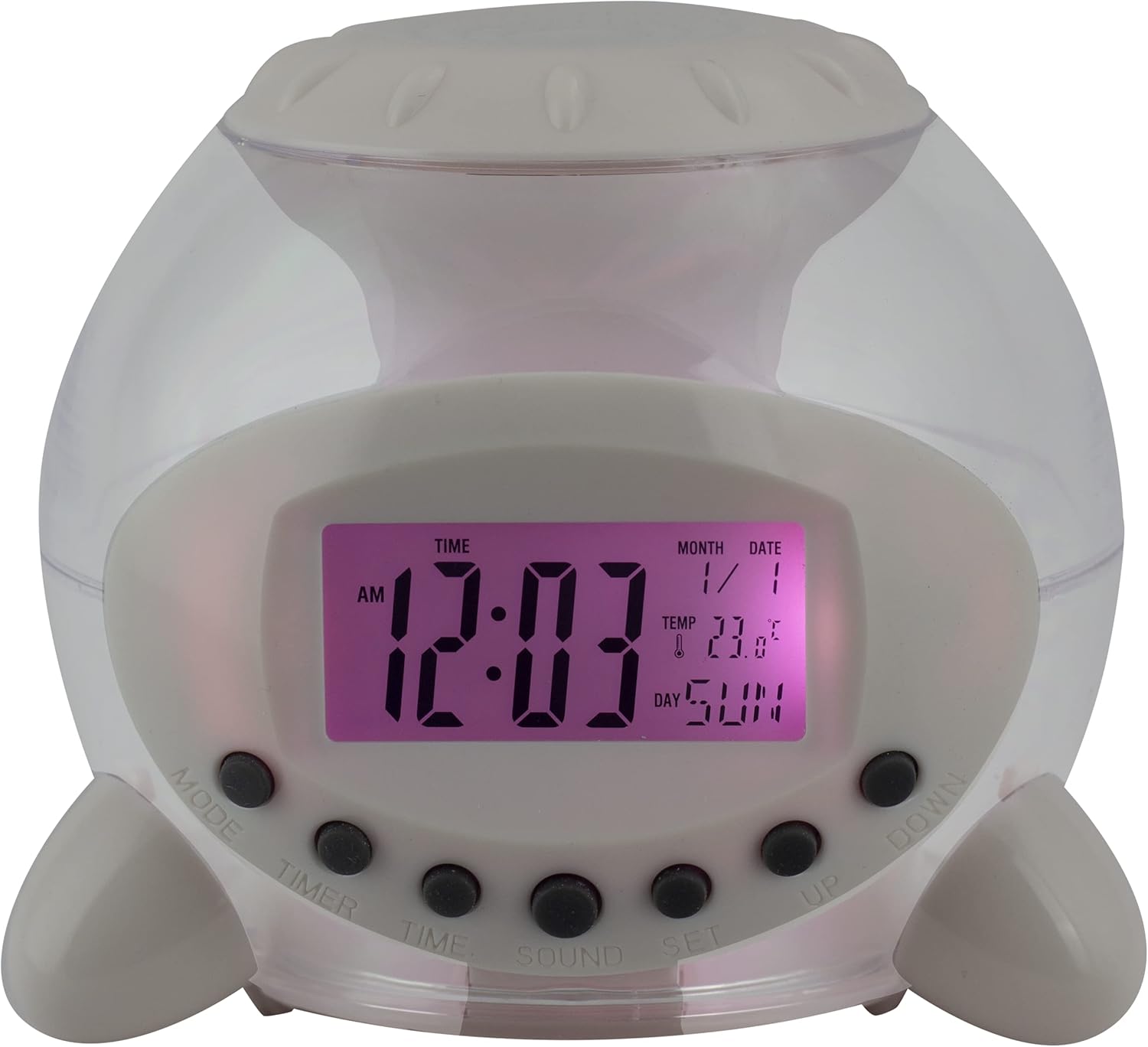
Slika 1: Prednja strana View of the Alarm Clock. This image displays the front of the Eurotime LCD Digital Alarm Clock, highlighting its transparent plastic housing and the central LCD screen. The screen shows the time (12:03 AM), month (1), date (1), temperature (23.8°C), and day (SUN). Below the screen are control buttons labeled MODE, TIMER, TIME, SOUND, and SET, along with UP and DOWN buttons.

Slika 2: Bočna strana View sa kontrolnim dugmadima. This image shows a side perspective of the alarm clock, emphasizing the array of control buttons located on the front-bottom edge. The transparent housing allows a glimpse of the internal structure and the LED lighting effect. The buttons are clearly visible for user interaction.

Slika 3: Bočna strana View with Internal Lighting. This image provides another side view, illustrating the transparent housing and the internal LED lighting. The light emanates from the base, creating a soft glow within the clock's structure, demonstrating its color-changing feature.
Kontrolna dugmad:
- UPUTE: Switches between time display, alarm setting, and countdown timer.
- TAJMER: Activates and sets the countdown timer.
- VRIJEME: Used to set the current time and date.
- ZVUK: Selects alarm tones or natural sounds.
- SET: Potvrđuje postavke ili ulazi u način rada za podešavanje.
- GORE DOLJE: Adjusts values during setting modes.
Setup
1. Instalacija baterije
- Pronađite odjeljak za baterije na dnu budilnika.
- Otvorite poklopac odeljka za baterije.
- Umetnite tri (3) baterije od 1.5 V AAA, pazeći na ispravan polaritet (+/-).
- Čvrsto zatvorite poklopac odeljka za baterije.
Napomena: The clock will automatically power on after battery installation. The display may flash, indicating it's ready for time setting.
Uputstvo za upotrebu
1. Podešavanje vremena i datuma
- U režimu normalnog prikaza vremena, pritisnite VRIJEME dugme jednom. Cifre za sate će treptati.
- Koristite UP or DOLJE dugmad za podešavanje sata.
- Pritisnite VRIJEME again to move to minute setting. Adjust with UP or DOLJE.
- Nastavite pritiskati VRIJEME to cycle through year, month, and date settings, adjusting each with UP or DOLJE.
- After setting the date, press VRIJEME one last time or wait a few seconds for the settings to be saved and return to normal display.
2. Postavljanje alarma
- Pritisnite MODE button until "ALARM" appears on the display (or an alarm icon).
- Pritisnite SET dugme. Cifre sati alarma će treptati.
- Koristite UP or DOLJE dugmad za podešavanje sata alarma.
- Pritisnite SET again to move to minute setting. Adjust with UP or DOLJE.
- Pritisnite SET one last time to confirm the alarm time.
- Da biste aktivirali/deaktivirali alarm, pritisnite dugme UP button in alarm display mode. An alarm icon will appear/disappear.
3. Funkcija odgode alarma
When the alarm sounds, press any button (except SET or MODE) to activate the snooze function. The alarm will pause and sound again after a few minutes (duration is adjustable, refer to advanced settings if available).
Da biste potpuno isključili alarm, pritisnite SET button when it is sounding.
4. Color Changing LED Lighting
The alarm clock features a 7-color changing LED light. This function typically activates automatically when the alarm sounds or can be manually toggled. Refer to the MODE or SET button for specific controls related to the lighting, if available.
5. Natural Alarm Tones
To select an alarm tone:
- In alarm setting mode (after pressing MODE to display alarm time), press the ZVUK dugme.
- Koristite UP or DOLJE buttons to cycle through the available natural alarm tones.
- Pritisnite SET da potvrdite svoj izbor.
6. Countdown Feature
Za korištenje tajmera za odbrojavanje:
- Pritisnite MODE button until "TIMER" appears on the display.
- Pritisnite TIMER dugme. Cifre sata će treptati.
- Koristi UP or DOLJE to set the desired countdown hour.
- Pritisnite TIMER again to set minutes, then seconds.
- Pritisnite SET za početak odbrojavanja.
- To pause or resume, press SET. Za resetovanje pritisnite MODE.
Održavanje
Čišćenje
- Obrišite sat mekom, suhom krpom.
- Do not use abrasive cleaners or solvents, as they may damage the plastic housing or display.
Zamjena baterije
When the display dims or functions become erratic, it is time to replace the batteries. Follow the "Battery Installation" steps in the Setup section.
Rješavanje problema
| Problem | Mogući uzrok | Rješenje |
|---|---|---|
| Ekran je prazan ili taman. | Slabe ili ispražnjene baterije. Nepravilna ugradnja baterija. | Replace batteries with new 1.5V AAA batteries. Ensure correct polarity. |
| Alarm se ne oglašava. | Alarm is not activated. Alarm volume is too low (if adjustable). | Ensure the alarm icon is displayed. Check alarm settings. |
| Vrijeme/datum je netačan. | Not set correctly after battery installation or power interruption. | Follow "Setting Time and Date" instructions to reset. |
| Color changing light not working. | Feature not activated or malfunction. | Check operating instructions for light activation. If problem persists, contact support. |
Specifikacije
- Brand: Eurotime
- Broj modela: 23708-00
- Dimenzije proizvoda: 8.99 x 8.99 x 8 cm
- Težina: 120 g
- Materijal: Plastika
- Vrsta prikaza: Digitalni LCD
- Posebne karakteristike: Calendar display, Snooze, Alarm, 7-Color Changing LED, Natural Alarm Tones, Countdown Feature, Indoor Temperature Display
- Izvor napajanja: 3 x 1.5 V AAA baterije (uključene)
Garancija i podrška
For warranty information or technical support, please refer to the retailer where the product was purchased or visit the official Eurotime webSačuvajte račun kao dokaz o kupovini.
Ask a question about this manual
Ask about setup, troubleshooting, compatibility, parts, safety, or missing instructions. Manuals+ will review the question and use this page’s manual context to help answer it.