
1. Uvod
Thank you for choosing the Fonestar AS-24U Hi-Fi USB/SD/MP3 Amplifier. This manual provides essential information for the safe and efficient operation of your device. Please read it thoroughly before use and retain it for future reference.
2. Sigurnosna uputstva
- Napajanje: Osigurajte ampUređaj je spojen na izvor napajanja koji odgovara navedenoj jačinitage (230 V).
- ventilacija: Ne blokirajte ventilacijske otvore. Osigurajte dovoljno prostora oko uređaja za pravilan protok zraka kako biste spriječili pregrijavanje.
- Vlaga: Zadrži amplifier away from water, moisture, and high humidity environments. Do not expose it to dripping or splashing.
- Izvori toplote: Izbjegavajte postavljanje uređaja u blizinu izvora topline kao što su radijatori, grijalice, peći ili drugi uređaji koji proizvode toplinu.
- čišćenje: Isključite kabel za napajanje prije čišćenja. Koristite suhu, meku krpu. Ne koristite tekuća sredstva za čišćenje ili aerosolna sredstva za čišćenje.
- servisiranje: Ne pokušavajte sami servisirati ovaj proizvod. Sve servise prepustite kvalificiranom servisnom osoblju.
- Unos predmeta/tečnosti: Nikada nemojte gurati predmete bilo koje vrste u ovaj proizvod kroz otvore jer mogu dodirnuti opasan volumentagtačke ili delovi u kratkom spoju koji mogu dovesti do požara ili strujnog udara.
3. Proizvod je gotovview
3.1 Prednja ploča
The front panel features controls for power, input selection, volume adjustment, and USB/SD media playback. It also includes a display for media information.
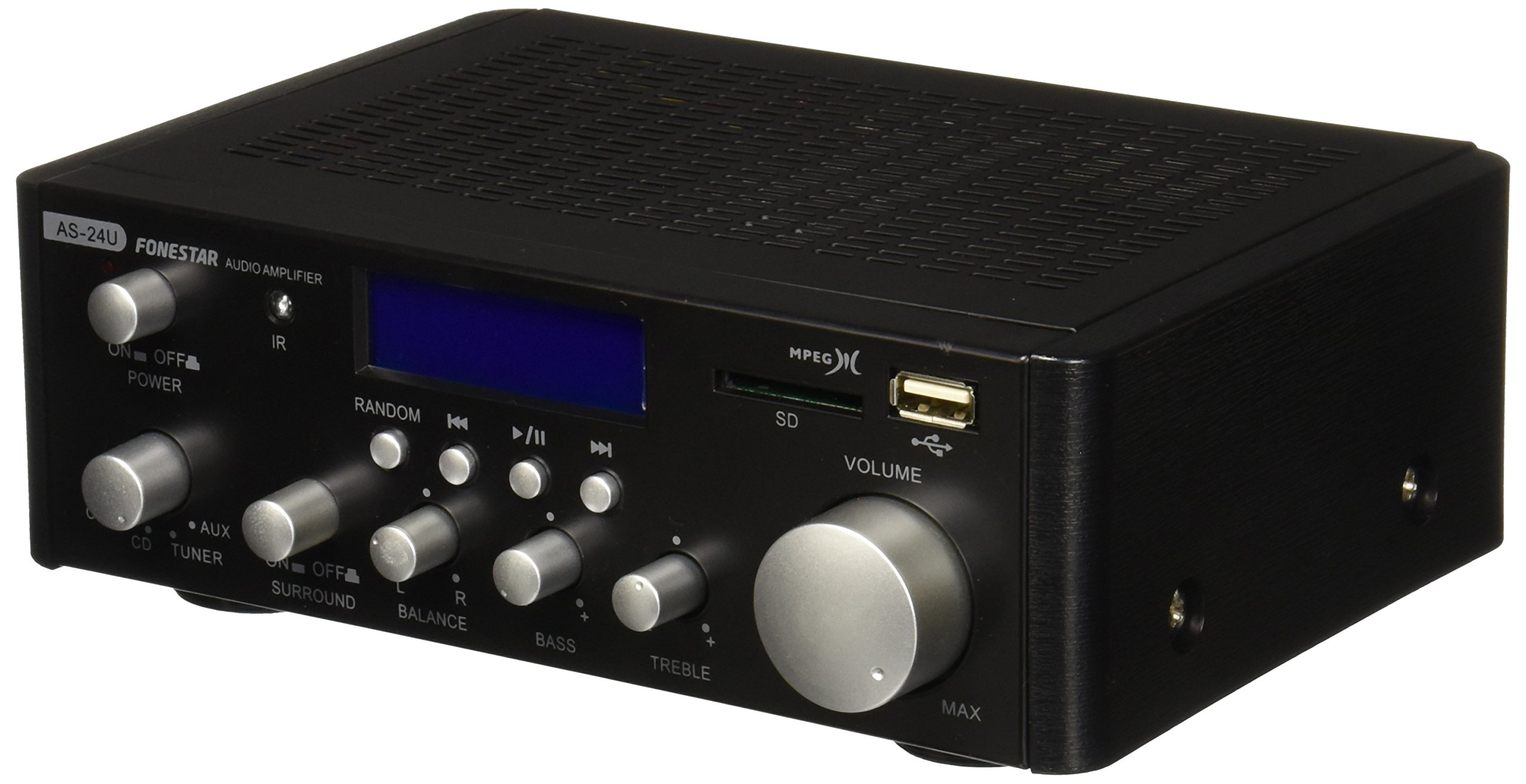
Slika 1: Prednja strana view of the Fonestar AS-24U amplifier, showing the main controls and display.
3.2 Zadnja ploča
The rear panel provides all necessary connections for audio input sources, speaker outputs, and power.

Slika 2: Pozadi view of the Fonestar AS-24U amplifier, detailing input/output ports and power connection.
- INPUT (AUX, TUNER, CD): RCA stereo inputs for connecting external audio sources.
- SPEAKER OUT (STEREO): Spring clip terminals for connecting passive speakers (4-8 Ω).
- SPEAKER OUT (SURROUND): Additional spring clip terminals for surround speakers (8 Ω).
- NAPAJANJE: AC power input for the main power cable.
- VOLTAGE SELEKTOR: Switch for selecting between 115V and 230V power input. Ensure this is set correctly for your region.
3.3 Daljinski upravljač
The included remote control allows for convenient operation of the amplifier's media playback functions.
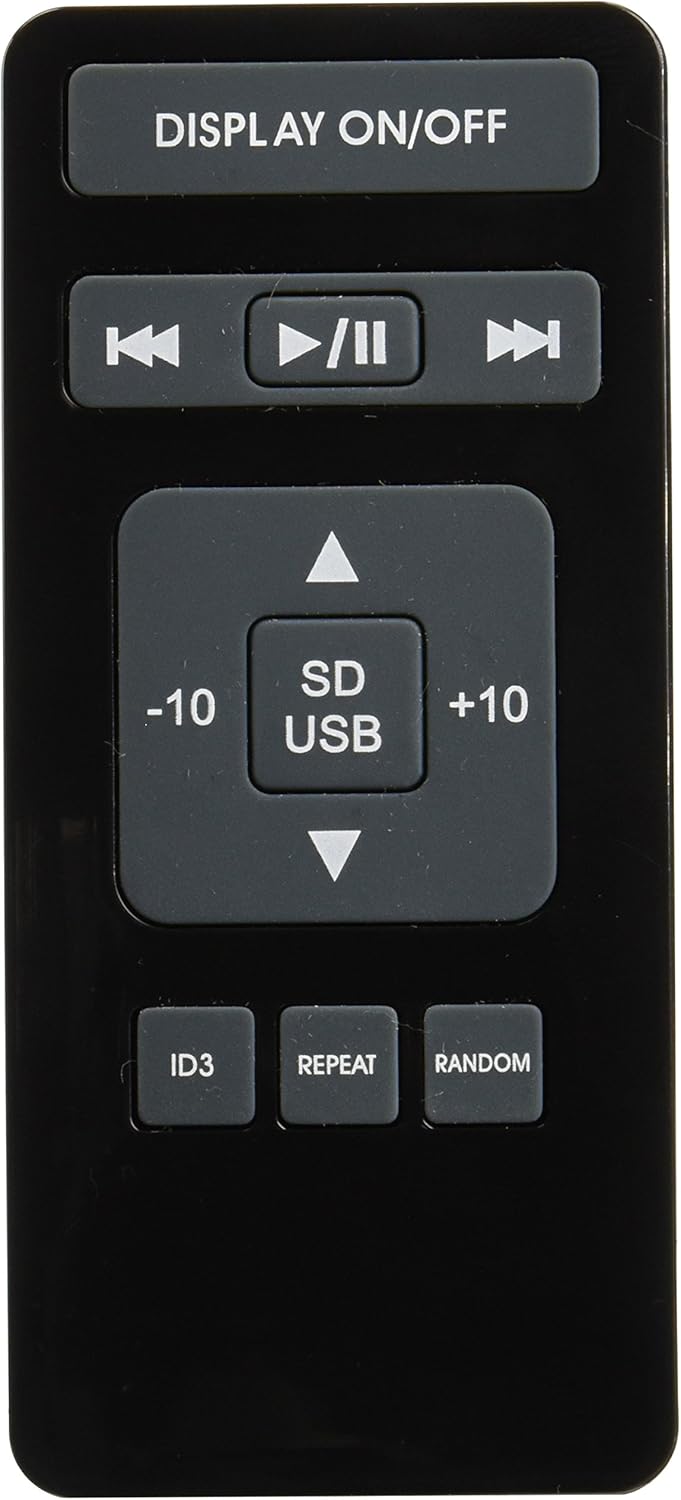
Image 3: Remote control for the Fonestar AS-24U amplifier, showing buttons for media playback and display control.
- UKLJUČENO / ISKLJUČENO PRIKAZIVANJE: Toggles the front panel display.
- PLAY/PAUSE, PREVIOUS/NEXT: Controls for media playback.
- SD/USB: Selects between SD card and USB drive as the media source.
- -10/+10: Skips tracks by 10.
- ID3: Displays ID3 tag informacije za MP3 files.
- PONAVLJANJE: Toggles repeat modes (e.g., repeat one, repeat all).
- SLUČAJNO: Toggles random playback.
4. Podešavanje
4.1 Povezivanje zvučnika
- Osigurajte ampUređaj za spašavanje je isključen iz struje i iskopčan iz struje.
- Connect your passive speakers to the SPEAKER OUT terminals on the rear panel.
- Match the positive (+) terminal on the amplifier to the positive (+) terminal on your speaker, and the negative (-) to the negative (-).
- For stereo speakers, use the 4-8 Ω terminals. For surround speakers, use the 8 Ω terminals. Ensure your speakers' impedance matches the ampspecifikacije lifiera.
4.2 Povezivanje audio izvora
- Connect your audio devices (e.g., CD player, tuner, auxiliary device) to the corresponding RCA INPUT jacks (CD, TUNER, AUX) on the rear panel.
- Ensure left and right channels are correctly matched (red for right, white for left).
4.3 Priključak za napajanje
- Provjerite VOLTAGE SELECTOR switch on the rear panel is set to the correct voltage for your region (e.g., 230V).
- Connect the power cable to the POWER IN socket on the rear panel and then to a suitable wall outlet.
5. Uputstvo za upotrebu
5.1 Uključivanje/isključivanje
Pritisnite dugme za napajanje na prednjoj ploči da biste uključili amplifier on or off. A soft start protection circuit is integrated.
5.2 Odabir ulaznog izvora
Use the input selector knob or buttons on the front panel to choose between CD, TUNER, AUX, USB, or SD inputs.
5.3 Podešavanje jačine zvuka
Rotate the main volume knob on the front panel to adjust the overall sound level. Start with a low volume and gradually increase it to a comfortable listening level.
5.4 Reprodukcija sa USB-a/SD kartice
- Umetnite USB fleš disk ili SD karticu koja sadrži MP3 audio zapis files into the respective slot on the front panel.
- Select the USB or SD input using the input selector.
- Use the playback controls (Play/Pause, Previous/Next) on the front panel or remote control to manage your music.
- The remote control allows for additional functions like skipping 10 tracks (+10/-10), displaying ID3 tags, repeating tracks, and random playback.
6. Održavanje
6.1 Čišćenje
Za čišćenje amplifier, first unplug it from the power outlet. Use a soft, dry cloth to wipe down the exterior surfaces. Do not use abrasive cleaners, waxes, or solvents as they may damage the finish.
6.2 Skladištenje
Ako pohranjujete amplifier for an extended period, ensure it is unplugged, clean, and stored in a cool, dry place away from direct sunlight and extreme temperatures.
7. Otkrivanje problema
- Nema napajanja:
- Provjerite je li kabel za napajanje sigurno spojen na oba ampupaljač i zidnu utičnicu.
- Ensure the wall outlet is functional.
- Provjerite VOLTAGE SELECTOR switch is set correctly.
- Nema zvuka:
- Potvrdite da je odabran ispravan ulazni izvor.
- Provjerite sve spojeve zvučnika na ispravan polaritet i sigurno prianjanje.
- Uvjerite se da je jačina zvuka pojačana i da nije isključena.
- Testirajte s drugim audio izvorom.
- izobličeni zvuk:
- Smanjite glasnoću.
- Provjerite kompatibilnost impedanse zvučnika.
- Ensure audio cables are not damaged and are securely connected.
- Problemi s reprodukcijom USB/SD kartice:
- Ensure the USB drive or SD card is formatted to a compatible file sistem (npr. FAT32).
- Provjerite je li zvuk files su u MP3 formatu.
- Pokušajte s drugim USB pogonom ili SD karticom.
8. Specifikacije
| Brand | FONESTAR |
| Model | AS-24U |
| Stereo Power Output | 25 + 25 W max, 15 + 15 W RMS (4 Ω), 12 + 12 W RMS (8 Ω) |
| Surround Power Output | 10 + 10 W max, 6 + 6 W RMS (8 Ω) |
| Inputs | 3 stereo (CD, Tuner, AUX), 2 x RCA 400 mV |
| Zaštite | Meki start, kratki spoj, preopterećenje |
| Voltage | 230 Volts |
| Dimenzije (D x Š x V) | 5 x 5 x 10 cm (približno 50 x 50 x 100 mm) |
| Težina | 1.9 kg |
| Povezivanje zvučnika | Žičani |
9. Garancija i podrška
This Fonestar AS-24U amplifier comes with a standard manufacturer's warranty. Please refer to the warranty card included with your purchase for specific terms and conditions. For technical support, service, or warranty claims, please contact your retailer or the official Fonestar customer service.