
1. Uvod
This manual provides instructions for the OEM RMT-B119A remote control, designed as a replacement or secondary remote for various Sony Blu-ray player models. This remote offers full functionality for controlling your Blu-ray player's features.
Compatible Sony Blu-ray Player Models:
- BDP-BX59
- BDP-S390
- BDP-S590
- BDP-BX110
- BDP-S1100
- BDP-S3100
- BDP-BX310
2. Podešavanje
2.1 Instalacija baterije
The remote control requires two (2) AAA batteries (not included). Follow these steps to install the batteries:
- Pronađite poklopac odeljka za baterije na poleđini daljinskog upravljača.
- Pritisnite jezičak i pomaknite poklopac prema dolje da biste otvorili pretinac.
- Umetnite dvije AAA baterije, pazeći da pozitivni (+) i negativni (-) terminali budu pravilno poravnati s oznakama unutar odjeljka.
- Vratite poklopac pretinca za baterije na mjesto dok ne klikne sigurno.
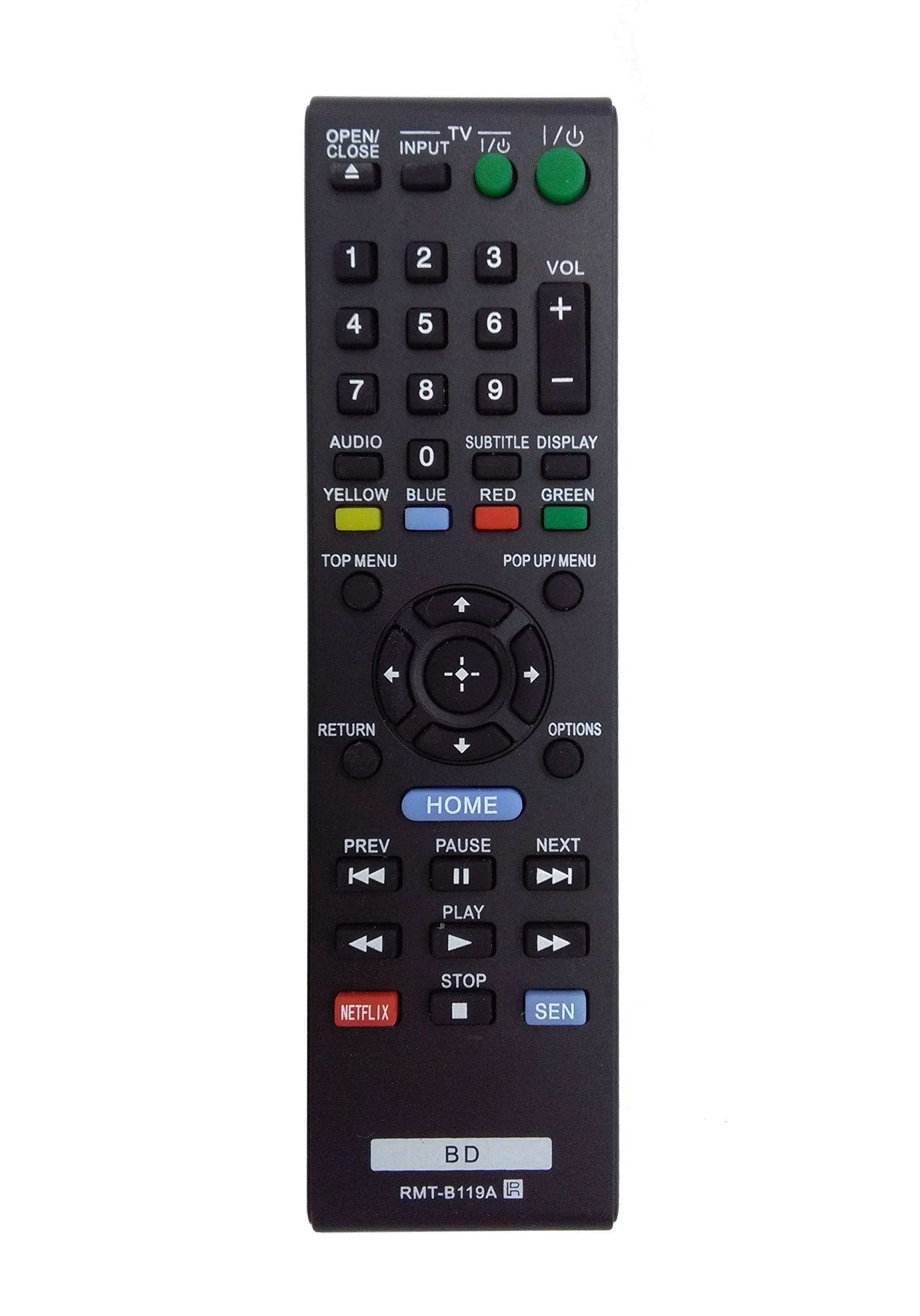
Image: The OEM RMT-B119A remote control, showing the full button layout on the front and a partial view of the open battery compartment on the back, revealing the battery terminals.
3. Uputstvo za upotrebu
3.1 Raspored daljinskog upravljača i funkcije dugmadi
Familiarize yourself with the buttons on your RMT-B119A remote control. Below is a description of each button's primary function.
Image: The OEM RMT-B119A remote control, displaying all buttons and their labels.
- Napajanje (U/I): Turns the Blu-ray player on or off.
- OPEN/CLOSE (▲): Otvara ili zatvara fioku diska.
- ULAZ: Switches the input source on the connected TV (if programmed).
- TV: Switches the remote to TV control mode (if programmed).
- Numerička tastatura (0-9): Used for direct track selection, chapter selection, or entering numerical data.
- VOL (+/-): Adjusts the volume level (typically for the connected TV, if programmed).
- AUDIO: Changes the audio track or language during playback.
- SUBTITLE DISPLAY: Toggles subtitle display on or off, or cycles through available subtitle languages.
- YELLOW, BLUE, RED, GREEN: Color-coded function buttons, typically used for specific features within menus or interactive content. Their function varies depending on the disc or menu.
- TOP MENI: Accesses the main menu of the Blu-ray disc.
- POP UP/MENU: Displays the pop-up menu during disc playback.
- Directional Pad (↑↓←→): Kreće kroz menije i opcije.
- Center Button (Enter/Select): Potvrđuje odabir ili ulazi u stavku menija.
- POVRATAK: Vraća se na prethodni ekran ili meni.
- OPCIJE: Displays context-sensitive options or settings.
- DOM: Accesses the Blu-ray player's home menu.
- PREV (◀◀): Skips to the beginning of the current track/chapter or the previous track/chapter.
- PAUSE (▌▌): Pauzira reprodukciju.
- NEXT (▶▶): Preskače na sljedeću pjesmu ili poglavlje.
- IGRAJ (▶): Pokreće ili nastavlja reprodukciju.
- STOP (■): Zaustavlja reprodukciju.
- NETFLIX: Direct access button for the Netflix streaming service.
- SEN: Direct access button for the Sony Entertainment Network (now PlayStation Video/Music).
- BD: Likely a dedicated button for Blu-ray Disc functions or to switch to Blu-ray mode.
4. Održavanje
Da biste osigurali dugotrajnost i pravilno funkcioniranje vašeg daljinskog upravljača, slijedite ove upute za održavanje:
- čišćenje: Obrišite daljinski upravljač mekom, suhom krpom. Za tvrdokornu prljavštinu, laganoampen the cloth with water or a mild, non-abrasive cleaner. Avoid using harsh chemicals or solvents.
- Zamjena baterije: Replace batteries when the remote's response becomes sluggish or it stops functioning. Always replace both batteries at the same time with new ones of the same type.
- Skladištenje: Daljinski upravljač čuvajte na hladnom i suhom mjestu, dalje od direktne sunčeve svjetlosti, ekstremnih temperatura i visoke vlažnosti. Ako daljinski upravljač nećete koristiti duži period, izvadite baterije kako biste spriječili curenje.
- Izbjegavajte kapi: Zaštitite daljinski upravljač od fizičkih udara, jer padovi mogu oštetiti unutrašnje komponente.
5. Otkrivanje problema
Ako imate problema s daljinskim upravljačem, pogledajte sljedeću tabelu za uobičajene probleme i rješenja:
| Problem | Mogući uzrok | Rješenje |
|---|---|---|
| Daljinski ne radi. | Prazne ili nepravilno umetnute baterije. | Zamijenite baterije novima, pazeći na ispravan polaritet (+/-). |
| Daljinski upravljač radi povremeno. | Slaba baterija ili prepreka. | Replace batteries. Ensure no objects are blocking the remote's signal path to the Blu-ray player. |
| Daljinski upravljač ne upravlja TV-om. | Remote not programmed for TV or TV mode not selected. | This remote is primarily for Blu-ray players. TV control functionality may require specific programming not covered by this manual, or may not be supported by this OEM model. |
| Dugmad ne reagiraju ili su ljepljiva. | Prljavština ili ostaci ispod dugmadi. | Clean the remote control surface. Avoid spilling liquids on the remote. |
6. Specifikacije
- Brand: OEM
- Broj modela: RMT-B119A
- Tehnologija povezivanja: infracrveni (IR)
- Kompatibilni uređaji: Sony Blu-ray Players (specific models listed in Introduction)
- Izvor napajanja: 2 x AAA baterije (nisu uključene)
- Maksimalni domet: Približno 10 metara (33 stope)
- Posebna karakteristika: Ergonomski dizajn
7. Garancija i podrška
This OEM RMT-B119A remote control comes with a 30-dnevna garancija od datuma kupovine, pokrivajući proizvodne nedostatke. Molimo sačuvajte dokaz o kupovini za reklamacije u slučaju garancije.
For technical support or warranty inquiries, please contact the retailer or manufacturer directly. Refer to your purchase documentation for specific contact information.