
XTAR MP1S
XTAR MP1S Intelligent USB Battery Charger User Manual
Model: MP1S
1. Uvod
The XTAR MP1S Intelligent USB Battery Charger is designed for charging various 3.7V Li-ion batteries, including 14650, 17670, 18650, 18700, and with the use of spacers, also 10440, 14500, 15270, 16340, and 18350 types. It features an advanced TC.CC.CV (Trickle Current, Constant Current, Constant Voltage) charging algorithm that continuously monitors battery status for safe and automatic charging. The charger is equipped with a protection circuit and intelligent temperature monitoring to ensure optimal performance and safety.
2. Sigurnosne mjere
Please read and understand all safety warnings before using the charger.
- Samo za unutrašnju upotrebu: Držite uređaj dalje od vode i vlage.
- Kompatibilnost baterija: Only charge 3.7V Li-ion batteries. Charging other battery types may cause damage or injury.
- Bez rastavljanja: Disassembly or modification of the charger is strictly prohibited.
- Izbjegavajte kratke spojeve: Short circuits are strictly prohibited and can cause severe damage to the charger and battery.
- Radna temperatura: Ensure the charger is used within the recommended operating temperature range of 0~40℃.
3. Značajke proizvoda
- Intelligent Charging Algorithm: Utilizes TC.CC.CV charging system for efficient and safe charging.
- Automatsko praćenje: Monitors battery status continuously throughout the charging process.
- Low Current Standby: Automatically enters a low current status (below 4uA) when the input voltage is removed, minimizing battery discharge.
- Održavanje punjenja: Continuously monitors the battery after charging is complete and restarts charging if the battery's voltage drops to 4.0V or below, maintaining a full charge.
- Kontrola temperature: The charging management chip monitors its own temperature. If the detected temperature is too high, the charge current will automatically lower to protect the charger.
- Zaštitni krug: Incorporates a robust protection circuit for enhanced safety.
4. Početak rada (Podešavanje)
Follow these steps to set up your XTAR MP1S charger:
- Priključite napajanje: Connect the USB cable to the charger's USB input port and then to a 5V USB power source (e.g., computer USB port, USB wall adapter, or car charger).
- Umetnite bateriju: Carefully insert the 3.7V Li-ion battery into the charging slot, ensuring the correct polarity (+ and - ends) aligns with the markings on the charger. The positive (+) end of the battery should align with the positive contact on the charger, and the negative (-) end with the negative spring contact.
- Indikacija punjenja: The charger will automatically begin charging. Refer to the operating section for details on charging status.
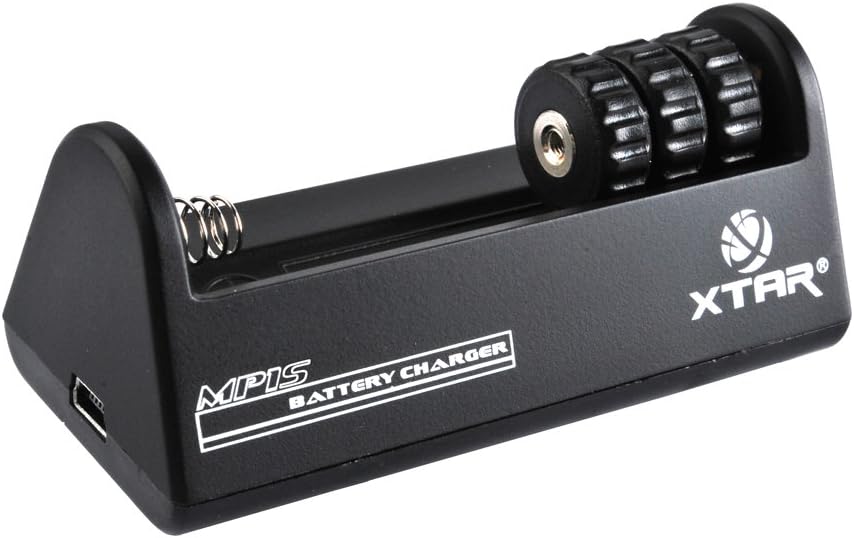
Slika 1: Prednja strana view of the XTAR MP1S Charger, showing the battery slot and USB input.
5. Operacija
The XTAR MP1S charger operates automatically once a compatible battery is inserted and power is connected.
- Proces punjenja: The charger employs a multi-stage TC.CC.CV charging method. It starts with a trickle current, then moves to constant current, and finally constant voltage to safely and efficiently charge your battery.
- Kompatibilnost baterija: This charger is designed for 3.7V Li-ion batteries. It supports 14650, 17670, 18650, 18700, and with the use of spacers, also 10440, 14500, 15270, 16340, 18350 battery sizes.
- Automatska dopuna: To ensure your battery remains fully charged, the charger will automatically restart charging if the battery voltage drops below 4.0V after a full charge.

Figure 2: Bottom and side views of the XTAR MP1S Charger, showing ventilation and USB port.
6. Održavanje
Pravilno održavanje osigurava dugotrajnost i optimalne performanse vašeg punjača:
- Održavati suhom: Always keep the charger in a dry environment. Avoid exposure to water or high humidity.
- Čisti kontakti: Periodically clean the charging contacts on the charger and your batteries with a dry, soft cloth to ensure good electrical connection.
- Skladištenje: Kada nije u upotrebi, čuvajte punjač na hladnom i suvom mestu dalje od direktne sunčeve svetlosti i ekstremnih temperatura.
- Izbjegnite udar: Do not drop or subject the charger to heavy impact.
7. Otkrivanje problema
If you encounter issues with your XTAR MP1S charger, consider the following:
- Punjač se ne uključuje:
- Provjerite je li USB kabel sigurno spojen i na punjač i na izvor napajanja.
- Verify that the USB power source (e.g., wall adapter, computer port) is functional and providing 5V output.
- Baterija se ne puni:
- Check that the battery is a 3.7V Li-ion type and is compatible with the charger (refer to compatible battery list).
- Uverite se da je baterija umetnuta sa ispravnim polaritetom.
- Inspect the battery and charger contacts for dirt or damage. Clean if necessary.
- Check for any signs of short circuit on the battery or within the charger slot.
- Charging is Slow or Stops Prematurely:
- The charger's internal temperature control may reduce charging current if it detects overheating. Allow the charger to cool down in a well-ventilated area.
- Ensure the USB power source can provide sufficient current (500mA recommended).
8. Specifikacije
| Specifikacija | Vrijednost |
|---|---|
| Broj modela | MP1S |
| Ulazni voltage / Struja | DC 5V/500mA |
| Output Voltage / Struja | DC 4.2V ±0.05% 500mA ±10% |
| Radna temperatura | 0~40℃ |
| Dimenzije proizvoda | 7.09 x 9.84 x 1.97 inča |
| Težina artikla | 2.82 unci (80 grama) |
| Proizvođač | XTAR |
| Datum prve dostupnosti | 3. jul 2013 |
9. Garancija i podrška
For warranty information and technical support, please contact XTAR customer service or visit the official XTAR webSačuvajte račun kao dokaz o kupovini.
You can visit the official XTAR store on Amazon for more information: XTAR Official Store
Ask a question about this manual
Ask about setup, troubleshooting, compatibility, parts, safety, or missing instructions. Manuals+ will review the question and use this page’s manual context to help answer it.