
Uvod
The Jabra Music Street2 Bluetooth Stereo Headset is designed to provide high-quality audio and hands-free communication. This manual provides essential information for the proper use, maintenance, and troubleshooting of your device. Please read it carefully before use.
Setup
1. Punjenje slušalica
Before first use, fully charge the headset. Connect the micro-USB charging cable to the charging port on the headset and the other end to a USB power source.
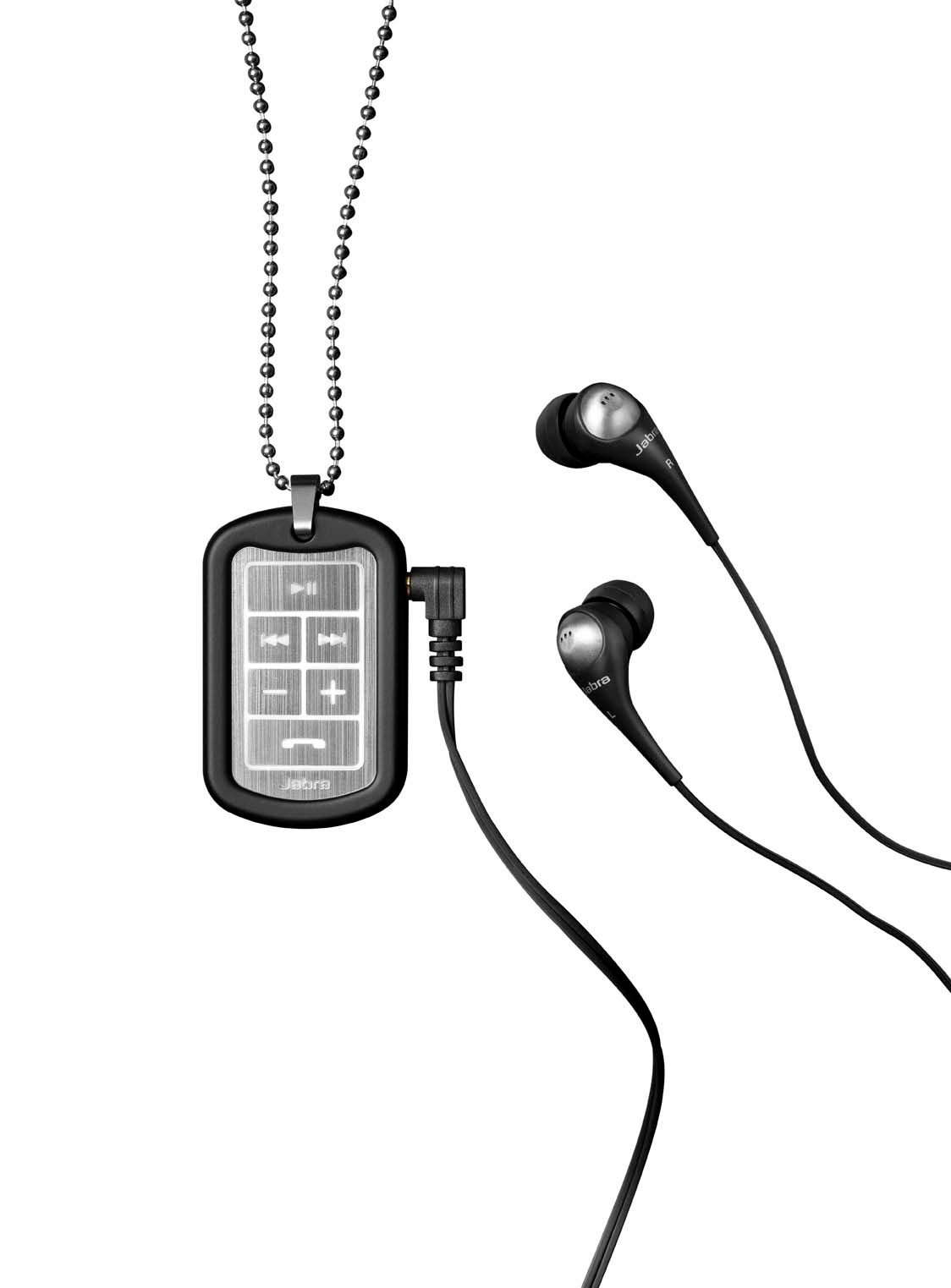
Image: The Jabra Music Street2 headset, highlighting the micro-USB charging port located on the side of the control unit.
- Potpuno punjenje obično traje otprilike 2 sata.
- LED indikator će prikazivati status punjenja (npr. crvena za punjenje, plava za potpuno napunjeno).
2. Uparivanje sa Bluetooth uređajem
- Provjerite jesu li slušalice isključene.
- Press and hold the Multi-function button (usually the play/pause button) for approximately 5-7 seconds until the LED indicator flashes blue rapidly. This indicates pairing mode.
- Na uređaju koji podržava Bluetooth (pametni telefon, tablet itd.), idite na postavke Bluetootha i omogućite Bluetooth.
- Traži available devices. "Jabra Street2" should appear in the list.
- Select "Jabra Street2" to connect. If prompted for a passcode, enter "0000" (four zeros).
- Once successfully paired, the LED indicator will flash blue slowly.
The headset can remember multiple paired devices but can only be connected to one at a time.
Uputstvo za upotrebu
Uključivanje/isključivanje
- Uključeno: Pritisnite i držite višenamjenski taster dok LED ne zatreperi plavo.
- Iskljuciti: Pritisnite i držite višenamjenski taster dok LED ne zatreperi crveno, a zatim se ugasi.
Kontrola muzike
- Pusti/pauza: Pritisnite višenamjenski taster jednom.
- Sljedeća pjesma: Press the "Next Track" button (usually marked with a forward arrow).
- Prethodni zapis: Press the "Previous Track" button (usually marked with a backward arrow).
- Povećavanje glasnoće: Pritisnite dugme "+".
- Smanjivanje jačine zvuka: Pritisnite dugme "-".
Upravljanje pozivima
- Odgovori na poziv: Pritisnite višenamjenski taster jednom.
- Završi poziv: Pritisnite višenamjensko dugme jednom tokom poziva.
- odbiti poziv: Pritisnite i držite višenamensko dugme 2 sekunde.
- Ponovno biranje zadnjeg broja: Dvaput pritisnite višenamjensko dugme kada niste u toku poziva.
- Glasovno biranje: Press the Multi-function button once when not on a call (if supported by your phone).
The headset automatically switches between music and calls.
Održavanje
- Keep the headset dry. Moisture can damage the electronic circuits.
- Avoid extreme temperatures. High temperatures can shorten the life of electronic devices, damage batteries, and warp or melt certain plastics.
- Do not attempt to open the headset. Unauthorized modifications can damage the unit and void your warranty.
- Clean the headset with a soft, dry cloth. Do not use harsh chemicals or detergents.
- Slušalice čuvajte na hladnom i suhom mjestu kada ih ne koristite duži period.
Rješavanje problema
Nema snage
- Ensure the headset is fully charged. Connect it to a power source and check the charging indicator.
Nije moguće upariti s uređajem
- Make sure the headset is in pairing mode (LED flashing blue rapidly).
- Ensure Bluetooth is enabled on your device and it is within range (typically 10 meters or 33 feet).
- Try turning off and on both the headset and your Bluetooth device.
- If previously paired, try deleting "Jabra Street2" from your device's Bluetooth list and re-pairing.
Nema zvuka ili je loš kvalitet zvuka
- Provjerite nivoe jačine zvuka i na slušalicama i na povezanom uređaju.
- Provjerite jesu li slušalice pravilno povezane s vašim uređajem.
- Približite se svom uređaju kako biste izbjegli smetnje.
- Ensure the ear buds are correctly inserted and fit snugly to block external noise.
Calls Not Switching Automatically
- Verify that the headset is the active audio device for calls on your phone's Bluetooth settings.
- Some phone models may require manual selection of the audio output during a call.
Specifikacije
| Naziv modela | Jabra Music Street2 |
| Bluetooth verzija | 3.0 + EDR |
| bežični domet | Do 10 metara (33 stope) |
| Vrijeme razgovora | Do 8 sati |
| Vrijeme pripravnosti | Do 9.5 dana |
| Vrijeme punjenja | Približno 2 sata |
| Povezivanje | Bluetooth, 3.5 mm Jack (for wired connection if applicable) |
| Karakteristike | Virtual surround sound, power bass, noise-blocking ear buds, automatic music/call switching |
Garancija i podrška
Jabra products are covered by a limited warranty. For specific warranty terms and conditions, please refer to the warranty card included with your product or visit the official Jabra website.
For technical support, frequently asked questions, or to download the latest software/firmware updates, please visit the official Jabra support page:
You may also contact Jabra customer service directly for assistance.