
1. Uvod
Hvala na kupoviniasing the Medeli M30 61-Key Professional Keyboard. This instrument is designed to provide a rich musical experience with its touch-sensitive keys, extensive voice library, and versatile accompaniment styles. This manual will guide you through the setup, operation, and maintenance of your new keyboard.
Sadržaj paketa
- Medeli M30 61-Key Professional Keyboard
- Adapter za napajanje
- Music Rest
- Korisnički priručnik (ovaj dokument)
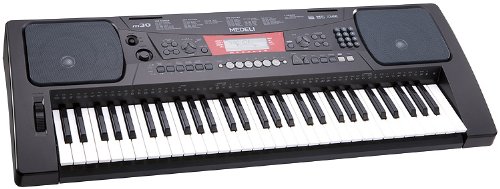
Figure 1: Medeli M30 61-Key Professional Keyboard. This image shows the keyboard from a front-angle view, highlighting its 61 keys, control panel, and display.
2. Sigurnosna uputstva
- Napajanje: Koristite samo navedeni adapter za napajanje. Osigurajte jačinu zvukatage odgovara vašem lokalnom izvoru napajanja.
- Voda i vlaga: Ne izlažite klavijaturu vodi ili vlazi. Izbjegavajte stavljanje tekućina u blizinu instrumenta.
- ventilacija: Do not block ventilation openings. Ensure adequate airflow around the keyboard.
- Izvori toplote: Keep the keyboard away from heat sources such as radiators, heat registers, stoves, or other apparatus (including ampLifiers) koji proizvode toplotu.
- čišćenje: Čistite samo suhom krpom. Ne koristite tekuća sredstva za čišćenje ili aerosole.
- servisiranje: Ne pokušavajte sami servisirati ovaj proizvod. Sve servise prepustite kvalificiranom servisnom osoblju.
3. Podešavanje
3.1 Raspakivanje
Pažljivo izvadite sve komponente iz ambalaže. Sačuvajte ambalažu za budući transport ili skladištenje.
3.2 Priključak za napajanje
- Ensure the keyboard's power switch is in the "OFF" position.
- Connect the power adapter to the DC IN jack on the rear panel of the keyboard.
- Uključite adapter za napajanje u standardnu AC utičnicu.
- Turn the power switch to the "ON" position to power on the keyboard.
3.3 Ugradnja stalka za note
Insert the music rest into the designated slots on the top panel of the keyboard. Ensure it is securely seated.
4. Uputstvo za upotrebu
4.1 Osnovna reprodukcija
- Uključeno: Press the [POWER] button to turn on the keyboard.
- Podešavanje jačine zvuka: Use the [MASTER VOLUME] knob to adjust the overall sound level.
- Sviranje tipki: The M30 features 61 touch-sensitive keys. The harder you press, the louder the sound.
4.2 Odabir glasova
The M30 offers 359 different voices (instrument sounds).
- Pritisnite dugme [VOICE].
- Use the numeric keypad or the [+] / [-] buttons to select a voice number.
- The selected voice name will appear on the display.
4.3 Selecting Styles
The keyboard includes 150 accompaniment styles.
- Pritisnite dugme [STYLE].
- Use the numeric keypad or the [+] / [-] buttons to select a style number.
- Press [START/STOP] to begin the accompaniment.
- Adjust the style volume using the [ACCOMPANIMENT VOLUME] button (if available, or general volume).
4.4 Playing Songs
The M30 has 100 built-in songs and 2 demo songs.
- Pritisnite dugme [SONG].
- Use the numeric keypad or the [+] / [-] buttons to select a song number.
- Press [PLAY/PAUSE] to start or pause the song.
- Press [STOP] to stop the song.
5. Povezivanje
5.1 USB veza
The Medeli M30 features a USB port for connecting to a computer. This allows for MIDI data transfer, enabling the keyboard to be used as a MIDI controller or to connect with music software.
- Connect a standard USB cable (Type B to Type A, not included) from the keyboard's USB port to your computer's USB port.
- Your computer should automatically recognize the keyboard as a MIDI device.
- Refer to your music software's documentation for instructions on setting up MIDI input devices.
6. Održavanje
6.1 Čišćenje
- Wipe the keyboard's surface with a soft, dry cloth.
- Za tvrdokornu prljavštinu, lagano dampNamočite krpu vodom i blagim deterdžentom, a zatim odmah obrišite suhom krpom.
- Ne koristite abrazivna sredstva za čišćenje, voskove ili rastvarače.
6.2 Skladištenje
- Kada se ne koristi duži period, isključite adapter za napajanje.
- Tastaturu čuvajte na hladnom i suhom mjestu, dalje od direktne sunčeve svjetlosti i ekstremnih temperatura.
- Consider using a dust cover to protect the keys and control panel.
7. Otkrivanje problema
| Problem | Mogući uzrok | Rješenje |
|---|---|---|
| Nema zvuka | Jačina zvuka je preniska ili utišana. | Increase the [MASTER VOLUME] knob. |
| Tastatura se ne uključuje | Adapter za napajanje nije priključen ili je neispravan. | Ensure power adapter is securely connected and plugged into a working outlet. Check power switch position. |
| Ključevi ne reagiraju | Keyboard may be in a specific mode (e.g., demo mode). | Try powering off and on again. Refer to the operating section for specific mode exits. |
8. Specifikacije
| Feature | Detalj |
|---|---|
| Ključevi | 61, Osetljiv na dodir |
| Glasovi | 359 |
| Stilovi | 150 |
| pjesme | 100 (plus 2 Demo Songs) |
| Povezivanje | USB (midi) |
| Dimenzije (D x Š x V) | 93.98 x 35.56 x 15.24 cm |
| Težina | 6.8 kg |
| Broj modela | M30 |
| UPC/GTIN | 857285003529 |
9. Garancija i podrška
For warranty information and technical support, please refer to the warranty card included with your product or visit the official Medeli webSačuvajte dokaz o kupovini za eventualne reklamacije.
Proizvođač: Medeli
Webstranica: www.medeli.com (Napomena: Ovo je rezervirano mjesto URL, please refer to actual product documentation for correct support contact.)