
1. Uvod
The Optex CX-702 is a high-performance Multi-Focus Passive Infrared (PIR) motion detector designed for reliable security applications. It utilizes advanced multi-focus optics to provide precise detection capabilities, minimizing false alarms while ensuring accurate intruder detection. This manual provides essential information for the proper installation, operation, and maintenance of your CX-702 detector.
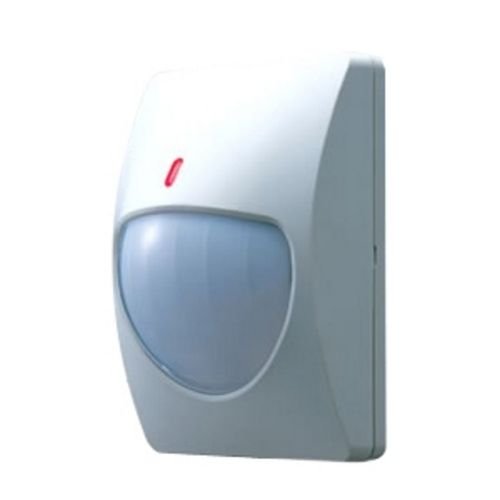
Figure 1: Optex CX-702 Multi-Focus PIR Motion Detector. This image shows the compact, white casing of the motion detector, typically mounted on a wall.
2. Sigurnosne informacije
Please read and understand all safety instructions before installing or operating the CX-702 detector. Failure to follow these instructions may result in injury, damage to the device, or improper operation.
- električna sigurnost: Ensure all power is disconnected before performing any wiring or maintenance. Installation should be performed by qualified personnel in accordance with local electrical codes.
- Montaža: Mount the detector securely to a stable surface to prevent it from falling.
- Uslovi okoline: Do not expose the detector to extreme temperatures, high humidity, or direct water spray.
- smetnje: Avoid installing the detector near sources of strong electromagnetic interference, heating/cooling vents, or direct sunlight, which can cause false alarms.
3. Sadržaj paketa
Prije nego što nastavite s instalacijom, provjerite da li se u paketu nalaze svi elementi:
- Optex CX-702 Multi-Focus PIR Motion Detector unit
- Nosač za montažu (ako je primjenjivo)
- Montažni vijci i ankeri
- Uputstvo za upotrebu (ovaj dokument)
4. Postavljanje i instalacija
Proper installation is crucial for optimal performance of the CX-702 detector.
4.1 Lokacija montiranja
- The CX-702 is designed for Zidni nosač instalacija.
- Choose a location where the detector has an unobstructed view područja koje treba zaštititi.
- Avoid aiming the detector directly at windows, heat sources, or areas with significant air currents.
- Recommended mounting height is typically between 2.1 to 2.7 meters (7 to 9 feet) for optimal coverage.
4.2 Ožičenje
The CX-702 operates on Corded Electric power. Refer to the wiring diagram inside the detector casing for specific terminal connections. Typically, connections include:
- Ulazna snaga: Connect to a stable DC power source (e.g., 9-16V DC). Observe polarity.
- Izlaz alarma: Connect to the alarm control panel's zone input. This is usually a normally closed (NC) relay output.
- Tamper Izlaz: (If available) Connect to a tamper zone on the control panel. This activates if the detector cover is removed.
4.3 Podešavanje osjetljivosti
The detector may feature internal jumpers or potentiometers for adjusting sensitivity. Consult the internal diagram for specific settings. Adjust sensitivity to suit the environment, balancing detection reliability with false alarm immunity.
5. Uputstvo za upotrebu
Once installed and powered, the Optex CX-702 detector will begin its warm-up period, typically lasting a few minutes. During this time, the detector may not be fully operational.
5.1 Princip detekcije
The CX-702 uses Passive Infrared (PIR) technology to detect changes in infrared energy (heat) within its detection pattern. When a person moves through the detection zones, the detector senses the change in infrared energy and triggers an alarm.
5.2 Domet detekcije
The detector offers a Maksimalni domet od do 70 stopa (approximately 21 meters). The actual coverage area depends on mounting height, sensitivity settings, and environmental factors.
5.3 LED indikator
Most PIR detectors include an LED indicator. This LED typically illuminates when motion is detected. During normal operation, the LED may be disabled to prevent drawing attention to the detector. Refer to the internal settings for LED control.
6. Održavanje
Regular maintenance ensures the long-term reliability and performance of your CX-702 detector.
- čišćenje: Periodically clean the detector lens with a soft, dry, lint-free cloth. Do not use abrasive cleaners or solvents, as these can damage the lens and affect detection.
- Provjera prepreka: Ensure that no objects are obstructing the detector's field of view.
- Test funkcionalnosti: Test the detector's functionality regularly (e.g., monthly) by walking through its detection pattern to confirm it triggers an alarm.
7. Otkrivanje problema
If you experience issues with your CX-702 detector, refer to the following common problems and solutions:
- Detector not triggering:
- Provjerite priključke za napajanje.
- Verify wiring to the alarm panel.
- Osigurajte da područje detekcije nema prepreka.
- Increase sensitivity settings if necessary.
- Lažni alarmi:
- Check for heat sources (heaters, direct sunlight) or air currents (vents) in the detection area.
- Ensure the detector is not aimed at windows where temperature changes or moving objects outside could cause detection.
- Reduce sensitivity settings.
- Clean the detector lens.
- Tampovaj alarm:
- Ensure the detector cover is securely closed.
- Provjerite tamper priključak prekidača.
8. Specifikacije
| Feature | Specifikacija |
|---|---|
| Brand | Optex |
| Broj modela | AL-OPT-CX702 (CX-702) |
| Izvor napajanja | Corded Electric |
| Težina artikla | 0.22 kilograma (7.7 unci) |
| Maksimalni domet | 70 stopa |
| Vrsta montaže | Zidni nosač |
| ASIN | B007HKI93G |
| Datum prve dostupnosti | 4. septembra 2010 |
9. Informacije o garanciji
Optex products are manufactured to high-quality standards. For specific warranty terms and conditions, please refer to the warranty card included with your product or visit the official Optex webSačuvajte dokaz o kupovini za slučaj reklamacije.
10. Tehnička podrška
If you require further assistance with installation, operation, or troubleshooting that is not covered in this manual, please contact Optex customer support or your authorized dealer. Contact information can typically be found on the official Optex webstranica: www.optexamerica.com